1. Вовед
This manual provides essential information for the safe and efficient operation of your TELLUR Obia PRO 60W Bluetooth Speaker. Please read this manual thoroughly before using the product and retain it for future reference.
2. Информации за безбедност
- Не го изложувајте звучникот на екстремни температури или директна сончева светлина подолг временски период.
- Избегнувајте паѓање или изложување на звучникот на силни удари.
- Не обидувајте се да го расклопите или модифицирате звучникот. Ова ќе ја поништи гаранцијата.
- Држете го звучникот подалеку од медицински уреди.
- Ensure the charging port cover is securely closed when near water to maintain IPX6 water resistance.
- Користете само наведениот кабел за полнење и адаптер за напојување.
3. Содржина на пакетот
Проверете дали сите артикли се присутни во пакувањето:
- TELLUR Obia PRO 60W Bluetooth Speaker
- USB кабел за полнење
- Аудио кабел од 3.5 мм AUX
- Упатство за употреба (овој документ)
4. Производот завршиview и Контроли
Запознајте се со компонентите и контролните копчиња на звучникот.

Слика 4.1: Предна страна view of the TELLUR Obia PRO speaker, showcasing the main grille, control panel, and integrated LED lights on the handle and side woofers.
4.1 Контролен панел

Слика 4.2: Детално view of the control buttons located on the top panel of the speaker.
- Volume Down (-) / Previous Track: Притиснете кратко за да ја намалите јачината на звукот. Притиснете и задржете за да се вратите на претходната песна.
- Volume Up (+) / Next Track: Press briefly to increase volume. Press and hold to go to the next track.
- LED Light Mode Button: Press to cycle through different LED light modes.
- Копче за вклучување: Press and hold to power on/off. Briefly press to play/pause music.
- Копче TWS (Вистинско безжично стерео): Press to activate TWS pairing mode.
- Копче за режим (М): Press to switch between Bluetooth, USB, and AUX input modes.
4.2 Влезни/Излезни порти
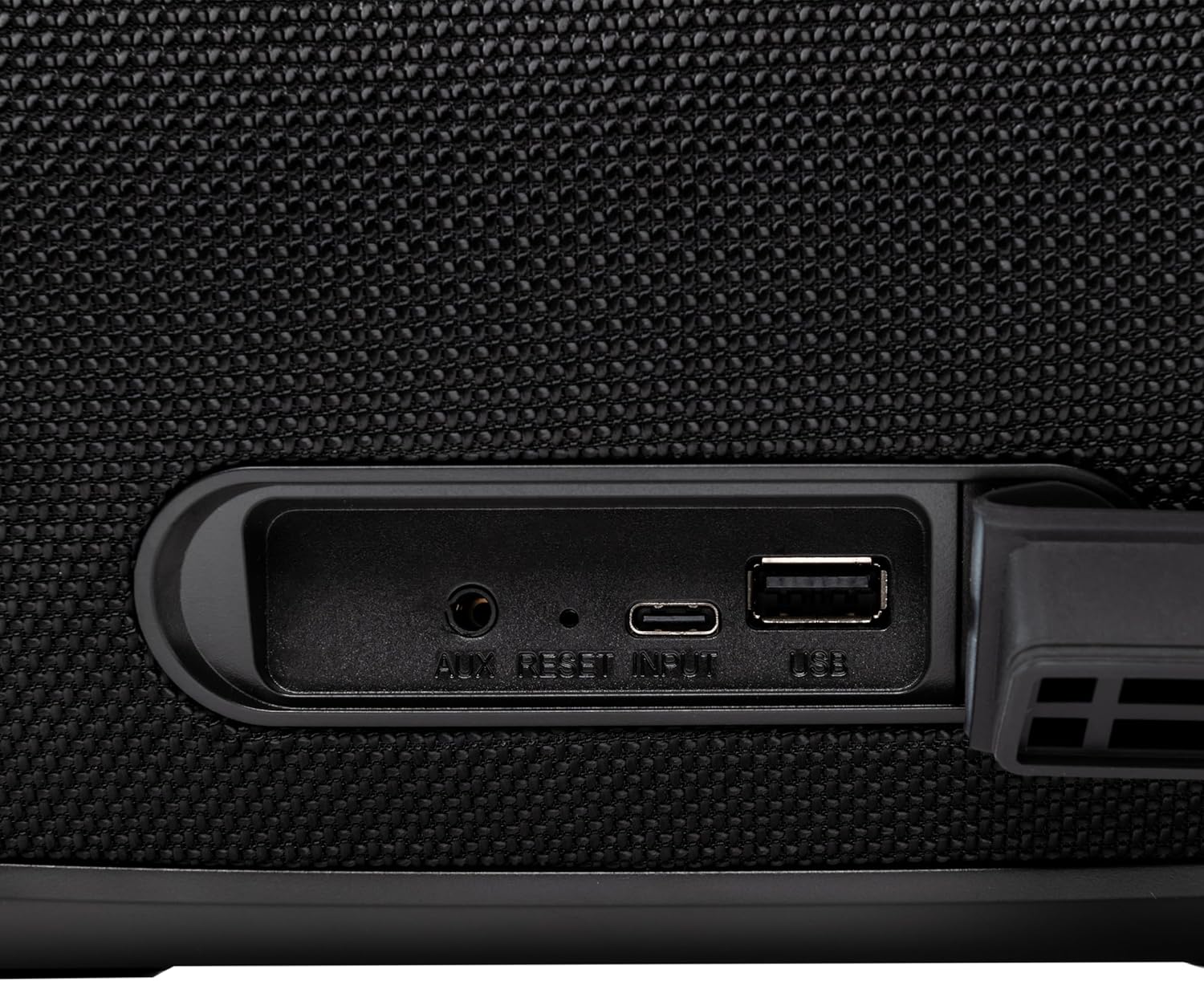
Слика 4.3: Close-up of the protected input/output ports on the rear of the speaker.
- AUX-IN порт: За поврзување на надворешни аудио уреди преку 3.5 мм аудио кабел.
- Копче за ресетирање: Use a thin object to press and reset the speaker if necessary.
- Влез со USB-C: За полнење на звучникот.
- USB-A порта: За репродукција на MP3 аудио files from a USB drive or for power bank functionality.
5. Поставување
5.1 Полнење на звучникот
Before initial use, fully charge the speaker. The speaker also functions as a power bank to charge other devices via its USB-A port.
- Connect the USB charging cable to the USB-C input port on the speaker.
- Поврзете го другиот крај од кабелот со компатибилен USB адаптер за напојување (не е вклучен).
- The charging indicator light will illuminate. It will turn off once charging is complete.
- The battery level can be displayed on your connected phone when paired via Bluetooth.
5.2 Вклучување/исклучување
- За вклучување: Притиснете и задржете го Копче за напојување for approximately 3 seconds until you hear an audible prompt and the LED lights activate.
- За исклучување: Притиснете и задржете го Копче за напојување for approximately 3 seconds until you hear an audible prompt and the LED lights turn off.
6. Упатства за работа
6.1 Спарување преку Bluetooth
The speaker uses Bluetooth v5.3 for stable wireless connection up to 10 meters.
- Уверете се дека звучникот е вклучен и во Bluetooth режим (означено со трепкачка сина LED диода). Ако не е, притиснете го Копче за режим (М) да се префрлите на режим Bluetooth.
- Овозможете Bluetooth на вашиот мобилен уред (паметен телефон, таблет итн.).
- Пребарај за достапни Bluetooth уреди и изберете „TELLUR Obia PRO“ од списокот.
- Once paired, the speaker will emit an audible confirmation, and the blue LED will stop flashing.
- Звучникот автоматски ќе се поврзе повторно со последниот поврзан уред кога ќе се вклучи, доколку е достапен.

Слика 6.1: The TELLUR Obia PRO speaker wirelessly connected to a smartphone, ready for audio playback.
6.2 Вистинска безжична стерео (TWS) функција
TWS allows you to pair two Obia PRO speakers for a stereo sound experience.
- Ensure both Obia PRO speakers are powered on and in Bluetooth mode, but not yet paired with any device.
- На еден звучник (ова ќе биде примарниот звучник), притиснете го Копче TWS. The speaker will enter TWS pairing mode, indicated by a flashing light.
- The two speakers will automatically connect to each other. Once connected, you will hear an audible confirmation, and the TWS indicator light on both speakers will become solid.
- Now, connect your mobile device to the primary speaker via Bluetooth as described in Section 6.1. The audio will play in stereo across both speakers.
6.3 Multiple Link Technology
This technology allows connecting an unlimited number of Obia PRO speakers wirelessly for a synchronized audio experience. Refer to the manufacturer's website or specific instructions for detailed setup of Multiple Link.
6.4 USB Playback (MP3)
Репродуцирајте MP3 аудио files directly from a USB flash drive (up to 128GB).
- Вметнете USB флеш драјв што содржи MP3 files во USB-A портата.
- Притиснете го Копче за режим (М) to switch to USB mode. The speaker will automatically begin playing music from the USB drive.
- Користете го Јачина на звук нагоре/надолу и Копче за напојување (for play/pause) to control playback.
6.5 AUX-IN конекција
Connect non-Bluetooth devices using the 3.5mm AUX audio cable.
- Connect one end of the 3.5mm AUX audio cable to the AUX-IN port on the speaker.
- Поврзете го другиот крај со приклучокот за аудио излез на вашиот надворешен уред (на пр., MP3 плеер, лаптоп).
- Притиснете го Копче за режим (М) за да се префрлите на AUX режим.
- Контролирајте ја репродукцијата и јачината на звукот од вашиот надворешен уред.
6.6 Повикување без раце
When connected to a smartphone via Bluetooth, the speaker's built-in microphone allows for hands-free calls.
- Одговори/заврши повик: Накратко притиснете го Копче за напојување.
- Одбијте го повикот: Притиснете и задржете го Копче за напојување за 2 секунди.
6.7 режими на LED светло
The speaker features integrated LED lights with multiple display modes.
- Притиснете го Копче за режим на светла LED to cycle through available light patterns and colors.
- Притиснете и задржете го Копче за режим на светла LED to turn the lights off or on.

Слика 6.2: A user interacting with the LED light mode button to change the speaker's lighting effects.
6.8 Equalizer Settings (Indoor/Outdoor)
The speaker allows for equalizer customization for different environments. Specific controls for this are not detailed in the provided data, but typically involve a dedicated button or a combination of existing buttons. Refer to the product's quick start guide or manufacturer's website for precise instructions on adjusting the equalizer.
7. Одржување
7.1 Чистење
- Избришете го звучникот со мека, сува крпа.
- Не користете абразивни средства за чистење, алкохол или хемиски растворувачи.
7.2 Водоотпорност (IPX6)
The Obia PRO speaker is rated IPX6, meaning it is protected against high-pressure water jets from any direction. This makes it suitable for outdoor use and environments where it might be exposed to splashes or rain.
- Ensure the rubber cover for the charging and AUX ports is securely closed before exposing the speaker to water.
- Не потопувајте го звучникот во вода.
- По изложување на вода, избришете го звучникот на суво пред да го полните.
7.3 Грижа за батерии
- За да го продолжите животниот век на батеријата, избегнувајте често целосно празнење на батеријата.
- Редовно полнете го звучникот, дури и ако не е во употреба, за да ја одржите состојбата на батеријата.
- Чувајте го звучникот на ладно и суво место кога не го користите подолг период.
8 Смена на проблеми
| Проблем | Можна причина | Решение |
|---|---|---|
| Звучникот не се вклучува. | Слаба батерија. | Наполнете го звучникот целосно. |
| Не може да се спари преку Bluetooth. | Звучникот не е во режим на спарување; Bluetooth-от на уредот е исклучен; премногу далеку од звучникот. | Ensure speaker is in Bluetooth mode (flashing LED). Turn on Bluetooth on your device. Move device closer to speaker (within 10m). |
| Нема звук. | Јачината на звукот е прениска; избран е неправилен режим; уредот не репродуцира. | Increase speaker and device volume. Press Копче за режим (М) to select correct input. Ensure audio is playing on the connected device. |
| Спарувањето преку TWS не успева. | Speakers already paired to a device; not both Obia PRO models. | Disconnect both speakers from any Bluetooth devices. Ensure both speakers are Obia PRO models. Try TWS pairing again. |
| USB репродукцијата не работи. | USB-уредот не е правилно форматиран; не е поддржан file type; drive capacity too large. | Уверете се дека USB-уредот е форматиран во FAT32. Само MP3 files are supported. Max capacity 128GB. |
9. Спецификации
| Име на моделот | Obia PRO |
| Бренд | ТЕЛУР |
| Излезна моќност | 60W (2x 20W RMS subwoofers, 2x 10W RMS tweeters) |
| Bluetooth верзија | v5.3 |
| Опсег | До 10 метри |
| Фреквентен одговор | 80 MHz (Note: This value is unusual for speaker frequency response and may be a typo in source data. Typically measured in Hz-kHz.) |
| Импеданса | 4 оми |
| Аудио режими | Bluetooth, USB (MP3), AUX-IN |
| USB поддршка | USB 2.0/3.0, up to 128GB (MP3 format) |
| Отпорност на вода | IPX6 |
| Капацитет на батеријата | 5400 mAh |
| Време на репродукција | До 12 часа (при умерена јачина на звук) |
| Функција на Power Bank | Yes, via USB-A port |
| Димензии (Д x Ш x В) | 37.7 x 17 x 18 cm |
| Тежина | 3.48 кг |
| Материјал | Пластика |
| Боја | Црното |
Забелешка: Спецификациите се предмет на промена без претходна најава.
10. Гаранција и поддршка
TELLUR products are manufactured to the highest quality standards. For information regarding warranty terms, technical support, or service, please refer to the warranty card included with your product or visit the official TELLUR webсајт.
Контакт информации: Ве молиме посетете www.tellur.com за најновите информации за поддршка.


