1. Вовед
The ZEBRONICS Pulse Wireless Mouse is designed for versatile and comfortable use across various devices. Featuring multi-connectivity options including dual Bluetooth and a 2.4GHz USB nano receiver, it offers seamless switching between systems. Its ergonomic design and 1200 DPI optical sensor ensure precise and smooth cursor control for enhanced productivity.

Слика 1.1: Горе view of the ZEBRONICS Pulse Wireless Mouse, showcasinнеговиот елегантен црн дизајн и тркало за скролување.
2. Содржина на пакетот
Ве молиме проверете дали сите артикли се присутни во вашиот пакет:
- ZEBRONICS Pulse Wireless Mouse
- USB Нано приемник
- Упатство за употреба
3. Клучни карактеристики
- Мулти-поврзување: Supports dual Bluetooth and 2.4GHz wireless connections.
- Висока прецизност: 1200 DPI optical sensor for accurate tracking.
- Ергономски дизајн: Comfortable and lightweight for extended use.
- 3 копчиња: Standard left, right, and scroll wheel buttons.
- Removable USB Nano Receiver: Conveniently stored in the mouse's bottom panel.
- Широка компатибилност: Works with desktop PCs, laptops, Mac OS, tablets, and more.
- Зачувување на енергија: Features an auto-shutoff function to conserve battery life.

Image 3.1: A visual summary of the mouse's key features, including its comfortable design, power switch, plug-and-play functionality, and high precision.
4. Водич за поставување
4.1. Инсталација на батерија
- Flip the mouse over to access the bottom panel.
- Locate the battery compartment cover and slide it open.
- Вметнете една AA батерија, внимавајќи на точниот поларитет (+/-).
- Добро затворете го капакот на преградата за батерии.
4.2. Connecting via 2.4GHz USB Nano Receiver
- Locate the USB nano receiver stored in the slot on the bottom of the mouse.
- Извадете го приемникот од неговиот слот за складирање.
- Plug the USB nano receiver into an available USB port on your computer or laptop.
- Slide the power switch on the bottom of the mouse to the 'ON' position.
- The mouse should automatically connect. If not, press the connection toggle button on the bottom of the mouse to select the 2.4GHz mode (indicated by '2.4G').

Image 4.1: The underside of the mouse, highlighting the battery slot, nano receiver storage, power switch, and connection toggle button.

Image 4.2: The USB nano receiver plugged into a laptop, demonstrating the 2.4GHz wireless connection.
4.3. Connecting via Bluetooth (BT1 / BT2)
- Ensure the mouse has a fresh battery and the power switch is in the 'ON' position.
- Press the connection toggle button on the bottom of the mouse to select either 'BT1' or 'BT2' mode. The corresponding LED indicator will blink.
- На вашиот уред (лаптоп, таблет, итн.), одете во поставките за Bluetooth.
- Пребарај за new devices. The mouse should appear as 'ZEB-PULSE' or similar.
- Select the mouse to pair. Once paired, the LED indicator will stop blinking and remain solid for a few seconds before turning off.
- You can pair a second device using the other Bluetooth channel (BT2) by repeating steps 2-5.
5. Упатства за работа
5.1. Основни функции
- Лево копче: Примарна функција за кликнување.
- Десно копче: Секундарна функција за кликнување (контекстно мени).
- Тркало за лизгање: Скролување нагоре/надолу и функција за среден клик.

Image 5.1: Illustration of the mouse's three buttons: left, right, and the scroll wheel/middle button.
5.2. Switching Connectivity Modes
To switch between the 2.4GHz wireless mode and Bluetooth modes (BT1, BT2), press the connection toggle button located on the bottom of the mouse. The mouse will cycle through the available modes, indicated by the corresponding LED.
5.3. Поставување DPI
The ZEBRONICS Pulse mouse operates at a fixed 1200 DPI (Dots Per Inch), providing a balance of speed and precision suitable for general use. This setting ensures smooth and responsive cursor movement.

Image 5.2: Visual representation of the mouse's 1200 DPI precision for accurate tracking.
6. Одржување
- Чистење: Користете мека, сува крпа за чистење на глувчето. Избегнувајте употреба на груби хемикалии или абразивни материјали.
- Замена на батерија: Заменете ја AA батеријата кога перформансите на глувчето ќе се намалат или кога тој ќе престане да реагира.
- Складирање: When not in use for extended periods, turn off the mouse to conserve battery life. Store the USB nano receiver in its dedicated slot on the mouse's bottom.
- Животна средина: Избегнувајте изложување на глувчето на екстремни температури, директна сончева светлина или прекумерна влага.
7 Смена на проблеми
7.1. Глувчето не реагира
- Ensure the mouse is turned 'ON'.
- Проверете ја батеријата. Заменете ја доколку е потребно.
- For 2.4GHz connection: Ensure the USB nano receiver is securely plugged into a working USB port and the mouse is in 2.4GHz mode.
- For Bluetooth connection: Ensure Bluetooth is enabled on your device and the mouse is in the correct BT1/BT2 mode. Try re-pairing the mouse.
- Try connecting the mouse to a different USB port or a different device to rule out port or device issues.
7.2. Неправилно движење на курсорот
- Исчистете го оптичкиот сензор на дното на глувчето со мека, сува крпа.
- Ensure you are using the mouse on a clean, non-reflective surface.
- Проверете дали има пречки од други безжични уреди.
7.3. Difficulty Switching Modes
- Проверете дали батеријата има доволно енергија.
- Press the connection toggle button firmly and observe the LED indicators to confirm mode changes.
8. Спецификации
| Карактеристика | Детал |
|---|---|
| Бренд | ЗЕБРОНИКА |
| Модел | Zeb-Pulse |
| Технологија за поврзување | Wireless (2.4GHz, Dual Bluetooth) |
| Технологија за откривање на движење | Оптички |
| DPI | 1200 |
| Број на копчиња | 3 |
| Извор на енергија | Напојувана со батерии (1x AA) |
| Тежина на ставката | 160 гр |
| Димензии на производот | 16.6 x 9.5 x 0.1 cm |
| Компатибилност на оперативниот систем | Windows, Mac OS, etc. |
| Земја на потекло | Кина |
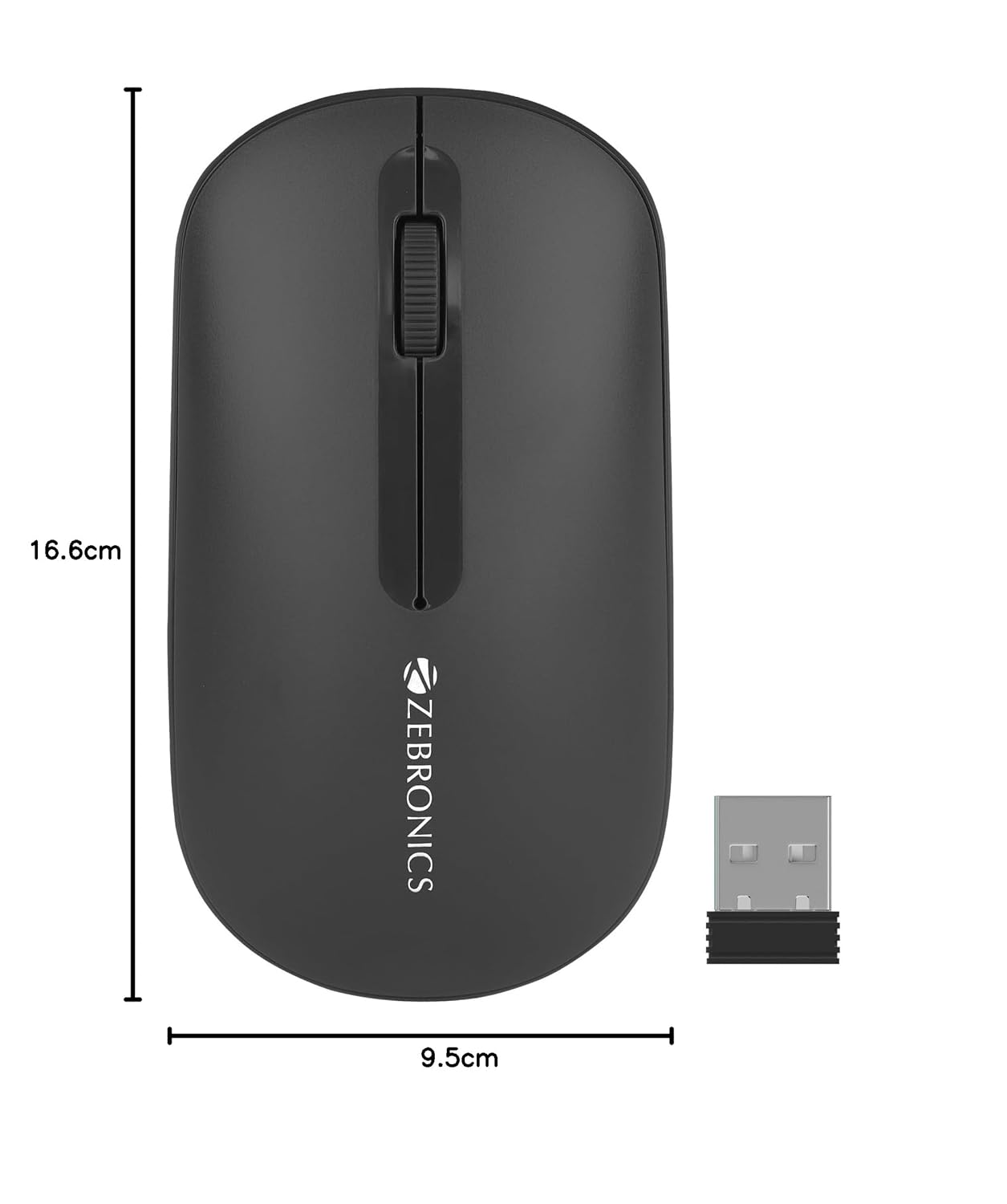
Image 8.1: Diagram showing the physical dimensions of the ZEBRONICS Pulse Wireless Mouse.
9. Гаранција и поддршка
For warranty information, technical support, or service inquiries, please refer to the warranty card included with your product or visit the official ZEBRONICS webлокација. Чувајте ја сметката како доказ за купување за гаранциски побарувања.
Official ZEBRONICS Webсајт: www.zebronics.com


