1. Вовед
Thank you for choosing the Dexnor Keyboard Case. This manual provides essential information for setting up, operating, and maintaining your new keyboard case. Designed to enhance your Samsung Galaxy Tab experience, this case features a magnetic attachment, a precise multi-touch trackpad, a 7-color backlit QWERTZ keyboard, and convenient S Pen storage. Please read this manual thoroughly before use to ensure optimal performance and longevity of your device.
2. Компатибилност
This keyboard case is exclusively designed for the following Samsung Galaxy Tab models:
- Samsung Galaxy Tab S10 Lite (Model SM-X400, SM-X406B)
- Samsung Galaxy Tab S10 FE 10.9" 2025 (Model SM-X520, SM-X526, SM-X526B)
- Samsung Galaxy Tab S9 FE 10.9" 2023 (Model SM-X510/SM-X516B/SM-X518U)
- Samsung Galaxy Tab S9 11" 2023 (Model SM-X710/SM-X716B/SM-X718U)
Note: This case is NOT compatible with Samsung Galaxy Tab S9+/S9 FE+ 12.4" or Samsung Galaxy Tab S11 (2025) 11". Please verify your tablet model before purchase.

Figure 2.1: Compatible and incompatible tablet models.
3. Содржина на пакетот
Ве молиме проверете го пакувањето за следните ставки:
- Dexnor Keyboard Case
- USB-C кабел за полнење
- Водич за брз почеток
- Упатство за употреба (овој документ)
4. Поставување
4.1 Attaching Your Tablet
The keyboard case features a strong magnetic hinge for secure attachment. Simply align your Samsung Galaxy Tab with the magnetic area on the case. The tablet will snap into place, transforming your device into a laptop-like setup.

Figure 4.1: Magnetic attachment and adjustable viewинголен агол.
4.2 Pairing the Keyboard via Bluetooth
- Осигурајте се дека тастатурата е доволно наполнета.
- Turn on the keyboard by pressing the power button (usually located on the side or top edge of the keyboard). The indicator light will flash, indicating it's in pairing mode.
- On your Samsung Galaxy Tab, go to Поставки > Поврзани уреди > Bluetooth и вклучете го Bluetooth.
- Your tablet will search for available devices. Select "Dexnor Keyboard" (or similar name) from the list.
- Follow any on-screen prompts to complete the pairing process. Once paired, the indicator light on the keyboard will stop flashing.
5. Упатства за работа
5.1 Прилагодување Viewингли агли
The robust aluminum alloy hinge allows for flexible viewing angles, transforming your tablet into a versatile workstation. Adjust the tablet's position to your preferred angle for typing, reading, or viewсодржината.

Figure 5.1: Tablet in floating cantilever position for optimal viewинг.
5.2 Тракпад со повеќе допири
The integrated high-precision multi-touch trackpad supports various gestures for seamless navigation. Use multi-finger gestures for actions such as scrolling, swiping, and zooming, enhancing your productivity.

Figure 5.2: Multi-touch trackpad for precise control.
5.3 Тастатура со позадинско осветлување
The keyboard features 7 different backlight colors and 3 adjustable brightness levels for comfortable typing in any lighting condition. Use the dedicated backlight key (often a sun icon or Fn + light key combination) to cycle through colors and adjust brightness.

Figure 5.3: Backlit QWERTZ keyboard with adjustable colors.
5.4 S Pen Holder
The case provides two convenient locations for your S Pen: an integrated magnetic holder within the keyboard for secure storage and a cutout slot at the rear of the case for charging and additional storage. This design ensures quick access and prevents loss.
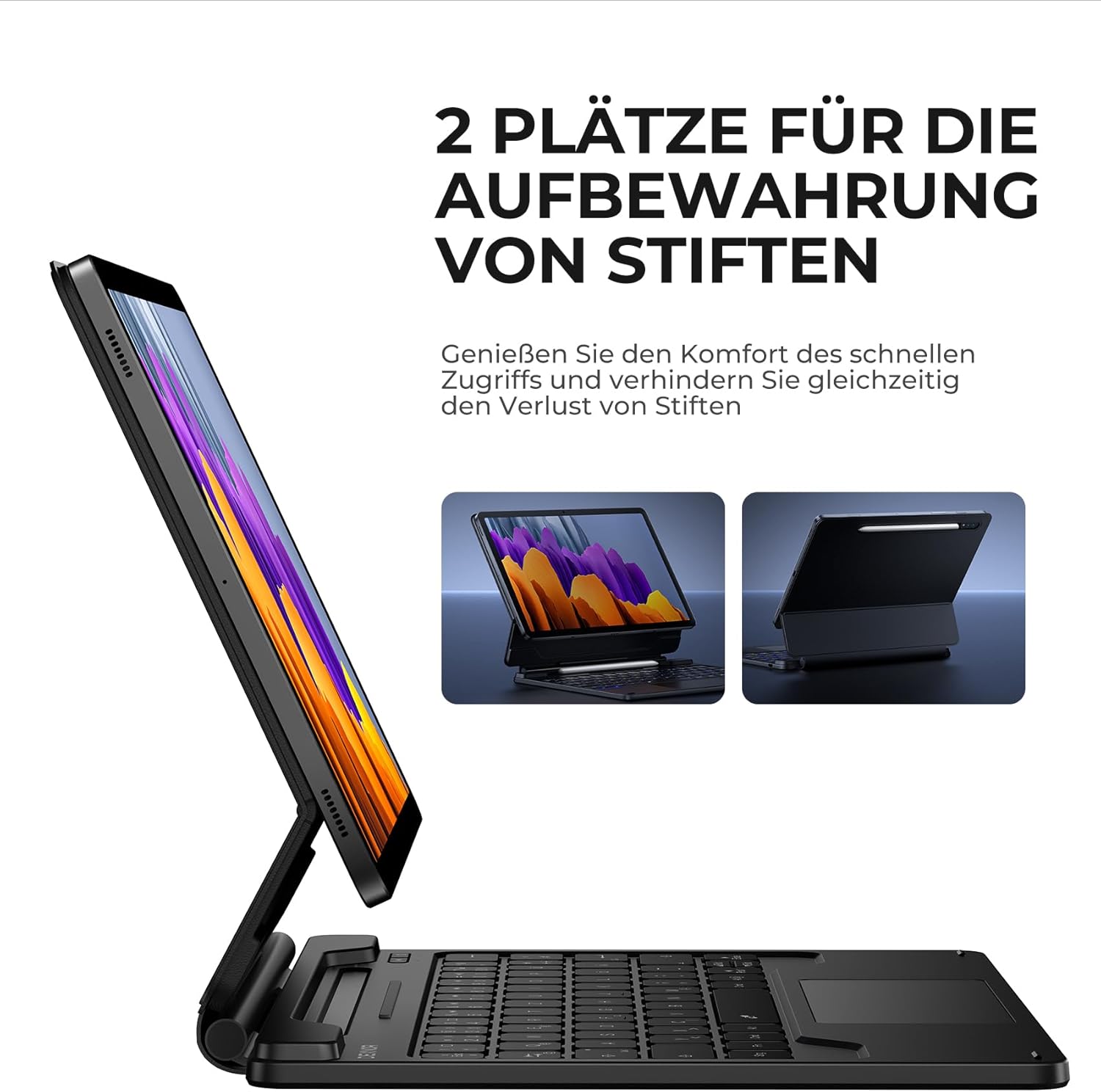
Figure 5.4: Dual S Pen storage options.
5.5 DEX Mode
Combine your tablet with the keyboard case and activate Samsung DEX mode to transform your tablet into a desktop-like experience. This allows for enhanced multitasking and productivity, similar to a traditional laptop setup.
5.6 Копчиња за кратенки
The keyboard includes a series of convenient shortcut keys for quick control over media playback, volume, and other tablet functions. Refer to the keyboard layout for specific key functions.

Figure 5.5: Keyboard layout with shortcut keys.
5.7 Автоматска функција за спиење/будење
The case supports automatic sleep/wake functionality. Closing the case will put your tablet to sleep, and opening it will wake it up, conserving battery life for both your tablet and the keyboard.
6. Полнење на тастатурата
The keyboard is equipped with a long-lasting 650 mAh battery. To charge the keyboard:
- Connect the provided USB-C charging cable to the charging port on the keyboard.
- Поврзете го другиот крај од кабелот со USB адаптер за напојување (не е вклучен) или со USB порт на компјутерот.
- Индикаторското светло за полнење ќе свети за време на полнењето и ќе се исклучи откако ќе се наполни целосно. Целосното полнење трае приближно 3.5 часа.
A single charge provides up to 200 hours of working time and 1200 hours of standby time.

Figure 6.1: USB-C charging port.
7. Одржување
To ensure the longevity and optimal performance of your Dexnor Keyboard Case:
- Чистење: Користете мека, гamp cloth to wipe the exterior of the case. For the keyboard keys, use a soft, dry cloth or a specialized keyboard cleaner. Avoid harsh chemicals or abrasive materials.
- Складирање: When not in use for extended periods, store the keyboard case in a cool, dry place. Ensure the case is closed to protect the tablet and keyboard.
- Избегнувајте течности: Keep the keyboard away from liquids to prevent damage to internal components.
- Ракувајте со внимание: While durable, avoid dropping the case or subjecting it to excessive force.
8 Смена на проблеми
8.1 Тастатурата не се поврзува
- Проверете ја батеријата: Осигурајте се дека тастатурата е наполнета.
- Повторно спарување: Delete the keyboard from your tablet's Bluetooth device list and attempt to pair it again (refer to Section 4.2).
- Рестартирајте ги уредите: Рестартирајте ги и таблетот и тастатурата.
- Пречки: Оддалечете се од други безжични уреди што може да предизвикаат пречки.
8.2 Тракпедот не реагира
- Проверете ја врската: Проверете дали тастатурата е правилно поврзана преку Bluetooth.
- Чистење на тракпедот: Ensure the trackpad surface is clean and free of debris.
- Рестартирајте: Restart the keyboard and tablet.
8.3 Задното осветлување не работи
- Проверете ја батеријата: Low battery can affect backlight functionality. Charge the keyboard.
- Вклучи/исклучи позадинско осветлување: Press the backlight key (or Fn + backlight key) to ensure it's not turned off or at the lowest brightness setting.
8.4 Прашања за наплата
- Проверете го кабелот: Ensure the USB-C cable is securely connected to both the keyboard and the power source. Try a different USB-C cable if available.
- Извор на енергија: Обидете се со друг USB адаптер за напојување или приклучок.
9. Спецификации
| Бренд | Dexnor |
| Број на модел | DK005 |
| Технологија за поврзување | Bluetooth |
| Посебни карактеристики | Multi-Touch Trackpad, Backlit Keyboard, S Pen Holder |
| Компатибилни уреди | Samsung Galaxy Tab S10 Lite 10.9", Samsung Galaxy Tab S9 11", Samsung Galaxy Tab S9 FE/S10 FE 10.9" |
| Состав на батерија | Литиум-јон |
| Капацитет на батеријата | 650 mAh |
| Време на полнење | Прибл. 3.5 часа |
| Работно време | До 200 часа |
| Време на мирување | До 1200 часа |
| Распоред на тастатура | QWERTZ (германски) |
| Димензии на производот | 25.9L x 20.5W x 1.9H cm |
10. Гаранција и поддршка
Dexnor provides a 1-year manufacturer's warranty for this product. Additionally, lifetime technical support is available.
For warranty claims, technical assistance, or any product-related inquiries, please contact Dexnor customer support through the retailer's platform or visit the official Dexnor webсајт за информации за контакт.


