1. Вовед
The ATTACK SHARK X3PRO is a high-performance lightweight wireless gaming mouse designed for precision and responsiveness. Featuring tri-mode connectivity, a flagship optical sensor, and durable switches, it offers an exceptional gaming experience for PC and Mac users.

Figure 1: ATTACK SHARK X3PRO Wireless Gaming Mouse (Red)
2. Карактеристики на производот
- 4K/8K Wireless Gaming Mouse: Equipped with wireless 4K polling and wired 8K polling, the X3PRO sends signals to the computer 4 to 8 times faster than standard gaming mice, ensuring best-in-class precision and responsiveness.
- Pixart PAW3395 Flagship Sensor: Utilizes a Pixart 3395 optical sensor, offering 6 adjustable DPI levels (800/1600/2400/3200/5000/26000), 650 IPS tracking speed, 4000/8000Hz response speed, and 50G acceleration limit for precise positioning.
- Трирежимска врска: Supports USB-C wired mode, 2.4G wireless mode, and Bluetooth 5.2 mode for versatile use across different scenarios and up to 4 devices simultaneously.
- Kailh GM8.0 Switch & TTC Encoder: Features high-end Kailh Black Mamba GM8.0 Micro switches for crisp clicks, fast rebound, and quick trigger, with an 80 million click lifespan. The TTC scroll wheel encoder provides precise positioning.
- 60g Ultralight & Ergonomic Design: Weighing only 49g, the X3PRO's ergonomic design ensures a natural grip, reducing fatigue during extended gaming sessions and providing agility.
- 5 програмабилни копчиња: Total of 5 programmable buttons allow customization of DPI, polling rate, LOD, shortcuts, and macros via the dedicated driver software.
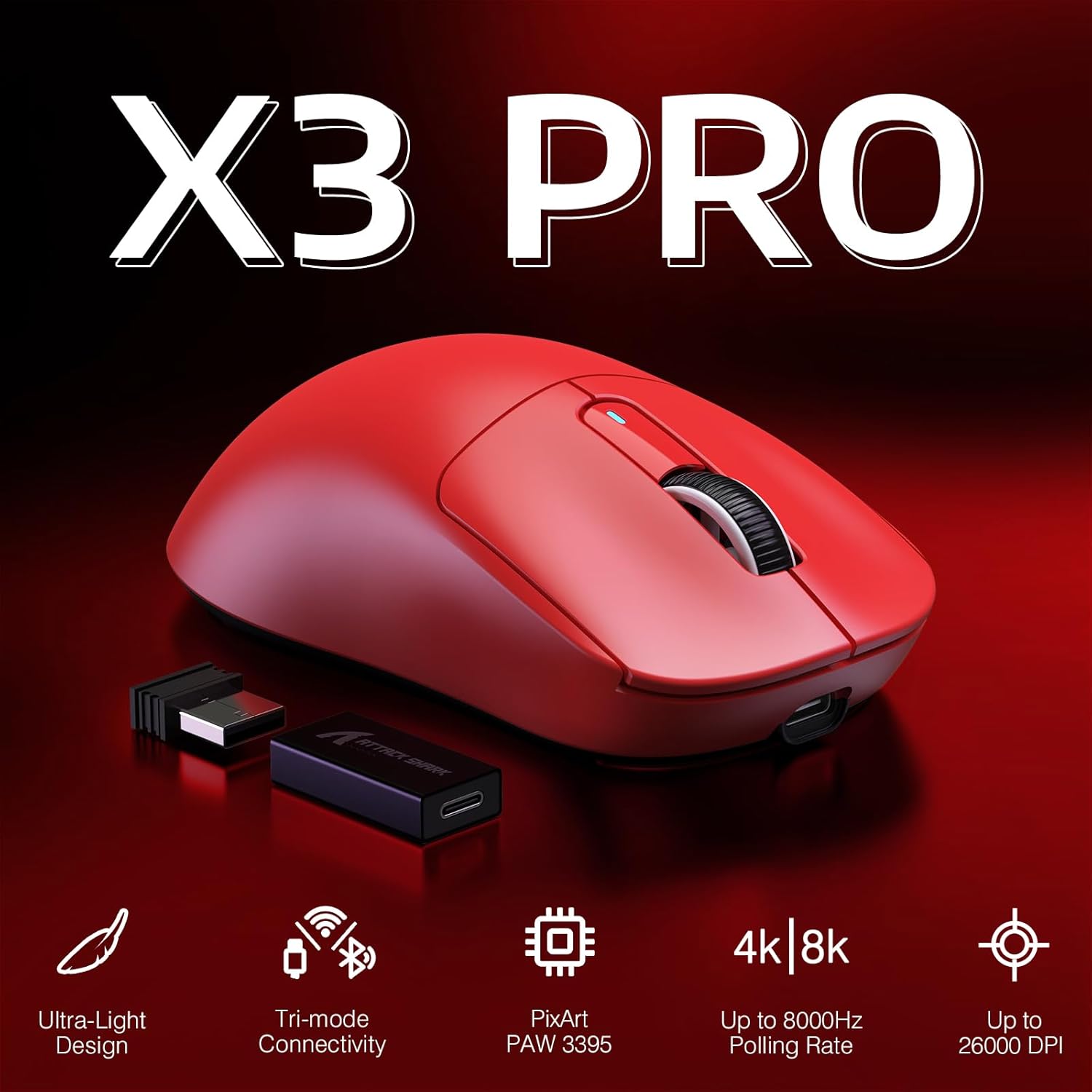
Figure 2: Key Features of the X3PRO Mouse

Figure 3: Ultra-Light Design for Effortless Action
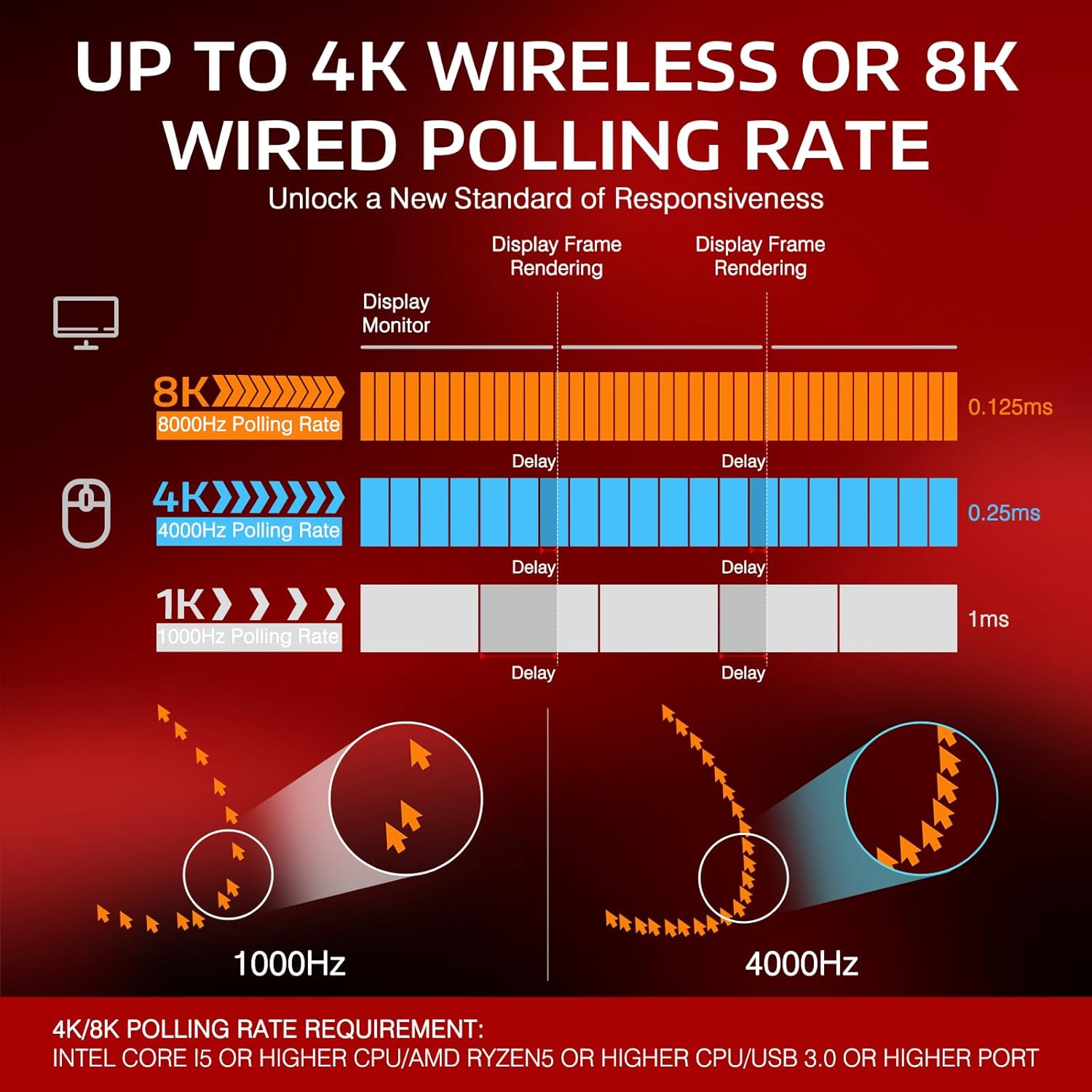
Figure 4: Polling Rate Comparison (1K, 4K, 8K)

Figure 5: Pixart PAW3395 Flagship Sensor

Figure 6: Kailh GM8.0 Switches & TTC Encoder
Производот завршиview Видео
Ова видео дава сеопфатен прегледview of the ATTACK SHARK X3PRO 4K/8K Lightweight Wireless Gaming Mouse, highlighting its key features and benefits.
3. Содржина на пакетот
Ве молиме осигурајте се дека сите артикли се присутни во пакетот:
- ATTACK SHARK X3PRO Wireless Gaming Mouse
- USB Receiver (located at the bottom of the mouse)
- USB-C Charging Cable (Flexible Paracord Cable)
- Type-C to USB A Adapter

Figure 7: Product Parameters and Components
4. Поставување
4.1. Поврзување на глувчето
The X3PRO mouse offers three connection modes:
- 2.4G безжичен режим:
- Locate the USB receiver on the bottom of the mouse. Open the cover and take out the receiver.
- Plug the USB receiver into an available USB port on your computer. For optimal performance, use a USB 3.0 or higher port.
- Switch the mode selector on the bottom of the mouse to '2.4G'. The mouse will automatically connect.
- Bluetooth 5.2 режим:
- Switch the mode selector on the bottom of the mouse to 'BT'.
- На вашиот компјутер, одете во поставките за Bluetooth и пребарајте нови уреди.
- Select 'ATTACK SHARK X3PRO' from the list of available devices to pair.
- USB-C жичен режим:
- Поврзете го испорачаниот USB-C кабел со предниот порт на глувчето.
- Connect the other end of the USB-C cable (or use the Type-C to USB A adapter if needed) to an available USB port on your computer.
- Switch the mode selector on the bottom of the mouse to 'OFF' or leave it in '2.4G'/'BT' mode; the mouse will function as a wired device and charge simultaneously.

Figure 8: Flashspeed Connectivity Modes
4.2. Driver/Software Installation
To unlock the full potential of your X3PRO mouse, including programmable buttons, DPI settings, polling rate adjustments, and macro functions, please download and install the official ATTACK SHARK driver software from the manufacturer's website. The software is compatible with Windows XP / VISTA / 7 / 8 / 10 / MAC.
5. Упатства за работа
5.1. Прилагодување на DPI
The mouse features 6 adjustable DPI levels. You can cycle through these levels using the dedicated DPI button on the bottom of the mouse or customize them via the driver software. The default DPI levels are 800/1600/2400/3200/5000/26000.
5.2. Прилагодување на стапката на гласање
The polling rate can be adjusted to 4000Hz (wireless) or 8000Hz (wired) for maximum responsiveness. This setting is typically adjusted within the driver software.
5.3. Прилагодување на копчињата
The X3PRO has 5 programmable buttons. Use the ATTACK SHARK driver software to assign custom functions, macros, or shortcuts to these buttons according to your preferences and gaming needs.
5.4. Полнење на глувчето
The mouse is equipped with a long-lasting lithium battery. To charge, connect the USB-C charging cable to the mouse and a USB power source (e.g., computer USB port, wall adapter). The mouse can be used while charging in wired mode.

Слика 9: Продолжен век на траење на батеријата
6. Одржување
To ensure the longevity and optimal performance of your ATTACK SHARK X3PRO mouse, follow these maintenance guidelines:
- Чистење: Редовно бришете ја површината на глувчето со мека, сува крпа. За тврдокорна нечистотија, малку бришетеampИзмијте ја крпата со вода. Избегнувајте употреба на груби хемикалии или абразивни материјали.
- Нега на сензорот: Одржувајте го оптичкиот сензор на дното од глувчето чист и без прашина или остатоци. Користете памукче или компримиран воздух доколку е потребно.
- Тефлонски стапала: The mouse features 100% virgin grade PTFE feet for consistent glide. Avoid scratching or damaging them. Replacement feet may be available from the manufacturer if worn.
- Складирање: Кога не го користите подолго време, чувајте го глувчето на ладно и суво место, подалеку од директна сончева светлина и екстремни температури.

Figure 10: 100% Virgin Grade PTFE Feet
7 Смена на проблеми
If you encounter issues with your ATTACK SHARK X3PRO mouse, please refer to the following common troubleshooting steps:
- Глувчето не реагира:
- Ensure the mouse is charged. Connect it via USB-C cable to charge and test in wired mode.
- Check the mode switch on the bottom of the mouse (2.4G, BT, OFF) and ensure it's set to the desired connection type.
- За 2.4G безжична врска, проверете дали USB приемникот е безбедно приклучен во функционален USB порт. Обидете се со друг USB порт.
- For Bluetooth, ensure Bluetooth is enabled on your computer and the mouse is paired correctly. Try unpairing and re-pairing the device.
- Рестартирајте го компјутерот.
- Intermittent Disconnections (2.4G/Bluetooth):
- Ensure the mouse is within range of the receiver/Bluetooth adapter and there are no significant obstructions.
- Avoid strong electromagnetic interference from other wireless devices.
- Уверете се дека батеријата на глувчето не е критично празна.
- Ажурирајте ги USB или Bluetooth драјверите на вашиот компјутер.
- If using 2.4G, try connecting the USB receiver to a different USB port, preferably a USB 3.0 or higher port.
- DPI/Polling Rate Issues:
- Ensure the ATTACK SHARK driver software is installed and up to date.
- Verify settings within the software.
- Копчињата не функционираат:
- Check button assignments in the driver software.
- Ensure no other software is conflicting with mouse button functions.
If the issue persists after trying these steps, please contact ATTACK SHARK customer support for further assistance.
8. Спецификации
| Карактеристика | Спецификација |
|---|---|
| Бренд | НАПАДНА АЈКУЛА |
| Модел | X3 PRO |
| Технологија за поврзување | Bluetooth, USB (Wired, 2.4G Wireless, BT 5.2) |
| Технологија за откривање на движење | Оптички (PAW3395 сензор) |
| Нивоа на DPI | 800/1600/2400/3200/5000/26000 (Adjustable) |
| Стапка на анкети | Up to 4000Hz (Wireless), Up to 8000Hz (Wired) |
| Прекинувачи | Kailh GM8.0 Micro Switches (80 Million Clicks) |
| Кодер | TTC енкодер за тркало за скролување |
| Програмабилни копчиња | 5 |
| Тежина на ставката | 1.73 унци (приближно 49 г) |
| Димензии на пакетот | 6.5 x 4.53 x 1.77 инчи |
| Компатибилност | Виндоус XP / ВИСТА / 7 / 8 / 10 / МАК |
9. Гаранција и поддршка
For warranty information and technical support regarding your ATTACK SHARK X3PRO gaming mouse, please refer to the official ATTACK SHARK webстраницата или директно контактирајте ја нивната служба за корисници. Чувајте ја сметката за купување како доказ за купување за какви било рекламации за гаранција.
ATTACK SHARK US Store: Посетете ја продавницата


