1. Производот завршиview
The Kungfuking Wall Mount Power Strip with USB is designed to provide convenient power access and charging capabilities for multiple devices. This unit features 3 standard AC outlets, 2 USB-A ports with QC 3.0 fast charging, and 1 USB-C port with 18W power delivery. It includes surge protection and a 6-foot extension cord, making it suitable for various mounting applications such as under desks, on walls, or on tabletops.
Клучни карактеристики:
- 3 приклучоци за наизменична струја: Provides standard power connections for electronic devices (100V-125V, 12A=1500W).
- 3 USB порти: Includes 2 QC 3.0 USB-A ports and 1 18W USB-C port for fast charging of compatible devices.
- Заштита од пренапони: Protects connected devices from power surges.
- Дизајн за монтирање: Features mounting holes for secure installation on various surfaces (walls, desks, table legs).
- Продолжен кабел од 6 стапки: Нуди флексибилност во поставувањето.
- UL наведено: Сертифициран според безбедносни стандарди.

Слика 1: Предна страна view of the Kungfuking Wall Mount Power Strip, showing 3 AC outlets, 2 USB-A ports, 1 USB-C port, an on/off switch, and the coiled 6-foot power cord.
2. Важни безбедносни инструкции
Please read and follow all safety instructions carefully before using this product to prevent injury or damage.
- Не го надминувајте максималниот капацитет на оптоварување од 12A / 1500W.
- This product is for indoor use only. Do not expose to moisture or use in wet environments.
- Do not disassemble or modify the power strip. Refer all servicing to qualified personnel.
- Да се чува подалеку од деца и домашни миленици.
- Осигурајте се дека кабелот за напојување е целосно вметнат во заземјен ѕиден штекер.
- Avoid running the power cord under carpets or in areas where it can be tripped over or damaged.
- If the power strip shows signs of damage, discontinue use immediately.
- The surge protector feature protects against power surges; however, it is not a substitute for proper grounding or protection against direct lightning strikes.
3. Поставување и инсталација
The Kungfuking Wall Mount Power Strip offers flexible installation options. Choose the method that best suits your needs.
Инструкции за монтирање:
- Изберете локација: Choose a flat, stable surface for mounting, such as a wall, under a desk, or on table legs. Ensure the location is dry and free from obstructions.
- Обележете ги точките за монтирање: Position the power strip in the desired location. Use a pencil to mark the positions of the four mounting holes located on the flanges at each end of the power strip.
- Дупчете пилотски дупки (доколку е потребно): Depending on the mounting surface material, you may need to drill small pilot holes at the marked points. Use an appropriate drill bit size for the screws provided (or suitable screws for your surface).
- Secure the Power Strip: Align the mounting holes on the power strip with the pilot holes (or marks) and secure the unit using screws. Ensure the power strip is firmly attached and does not wobble.
- Поврзете се на напојување: Plug the 6-foot extension cord into a standard grounded wall outlet.

Figure 2: Illustration of the power strip's mounting holes for secure installation.

Слика 3: Прamples of mounting locations: tabletop, under desk, and table legs.
4. Упатства за работа
Once installed and connected to power, the power strip is ready for use.
Вклучување/исклучување:
- Locate the red ON/OFF switch on the power strip.
- Press the switch to the "ON" position to supply power to the outlets and USB ports. The switch will illuminate when power is active.
- Press the switch to the "OFF" position to cut power to all connected devices.
Користење на приклучоци за наизменична струја:
- Plug your electronic devices directly into the 3 AC outlets.
- Ensure that the total power consumption of all connected devices does not exceed 1500W.
Користење на USB порти за полнење:
- USB-A Ports (QC 3.0): Connect compatible devices using a USB-A cable for fast charging. These ports support Quick Charge 3.0 for accelerated charging speeds.
- USB-C порт (18W): Connect compatible devices using a USB-C cable for 18W power delivery. This port is suitable for charging smartphones, tablets, and other USB-C powered devices.
- The USB ports provide power automatically when a device is connected and the power strip is on.
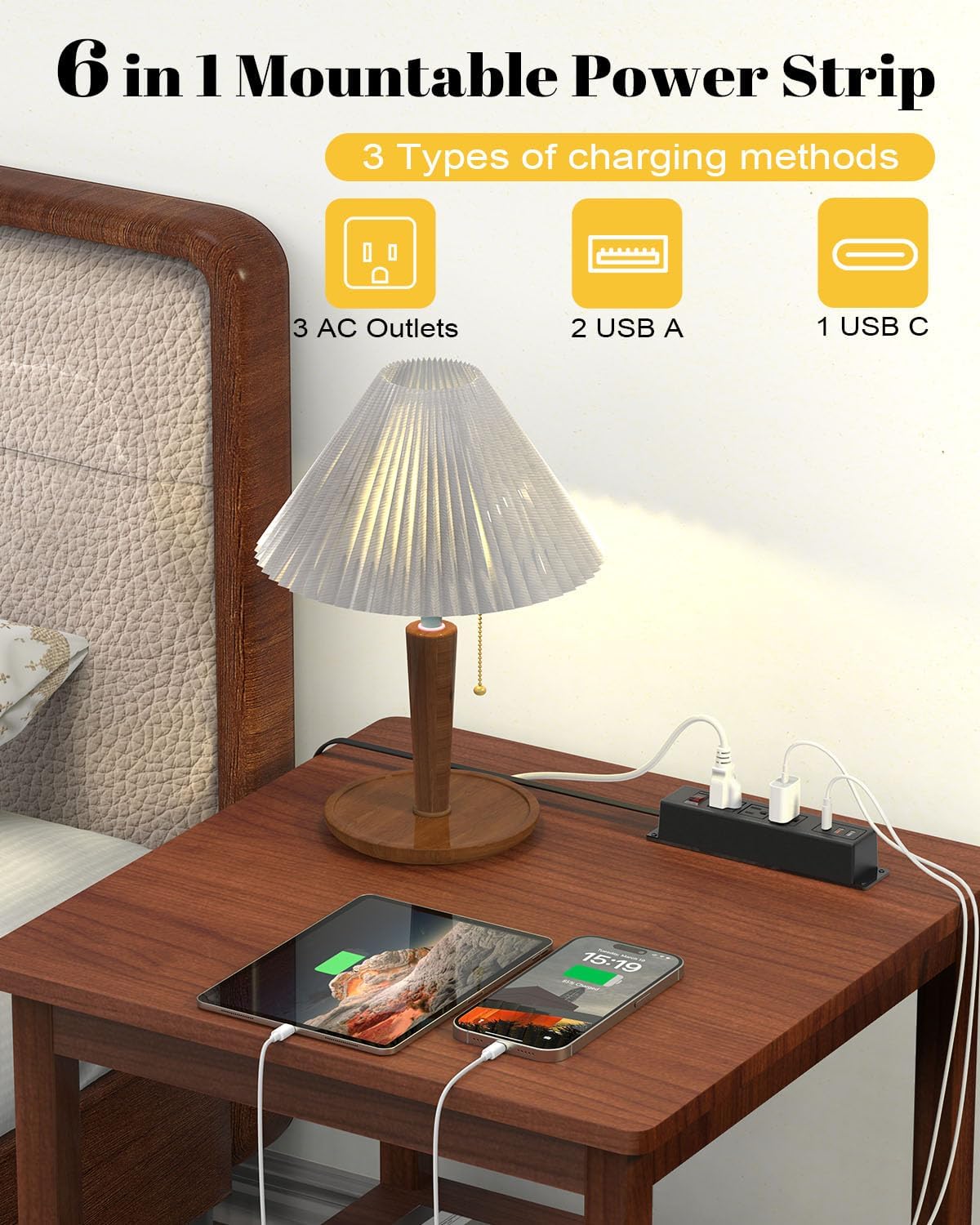
Figure 4: The power strip providing power to a lamp, phone, and tablet via AC and USB ports.

Figure 5: A device charging rapidly via the 18W USB-C port.
5. Одржување
Proper maintenance ensures the longevity and safe operation of your power strip.
- Чистење: Disconnect the power strip from the wall outlet before cleaning. Use a dry, soft cloth to wipe the exterior. Do not use liquid cleaners or aerosols.
- Инспекција: Periodically inspect the power cord and the power strip for any signs of damage, such as frayed wires, cracks, or loose connections. If damage is found, discontinue use and replace the unit.
- Складирање: If storing the power strip, ensure it is disconnected from power and stored in a dry, cool place away from direct sunlight.
6 Смена на проблеми
Доколку наидете на проблеми со вашиот електричен разводник, погледнете ги следните вообичаени проблеми и решенија:
| Проблем | Можна причина | Решение |
|---|---|---|
| Нема струја во штекерите/USB портите. |
|
|
| Уредите не се полнат преку USB. |
|
|
| Разводникот е топол. |
|
|
7. Спецификации
| Карактеристика | Детал |
|---|---|
| Бренд | Кунгфукинг |
| Модел | B0CT5QM5KD |
| Излезни места за наизменична струја | 3 |
| USB порти | 2 x USB-A (QC 3.0), 1 x USB-C (18W) |
| Voltage Оценка | 100V-125V |
| AC излез | 12A / 1500W (Max) |
| Должина на продолжен кабел | 6 стапки |
| Тежина на ставката | 15.8 унци |
| Димензии (пакет) | 9.21 x 3.62 x 2.87 инчи |
| Посебни карактеристики | Desk Mount, Wall Mount, On/Off Switch, USB Slot, Surge Protection |
| Сертификати | UL наведено |
8. Гаранција и поддршка
For warranty information or technical support, please contact Kungfuking customer service. You can find more information and contact details on the official Kungfuking store page:
