1. Вовед
The HIKMICRO ECO-V Handheld Thermography Camera is a versatile thermal imaging device designed for various professional applications. It offers thermal, bi-spectrum image fusion, and visible light modes to meet diverse business needs. This manual provides essential information for the safe and effective operation of your ECO-V camera.
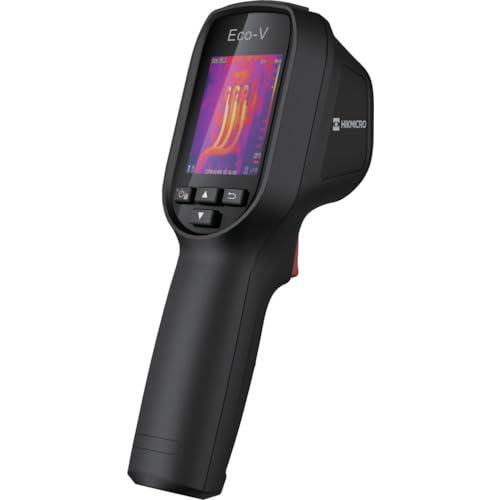
Figure 1: HIKMICRO ECO-V Handheld Thermography Camera
2. Информации за безбедност
Ве молиме прочитајте ги и разберете ги сите безбедносни предупредувања и упатства пред да го користите овој производ. Непочитувањето на овие упатства може да резултира со електричен удар, пожар или сериозни повреди.
Општи безбедносни мерки на претпазливост
- Не го користете уредот во експлозивни атмосфери, како на пример во присуство на запаливи течности, гасови или прашина.
- Чувајте го уредот подалеку од вода и други течности.
- Не обидувајте се да го отворите или модифицирате уредот. За сите сервиси обратете се на квалификуван персонал.
- Use only HIKMICRO-approved accessories.
- Avoid direct exposure of the thermal lens to strong light sources (e.g., sun, laser) as this may damage the detector.
Безбедност на батеријата
- The device contains a built-in Lithium-ion battery. Do not expose the battery to excessive heat, direct sunlight, or fire.
- Не ја дупчете, не ја отворајте или не ја расклопувајте батеријата.
- Charge the battery only with the provided USB cable and a compatible power adapter.
- Фрлете ги батериите според локалните прописи.
3. Содржина на пакетот
The HIKMICRO ECO-V package includes the following items:
- HIKMICRO Handheld Thermography Camera ECO-V
- Кабел за USB Type-C
- Quick Start Guide (not explicitly mentioned but standard)
- Calibration Certificate (not explicitly mentioned but standard)
Video 3.1: Unboxing the HIKMICRO M-Series (similar to ECO-V, showing typical package contents and device appearance).
4. Уредот завршиview
Familiarize yourself with the physical components and interface of your HIKMICRO ECO-V camera.
Изглед и интерфејс
The ECO-V features a compact, ergonomic design for comfortable handheld use. Key components include the thermal lens, optical lens, laser indicator, white light, trigger button, navigation buttons, and a 2.4-inch display.
Video 4.1: This video demonstrates the physical appearance and interface of a HIKMICRO M-Series camera, which shares similar design elements and interface components with the ECO-V.
5. Поставување
5.1 Полнење на уредот
Before initial use, fully charge the device's built-in Lithium-ion battery.
- Connect the provided USB Type-C cable to the device's USB port.
- Connect the other end of the USB cable to a compatible power adapter (5V2A recommended) and plug it into a power outlet.
- The charging indicator will show red during charging and turn green when fully charged.
Video 5.1: This HIKMICRO ECO operation video demonstrates the charging process for the device.
5.2 Вклучување/исклучување
To power on the device, press and hold the power button for more than 6 seconds. To power off, press and hold the power button again until the device shuts down.
Video 5.2: This HIKMICRO ECO operation video demonstrates how to power on the device.
6. Упатства за работа
This section covers the basic and advanced operational features of your ECO-V camera.
6.1 Image Capture and Display
To capture a thermal image, aim the camera at the target and press the trigger button. The captured image will be saved to the internal EMMC storage. To view saved images, navigate to the 'Albums' section in the menu.
Video 6.1: This HIKMICRO ECO operation video demonstrates image capture and viewing saved snapshots.
6.2 Мерни алатки
The ECO-V provides various measurement tools to analyze thermal images:
- Hot Spot: Automatically identifies and displays the highest temperature point.
- Cold Spot: Automatically identifies and displays the lowest temperature point.
- Централно место: Displays the temperature at the center of the screen.
Video 6.2: This HIKMICRO ECO operation video demonstrates the use of measurement tools like hot, cold, and center spots.
6.3 SuperIR Image Enhancement
SuperIR technology enhances the thermal image resolution, providing more detail for analysis. You can enable or disable this feature in the settings menu.
Video 6.3: This HIKMICRO ECO operation video demonstrates how to enable and use the SuperIR image enhancement feature.
6.4 Режими на слика
The ECO-V supports multiple image modes for different inspection needs:
- Термички: Displays only the thermal image.
- Фузија: Blends the thermal and visible light images for enhanced detail.
- PIP (Слика во слика): Overlays a smaller thermal image on a visible light image.
- Оптички: Displays only the visible light image.
Video 6.4: This HIKMICRO B10S product video demonstrates switching between different image modes, including Thermal, Fusion, PIP, and Optical.
6.5 Parallax Correction
When using fusion modes, adjust the parallax correction based on the distance to the target to ensure accurate alignment between thermal and visible images.
Video 6.5: This HIKMICRO B10S product video demonstrates how to adjust parallax correction for accurate image fusion.
6.6 Palette Adjustment
Select from various color palettes (e.g., White Hot, Black Hot, Rainbow, Ironbow) to visualize temperature differences more effectively. This can be adjusted in the settings menu.
Video 6.6: This HIKMICRO B10S product video demonstrates how to adjust color palettes.
6.7 Emissivity and Distance Settings
For accurate temperature measurements, it is crucial to set the correct emissivity value for the target material and the distance to the target. Refer to the general emissivity reference table in the specifications section.
Video 6.7: This HIKMICRO ECO operation video demonstrates setting emissivity and distance for accurate temperature readings.
6.8 Ласерски покажувач
The built-in laser pointer helps to precisely identify the measurement target. It can be enabled or disabled in the settings menu.
Video 6.8: This HIKMICRO ECO operation video demonstrates how to enable and use the laser pointer.
6.9 Аларм за висока температура
Set a high temperature alarm threshold to be notified when temperatures exceed a predefined limit. This feature is useful for identifying potential overheating issues.
Video 6.9: This HIKMICRO B10S product video demonstrates how to set a high temperature alarm.
6.10 Hotspot Connection
The ECO-V can connect to a mobile device via Wi-Fi hotspot for live viewing and data transfer. Enable the Wi-Fi hotspot function in the device settings and connect your mobile device.
Video 6.10: This HIKMICRO M-Series video demonstrates how to establish a hotspot connection with a mobile device.
6.11 HIKMICRO Viewer App Connection
Download the HIKMICRO Viewer app on your mobile device to access live view, manage images and videos, and generate reports. Connect the device to your phone via Wi-Fi.
Video 6.11: This HIKMICRO Pocket series video demonstrates connecting the device to the HIKMICRO Viewer app for various functions.
7. Одржување
7.1 Чистење
- Избришете го телото на уредот со мека, дamp крпа. Не користете абразивни средства за чистење или растворувачи.
- Gently clean the lenses with a lens cleaning cloth. Avoid touching the lens surface with bare hands.
7.2 Складирање
- Чувајте го уредот на ладно и суво место, подалеку од директна сончева светлина и екстремни температури.
- Доколку ја складирате подолго време, осигурајте се дека батеријата е делумно наполнета (околу 50%) и полнете ја на секои неколку месеци за да ја одржите нејзината состојба.
8 Смена на проблеми
If you encounter issues with your HIKMICRO ECO-V, refer to the following common problems and solutions:
| Проблем | Можна причина | Решение |
|---|---|---|
| Уредот не се вклучува | Слаба батерија; Неисправност на уредот; | Charge the battery; Contact support |
| Неточни отчитувања на температурата | Incorrect emissivity/distance settings; Dirty lens | Adjust emissivity/distance; Clean the lens |
| Не може да се поврзе со Wi-Fi точка за пристап | Incorrect password; Hotspot not enabled | Verify password; Enable hotspot in settings |
9. Спецификации
Detailed technical specifications for the HIKMICRO ECO-V camera:
| Карактеристика | Спецификација |
|---|---|
| Модел | ЕКО-В |
| Опсег на мерење на температурата | -20°C до 550°C |
| Minimum Temperature Display | 0.1°C |
| Поле на View (ФОВ) | 50° × 50° |
| Просторна резолуција (IFOV) | 8.89 денари |
| Опсег на работна температура | -10°C до 50°C |
| Температурен опсег на складирање | -40°C до 70°C |
| Големина на приказ | 2.4 инчи |
| Извор на енергија | Вградена литиум-јонска батерија |
| Време на работа со батерија | 8 часа |
| Wi-Fi | Не е достапно |
| Ниво на заштита | IP54 |
| Интерфејс | USB тип-C |
| Pixel Pitch | 12 μm |
| Мерење на бранова должина | 7.5-14μm |
| НЕТД | < 40 mK (@ 25°C, F#=1.0) |
| Фокусна должина | 1.35 мм |
| Отворање | F1.0 |
| Минимално растојание на фокусот | 0.1 метри (0.33 стапки) |
| Стапка на слики | 25 Hz |
| Фокусен систем | Без фокус |
| Медиум за снимање | EMMC (4GB) |
| Капацитет за складирање слики | 30,000 слики |
| Слика File Формат | BMP (includes measurement data) |
| Термичка резолуција на сликата | 96×96 (9,216 pixels) |
| Visible Image Resolution | 640×480 |
| Точност | ±2°C or ±2% (whichever is greater), when ambient temperature is 15°C to 35°C and target temperature is 0°C or above. |
| Материјали | Поликарбонат, ABS смола |
| Тежина | 360 гр |
General Emissivity Reference
| Материјал | Емисивност |
|---|---|
| Човечка кожа | 0.98 |
| ПХБ | 0.91 |
| Цементен бетон | 0.95 |
| Керамика | 0.92 |
| Гума | 0.95 |
| Боја | 0.93 |
| Дрво | 0.85 |
| Тула | 0.96 |
| Песок | 0.90 |
| Почва | 0.92 |
| Памук | 0.98 |
| Картон | 0.90 |
| Бела книга | 0.96 |
| Вода | 0.96 |
10. Гаранција и поддршка
HIKMICRO products are covered by a limited warranty. For detailed warranty terms and conditions, please refer to the official HIKMICRO webлокација или контактирајте го вашиот локален дистрибутер.
Поддршка за корисници
If you require technical assistance, troubleshooting, or have questions about your ECO-V camera, please contact HIKMICRO customer support through their official webстраницата или информациите за контакт наведени во пакувањето на вашиот производ.


