1. Вовед
Thank you for choosing the A4TECH F.STYLER FBK11 Wireless Bluetooth Keyboard. This versatile keyboard offers dual connectivity modes (Bluetooth and 2.4 GHz wireless) and supports pairing with up to four devices simultaneously. It is designed for seamless use across various operating systems, including Windows, macOS, Android, and iOS. This manual provides detailed instructions to help you set up, operate, and maintain your new keyboard.

Слика 1: Предна страна view of the A4TECH F.STYLER FBK11 Wireless Bluetooth Keyboard, showcasing неговиот компактен дизајн и распоред на копчињата.
2. Карактеристики на производот
- Двојно поврзување: Supports both Bluetooth and 2.4 GHz wireless modes for flexible connection options.
- Спарување на повеќе уреди: Connect and switch between up to 4 devices (3 via Bluetooth, 1 via 2.4G wireless) seamlessly.
- Мултимедијални копчиња: Dedicated shortcut keys for quick access to media controls and other functions.
- Компатибилност со оперативен систем: Compatible with Windows, macOS, Chrome OS, Android, and iOS devices.
- Компактен и пренослив дизајн: Lightweight and easy to carry for on-the-go productivity.
- Arabic/English Layout: Features a dual-language key layout for broader usability.
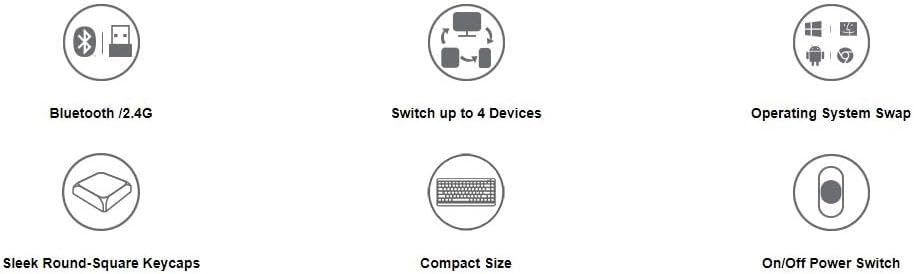
Figure 2: Visual representation of key features including Bluetooth/2.4G connectivity, multi-device switching, OS swap, sleek keycaps, compact size, and on/off power switch.
3. Содржина на пакетот
Ве молиме проверете го пакувањето за следните ставки:
- A4TECH F.STYLER FBK11 Wireless Bluetooth Keyboard
- 2.4 GHz USB Нано приемник
- 2 x AAA алкални батерии
- Упатство за употреба (овој документ)

Figure 3: The keyboard shown with its included accessories: the USB receiver and two AAA batteries.
4. Поставување
4.1. Инсталација на батерија
- Пронајдете го делот за батерии на долната страна од тастатурата.
- Отворете го капакот на преградата за батерии.
- Insert the two AAA alkaline batteries, ensuring correct polarity (+/-).
- Добро затворете го капакот на преградата за батерии.
4.2. Вклучување/исклучување
Slide the power switch, located on the top right edge of the keyboard, to the 'ON' position to power on the keyboard. Slide it to 'OFF' when not in use to conserve battery life.
5. Упатства за работа
5.1. Режими на поврзување
The FBK11 keyboard supports two connectivity modes: Bluetooth and 2.4 GHz wireless.
5.1.1. Безжична конекција од 2.4 GHz
- Insert the 2.4 GHz USB Nano Receiver into an available USB port on your computer or device.
- Вклучете ја тастатурата.
- The keyboard should automatically connect to the receiver. The 2.4G indicator light on the keyboard will illuminate briefly.
5.1.2. Поврзување со Bluetooth
The keyboard can connect to up to three Bluetooth devices (BT1, BT2, BT3).
- Вклучете ја тастатурата.
- Притиснете и задржете го Fn key and then press one of the Bluetooth keys (БТ1, БТ2, или БТ3) for 3-5 seconds until the corresponding Bluetooth indicator light starts blinking rapidly. This indicates the keyboard is in pairing mode.
- На вашиот уред (компјутер, таблет, паметен телефон), одете во поставките за Bluetooth и пребарајте нови уреди.
- Select "A4TECH FBK11" or a similar name from the list of available devices.
- Следете ги сите упатства на екранот за да го завршите процесот на спарување. Индикаторското светло ќе престане да трепка и ќе остане непрекинато неколку секунди откако ќе се поврзе.
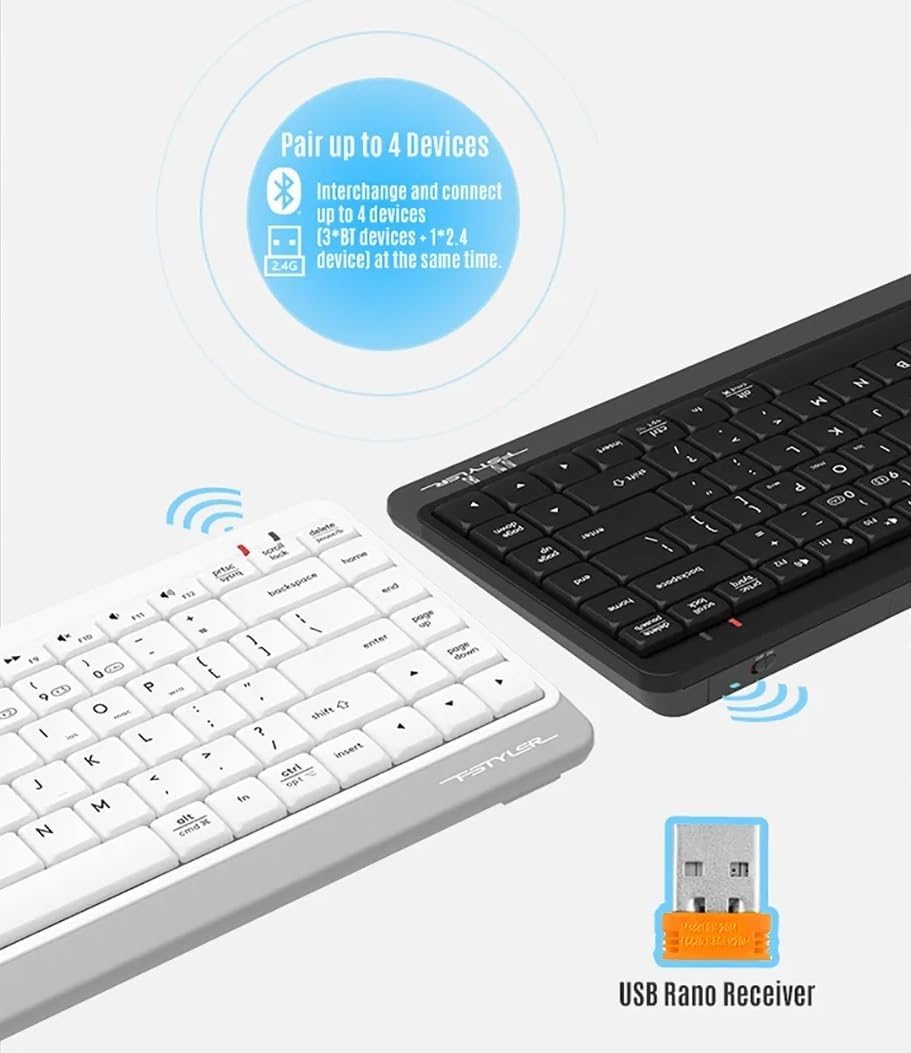
Figure 4: The keyboard demonstrating its dual connectivity options, including the USB Nano Receiver for 2.4G wireless and Bluetooth pairing capabilities.
5.2. Префрлување на повеќе уреди
За да се префрлате помеѓу поврзани уреди:
- Притиснете Fn + 2.4G to switch to the device connected via the 2.4 GHz USB receiver.
- Притиснете Fn + BT1 to switch to the first Bluetooth-paired device.
- Притиснете Fn + BT2 to switch to the second Bluetooth-paired device.
- Притиснете Fn + BT3 to switch to the third Bluetooth-paired device.

Figure 5: Diagram illustrating how the keyboard can be paired with up to four different devices simultaneously, including a smartphone, tablet, laptop, and desktop computer.
5.3. Префрлување на оперативен систем
The keyboard features dedicated keys to optimize its layout for different operating systems:
- Притиснете Fn + Q for Android/iOS mode.
- Притиснете Fn + W за Windows режим.
- Притиснете Fn + E for macOS mode.
5.4. Multimedia Hotkeys and FN Lock Mode
The keyboard includes 12 multimedia and internet hotkeys (F1-F12) that can be accessed directly or by using the Fn key.

Слика 6: Готовоview of the keyboard's main functions, highlighting FN Locking Mode, Multimedia & Internet Hotkeys, Multi-Device Switch, Operating System Swap, and PC/MAC Dual-Function Keys.
5.4.1. FN Lock Mode
By default, after pairing, the FN shortcut is locked in FN mode. This means you can use the multimedia functions (F1-F12) directly without pressing the Fn key.
- Режим за заклучување Fn: No need to press the Fn key for multimedia functions.
- Отклучете го режимот Fn: Притиснете Fn + ESC to switch back to standard F1-F12 key functions, requiring the Fn key to access multimedia shortcuts.
The locking FN mode is memorized when switching devices and shutting down.

Figure 7: Detailed explanation of how to lock and unlock the FN mode, allowing direct access to multimedia functions.
6 Смена на проблеми
| Проблем | Можна причина | Решение |
|---|---|---|
| Тастатурата не реагира | Low battery; Keyboard is off; Incorrect connection mode; Device Bluetooth is off. | Replace batteries; Turn on keyboard; Switch to correct connection mode (2.4G/BT1/BT2/BT3); Enable Bluetooth on your device. |
| Не може да се спари преку Bluetooth | Keyboard not in pairing mode; Device is too far; Interference. | Ensure keyboard is in pairing mode (blinking light); Move keyboard closer to device; Remove potential sources of interference. |
| 2.4G connection issues | USB receiver not properly inserted; Interference. | Re-insert USB receiver; Try a different USB port; Move keyboard closer to receiver; Remove potential sources of interference. |
| Мултимедијалните клучеви не работат | FN Lock mode is off. | Притиснете Fn + ESC to toggle FN Lock mode. |
7. Спецификации
- Модел: ФБК11
- Поврзување: Bluetooth 5.0, 2.4 GHz Wireless
- Оперативен опсег: До 10 метри (33 стапки)
- Тип на батерија: 2 x AAA алкални батерии
- Материјал: Пластика
- Боја: Црното
- Димензии: Приближно 36.1 x 15.3 x 4.4 cm
- Тежина: Приближно 363 грама
- Компатибилен ОС: Windows, macOS, Chrome OS, Android, iOS
- Посебни карактеристики: Lightweight, Portable, Multi-functional, Multi-device support
8. Одржување
- Чистење: Use a soft, dry cloth to clean the keyboard. For stubborn dirt, a slightly damp cloth can be used, but ensure no moisture enters the keyboard.
- Складирање: Чувајте ја тастатурата на ладно и суво место, подалеку од директна сончева светлина и екстремни температури.
- Нега на батеријата: Remove batteries if the keyboard will not be used for an extended period to prevent leakage.
- Избегнувајте течности: Не ја изложувајте тастатурата на вода или други течности.
- Ракувајте со внимание: Избегнувајте испуштање или подложување на тастатурата на силни удари.
9. Гаранција и поддршка
This product comes with a standard manufacturer's warranty. For detailed warranty terms and conditions, please refer to the warranty card included with your purchase or contact your local A4TECH distributor or retailer.
For technical support, troubleshooting assistance, or inquiries about your A4TECH F.STYLER FBK11 keyboard, please visit the official A4TECH website or contact their customer service department. Contact information can typically be found on the product packaging or the A4TECH webсајт.


