Вовед
Thank you for choosing the FLEXISPOT Lite Electric Standing Desk. This manual provides essential information for the safe and efficient assembly, operation, and maintenance of your new desk. Please read this manual thoroughly before use and retain it for future reference.
The FLEXISPOT Lite Electric Standing Desk is designed to promote a healthier working environment by allowing seamless transitions between sitting and standing positions. Its robust construction and intuitive controls ensure a comfortable and productive workspace.
Инструкции за безбедност
- Пред склопување, проверете дали сите компоненти се присутни и неоштетени. Не го користете ако некои делови недостасуваат или се скршени.
- Држете ги децата и домашните миленици подалеку од работната маса за време на работата за да спречите повреда.
- Do not place hands or other objects near the moving parts of the desk frame during height adjustment.
- Проверете дали кабелот за напојување е правилно поврзан и не е оштетен. Не ракувајте со бирото со оштетен кабел или приклучок.
- Не преоптоварувајте ја работната маса. Погледнете го делот со спецификации за максимален капацитет на тежина.
- Only use the desk on a level surface to ensure stability.
- Исклучете го напојувањето пред чистење или вршење на какво било одржување.
Содржина на пакетот
Ве молиме проверете дали сите од следниве компоненти се вклучени во вашиот пакет:
- Desktop (160 x 75 cm, White+Maple)
- Desk Legs/Frame (Alloy Steel)
- Електричен мотор и контролна кутија
- Контролен панел
- Адаптер за напојување и кабел
- Држач за чаши
- Кука за складирање
- Cable Management Accessories (Cable ties, Bundle Clamp)
- Assembly Hardware (Screws, Allen wrenches, etc.)
- Упатство за употреба
Слика 1: Во текот наview of desk components, including the desktop, frame, and control panel, ready for assembly.
Поставување и склопување
Follow these steps to assemble your FLEXISPOT Lite Electric Standing Desk. It is recommended to have two people for assembly, especially when handling the desktop.
- Отпакувајте ги компонентите: Carefully remove all parts from the packaging and lay them out on a clean, soft surface to prevent scratches. Refer to the "Package Contents" section to ensure all parts are present.
- Attach Lifting Columns to Feet: Secure the lifting columns to the desk feet using the provided screws and tools. Ensure they are firmly attached.
- Поврзете ја пречката: Attach the crossbar between the two lifting columns. This forms the main frame of the desk.
- Инсталирајте ја контролната кутија и моторот: Mount the control box and motor onto the designated areas of the desk frame. Connect the motor cables to the control box.
- Прикачи десктоп: Carefully place the desktop upside down on a soft surface. Position the assembled frame onto the desktop, aligning the pre-drilled holes. Secure the frame to the desktop using the provided screws.
- Инсталирајте ја контролната табла: Mount the control panel to the underside of the desktop in an easily accessible location. Connect its cable to the control box.
- Прикачете додатоци: Install the cup holder and storage hook to the desired locations on the desktop edge.
- Управување со кабли: Use the provided cable management accessories to organize and secure all cables, including the power cord.
- Позициски шалтер: With assistance, carefully flip the desk upright and place it in its desired location. Ensure it is on a stable, level surface.
- Поврзете напојување: Plug the power adapter into the control box, then plug the power cord into a wall outlet.
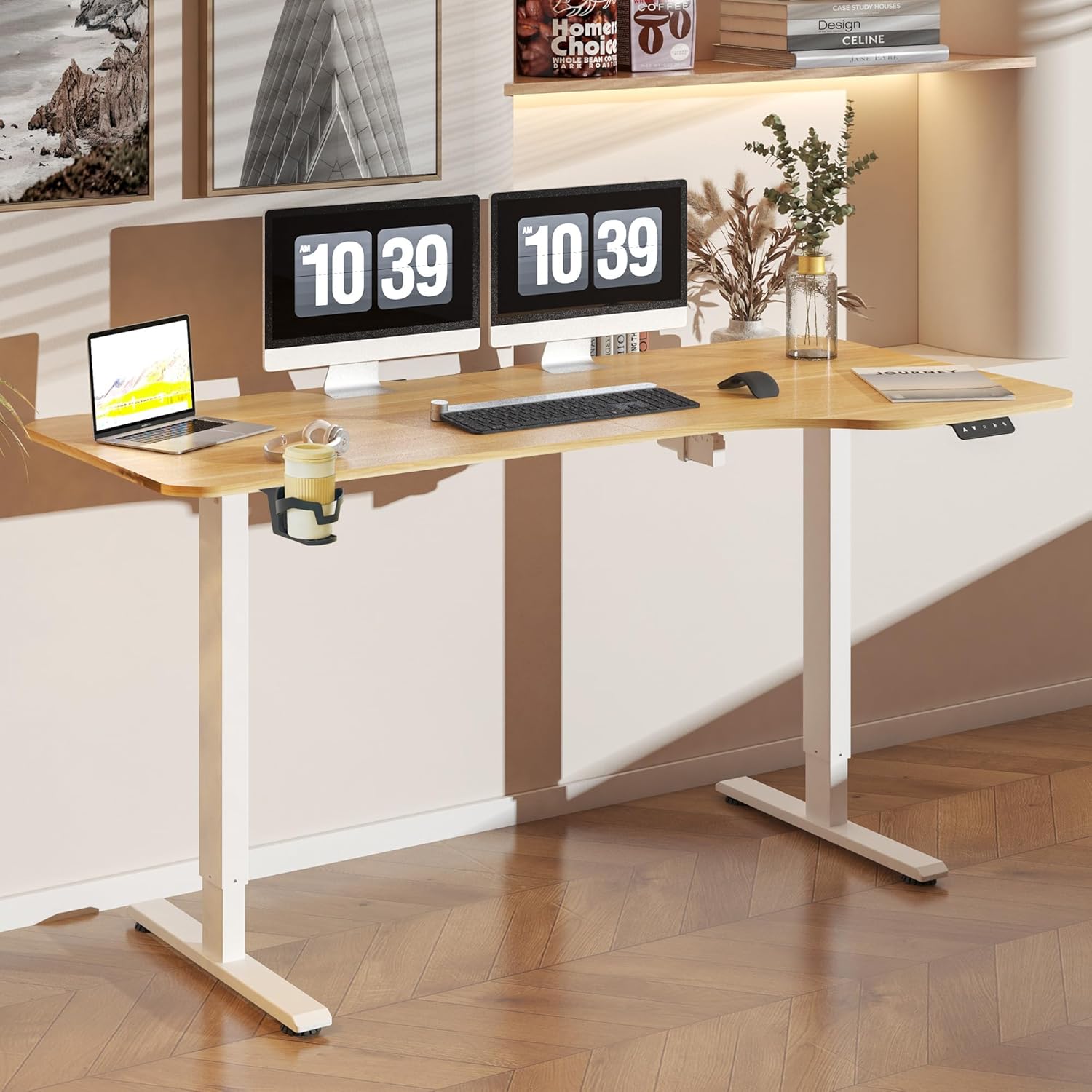
Слика 2: The FLEXISPOT Lite Electric Standing Desk fully assembled and set up in a modern home office environment.
Упатства за работа
Контролниот панел завршиview

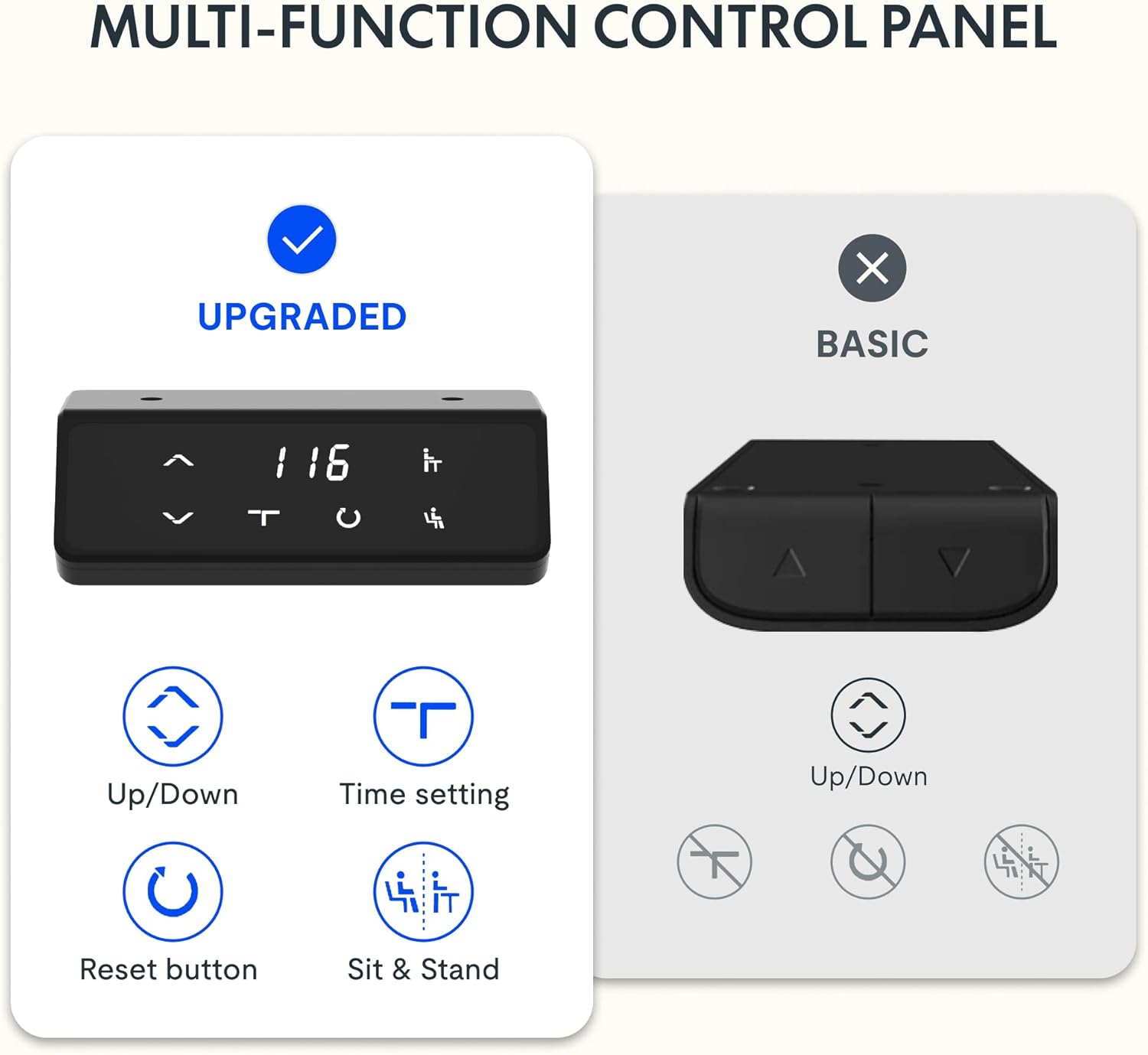
Слика 3: Детално view of the desk's control panel, showing buttons for Up/Down adjustment, Time Setting, Reset, and Sit & Stand memory presets.
Your FLEXISPOT Lite Electric Standing Desk features an intuitive control panel for easy height adjustment and memory functions.
- Up/Down Buttons (⌃ / ⌄): Press and hold these buttons to manually adjust the desk height upwards or downwards. Release the button to stop at the desired height.
- Поставки за меморија: The control panel allows you to save and recall preferred height settings.
- Adjust the desk to your desired height (e.g., a comfortable sitting or standing position) using the Up/Down buttons.
- Press and hold the 'Sit & Stand' button (person icon) for approximately 3-5 seconds until the display flashes or beeps, indicating the height is saved.
- To recall a saved height, simply press the 'Sit & Stand' button. The desk will automatically move to the last saved height. (If your model supports multiple presets, consult the full product manual for specific instructions on saving and recalling each position.)
- Reset Button (R): If the desk encounters an error or does not respond correctly, a reset may be required.
- Press and hold the 'R' button (often indicated by a circle icon or 'Reset' text).
- The desk will move to its lowest position, then slightly rise. Release the button once this sequence is complete. The desk is now reset.
- Time Setting (T): This button, often labeled with a clock icon, may be used to set a timer for sit/stand reminders, if available on your model. Consult the full product manual for detailed instructions on using this feature.

Слика 4: The FLEXISPOT Lite Electric Standing Desk in use, highlighting the accessible placement of the control panel for easy height adjustments.
Карактеристики
Опсег за прилагодување на висината
The desk offers a wide range of height adjustment to accommodate various user preferences and activities, from a minimum of 71 cm to a maximum of 117 cm.

Слика 5: Visual representation of the desk's height adjustment capabilities, illustrating the minimum and maximum heights.
Интегрирани додатоци
- Држач за чаши: A convenient cup holder is included to keep your beverages secure and prevent spills on your workspace.
- Storage Hook: A practical hook is provided for hanging headphones, bags, or other items, helping to keep your desktop clear and organized.

Слика 6: Детално view of the integrated cup holder and storage hook, designed for convenience and organization.
Управување со кабли
The desk includes features to help manage and organize your cables, ensuring a tidy and safe workspace.
- Cable Management Tray/Clips: Utilize the provided cable management solutions to route and secure power cords and peripheral cables.
- Bundle Clamp/Grommet: The desktop features a grommet hole and clamp for neatly passing cables through the desk surface.

Слика 7: Examples of the desk's cable management features, including a cable routing system and a desktop grommet for organized wiring.
Одржување
- Чистење: Избришете ја површината и рамката на бирото со мека, дamp крпа. Избегнувајте абразивни средства за чистење или груби хемикалии кои би можеле да ја оштетат завршната обработка.
- Инспекција: Периодично проверувајте ги сите завртки и врски за да се осигурате дека се стегнати. Затегнете ги повторно доколку е потребно.
- Управување со кабли: Ensure cables are not pinched or tangled, especially during height adjustments.
- Грижа за мотори: The electric motor is designed for maintenance-free operation. Do not attempt to open or service the motor or control box.
Решавање проблеми
| Проблем | Можна причина | Решение |
|---|---|---|
| Бирото не се поместува. | Power cord disconnected; motor cable loose; overload. | Check power connections. Ensure motor cables are securely plugged in. Reduce weight on the desk. Perform a reset. |
| Бирото се движи нерамномерно или испушта необични звуци. | Loose connections; obstruction; uneven load. | Check all assembly screws. Ensure no objects are obstructing the lifting columns. Distribute weight evenly on the desktop. Perform a reset. |
| Код за грешка прикажан на контролната табла. | Specific system error. | Refer to the specific error code in the full product manual (if available) or contact customer support. Often, a reset can resolve minor errors. |
| Претходно поставените мемориски поставки не работат. | Presets not saved correctly; system glitch. | Re-save your desired height presets. Perform a reset if the issue persists. |
Спецификации
| Карактеристика | Детал |
|---|---|
| Број на модел | QS1M-1675-IE |
| Големина на работната површина | 160 x 75 cm |
| Материјал за работна површина | Дрво |
| Материјал за рамка | Легуриран челик |
| Боја | White+Maple |
| Минимална висина | 71 см |
| Максимална висина | 117 см |
| Максимална тежина капацитет | 150 фунти (приближно 68 кг) |
| Ниво на бучава на моторот | Помалку од 50 dB |
| Потребно е собрание | Да |
Гаранција и поддршка
FLEXISPOT stands behind the quality of its products. Your FLEXISPOT Lite Electric Standing Desk comes with the following warranty:
- 5-годишна гаранција: Applies to the desk frame.
- 3-годишна гаранција: Applies to controllers and motors.
For warranty claims, technical support, or any questions regarding your product, please contact FLEXISPOT customer service. Please have your model number (QS1M-1675-IE) and proof of purchase ready.

Слика 8: Official FLEXISPOT warranty details, outlining coverage for the desk frame, controllers, and motors.


