1. Во текотview
1.1 Опис на производот
The PNI GreenHouse SC1800C PRO Solar Inverter is a central component for small off-grid solar systems, suitable for areas with or without grid electricity. It provides a continuous output of 3000W with a pure sine wave, making it suitable for various household lighting installations and other small electronic motors, including refrigerators, pumps, tools, and charging devices for phones, laptops, and TVs.
1.2 Клучни карактеристики
- Maximum photovoltaic panel input power: 2000 W.
- Максимална јачина на DC влезtage from photovoltaic panels: 30 - 120 VDC (Vmp).
- Maximum solar charge current: 30 A input from panels, 60 A output to batteries.
- Solar charging efficiency: 98%.
- MPPT solar charger type.
- Оценет излез волtagе: 230 В.
- Rated output power: 3000 W (under ideal conditions with proportional battery count and 100% charged batteries).
- Maximum apparent power: 6000 VA (peak, 0.5 seconds under ideal conditions).
- Излез волtage waveform: Pure sine wave.
- Output signal frequency: 50, 60 Hz.
- Влез волtage: 230 V AC.
- Grid connection for backup.
- Compatible with 24V batteries: AGM, lead-acid, gel, flooded lithium-ion.
- Minimum battery start voltage: 23 V (cold start voltagд)
- Integrated high-frequency inverter type (switching).
- Inverter efficiency: 90% ~ 93% (100% charged battery).
- Typical transfer time: 10 ms (UPS, VDE) 20 ms (APL).
- Line mode efficiency: > 95% (rated R load, fully charged battery).
- Hybrid operating modes: SBU – Solar/Battery/Utility, Solar Utility (UPS).
- AC charge voltagе: 230 В.
- Maximum AC charge current: 30 A.
- Automatic switching: Solar - Batteries - Grid.
- Функција за заштеда на енергија.
- Multiple protections.
- Мултифункционален дисплеј.
- Dedicated menu for advanced settings.
- Monitoring with PC software (USB cable included).
- Remote monitoring from mobile/PC (with optional WiFi USB dongle).
1.3 Содржина на пакетот
- PNI GreenHouse SC1800C PRO Solar Inverter
- USB кабел
- Упатство за употреба
- PNI Smart Dongle-WLAN (for WiFi monitoring)
2. Информации за безбедност
Внимателно прочитајте ги сите упатства и предупредувања пред инсталација и работа. Непочитувањето на овие упатства може да резултира со електричен удар, пожар или тешки повреди.
- Квалификуван персонал: Инсталирањето и одржувањето мора да ги врши квалификуван персонал.
- Опасност од електричен удар: Овој уред работи со висок волуменtages. Do not open the casing unless specifically instructed.
- Безбедност на батеријата: Batteries can produce explosive gases. Ensure proper ventilation. Do not smoke or allow sparks or flames near batteries. Wear eye protection.
- Правилна вентилација: Инсталирајте го инверторот во добро проветрено место за да спречите прегревање.
- Еколошки услови: Avoid exposure to rain, snow, spray, or any liquids. Operate within the specified temperature range (-26 °C to 80 °C).
- Заземјување: Осигурајте се дека инверторот е правилно заземјен според локалните електрични кодови.
- Исклучете го напојувањето: Always disconnect all power sources (solar, battery, AC grid) before performing any wiring or maintenance.
3. Компоненти на производот
3.1 PNI GreenHouse SC1800C PRO Solar Inverter

Слика 3.1: Предна страна view of the PNI GreenHouse SC1800C PRO Solar Inverter, showing the display and control buttons.

Слика 3.2: Заден дел view of the PNI GreenHouse SC1800C PRO Solar Inverter, illustrating the various connection ports for solar panels, batteries, AC input, and AC output.
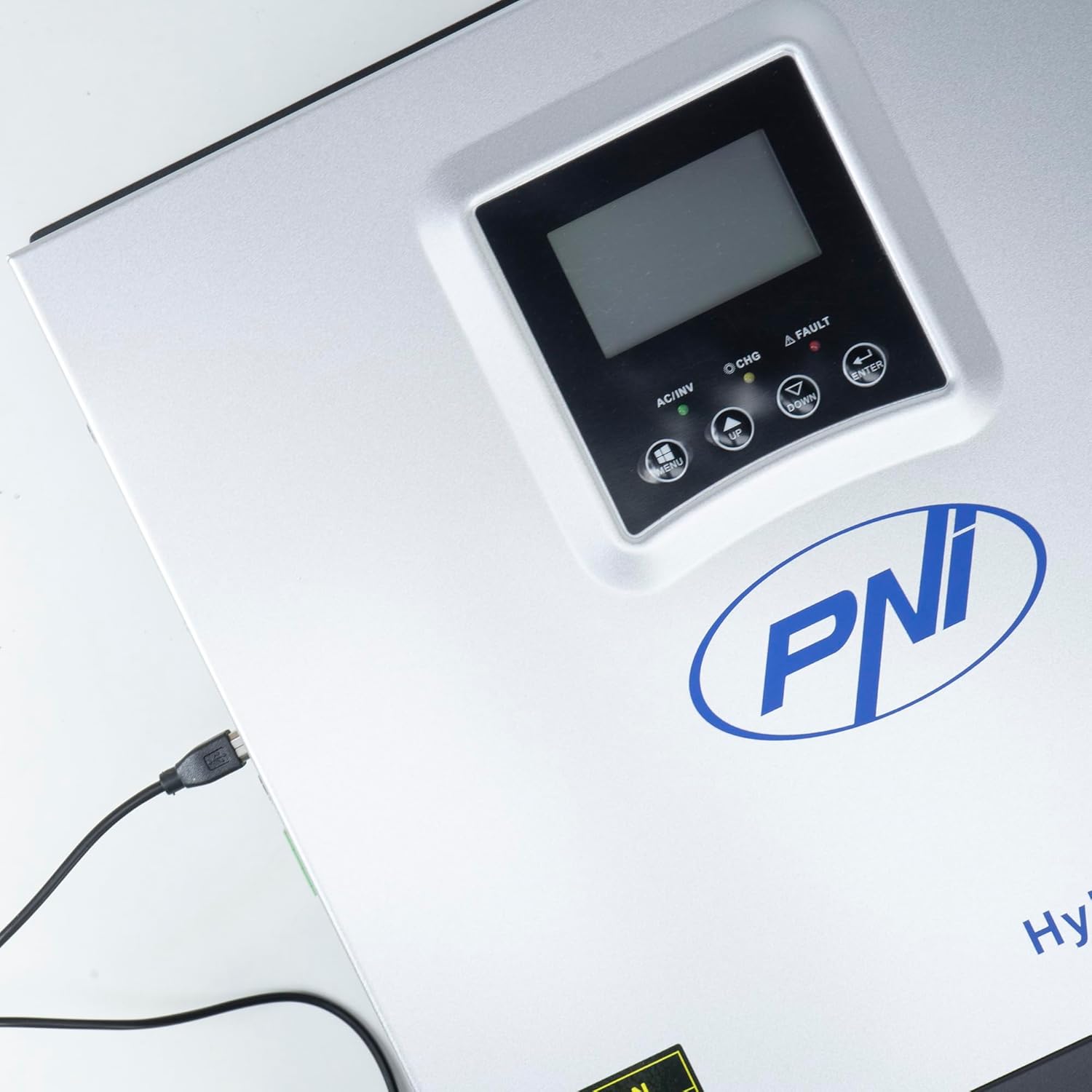
Figure 3.3: Close-up of the USB connection port on the inverter, used for PC monitoring.
3.2 PNI Smart Dongle-WLAN (Optional)

Figure 3.4: The PNI Smart Dongle-WLAN, an optional accessory for remote WiFi monitoring of the inverter.

Figure 3.5: The PNI Smart Dongle-WLAN connected to the inverter's dedicated port for WiFi communication.
4. Инсталација и поставување
4.1 Монтирање на ѕид
The inverter is designed for wall mounting. Choose a location that is dry, well-ventilated, and protected from direct sunlight and moisture. Ensure sufficient clearance around the unit for proper airflow and heat dissipation. Use appropriate mounting hardware for your wall type.
4.2 Дијаграм за поврзување на системот

Figure 4.1: Basic application diagram showing the connections between solar panels, utility grid, generator, inverter, battery, and home loads. Note: Generator, PV modules, WiFi module, and battery are not included with the inverter unless specified.
4.3 Приклучоци за жици
Follow the diagram above and the labels on the inverter for correct wiring. Ensure all connections are secure and properly insulated. It is highly recommended that a qualified electrician performs all wiring.
- Поврзување на соларни панели: Connect your solar panels to the designated PV input terminals. Observe correct polarity (positive to positive, negative to negative). The maximum DC input voltage е 120 VDC.
- Поврзување со батерија: Connect the 24V battery bank to the battery terminals. Ensure correct polarity. The inverter supports AGM, lead-acid, gel, and flooded lithium-ion batteries.
- Влез за наизменична струја (Мрежа/Генератор): Connect the AC utility grid or a generator to the AC input terminals. This provides backup power and can charge batteries.
- AC излез (оптоварувања): Connect your household loads to the AC output terminals.
4.4 Почетно вклучување
After all connections are made and verified:
- Вклучете го прекинувачот на батеријата.
- Turn on the solar panel breaker (if applicable).
- Turn on the AC input breaker (if connected to grid/generator).
- Turn on the inverter's power switch.
- Observe the display for status indicators and initial readings.
5. Работни режими
The PNI GreenHouse SC1800C PRO offers intelligent energy management with several configurable operating modes:
- Solar Priority Mode (SBU): In this mode, the inverter prioritizes power consumption from solar energy. If solar power is insufficient, it will draw from batteries. The utility grid acts as a backup.
- Приоритетен режим на батерија: The inverter prioritizes drawing power from the batteries. Solar energy will charge the batteries. The utility grid is used only when battery voltage drops below a set threshold.
- Utility Priority Mode (UPS): This mode prioritizes power from the utility grid. Solar energy will charge the batteries. The inverter switches to battery power only when the grid is unavailable, functioning as an Uninterruptible Power Supply (UPS).
These modes can be configured via the inverter's multifunction display and dedicated menu for advanced settings.
5.1 Следење
The inverter supports monitoring through:
- PC Software (USB): Connect the inverter to a PC using the provided USB cable and dedicated software for detailed monitoring and analysis of parameters.
- Remote Monitoring (WiFi - Optional): With the optional PNI Smart Dongle-WLAN, you can monitor the inverter remotely via a mobile application or web интерфејс.
6. Одржување
Regular maintenance ensures optimal performance and longevity of your inverter. Always disconnect all power sources before performing any maintenance.
- Чистење: Periodically clean the exterior of the inverter with a dry cloth. Ensure ventilation openings are free from dust and debris. Do not use liquid cleaners.
- Проверки за поврзување: Annually inspect all wiring connections (solar, battery, AC input/output) for tightness and signs of corrosion. Tighten any loose connections.
- Проверка на батеријата: If using lead-acid batteries, check electrolyte levels and terminal condition as per battery manufacturer guidelines.
- Проверка на животната средина: Осигурајте се дека просторијата за инсталација останува во рамките на наведените опсези на температура и влажност.
7 Смена на проблеми
Овој дел дава упатства за вообичаени проблеми. За сложени проблеми, контактирајте квалификуван сервисер.
| Проблем/Аларм | Можна причина | Решение |
|---|---|---|
| Аларм за слаба батерија | Волумен на батеријаtage е под низок волуменtage warning threshold. | Check battery charge level. Ensure solar panels are producing power or AC input is connected for charging. Reduce load. |
| Battery Disconnected Alarm | Battery cables are loose or disconnected. | Safely disconnect all power sources and check battery connections. Reconnect securely. |
| Overvoltage Аларм | Влез волtage (PV or AC) exceeds safe limits. | Verify solar panel array voltage or AC input voltage. Ensure it is within the inverter's specifications. |
| Заштита од преоптоварување со наизменична струја | Connected loads exceed the inverter's output capacity. | Reduce the total load connected to the inverter. Check individual appliance power consumption. |
| Нема излезна моќност | Inverter off, low battery, overload, or fault. | Check if the inverter is powered on. Verify battery voltage. Check for overload or fault codes on the display. |
8. Спецификации
| Карактеристика | Спецификација |
|---|---|
| Бренд | PNI |
| Број на модел | PNI-SC1800P-DG |
| Номинална моќност | 3000 W |
| Врвна моќност | 6000 VA (0.5 seconds) |
| Батерија Voltage | 24 В |
| Макс. Влезна моќност на PV | 2000 W |
| Макс PV Влез Voltage (Vmp) | 30 - 120 VDC |
| MPPT Solar Charge Current | 60 A (output to batteries) |
| AC Влез Voltage | 230 В |
| Излез наизменична струја Voltage | 230 В |
| Излезна бранова форма | Чист синусен бран |
| Излезна фреквенција | 50/60 Hz |
| Max. AC Charge Current | 30 А |
| Ефикасност на инвертерот | 90% ~ 93% |
| Работна температура | -26 °C до 80 °C |
| Димензии (Д x Ш x В) | 29 x 12 x 35 cm |
| Тежина | 6.9 кг |
| Потрошувачка во мирување | ≈ 25 W (Energy saving mode ≈ 12.5 W) |
| Комуникација | USB, Optional WiFi Dongle |
9. Гаранција и поддршка
За информации за гаранцијата и техничка поддршка, ве молиме погледнете ја документацијата што ја приложивте со вашата нарачка или контактирајте го вашиот продавач. Зачувајте го доказот за купување за рекламации во врска со гаранцијата.