1. Вовед
Welcome to the user manual for your Jooeniok L81 Smart Watch. This guide provides detailed instructions on how to set up, operate, and maintain your device, ensuring you get the most out of its features. The Jooeniok L81 is designed to enhance your daily life with its communication, fitness tracking, and health monitoring capabilities.
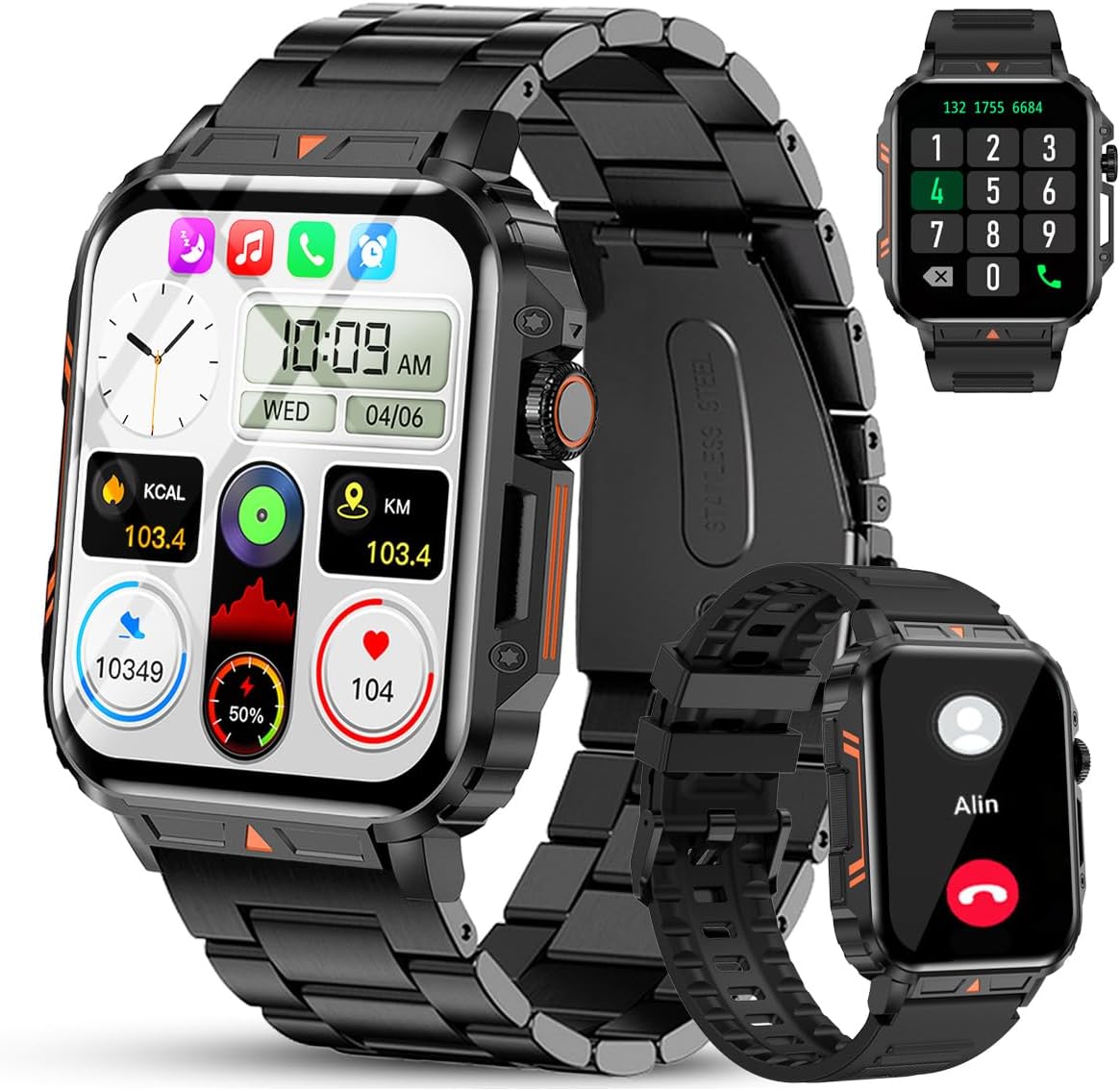
Image 1.1: The Jooeniok L81 Smart Watch, showcasing неговиот главен дисплеј и заменливи ремени.
2. Клучни карактеристики
- Bluetooth Calling & Message Alerts: Make and receive calls, read messages, and receive notifications from various apps directly on your watch.
- 1.95'' HD Touch Screen & DIY Dial: Enjoy a clear display and personalize your watch face.
- 112+ спортски режими: Track a wide range of activities including running, cycling, badminton, and hiking.
- IP68 водоотпорен: Suitable for daily use, hand washing, and outdoor activities in rain. (Note: Not recommended for diving, showering, or sauna.)
- Здравствено следење: Monitor heart rate, blood oxygen (SpO2), blood pressure, and sleep patterns.
- Долготрајна батерија: Опремен е со батерија од 340 mAh за продолжена употреба.
- Мултифункционални: Includes features like timer, alarm, stopwatch, weather, calendar, water reminder, sedentary reminder, and remote photo control.
3. Водич за поставување
3.1. Полнење на паметниот часовник
Before initial use, fully charge your Jooeniok L81 Smart Watch. Connect the magnetic charging cable to the charging contacts on the back of the watch and plug the USB end into a standard USB power adapter (not included) or a computer's USB port. The watch display will indicate charging status.

Image 3.1: Illustration of the watch dimensions and the location of the charging contacts.
3.2. Инсталација на апликација и спарување
- Преземете ја апликацијата: Scan the QR code provided in the watch's quick start guide or search for the official companion app (e.g., "FitCloudPro" or similar, check packaging for exact name) in the Apple App Store (for iOS) or Google Play Store (for Android).
- Овозможи Bluetooth: Проверете дали Bluetooth е овозможен на вашиот паметен телефон.
- Отворете ја апликацијата: Стартувајте ја инсталираната апликација и следете ги упатствата на екранот за да креирате сметка или да се најавите.
- Додај уред: Within the app, navigate to the "Device" or "Add Device" section. The app will search for available Bluetooth devices. Select "L81" or the corresponding device name when it appears.
- Потврдете го спарувањето: Барање за спарување може да се појави на вашиот часовник и телефон. Потврдете го спарувањето на двата уреди.
- Доделете дозволи: Дозволете ги потребните дозволи (на пр., известувања, локација, контакти) за апликацијата да функционира правилно.
The watch is compatible with Android 5.1 and above, and iOS 10.0 and above.
3.3. Initial Settings and Language
After successful pairing, the watch should automatically synchronize time and language settings with your phone. If the watch displays an incorrect language, navigate to the watch's settings menu (usually by swiping down from the main screen or pressing the side button to access the app list, then finding the 'Settings' icon). Look for 'Language' or 'System' settings to change it to English or your preferred language.
4. Упатства за работа
4.1. Основна навигација
- Екран на допир: Повлечете лево/десно, горе/долу за да се движите низ менијата и функциите. Допрете за да изберете.
- Странично копче: Press to return to the main screen or access the app list. Long press for power options.
- Crown Button (if present): Rotate to scroll through lists or adjust settings, press to select.
4.2. Bluetooth повици и известувања
Once paired, your watch can handle calls and display notifications. Ensure Bluetooth is connected and the companion app has the necessary permissions.
- Остварување повици: Access the dial pad or contact list on your watch to initiate calls.
- Примање повици: Кога ќе добиете повик, можете да одговорите или да го одбиете директно од часовникот.
- Известувања: Swipe down from the main screen or access the notification center to view incoming messages from SMS, WhatsApp, Facebook, and other apps.
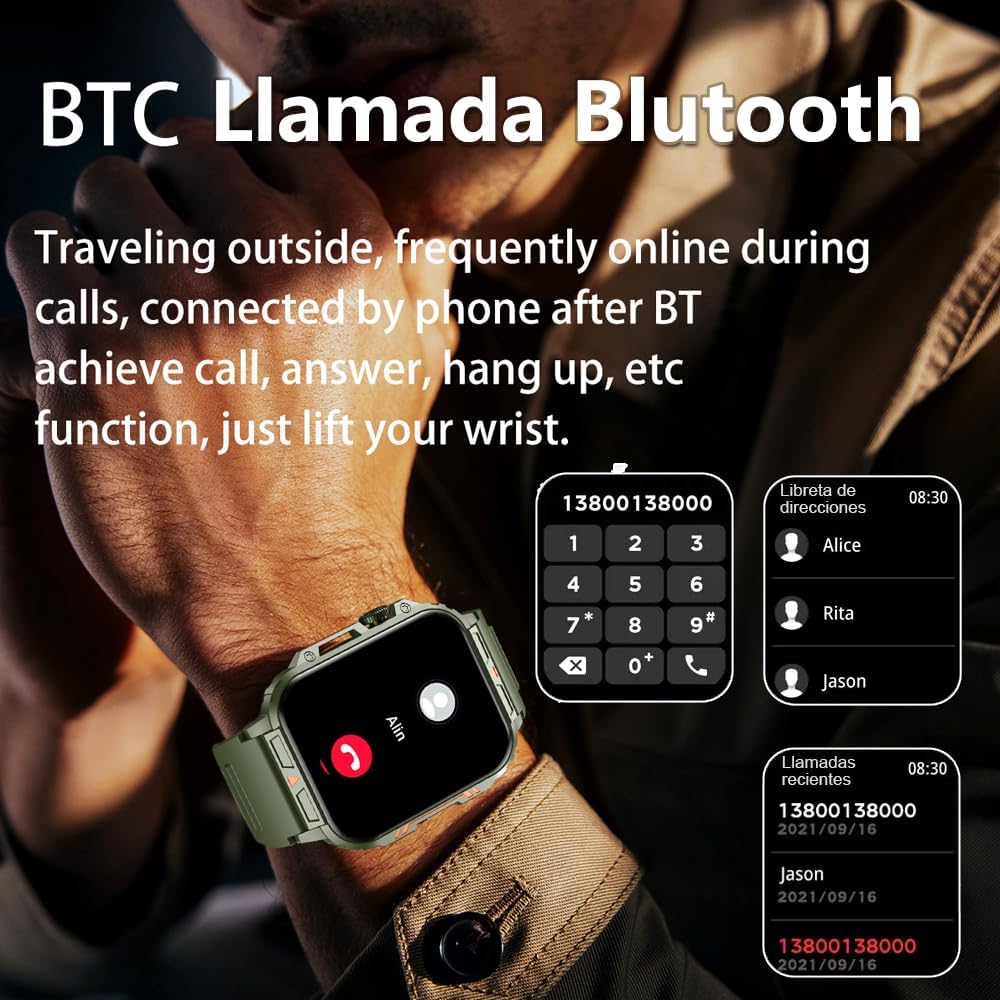
Image 4.1: The watch screen showing an incoming call and the dial pad for making calls.

Image 4.2: The watch displaying notifications from various social media and messaging applications.
4.3. Спортски режими
The watch supports over 112 sports modes. To access them, navigate to the 'Sports' or 'Workout' section on your watch. Select your desired activity to start tracking. The watch will record steps, distance, and calories.

Image 4.3: Icons representing various sports modes available on the watch.
4.4. Мониторинг на здравјето
The Jooeniok L81 provides continuous monitoring of several health metrics. Access these features through the watch's menu or the companion app.
- Отчукувањата на срцето: The watch uses an optical sensor to monitor your heart rate. View податоци во реално време на часовникот или детални трендови во апликацијата.
- Blood Oxygen (SpO2) & Blood Pressure: Initiate a measurement from the watch. Results are displayed on the screen and recorded in the app for historical analysis.
- Следење на сонот: Wear the watch to bed for automatic sleep tracking. It analyzes deep sleep, light sleep, and awake times, providing a comprehensive sleep quality report in the app.
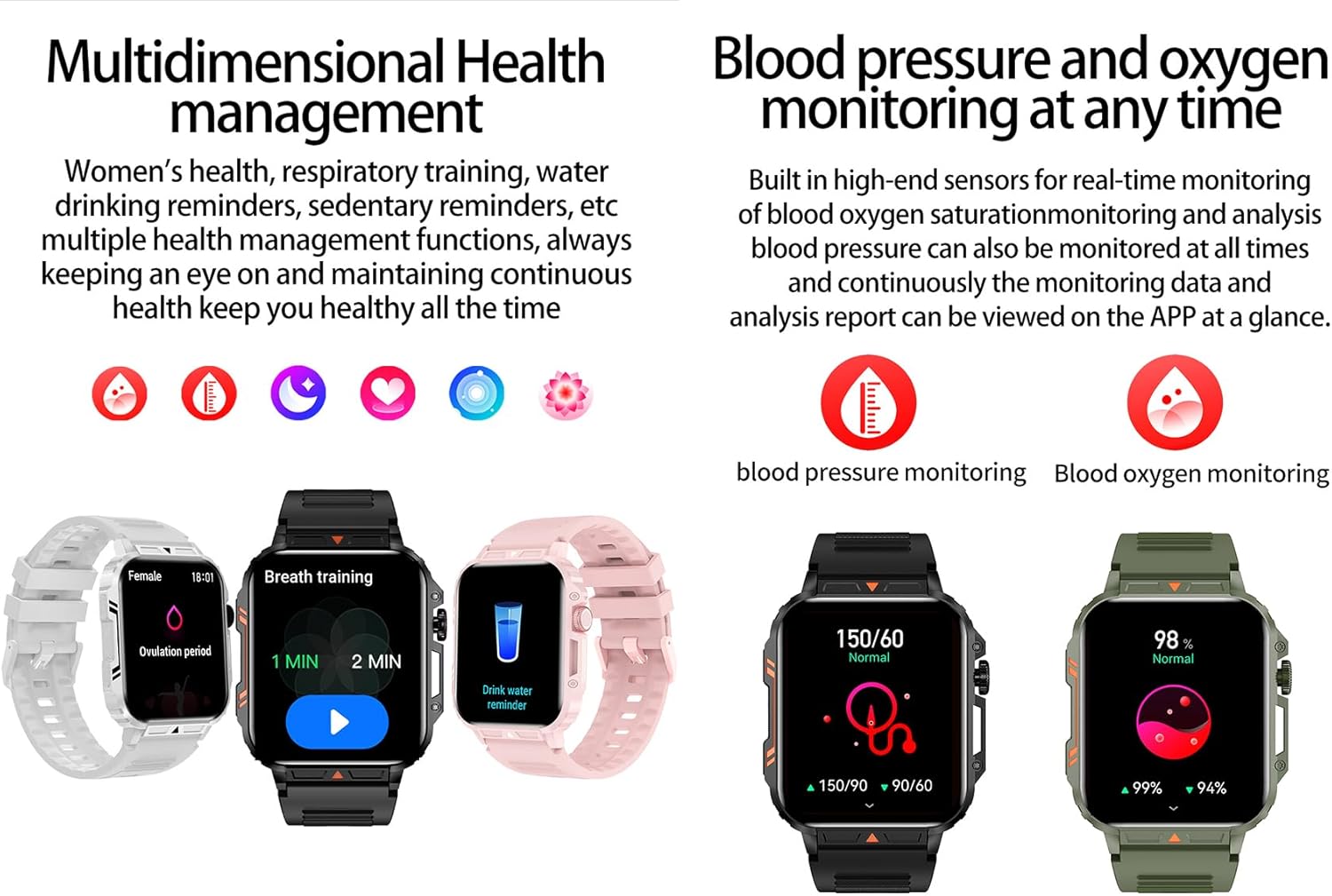
Image 4.4: Watch screens showing blood pressure and blood oxygen monitoring results.

Image 4.5: Watch screens showing real-time heart rate and a summary of sleep data.
4.5. AI Intelligent Voice Function
After connecting the watch to your phone via Bluetooth, activate the voice function on the watch. This allows you to use voice commands to open applications, check weather, make calls, or navigate, offering a hands-free experience.
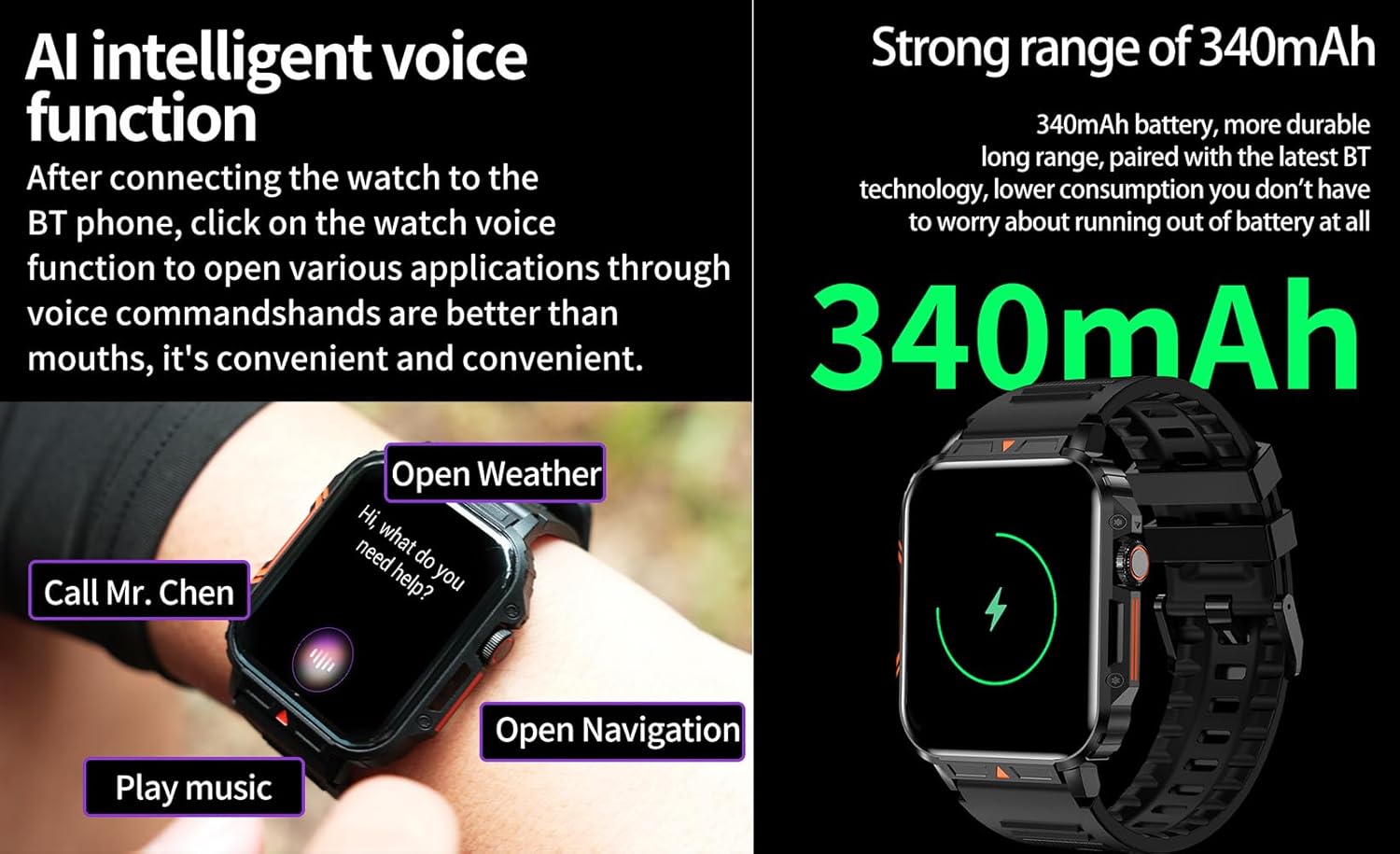
Image 4.6: The watch screen illustrating the AI voice assistant interface with exampле команди.
4.6. Направи сам бројчаник
Personalize your watch face by using the DIY dial feature within the companion app. You can often upload custom images or choose from a variety of pre-designed watch faces.
5. Одржување
5.1. Водоотпорност
The Jooeniok L81 Smart Watch is IP68 waterproof and dustproof. This means it is resistant to dust and can withstand immersion in water up to 1.5 meters for up to 30 minutes. It is suitable for daily use, hand washing, and light rain.
Важно: Часовникот е не recommended for diving, hot showers, or saunas, as steam and high water pressure can compromise the seals and cause damage.

Image 5.1: The watch shown with water splashes, indicating its water resistance.
5.2. Чистење
Редовно чистете го часовникот и ременот за да спречите иритација на кожата и да ја одржите функционалноста. Користете мека,amp cloth to wipe the screen and body. For the strap, follow the manufacturer's recommendations for the specific material (e.g., silicone, metal).
- Избегнувајте употреба на груби хемикалии или абразивни материјали.
- Уверете се дека часовникот е целосно сув пред полнење или продолжена употреба.
5.3. Нега на батерии
За да го продолжите животниот век на батеријата:
- Избегнувајте екстремни температури.
- Не дозволувајте батеријата целосно да се празни често.
- Наполнете го часовникот користејќи го испорачаниот кабел.
Image 5.2: The watch screen highlighting its 340mAh battery capacity.
6 Смена на проблеми
| Проблем | Можно решение |
|---|---|
| Часовникот не се вклучува. | Проверете дали часовникот е целосно наполнет. Поврзете го со полначот најмалку 30 минути. |
| Не може да се спари со паметен телефон. |
|
| Прикажан е неточен јазик. | Navigate to the watch's settings menu, find 'Language' or 'System' settings, and select your preferred language. If paired, the app might also have a language setting. |
| Touch screen unresponsive or intermittent. |
|
| Не се примени известувања. |
|
| Health monitoring data seems inaccurate. |
|
7. Спецификации
| Карактеристика | Детал |
|---|---|
| Име на моделот | L81 |
| Бренд | Џуениок |
| Големина на екранот | 1.95 инчи |
| Технологија за поврзување | Bluetooth |
| Стандард за безжична комуникација | Bluetooth |
| Оперативен систем | Андроид (компатибилен со Android 5.1+ и iOS 10.0+) |
| Капацитет за складирање на меморија | 128 MB |
| Батерија | 1 Lithium Polymer battery (340mAh, included) |
| Отпорност на вода | IP68 |
| Посебни карактеристики | Activity Tracker, Notifications, Phone Call, Time Display, Heart Rate Monitor, Blood Oxygen Monitor, Sleep Monitor, 112+ Sports Modes, AI Voice Function |
| Димензии (прибл.) | Watch face: 44mm (width) x 52mm (height); Thickness: 12mm; Strap length: 260mm |
8. Гаранција и поддршка
The Jooeniok L81 Smart Watch is backed by a 365 дена гаранција од датумот на купување. Оваа гаранција ги покрива производствените дефекти и неисправностите при нормална употреба.
For technical support, warranty claims, or any questions regarding your product, please contact Jooeniok customer service through the retailer's platform or the contact information provided on the product packaging or official webсајт.
Ве молиме зачувајте го доказот за купување за потврда на гаранцијата.


