Вовед
This manual provides detailed instructions for the 1Mii B0C88R8JSB Bluetooth 5.0 HiFi Audio Receiver. This device allows you to wirelessly stream high-fidelity audio from your Bluetooth-enabled devices to your home stereo system or speakers. Featuring long-range connectivity, versatile output options (3.5mm and RCA), and integrated volume controls, it enhances your audio experience by bringing modern wireless capabilities to traditional sound systems.
Содржина на пакетот
- 1Mii Audio Receiver
- USB кабел за напојување
- Аудио кабел од 3.5 мм
- Аудио кабел RCA
- Упатство за употреба
Производот завршиview
The 1Mii Bluetooth 5.0 HiFi Audio Receiver is a compact device designed to seamlessly integrate with your existing audio equipment. It features a central multi-function button, volume controls, and various audio output ports.

Слика 1: Предна страна view of the 1Mii Bluetooth Audio Receiver, showing the central control button and volume buttons.
The rear panel provides connections for power and audio output, offering flexibility for different stereo setups.
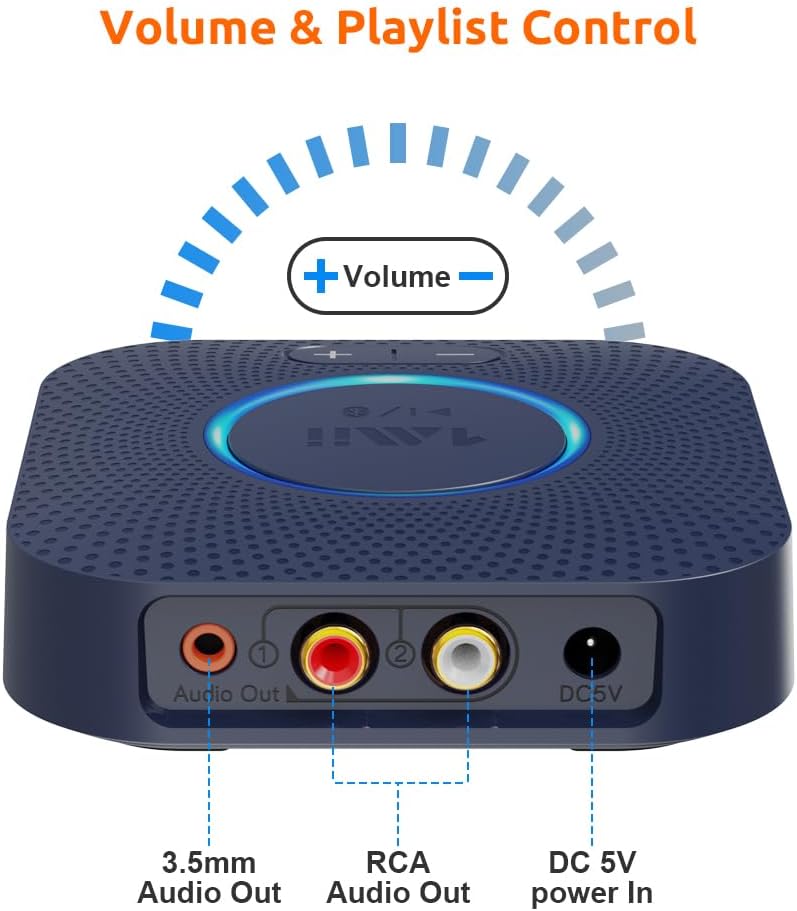
Слика 2: Заден дел view of the receiver, highlighting the 3.5mm audio output, RCA audio outputs (red and white), and the DC 5V power input.
Инструкции за поставување
- Поврзување за напојување: Connect the provided USB power cable to the DC 5V power input on the receiver. Plug the other end into a USB power adapter (not included) or a USB port on your stereo system for power.
- Аудио излезна врска:
- Using RCA Cables: Connect the red and white RCA audio cables from the receiver's RCA outputs to the corresponding RCA input ports (e.g., AUX, CD, TAPE) on your home stereo system or ampживописен.
- Using 3.5mm AUX Cable: Connect the 3.5mm audio cable from the receiver's 3.5mm audio output to the AUX input port on your stereo system or powered speakers.
- Вклучување: The receiver will automatically power on when connected to a power source. The central LED indicator will illuminate.
- Спарување на Bluetooth:
- Ensure your Bluetooth-enabled device (smartphone, tablet, etc.) has Bluetooth activated.
- The receiver will automatically enter pairing mode, indicated by a flashing LED light.
- On your device, search for Bluetooth devices and select "1Mii B0C88R8JSB" (or similar name) from the list.
- Once connected, the LED indicator on the receiver will remain solid, indicating a successful connection.
- Select Input on Stereo: Set your home stereo system or amplifier to the correct input source (e.g., AUX, CD, TAPE) where the 1Mii receiver is connected.

Слика 3: Прample setup showing the receiver connected to a stereo amplifier and ready for Bluetooth streaming.
Упатства за работа
Репродукција на музика
- After successful pairing, play music from your Bluetooth-enabled device. The audio will be streamed to your connected stereo system.
- Adjust the volume using the volume buttons on the 1Mii receiver or directly from your connected device/stereo system.

Figure 4: The receiver's volume controls allow for easy adjustment of audio output.
Контрола на јачина на звук и колосек
- Притиснете го + копче за зголемување на јачината на звукот.
- Притиснете го - копче за намалување на јачината на звукот.
- Притиснете и задржете го + button for 2 seconds for the next track.
- Притиснете и задржете го - button for 2 seconds for the previous track.
Voice Command Integration (Alexa)
The 1Mii receiver can be controlled using voice commands through Amazon Alexa. Ensure your Echo device is paired with the 1Mii receiver via Bluetooth in the Alexa app.
- Connect the 1Mii audio adapter to your stereo using a 3.5mm or RCA cable.
- Pair the 1Mii receiver with your Echo device via Bluetooth in the Alexa app.
- You can now use voice commands to control music playback through your stereo system.
- Забелешка: The audio cable should connect the Bluetooth receiver to your stereo, not directly to the Echo device.

Figure 5: The receiver supports integration with voice command systems like Amazon Alexa for convenient control.
Одржување
- Чувајте го уредот на суво место, подалеку од влага и екстремни температури.
- Чистете го уредот со мека, сува крпа. Не користете течни средства за чистење или аеросоли.
- Избегнувајте паѓање или изложување на уредот на силни удари.
- Обезбедете соодветна вентилација околу уредот за да спречите прегревање.
Решавање проблеми
| Проблем | Можна причина | Решение |
|---|---|---|
| Нема звук | Incorrect input selected on stereo; loose audio cables; receiver not powered on; device not paired. | Ensure stereo input matches receiver connection (AUX, CD, etc.). Check all cable connections. Verify receiver is powered and paired. Adjust volume on both receiver and stereo. |
| Не може да се спари преку Bluetooth | Receiver not in pairing mode; device too far; interference; previously paired device connected. | Ensure receiver LED is flashing (pairing mode). Move device closer to receiver. Turn off Bluetooth on other nearby devices. Disconnect from previously paired devices. Restart both receiver and source device. |
| Лош квалитет на звук или прекината врска | Distance too great; obstacles; interference from other wireless devices (Wi-Fi routers). | Reduce distance between receiver and source device. Remove obstacles. Move receiver away from Wi-Fi routers or other strong signal sources. |
| Копчињата за јачина на звук не реагираат | Device not actively playing music; temporary software glitch. | Ensure music is playing. Try restarting the receiver. Adjust volume directly from the source device. |
Спецификации
- Модел: 6976331140583
- Bluetooth верзија: 5.0
- Технологија за поврзување: Помошен, RCA
- Режим за излез на звук: Стерео
- Компатибилни уреди: Паметен телефон, звучник
- Тип на конектор: Џек од 3.5 мм, RCA
- Голем дострел: Up to 197ft (60m) line-of-sight outdoors, 50-70ft (20-30m) indoors (without obstacles)
- Димензии на производот: 4.33 x 3.54 x 0.79 инчи
- Тежина на ставката: 8.1 унци
- Производител: 1Ми
Гаранција и поддршка
За информации за гаранцијата и техничка поддршка, ве молиме погледнете го официјалниот 1Mii webлокација или директно контактирајте ја нивната служба за корисници. Зачувајте ја сметката за купување за гаранциски барања.