1. Вовед и повеќеview
The Ditec RM-L 1370 is a universal replacement remote control designed for a wide range of Sony Bravia televisions. This remote offers direct compatibility with various Sony LCD, LED, UHD, OLED, and QLED 4K Ultra HD Smart Android TV models, eliminating the need for complex programming or pairing. It features dedicated hotkeys for popular streaming services like YouTube and Netflix for convenient access.

Image: The Ditec RM-L 1370 remote control, highlighting its compatibility as a single remote solution for Sony TVs.
2. Поставување и првична употреба
This remote control is designed for immediate use without any setup or programming. Simply insert the required batteries, and it will be ready to operate your compatible Sony TV.
2.1 Инсталација на батерија
- Пронајдете ја преградата за батерии на задниот дел од далечинскиот управувач.
- Отворете го капакот на преградата за батерии.
- Insert two (2) AAA batteries (not included), ensuring correct polarity (+ and - terminals).
- Добро затворете го капакот на преградата за батерии.

Слика: Заден дел view на далечинскиот управувач, што ја илустрира локацијата на преградата за батерии.
2.2 Прва употреба
Once batteries are installed, point the remote control towards your Sony TV and press the Power button. The remote should operate your TV without any further configuration.
3. Упатства за работа
The Ditec RM-L 1370 remote control provides all standard functions for your Sony Bravia TV, along with convenient shortcut buttons.
3.1 Основни функции
- Копче за вклучување: Го вклучува или исклучува телевизорот.
- Копчиња со броеви (0-9): За директен избор на канали.
- Јачина на звук нагоре/намалување: Ја прилагодува јачината на телевизорот.
- Канал нагоре/надолу: Менува ТВ канали.
- Navigation Pad (Up/Down/Left/Right/Enter): За навигација низ менито и избор.
- Копче за почеток: Accesses the TV's Smart Home screen or main menu.
- Return/Back Button: Се враќа на претходниот екран или мени.
- Копче за опции: Прикажува опции чувствителни на контекст.
3.2 Посебни карактеристики
- YouTube Hotkey: Directly launches the YouTube application.
- Netflix Hotkey: Директно ја стартува апликацијата Netflix.
The remote features an enhanced infrared sensor for a farther transmitting distance, allowing effective control up to 50 feet.

Image: The remote control demonstrating its farther distance sensor, capable of operating up to 50 feet.
4. Компатибилност
The Ditec RM-L 1370 universal remote is compatible with a wide range of Sony Bravia LCD, LED, UHD, OLED, and QLED 4K Ultra HD Smart Android TVs. It is designed to replace many original Sony remote models, including but not limited to:
- RMT-TX100U, RMT-TX102U
- RMF-TX200U, RMF-TX201U, RMF-TX220U
- RMT-TX300U, RMF-TX310U
- RMT-TX500U, RMF-TX520U, RMF-TX600U
- And many other Sony TV remote models.
For a comprehensive list of compatible Sony TV remote models, please refer to the image below:
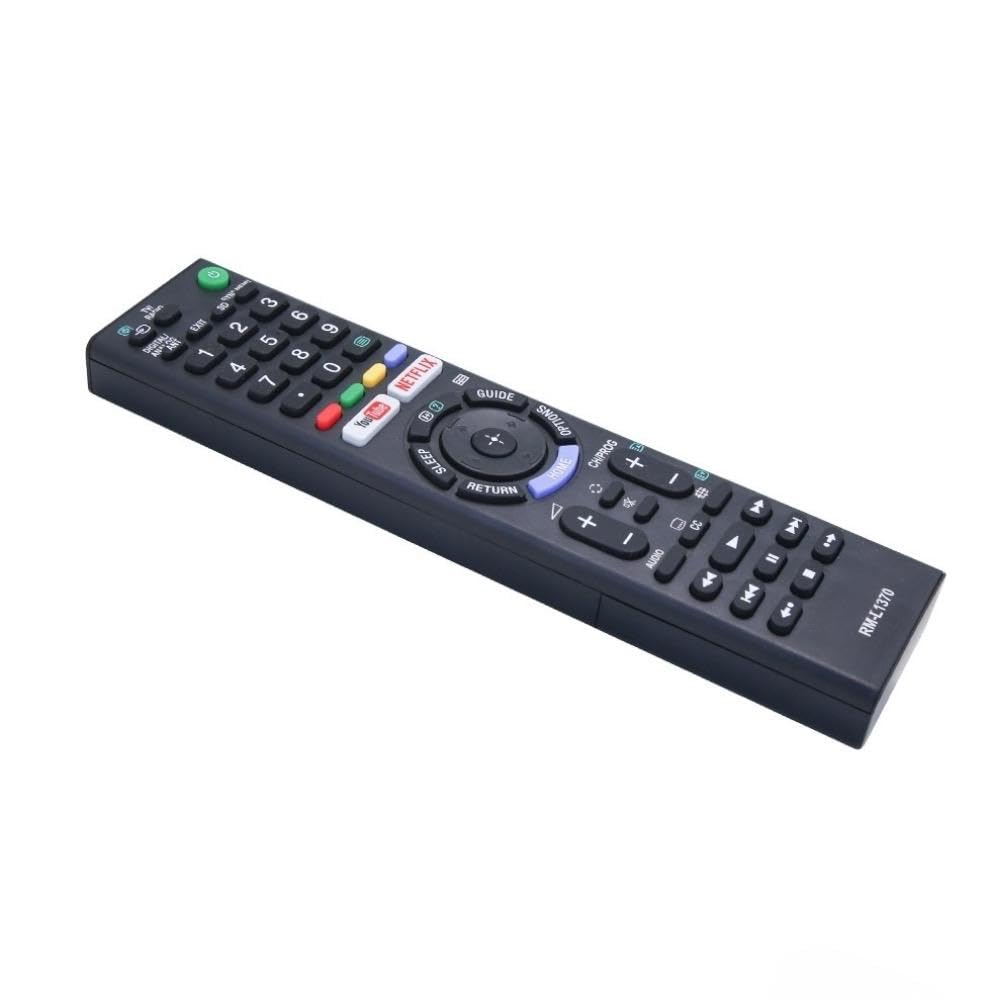
Image: A detailed list of Sony TV remote models that are compatible with the Ditec RM-L 1370.
It is recommended to compare the appearance of this remote with your original remote for visual confirmation of compatibility.
5. Одржување
5.1 Замена на батеријата
When the remote control's performance degrades or it stops responding, replace the batteries with two new AAA alkaline batteries. Always replace both batteries at the same time. Do not mix old and new batteries or different types of batteries.
5.2 Чистење
За чистење на далечинскиот управувач, користете мека, сува крпа. Не користете течни средства за чистење, спрејови или абразивни материјали, бидејќи тие може да ја оштетат површината на далечинскиот управувач или внатрешните компоненти.
6 Смена на проблеми
- Далечинското не реагира:
- Проверете дали батериите се вметнати правилно со точен поларитет.
- Заменете ги старите батерии со нови.
- Уверете се дека нема пречки помеѓу далечинскиот управувач и инфрацрвениот приемник на телевизорот.
- Уверете се дека сте во рамките на ефективниот работен опсег (до 50 стапки).
- Одредени копчиња не работат:
- Some advanced functions or TV-specific features might not be supported by a universal replacement remote.
- Ensure the TV is powered on and functioning correctly.
7. Спецификации
| Карактеристика | Детал |
|---|---|
| Бренд | Дитек |
| Модел | RM-L 1370 |
| Компатибилни уреди | Sony Bravia LCD, LED, UHD, OLED, QLED 4K Ultra HD Smart Android TVs |
| Тип на конектор | Инфрацрвена (IR) |
| Потребни се батерии | 2 x AAA (не е вклучено) |
| Посебни карактеристики | Ergonomic design, YouTube & Netflix Hotkeys |
| Димензии на производот | 3 x 3 x 12 cm |
| Тежина на ставката | 80 гр |
| Земја на потекло | Кина |
8. Поддршка
For assistance with compatibility or any questions regarding your Ditec RM-L 1370 remote control, you may contact support by sending a picture of your old remote or your device's brand name and model number to +91 9924350801. This will help in verifying compatibility or addressing specific queries.

Image: Information on how to contact support for compatibility checks or questions.


