Вовед
Welcome to the user manual for your Samsung 75-inch QN95C Neo QLED 4K TV. This guide provides essential information for setting up, operating, maintaining, and troubleshooting your television. The Samsung QN95C features Neo QLED technology for stunning picture quality, 4K resolution, and a 144Hz refresh rate for smooth gaming performance. It also includes advanced audio features like Dolby Atmos for an immersive sound experience.

Слика: напред view of the Samsung QN95C Neo QLED 4K TV, showcasing неговиот тенок рамка и живописниот дисплеј.
Поставување
1. Распакување и поставување
Carefully remove the TV and its components from the packaging. The box typically includes the TV unit and a stand. Ensure you have a clean, flat surface for assembly. Place the TV in a location with adequate ventilation and away from direct sunlight or heat sources.
2. Attaching the Stand (if applicable)
If you are not wall-mounting, attach the provided stand to the TV according to the instructions in the separate quick setup guide. Ensure all screws are securely fastened.
Слика: Страничен професионалецfile of the Samsung QN95C Neo QLED 4K TV, illustrating its slim design and the attached stand.
3. Поврзување на надворешни уреди
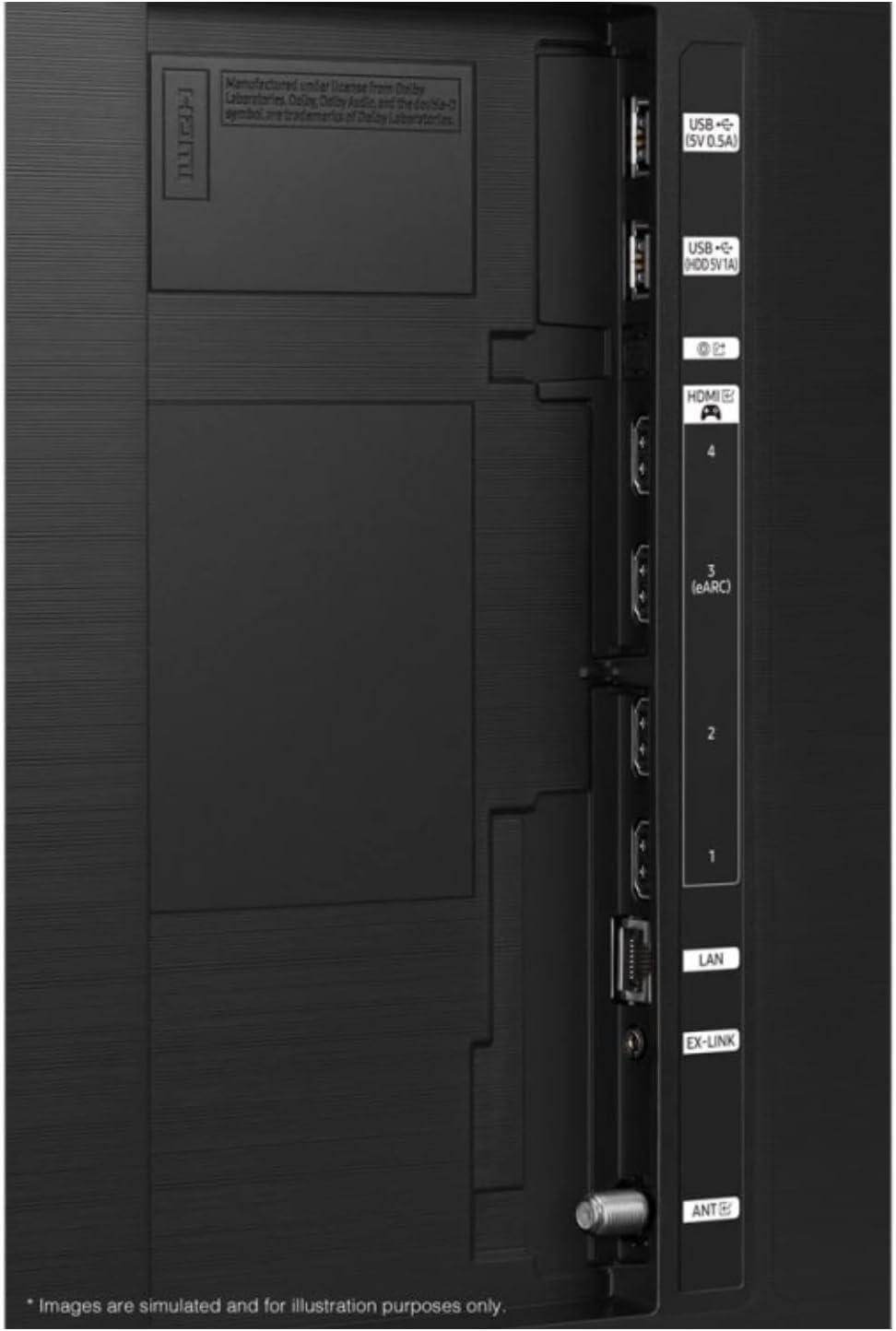
Поврзете ги вашите надворешни уреди како што се кабелски приемници, играчки конзоли или звучни системи на соодветните порти на задната страна од телевизорот.
- HDMI: For high-definition audio and video. Your TV features multiple HDMI ports, including one with eARC for enhanced audio return channel functionality.
- USB: For connecting USB storage devices (5V 0.5A and 5V 1A ports available).
- LAN: За жична интернет конекција.
- АНТ: За поврзување на антена за емитување преку етерот.

Слика: Детална view of the TV's back panel, highlighting the HDMI, USB, LAN, and ANT ports for connecting various devices.
4. Првично вклучување и конфигурација
Plug the power cord into the TV and then into a wall outlet. Press the power button on the TV or remote control. The TV will guide you through the initial setup process, which typically includes:
- Избор на јазик: Изберете го саканиот јазик.
- Мрежна конекција: Connect to your home Wi-Fi network or use a wired LAN connection.
- Smart Setup Options: You will be presented with options to set up your TV using a smartphone (Quick and Easy) or via the remote control (Step-by-Step). Follow the on-screen prompts for your chosen method.
- Скенирање канали: Ако користите антена, телевизорот ќе скенира за достапни канали.
- Поставување сметка: Sign in to your Samsung account or create a new one to access Smart TV features and apps.
Ракување со вашиот телевизор
1. Основни контроли
Use the remote control to navigate the TV's interface. Common functions include:
- Моќност: Вклучете или исклучете го телевизорот.
- Волумен: Прилагодете го нивото на звук.
- Канал: Change TV channels (if an antenna is connected).
- Извор/Влез: Switch between connected external devices (e.g., HDMI 1, HDMI 2).
- Копче за почеток: Access the Smart Hub for apps, settings, and other features.
2. Карактеристики на паметниот телевизор
Your Samsung QN95C is a Smart TV, offering access to a wide range of online content and applications. Supported internet services include a web browser and YouTube. You can download additional apps from the Samsung App Store.
3. Поставки за слика
За да го оптимизирате вашиот viewing experience, you can adjust various picture settings:
- Режим на слика: Select from modes like Standard, Dynamic, Movie, or Filmmaker Mode.
- Осветленост/Контраст: Фино подесете ги нивоата на осветленост и контраст на екранот.
- Боја/Нијанса: Прилагодете ја сатурацијата на бојата и нијансата.
- Острина: Enhance the detail of the image.
- Стручни поставки: Access advanced calibration options for professional adjustments.
4. Поставки за звук
The TV supports Dolby Atmos for an immersive audio experience. You can customize sound settings:
- Звук на владата: Изберете од различни режими на звук (на пр., стандарден, адаптивен звук, Ampживот).
- Еквилајзер: Manually adjust frequency bands.
- Dolby Atmos: Ensure this feature is enabled for compatible content to experience spatial audio.
- Q-Симфонија: If you have a compatible Samsung soundbar, enable Q-Symphony to synchronize the TV speakers and soundbar for richer, more immersive audio.
5. Карактеристики за игри
The QN95C is optimized for gaming with a 144Hz refresh rate. Ensure your gaming console is connected to an HDMI port that supports high refresh rates. Activate Game Mode in the TV settings for reduced input lag and optimized picture settings for gaming.
Одржување
1. Чистење на вашиот телевизор
To maintain the clarity and longevity of your TV, follow these cleaning guidelines:
- Екран: Нежно избришете го екранот со мека, сува крпа од микрофибер. За тврдокорни дамки, лесно избришете гоampen the cloth with distilled water or a screen-specific cleaning solution (never spray directly onto the screen).
- Рамка и држач: Користете мека, сува крпа за да ја избришете прашината од рамката и држачот на телевизорот.
- Не користете: Избегнувајте употреба на абразивни средства за чистење, алкохол, бензен или разредувачи, бидејќи тие можат да ја оштетат површината на телевизорот.
2. Софтверски ажурирања
Regularly check for and install software updates to ensure your TV has the latest features, performance improvements, and security patches. You can usually find this option in the TV's settings menu under Support > Software Update.
Решавање проблеми
If you encounter issues with your TV, try the following solutions before contacting service.
| Проблем | Можно решение |
|---|---|
| Нема моќ | Проверете дали кабелот за напојување е безбедно приклучен и во телевизорот и во функционален ѕиден штекер. Обидете се со друг штекер. |
| Нема слика, но звукот е присутен | Check the input source. Ensure all cables are securely connected. Try restarting connected devices. |
| Нема звук, но сликата е присутна | Check the volume level. Ensure mute is not activated. Verify audio output settings (TV speakers, external sound system). Check audio cables. |
| Далечинскиот управувач не работи | Заменете ги батериите. Уверете се дека нема пречки помеѓу далечинскиот управувач и телевизорот. Обидете се повторно да го спарите далечинскиот управувач ако е Bluetooth далечински управувач. |
| Не може да се поврзе на Wi-Fi | Check your router and modem. Restart your router. Ensure the Wi-Fi password is correct. Try moving the TV closer to the router or using a wired LAN connection. |
| Проблеми со квалитетот на сликата (на пр., заматена, искривена) | Check the resolution of the input source. Adjust picture settings. Ensure cables are not damaged. |
Спецификации
Below are the key specifications for the Samsung QN95C Neo QLED 4K TV (QN75QN95CAFXZA):
| Карактеристика | Детал |
|---|---|
| Бренд | Samsung |
| Име на моделот | QN95C |
| Големина на екранот | 75 инчи |
| Технологија на прикажување | QLED |
| Резолуција | 4K |
| Специјална карактеристика | Рамен |
| Сооднос на аспект | 16:9 |
| Технологија за поврзување | Wi-Fi |
| Поддржани интернет услуги | Browser, YouTube |
| Вклучени компоненти | Стенд, ТВ |
| ASIN | B0D19GL7JP |
| Датум прв на располагање | 9 април 2024 година |
Гаранција и поддршка
As this product is a renewed item, warranty terms may differ from new products. Please refer to the specific warranty information provided at the time of purchase or contact the seller directly for details regarding your renewed product's warranty coverage.
For technical support, product registration, or further assistance, please visit the official Samsung support website or contact Samsung customer service. Have your TV's model number (QN75QN95CAFXZA) and serial number ready when seeking support.


