Вовед
This manual provides detailed instructions for the setup, operation, and maintenance of your MageGee V560 Wireless Gaming Keyboard and Mouse Combo. Please read this manual thoroughly before use to ensure optimal performance and longevity of your device.

Image: The MageGee V560 Wireless Gaming Keyboard and Mouse Combo, featuring a blue, white, and purple color scheme, with the USB receiver visible.
Содржина на пакетот
Ве молиме проверете дали сите артикли се присутни во пакетот:
- MageGee V560 Wireless Keyboard
- MageGee Wireless Mouse
- 2.4GHz USB Receiver (stored in mouse battery compartment)
- USB-C кабел за полнење
- Упатство за употреба

Image: Contents of the MageGee V560 package, including the keyboard, mouse, USB receiver, charging cable, and user manual.
Инструкции за поставување
- Лоцирајте го USB приемникот: Open the battery cover of the wireless mouse. The 2.4GHz USB receiver is stored inside the compartment next to the mouse battery slot.
- Поврзете го ресиверот: Приклучете го USB-приемникот во достапна USB порта на вашиот компјутер.
- Уреди за вклучување: Ensure both the keyboard and mouse are powered on. The devices are plug-and-play and should connect automatically.
- Почетна наплата: For optimal performance, it is recommended to fully charge both the keyboard and mouse before first use. Use the provided USB-C charging cable.

Image: Illustration showing the 2-in-1 USB receiver connecting the keyboard and mouse wirelessly to a laptop.
Упатства за работа
Функции на тастатурата
- Контрола на RGB позадинско осветлување:
- Притиснете FN + INS за вклучување или исклучување на позадинското осветлување.
- Притиснете FN + PgUp or FN + PgDn to adjust the 3-level backlight brightness.
- Притиснете FN + 1 / 2 / 3 / 4 / 5 to switch between different backlight modes. Note: Backlight settings are not saved after power off.
- Мултимедијални кратенки: Користете го FN клуч во комбинација со F1-F12 keys for quick access to multimedia functions such as volume control, media playback, and more.
- Ергономски дизајн: The keyboard features a stepped layout and foldable brackets at the bottom, allowing you to adjust the typing angle for comfort during extended use.
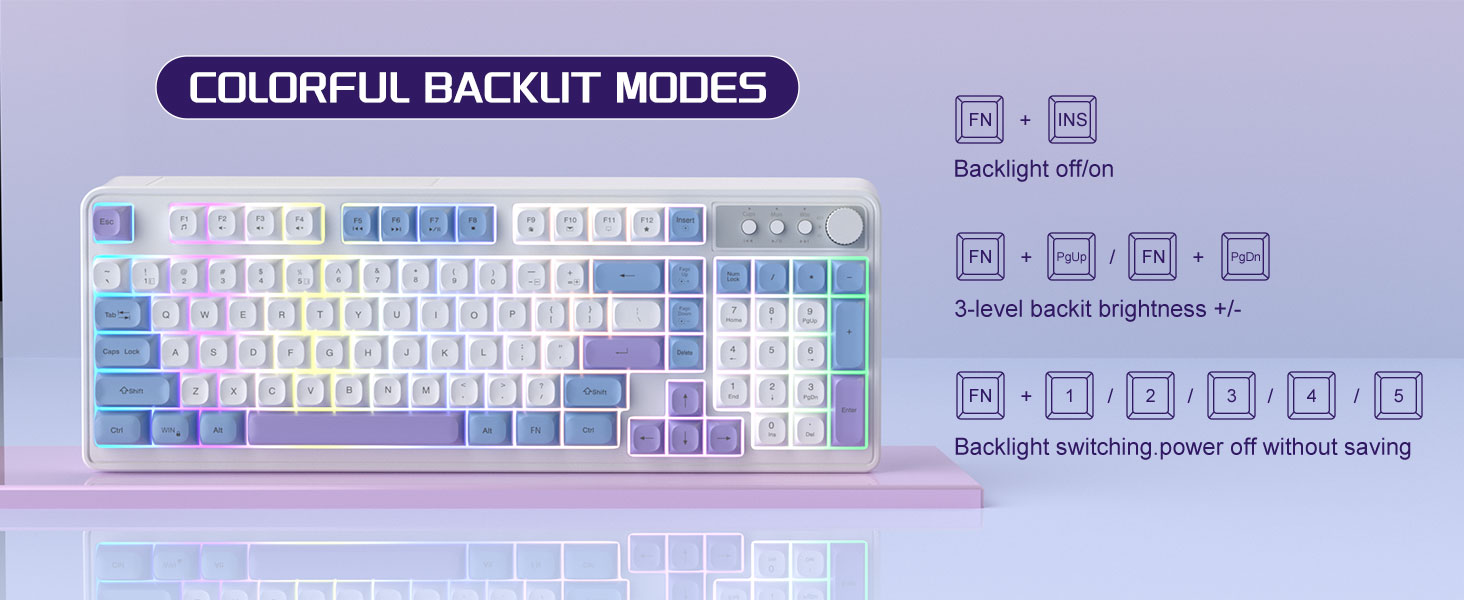
Image: The MageGee V560 keyboard displaying various colorful backlit modes, with instructions for controlling them.

Image: A visual representation of the 16 multimedia shortcuts available on the MageGee V560 keyboard, activated via the FN key.
Функции на глувчето
- Прилагодување на DPI: The mouse supports 6 levels of DPI adjustment (600-3200 DPI). Press the DPI button (usually located below the scroll wheel) to cycle through the sensitivity settings. Internal indicator lights will show the current DPI level.
- Breathing Backlight: The mouse features 7 dazzling color breathing backlights. This lighting is automatic and indicates mouse activity.

Image: The MageGee V560 mouse highlighting its DPI settings (1000, 1200, 1600 DPI) and showing the USB-C charging port.
Полнење и траење на батеријата
- Both the keyboard and mouse are rechargeable. Use the provided USB-C charging cable to charge them.
- Keyboard Standby Time: До 365 дена.
- Mouse Standby Time: До 270 дена.
- Функција за автоматско спиење: The devices automatically enter sleep mode after a period of inactivity to conserve battery power and extend battery life.

Image: An illustration demonstrating the intelligent auto-sleep feature of the MageGee V560 combo, which conserves battery life.
Компатибилност
The MageGee V560 Wireless Gaming Keyboard and Mouse Combo is compatible with the following operating systems:
- Win2000
- Победи XP
- Освојте МЕ
- Виста
- Win7
- Win8
- Win10
- Андроид
- Linux
- Mac OS
Решавање проблеми
If you encounter issues with your MageGee V560 combo, please refer to the following common solutions:
- Уредот не се поврзува:
- Осигурајте се дека USB приемникот е безбедно приклучен во функционален USB порт.
- Проверете дали и тастатурата и глувчето се вклучени.
- Check the battery levels of both devices and charge if necessary.
- Обидете се да го приклучите USB-приемникот во друга USB-порта.
- Доцнење или исклучување:
- Ensure the devices are within the 33 ft (10 meter) operating range of the USB receiver.
- Minimize interference from other 2.4GHz wireless devices (e.g., Wi-Fi routers, cordless phones).
- Charge the devices to ensure sufficient power.
- Keys Not Registering / Mouse Not Responding:
- Наполнете ја тастатурата и глувчето.
- Ensure the USB receiver is properly connected.
- Рестартирајте го компјутерот.
- Проблеми со позадинско осветлување:
- Осигурајте се дека тастатурата е наполнета.
- Користете FN + INS to toggle the backlight.
- Прилагодете ја осветленоста со FN + PgUp/PgDn.
Спецификации
| Бренд | МејџГи |
| Модел | V560 |
| Технологија за поврзување | 2.4GHz Безжична |
| Посебни карактеристики | RGB lighting, rechargeable keyboard and mouse, ergonomic design |
| Компатибилни уреди | Personal Computer (Win2000, Win XP, Win ME, Vista, Win7, Win8, Win10, Android, Linux, Mac OS) |
| Тежина на ставката | 1.87 фунти |
| Димензии на пакетот | 16.61 x 9.21 x 1.73 инчи |
| Производител | MAGEGEE |
Одржување
- Чистење: Use a soft, dry cloth to clean the keyboard and mouse. For stubborn dirt, a slightly damp може да се користи крпа, осигурувајќи се дека течноста нема да влезе во уредот.
- Складирање: Чувајте ги уредите на ладно и суво место, подалеку од директна сончева светлина и екстремни температури.
- Нега на батеријата: Избегнувајте често целосно празнење на батериите. Полнете ги редовно за да ја одржите нивната состојба.
Гаранција и поддршка
Овој производ доаѓа со а 1 година гаранција од датумот на купување.
For any questions or support needs, please contact MageGee customer service via Amazon email. We aim to respond within 12 hours and provide a satisfactory solution.


