Производот завршиview
The JTEMAN 360 Rotating Cell Phone Stand with Wireless Bluetooth Speaker with Light is a versatile device designed to enhance your mobile experience. It integrates a rotatable phone stand, a Bluetooth speaker, and an atmosphere light into a single unit. This manual provides detailed instructions for its setup, operation, and maintenance.
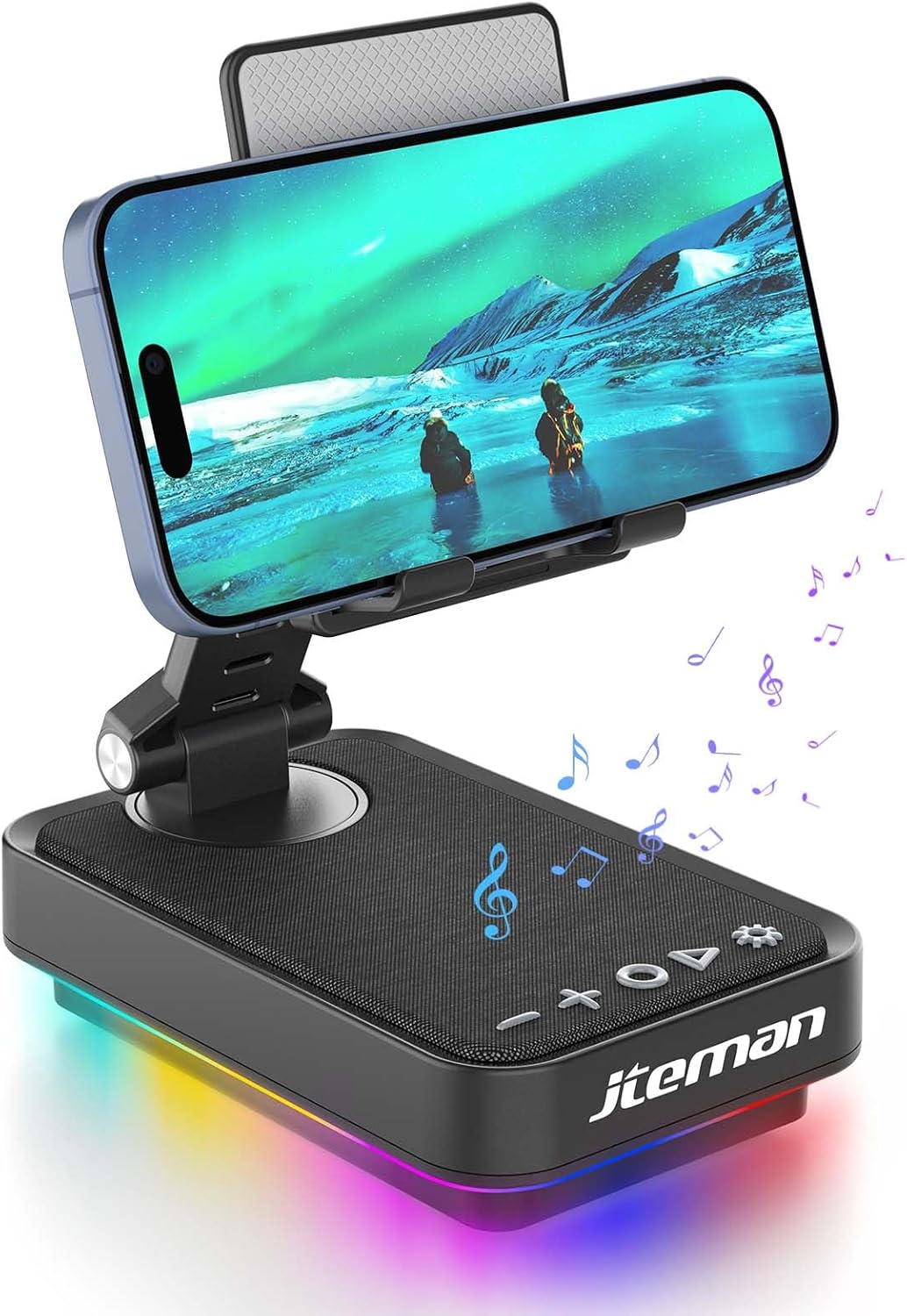
Figure 1: JTEMAN 360 Rotating Cell Phone Stand with Wireless Bluetooth Speaker with Light.
Вклучени компоненти:
- Bluetooth Speaker (with integrated phone stand and light)
- Кабел тип-C
- Упатство за употреба
Водич за поставување
1. Распакување и првична инспекција:
Carefully remove all components from the packaging. Inspect the device and accessories for any signs of damage. Ensure all listed components are present.
Video 1: Unboxing and initial setup of the JTEMAN phone stand and Bluetooth speaker.
2. Preparing the Phone Stand:
Before first use, locate and remove the silicone protective patch from the device's base. This patch protects the surface during shipping.
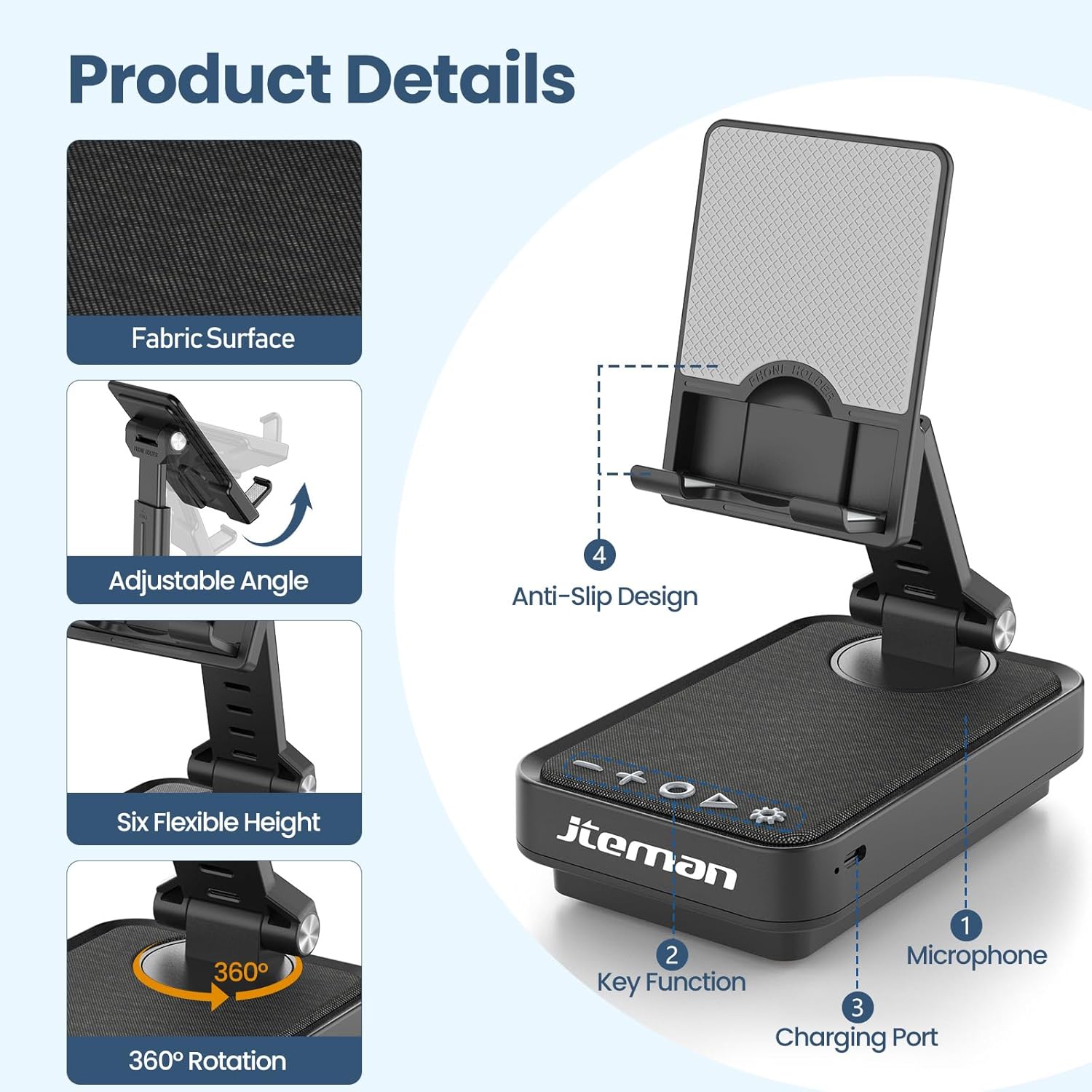
Figure 2: Product details and components. Note the anti-slip design and key functions.
3. Полнење на уредот:
Connect the provided Type-C cable to the charging port on the device and the other end to a compatible USB power adapter (not included). The power indicator light will show red during charging and turn green when fully charged.
- Црвено светло: Батеријата се полни.
- Зелено светло: Батеријата е целосно наполнета.

Слика 3: Капацитет на батеријата и проценето време на користење.
4. Спарување преку Bluetooth:
- Long press the Power ON/OFF button (3) for 3 seconds to turn on the speaker. The speaker will enter pairing mode, indicated by a flashing blue light.
- На вашиот паметен телефон или таблет, одете до поставките за Bluetooth.
- Select "L39-1" from the list of available devices.
- Once connected, the blue light will become solid.

Figure 4: Bluetooth connection with a laptop, demonstrating wireless audio playback.
Упатства за работа
Контролниот панел завршиview:

Слика 5: Детално view на контролната табла и неговите функции.
- VOL- (1): Притиснете за да ја намалите јачината на звукот.
- VOL+ (2): Притиснете за да ја зголемите јачината на звукот.
- Answer/Hang up/Play/Pause/Next (4):
- Кратко притиснете за да репродуцирате/паузирате музика.
- Short press to answer/hang up calls.
- Долго притиснете за да прескокнете на следната песна.
- Power ON/OFF (3):
- Долго притиснете 3 секунди за да го вклучите/исклучите звучникот.
- Double press to switch between Bluetooth and AUX modes.
- Short press to adjust the brightness of the atmosphere lights (4 levels).
- Atmosphere Light (5):
- Long press for 3 seconds to turn on/off the light.
- Short press to switch lighting mode (11 modes available, 3 modes sync with music).
- Микрофон (6): За повици без раце.
- Порт за полнење (7): Type-C input for charging.
- Power Indicator Light (8): Shows charging status and Bluetooth connection status.
Phone Stand Adjustment:
The phone stand features 360° rotation and adjustable height and angle to suit various viewing needs. The anti-slip silicone pads ensure device stability.

Figure 6: The phone stand supports a wide range of devices, including smartphones and tablets (4-13 inches).
The stand is foldable for easy portability.

Figure 7: The foldable design allows for easy storage and transport.
Одржување
Чистење:
Wipe the device with a soft, dry cloth. Do not use abrasive cleaners, solvents, or harsh chemicals, as these may damage the surface or internal components. Avoid exposing the device to excessive moisture.
Складирање:
When not in use for extended periods, store the device in a cool, dry place away from direct sunlight and extreme temperatures. Ensure the device is fully charged before storing to prolong battery life.
Нега на батеријата:
To maximize battery lifespan, avoid fully discharging the battery frequently. Charge the device regularly, even if not in constant use. Do not expose the battery to high temperatures.
Решавање проблеми
| Проблем | Можна причина | Решение |
|---|---|---|
| Уредот не се вклучува. | Слаба батерија. | Наполнете го уредот користејќи го испорачаниот кабел Type-C. |
| Не може да се поврзе преку Bluetooth. | Bluetooth not enabled on device; speaker not in pairing mode; too far from speaker. | Ensure Bluetooth is enabled on your phone/tablet. Long press Power ON/OFF button to enter pairing mode (flashing blue light). Move device closer to the speaker. |
| Нема звук од звучникот. | Volume too low; device not connected; AUX mode active. | Increase volume on both the speaker and your connected device. Verify Bluetooth connection. Double press Power ON/OFF button to switch to Bluetooth mode if in AUX mode. |
| Atmosphere lights not working. | Светлата се изгаснати; слаба батерија. | Long press the Atmosphere Light button (5) to turn on. Charge the device. |
Спецификации
| Карактеристика | Детал |
|---|---|
| Име на моделот | L39-1 |
| Тип на монтирање | Монтирање на маса |
| Тип на звучник | Сараунд звук |
| Специјална карактеристика | LED светло |
| Препорачана употреба | За паметни телефони или таблети |
| Компатибилни уреди | Smartphone, Tablet (4-13 inches) |
| Тип на контролер | Копче, допрете |
| Канал за опкружувачки звук | 2.0 |
| Димензии на производот | 5.3" Д x 3.5" Ш x 2.3" В |
| Водоотпорен е | НЕТОЧНО |
| Извор на енергија | Напојува со батерија |
| Тип на батерија | 1 литиум јон (вклучен) |
| Тип на драјвер за аудио | Динамичен драјвер |
| Безжично поврзување | Bluetooth 5.3 |
| Максимална излезна моќност на звучникот | 5 вати |
| Фреквентен одговор | 1 KHz |
| Тежина на ставката | 15.5 унци |
Информации за гаранцијата
This JTEMAN product comes with a Едногодишна гаранција од датумот на купување. Оваа гаранција ги покрива производствените дефекти и неисправности при нормална употреба. Не ги покрива штетите предизвикани од злоупотреба, несреќи, неовластени модификации или нормално абење.
Please retain your proof of purchase for warranty claims. For detailed warranty terms and conditions, refer to the official JTEMAN webсајт или контактирајте со поддршката за корисници.
Поддршка за корисници
If you encounter any issues or have questions not covered in this manual, please contact JTEMAN customer support. Provide your product model number (L39-1) and a detailed description of the issue to assist our support team.
For the most up-to-date contact information, please visit the official JTEMAN webсајт: JTEMAN Store on Amazon


