1. Во текотview
The Baseus SpaceMate(MAC) Docking Station is an 11-in-1 USB-C hub designed to expand the connectivity of your MacBook or Windows laptop. It provides multiple ports for external displays, high-speed data transfer, power delivery, network connection, and audio output, enhancing your productivity and workspace organization.
Клучни карактеристики:
- 11-во-1 поврзување: Features 3 HDMI ports, 2 USB-A (10Gbps), 1 USB-C (10Gbps), 2 USB-A (480Mbps), 100W PD input, Gigabit Ethernet, and a 3.5mm AUX jack.
- Triple 4K Display: Supports up to three 4K displays at 60Hz for macOS and Windows laptops, utilizing DisplayLink technology for extended desktop functionality.
- Innovative Upright Design: Sleek design with a magnetic base for stable placement and cable management. Includes an LED screen for port status and a screen-lock button for privacy.
- Супер брз пренос на податоци: Achieve 10Gbps transfer speeds via USB 3.1 ports, allowing quick transfer of large files.
- Испорака на енергија од 100 W: Provides up to 85W pass-through charging to your laptop (100W input required).
2. Водич за поставување
2.1. Содржина на пакетот:
Ве молиме осигурајте се дека сите предмети се присутни:
- Baseus SpaceMate(MAC) Docking Station
- USB-C to USB-C Cable (integrated or included)
- Упатство за употреба (овој документ)
Note: Power adapter and input cable are not included. A PD 100W adapter and a PD cable are recommended for optimal charging efficiency.
2.2. Поврзување на приклучната станица:
- Place the docking station on a stable surface. The magnetic base ensures secure positioning.
- Connect the integrated USB-C cable from the docking station to a USB-C port on your laptop.
- For power delivery, connect a compatible USB-C power adapter (100W recommended) to the PD input port on the docking station.
- Поврзете ги вашите надворешни монитори со HDMI портите на приклучната станица.
- Connect any other peripherals (USB devices, Ethernet cable, audio devices) to their respective ports.

Слика: Преден и заден дел view of the Baseus SpaceMate Docking Station, highlighting its various input and output ports.
2.3. Driver Installation (Crucial for Display Functionality):
The docking station utilizes DisplayLink technology for multi-monitor support, especially for macOS. It is essential to install the DisplayLink driver for proper functionality of the HDMI ports.
- Посетете ја официјалната страница на DisplayLink webсајт (https://www.synaptics.com/products/displaylink-graphics/downloads) to download the latest DisplayLink driver compatible with your operating system (macOS or Windows).
- Следете ги упатствата на екранот за да го инсталирате двигателот.
- After installation, ensure the DisplayLink Manager application is set to launch automatically at system startup. This is critical for consistent multi-monitor functionality.
- Рестартирајте го компјутерот доколку се побара.
3. Упатства за работа
3.1. Display Connectivity:
The docking station supports single, dual, and triple display setups at 4K resolution (3840x2160) at 60Hz via its HDMI ports.

Image: A MacBook Pro connected to the Baseus SpaceMate Docking Station, extending its display across three external 4K monitors, demonstrating a triple display setup for macOS.

Image: Visual representation of a triple display setup on macOS, with the laptop screen (A) and three external monitors (B, C, D) connected to the docking station.

Image: A table illustrating the supported resolutions and refresh rates for single, dual, and triple display configurations in Mac MST Mode (macOS DP1.4).

Image: Visual representation of a triple display setup for Windows laptops, with the laptop screen (A) and three external monitors (B, C, D) connected to the docking station.

Image: A table illustrating the supported resolutions and refresh rates for single, dual, and triple display configurations in Windows MST Mode (Windows DP1.4 output with DSC).
3.2. Пренос на податоци:
The docking station features high-speed USB ports for efficient data transfer:
- 2 x USB-A (10Gbps) & 1 x USB-C (10Gbps): Ideal for connecting external SSDs, flash drives, or other high-speed storage devices. Transfer 20GB files in approximately 20 seconds.
- 2 x USB-A (480Mbps): Suitable for connecting peripherals like keyboards, mice, or printers.

Image: The docking station facilitating fast data transfer between a laptop and an external SSD, highlighting the 10Gbps speed capability.
3.3. Испорака на енергија:
The USB-C PD input port supports up to 100W power input, providing up to 85W pass-through charging to your connected laptop. This allows you to charge your laptop while using the docking station with a single cable connection.

Image: A diagram illustrating the power flow, showing 100W input to the docking station from a power adapter and 85W output to a MacBook Pro for charging.
3.4. Мрежна врска:
The Gigabit Ethernet port provides a stable and fast wired network connection, supporting speeds up to 1Gbps. This is ideal for reliable internet access and large file transfers over a local network.

Слика: Крупен план view of the Gigabit Ethernet port on the Baseus SpaceMate Docking Station, with an Ethernet cable plugged in, indicating stable network expansion.
3.5. Аудио поврзување:
The integrated 3.5mm AUX jack allows you to connect headphones, speakers, or microphones for high-quality audio input and output without delay.

Image: A user enjoying audio through headphones connected to the 3.5mm AUX port of the docking station, demonstrating seamless audio and visual synchronization.
3.6. Screen-Lock Button:
The screen-lock button on top of the docking station provides a quick way to secure your sensitive information. Press it once for Windows or twice for macOS to lock your screen instantly.

Image: A hand pressing the screen-lock button on the top of the docking station, with icons indicating single press for Windows and double press for macOS to protect privacy.
3.7. LED дисплеј:
The built-in LED screen on the front of the docking station intelligently displays the connection status of each port, providing visual feedback on active connections for screen casting, data transfer, charging, Ethernet, and audio.
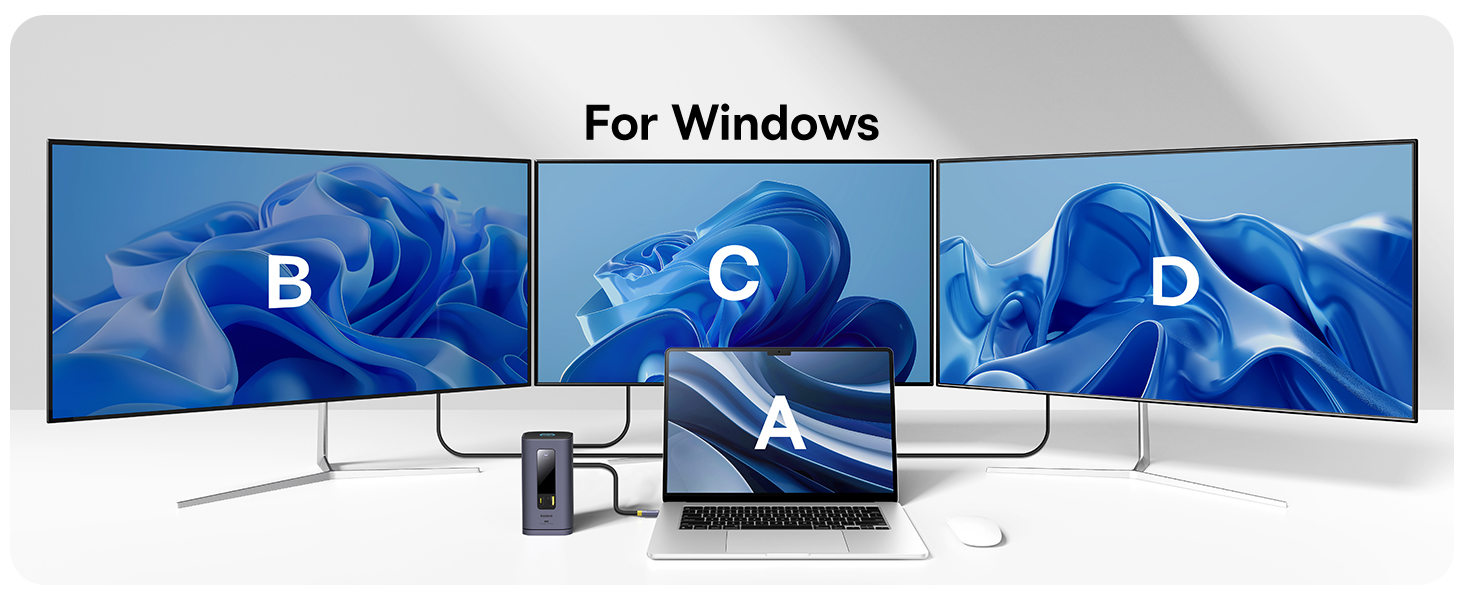
Image: The LED display on the docking station illuminating icons for Screen Casting, Data Transfer, Charging, Ethernet, and Audio, indicating active connections.
4. Одржување и грижа
- Keep the docking station in a dry environment and avoid exposure to liquids.
- Исчистете ја површината со мека, сува крпа. Не користете абразивни средства за чистење или растворувачи.
- Ensure proper ventilation around the device to prevent overheating, especially during prolonged use with multiple connected devices.
- Избегнувајте паѓање или изложување на уредот на силни удари.
- When disconnecting, always pull from the plug, not the cable, to prevent damage.
5. Решавање на вообичаени проблеми
| Проблем | Можна причина | Решение |
|---|---|---|
| No external display or unstable HDMI connection. | DisplayLink driver not installed or not running; faulty cables; incorrect display settings. | Ensure DisplayLink driver is installed and DisplayLink Manager is running (set to auto-launch). Try different HDMI cables. Check display settings on your laptop to detect monitors. Restart the docking station and laptop. |
| Docking station feels warm/hot. | Normal operation under heavy load; insufficient ventilation. | Some heat is normal, especially when charging or driving multiple displays. Ensure the docking station is placed in a well-ventilated area and not covered. If excessively hot, disconnect and allow to cool. |
| USB ports or Ethernet not working. | Loose connection; driver issue; power issue. | Ensure all cables are securely connected. Reinstall DisplayLink driver. Verify the docking station is receiving sufficient power, especially if using power-hungry devices. Try connecting devices to different ports. |
| Laptop not charging or charging slowly. | Insufficient power adapter; non-PD compatible cable. | Ensure you are using a 100W PD power adapter and a USB-C cable that supports Power Delivery. Check if the power adapter is properly connected to the docking station. |
6. Спецификации на производот
| Карактеристика | Детал |
|---|---|
| Број на модел | 11 во 1 |
| Бренд | Басеус |
| Боја | Греј |
| Хардверски интерфејс | USB 3.1 Type A, USB 3.1 Type C, Ethernet, HDMI, USB 2.0 Type A, 3.5mm Audio |
| HDMI порти | 3 x HDMI (up to 4K@60Hz) |
| USB порти за податоци | 2 x USB-A (10Gbps), 1 x USB-C (10Gbps), 2 x USB-A (480Mbps) |
| Испорака на енергија (ПД) | 100W Input, 85W Output (Pass-through charging) |
| Етернет порта | Gigabit Ethernet (up to 1Gbps) |
| Аудио Џек | 3.5mm AUX In/Out |
| Компатибилни уреди | For M1/M2/M3 Mac and Windows laptops |
| Тежина на ставката | 1.5 фунти |
| Димензии на пакетот | 7.17 x 4.76 x 3.03 инчи |
| Датум прв на располагање | 9 мај 2024 година |
7. Гаранција и корисничка поддршка
Baseus products are designed and manufactured to the highest quality standards. For information regarding warranty coverage, please refer to the warranty card included with your product or visit the official Baseus webсајт.
If you encounter any issues or have questions about your Baseus SpaceMate(MAC) Docking Station, please contact Baseus customer support through their official webвеб-страницата или продавачот на мало каде што сте го купиле производот. Ве молиме имајте го при рака бројот на моделот на производот и деталите за купувањето кога контактирате со поддршката.


