1. Важни безбедносни информации
Please read all safety instructions carefully before using the VETEK NPX108 camcorder. Keep this manual for future reference.
- Не изложувајте ја камерата на вода или влага.
- Избегнувајте екстремни температури.
- Не обидувајте се сами да ја расклопите или поправате камерата.
- Користете само одобрени додатоци и адаптери за напојување.
- Да се чува подалеку од дофат на деца.
2. Содржина на пакетот
Проверете дали сите артикли се присутни во вашиот пакет:
- VETEK NPX108 4K Camcorder
- Рачен стабилизатор
- Аспиратор за леќа
- Микрофон
- Пополнете светлина
- 64 GB SD-картичка
- Далечински управувач
- DV-108 Battery (4500mAh)
- USB кабел
- Полнач
- Торба со камера
- Упатство за употреба

Image: The VETEK NPX108 camcorder with all included accessories, such as the handheld stabilizer, microphone, fill light, SD card, battery, cables, and carrying bag.

Image: A visual representation of the camcorder and its accessories, including microphone, remote control, LED lights, lens hood, battery, bag, 64GB SD card, data line, charger, and user manual.
3. Производот завршиview
3.1. Компоненти и контроли

Image: A multi-angle diagram of the camcorder highlighting key components such as Handle Charging Port, Battery, Video Button, Photo Button, Confirmation Button/Control Wheel, DISP Button, USB Interface/Camera Charging Port, MIC Interface, HDMI Interface, Lens, Power Button, Menu Button, Mode Button, Playback Button, SD Card Slot, Speaker, Handle Hot Shoe, Handle Video/Photo Button, Handle Digital Zoom, Camera Zoom, and Camera Hot Shoe.
The VETEK NPX108 camcorder features a 4.0-inch 270-degree rotating touchscreen for flexible viewing and control. It supports 4K Ultra HD 60FPS video resolution and 64MP image resolution, with 18X digital zoom.

Image: The VETEK NPX108 camcorder showcasing its 4K UHD capabilities, 64MP resolution, 270-degree rotating screen, and 3.0-inch HD touch screen.
4. Поставување
4.1. Инсталација и полнење на батеријата
The camcorder uses a 4500mAh Lithium Polymer battery. Ensure the battery is fully charged before first use.
- Отворете го капакот на преградата за батерии.
- Вметнете ја батеријата според индикаторите за поларитет.
- Добро затворете го капакот на преградата за батерии.
- Connect the USB cable to the camera's charging port and the charger, then plug into a power outlet. The camera supports recording while charging.

Image: The camcorder displaying a 93% battery charge on its screen, emphasizing its 4500mAh battery for longer shooting times.
4.2. Инсталација на SD-картичка
The camcorder comes with a 64GB SD card. Insert it correctly to store your recordings.
- Пронајдете го отворот за SD картичка на камерата.
- Insert the SD card with the metal contacts facing the correct direction until it clicks into place.
- To remove, gently press the card until it ejects.
4.3. Прикачување на додатоци
Attach the included accessories for enhanced functionality.
- Handheld Stabilizer: Attach the stabilizer to the bottom of the camera for improved stability, especially for low-angle shots. It includes zoom and shooting buttons for convenience.
- Микрофон: Connect the external microphone to the MIC interface for clearer audio recording, reducing background noise.
- Пополнете светлина: Mount the fill light onto the camera's hot shoe for additional illumination in low-light conditions. Adjust brightness and color temperature as needed.
- Аспиратор за објектив: Attach the lens hood to protect the lens from damage and improve image contrast by reducing glare.
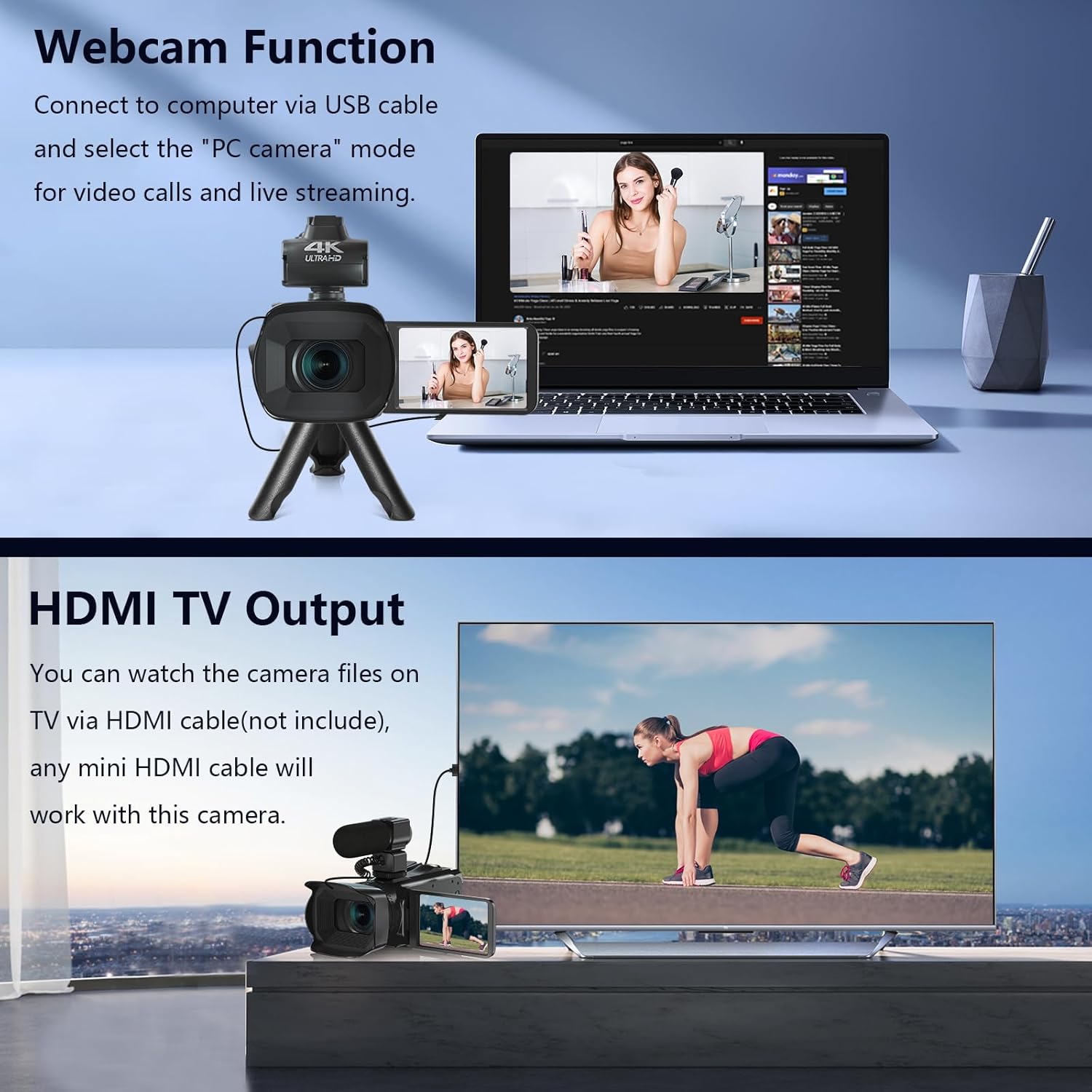
Image: The fill light accessory demonstrating its adjustable brightness (100%, 50%, 10%) and color temperature (3300K-5600K) settings, with examples of white light, white glow, and warm light.
5. Ракување со камерата
5.1. Вклучување/исклучување
Open the LCD screen to power on the camera. Close it to power off.
5.2. Основно снимање (видео/фотографија)
Use the dedicated Video and Photo buttons to switch between modes and start/stop recording or capture images.
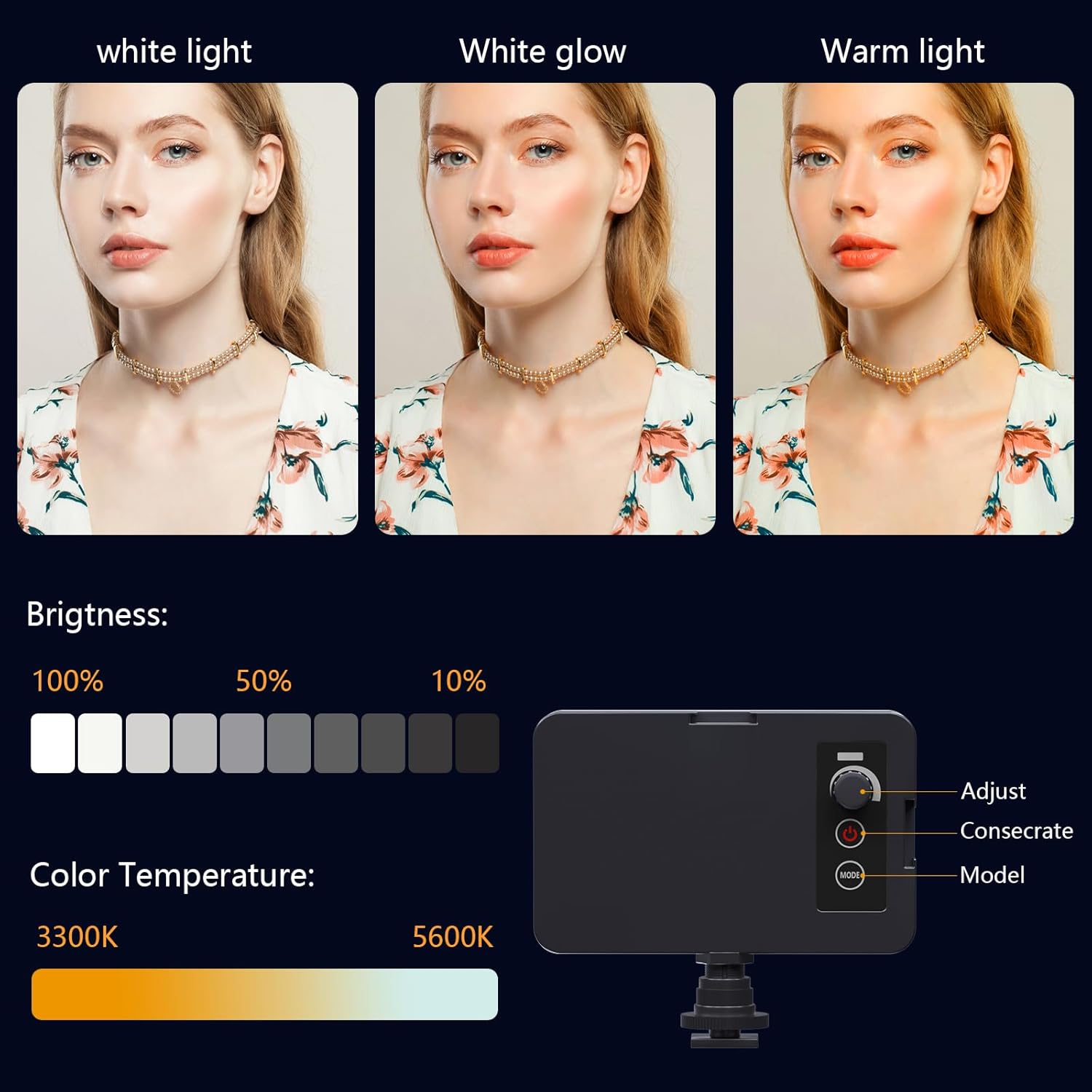
Image: The camcorder recording a 4K 60FPS video, with smaller inset images showing the effect of 18X, 16X, and 12X digital zoom on a subject.
5.3. Функција за зумирање
Use the zoom controls on the camera body or handheld stabilizer to adjust the 18X digital zoom.
5.4. Работа со екран на допир
Navigate menus and settings directly on the 4.0-inch touchscreen. The screen can rotate 270 degrees for versatile shooting angles.
5.5. Поставки за менито
Press the Menu button to access various settings such as resolution, white balance, exposure, and metering mode. Use the control wheel or touchscreen to make selections.
5.6. Wi-Fi конекција и користење на апликации
Connect your smartphone to the camcorder via Wi-Fi to control it remotely and transfer files.
- Turn on Wi-Fi on the camcorder via the menu. The screen will display the Wi-Fi ID (e.g., 4K_WIFI) and password (e.g., 12345678), along with a QR code.
- Download the "IDC CAM" app by scanning the QR code or searching on your app store.
- On your smartphone, go to Wi-Fi settings and connect to the camcorder's Wi-Fi network using the provided password.
- Open the "IDC CAM" app. You can now view a live feed, control recording, and capture photos remotely.

Image: The camcorder's screen showing Wi-Fi ID, password, and a QR code for downloading the companion app, with smartphones connected via Wi-Fi in the background.
For a visual guide on Wi-Fi connection and app usage, watch this video:
Video: This video demonstrates how to connect the NPX108 digital video camera to Wi-Fi and use the companion app for remote control and file управување.
5.7. WebФункција на камери
The camcorder can be used as a webcam for video calls and live streaming.
- Поврзете ја камерата со вашиот компјутер користејќи USB кабел.
- On the camera's screen, select "PC CAM" mode.
- Your computer should now recognize the camcorder as a webкамера
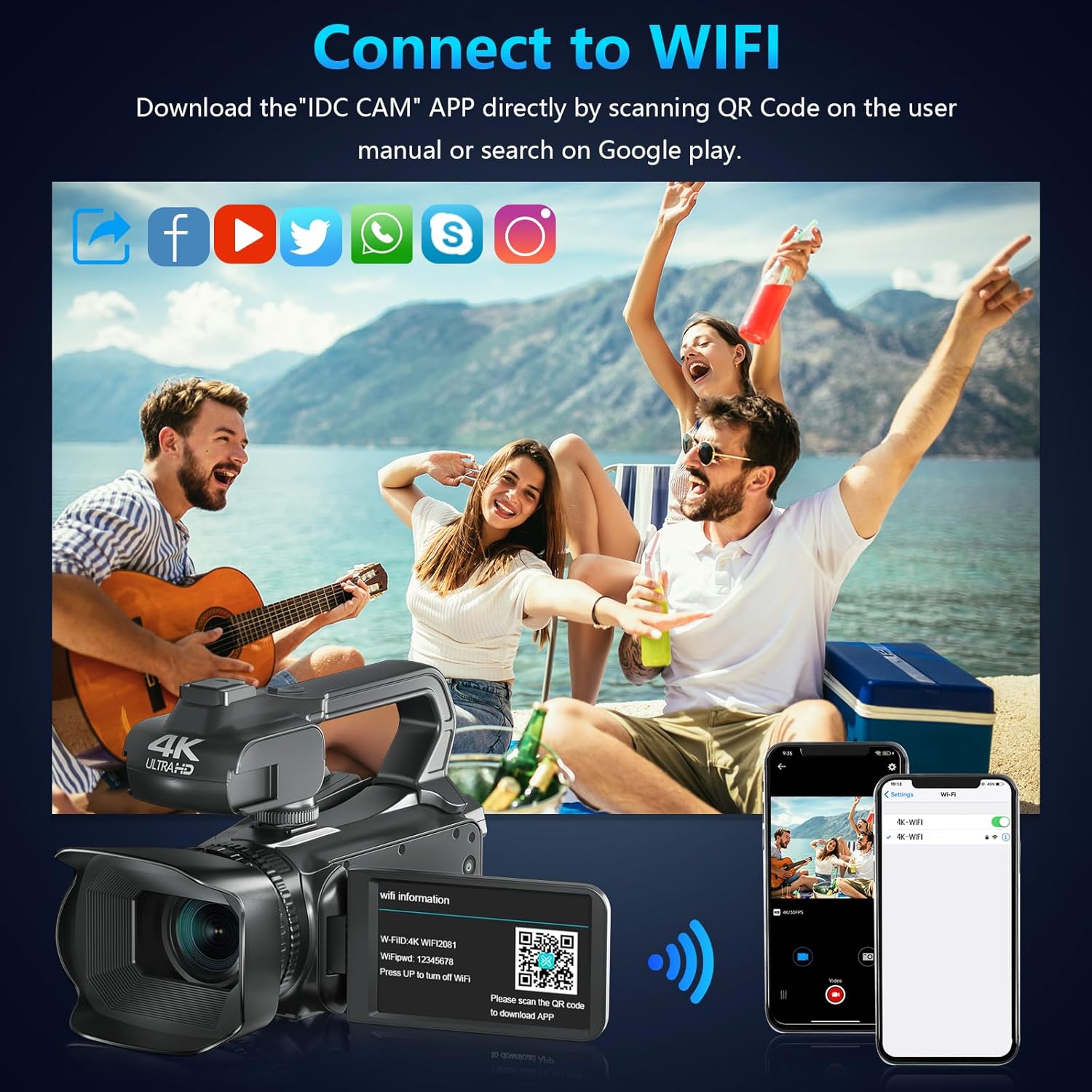
Image: The camcorder functioning as a webcam connected to a laptop, and also connected to a TV via HDMI for output.
5.8. HDMI TV Output
View your recorded videos and photos directly on a TV or monitor.
- Connect the camcorder to your TV using a mini HDMI cable (not included).
- Изберете го соодветниот HDMI влез на вашиот телевизор.
- The camera's display will now be mirrored on your TV.

Image: The camcorder connected to a laptop for live streaming (webcam mode) and to a TV via an HDMI cable for real-time viewвнесување на содржината.
5.9. Посебни карактеристики
- Снимање додека се полни: Continue recording even when the battery is low by connecting the charger.
- Бавно движење: Capture dynamic scenes in slow motion.
- Временски пропуст: Record events over an extended period and condense them into a short video.
- Само-тајмер: Set a delay before capturing a photo or starting a video.
- Против тресење: Дигиталната стабилизација на сликата помага да се намали заматеноста од движењето на камерата.
- Ноќно гледање: Capture clear footagд во услови на слаба осветленост.

Image: A collage demonstrating various camcorder features: recording while charging, pause function, continuous shooting, and anti-shake stabilization.

Image: A sequence of three images illustrating the time-lapse recording feature, capturing the progression of a sunset over water.
6. Одржување
6.1. Чистење
- Користете мека, сува крпа за чистење на телото на фотоапаратот.
- За леќите, користете крпа за чистење леќи и специјализиран раствор за чистење леќи. Избегнувајте директно допирање на леќите со прстите.
- Clean the touchscreen with a microfiber cloth.
6.2. Складирање
- When not in use, store the camera in its protective bag in a cool, dry place.
- Отстранете ја батеријата ако камерата нема да се користи подолг период.
7 Смена на проблеми
| Проблем | Можна причина | Решение |
|---|---|---|
| Камерата не се вклучува | Батеријата е празна или неправилно вметната. | Наполнете ја батеријата или вратете ја правилно. |
| Не може да снима видео/фотографира | SD card is full, not inserted, or corrupted. | Insert a new SD card, ensure it's properly inserted, or format the card (this will erase all data). |
| Poor video/image quality | Lens is dirty, insufficient lighting, or incorrect settings. | Clean the lens, use the fill light, or adjust exposure/white balance settings. |
| Проблеми со Wi-Fi конекцијата | Incorrect password, app not installed, or distance too far. | Verify password, install "IDC CAM" app, ensure close proximity to camera. |
8. Спецификации
- Бренд: ВЕТЕК
- Број на модел: NPX108
- Резолуција за снимање видео: 4 илјади (60 FPS)
- Резолуција на сликата: 64 MP
- Дигитален зум: 18X
- Големина на екранот: 4.0 Inches (270-degree rotating touchscreen)
- Поврзување: Wi-Fi, USB, HDMI
- Посебни карактеристики: Auto Focus, Recording While Charging, Slow Motion, Time-Lapse, Webcam Function, Self-Timer, HD Output, External MIC Support, Handheld Stabilizer Support, Night Vision, Anti-Shake, Face Detection
- Батерија: 4500mAh литиумски полимер (вклучен)
- Складирање: SD картичка (вклучена е 64GB)
- Тежина на ставката: 3.56 фунти
- Димензии на производот: 6.7 x 3.8 x 3.9 инчи
9. Гаранција и поддршка
VETEK products are designed for quality and reliability. For any issues or inquiries, please refer to the following:
- Политика за враќање: All products are eligible for a free return within 30 days of purchase.
- Услуга за клиенти: VETEK offers 24-hour customer service. Please contact us for assistance.
- Планови за заштита: Extended protection plans are available for purchase (e.g., 2-Year Protection Plan, 3-Year Protection Plan, Complete Protect).

Image: The VETEK brand logo, representing quality and customer commitment.


