1. Вовед
Welcome to the Ninkear A15 Laptop user manual. This guide provides essential information for setting up, operating, maintaining, and troubleshooting your new Ninkear A15 laptop. Please read this manual thoroughly to ensure proper use and to maximize the performance and longevity of your device.
The Ninkear A15 is a high-performance laptop featuring an AMD Ryzen 5 5500U Hexa-core Processor, 16GB RAM, and a 512GB PCIe SSD, designed for a variety of computing tasks from daily productivity to graphic design and entertainment.
2. Што има во кутијата
Upon opening your Ninkear A15 Laptop package, please verify that all the following items are included:
- A15 laptop x 1
- Глувче x 1
- Подлога за глушец x 1
- Полнач x 1
3. Производот завршиview
The Ninkear A15 laptop is engineered for efficiency and user comfort. Below are key features and components:
3.1 Клучни карактеристики
- Моќен процесор: Equipped with an AMD Ryzen 5 5500U processor, AMD Radeon graphics, 6 cores and 12 threads, with a frequency up to 4.0Ghz, suitable for various applications.
- Извонреден приказ: Features a 15.6-inch FHD IPS display with 1920x1080 resolution, offering a 90.3% screen-to-body ratio and a 180-degree viewing angle for clear and natural picture quality.
- Продолжен век на батеријата: A 4350mAh battery provides up to 6 hours of daily use, making it ideal for mobile work. It supports full-function Type-C charging.
- AmpСкладирање и меморија: Comes with 16GB DDR4 RAM (3200Mhz) and a 512GB PCIe SSD, ensuring fast performance for professional software and multitasking.
- Дизајн пријатен за корисниците: Includes a full digital backlit keyboard with three adjustable monochrome backlight levels (FN+F9) and a 0.5-second fingerprint unlocking feature for enhanced security and convenience.
3.2 Визуелен прегледview

Предна страна view of the Ninkear A15 Laptop, showcasinнеговиот елегантен дизајн и дисплеј.

Надview of the Ninkear A15 Laptop highlighting key specifications like 15.6" IPS FHD display, AMD Ryzen 5 5500U processor, 16GB DDR4 RAM, 512GB PCIe SSD, 4350mAh battery, backlit keyboard, and Type-C full function port.

Детално view of the AMD Ryzen 5 5500U processor, emphasizing its 6 cores, 12 threads, 7nm process, and 4.0GHz max turbo frequency.
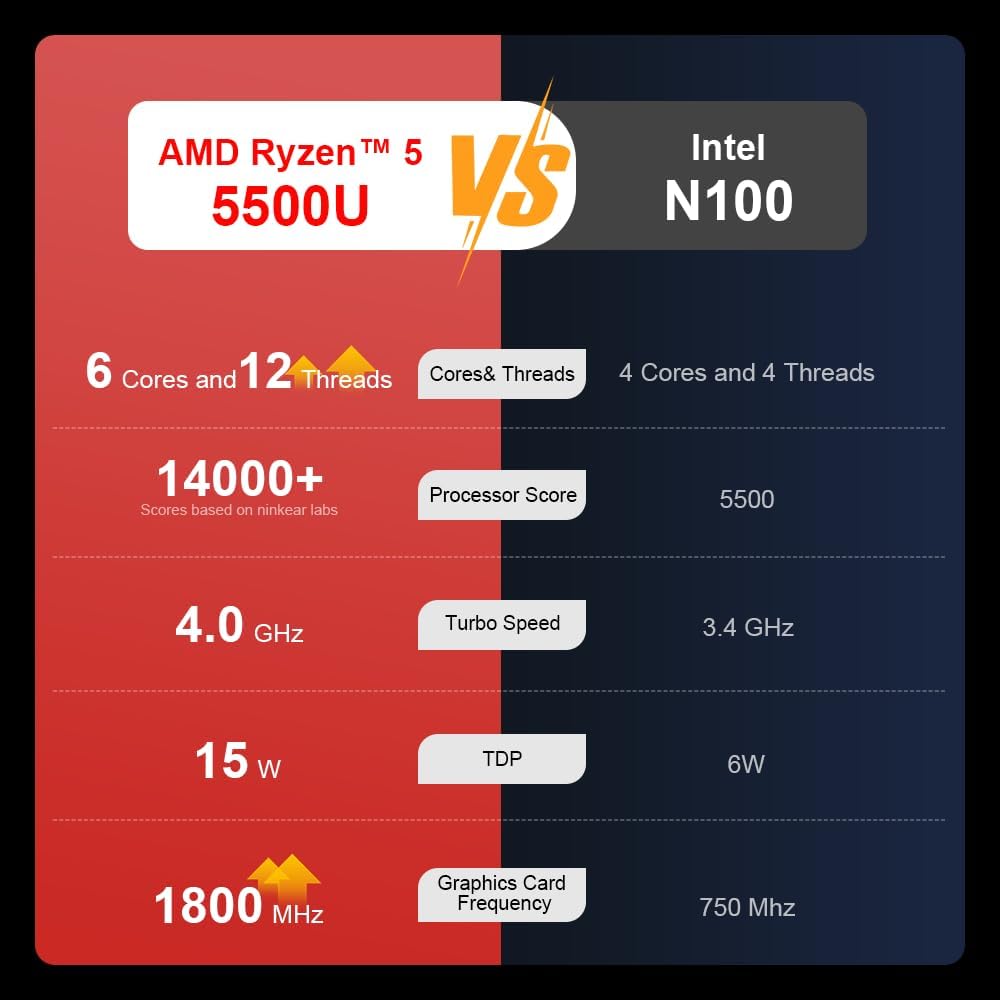
A comparison chart illustrating the performance differences between the AMD Ryzen 5 5500U and Intel N100 processors, including core/thread count, processor score, turbo speed, TDP, and graphics card frequency.

Image showing the 512GB M.2 PCIe SSD and highlighting the 3200MHz DDR4 running frequency, indicating a 20% speed improvement over 2666MHz DDR4.

The 15.6-inch IPS FHD screen of the A15, designed to deliver vibrant and accurate colors while reducing eye strain during long work hours.

Illustration of the A15 laptop's suitability for various 'recreational office' tasks, including graphic design (Ae, Ps, Ai) and gaming/entertainment.

Information about the laptop's 50.5WH high-capacity lithium-ion battery, providing up to 8 hours of local video playback and 72 hours of standby time.

A visual guide to the rich interfaces of the Ninkear A15 Laptop, including USB 3.0, USB 2.0, Headphone Jack, Charging Port, HDMI, and full-function Type-C ports.
3.3 Видео за производот
Официјално видео претставување на производотasing the Ninkear A15 Laptop's features, including its design, display, backlit keyboard, and various ports. This video provides a dynamic overview of the laptop's capabilities and physical attributes.
4. Поставување
Follow these steps to set up your Ninkear A15 Laptop for the first time:
- Распакувајте го лаптопот: Внимателно извадете го лаптопот и сите додатоци од пакувањето.
- Поврзете напојување: Plug the charger into the laptop's charging port (DC-in or Type-C) and then into a power outlet.
- Првично стартување: Open the laptop lid and press the power button (integrated with fingerprint sensor). The laptop will power on and begin the initial Windows 11 setup process.
- Поставување на Windows 11: Follow the on-screen instructions to complete the Windows 11 setup, including selecting your region, language, connecting to Wi-Fi, and creating a user account.
- Поставување на отпечаток од прст: During or after Windows setup, you can configure the fingerprint reader for quick and secure login.
5. Упатства за работа
This section covers basic operation of your Ninkear A15 Laptop.
5.1 Вклучување/исклучување и режим на мирување
- Вклучување: Притиснете го копчето за вклучување.
- Исклучено: Кликнете на копчето „Старт“ во Windows, потоа изберете „Напојување“ > „Исклучи“.
- Режим на спиење: Затворете го капакот или кликнете на копчето „Старт“, а потоа изберете Вклучување > Спиење.
5.2 Тастатура и тачпед
- Тастатура со позадинско осветлување: Притиснете Fn + F9 to cycle through the three levels of monochrome backlight brightness or turn it off.
- Подлога за допир: Use the integrated touchpad for cursor control and gestures. Refer to Windows settings for touchpad customization.
- Нумеричка тастатура: The laptop features a full digital numeric keypad for convenient data entry.
5.3 Поврзување на периферни уреди
Користете ги различните порти за надворешни уреди:
- USB порти: Connect USB devices like external hard drives, mice, or keyboards to the USB 2.0 or USB 3.0 ports.
- HDMI: Connect to external monitors or projectors using the HDMI port.
- Тип Ц: The full-function Type-C port supports data transfer, video output, and power delivery.
- Аудио Jackек: Поврзете слушалки или надворешни звучници во 3.5 мм аудио приклучокот.
5.4 Поставки на екранот
Adjust display settings via Windows Settings > System > Display to optimize resolution, scaling, and multiple monitor setups.
6. Одржување
Proper maintenance ensures the longevity and optimal performance of your Ninkear A15 Laptop.
- Чистење: Користете мека крпа што не остава влакненца за чистење на екранот и куќиштето. За тврдокорни дамки, малку исплакнетеampИзбришете ја крпата со вода или средство за чистење екрани. Избегнувајте груби хемикалии.
- Ажурирања на софтверот: Regularly update Windows and device drivers to ensure system stability, security, and performance.
- Нега на батеријата: За да го продолжите животниот век на батеријата, избегнувајте често целосно празнење на батеријата. Чувајте го лаптопот на ладно и суво место кога не го користите подолг период.
- Вентилација: Проверете дали отворите за вентилација на лаптопот не се блокирани за да спречите прегревање. Користете го лаптопот на тврда, рамна површина.
- Бекап на податоци: Редовно правете резервна копија на вашите важни податоци на надворешен диск или во облак за да спречите губење на податоци.
7 Смена на проблеми
This section addresses common issues you might encounter with your Ninkear A15 Laptop.
| Проблем | Можна причина | Решение |
|---|---|---|
| Лаптопот не се вклучува | Проблем со слаба батерија или адаптерот за напојување | Ensure the charger is properly connected and the power outlet is working. Allow the laptop to charge for at least 30 minutes before attempting to power on again. |
| Екранот е празен или црн | Display driver issue, external display connected, or sleep mode | Press any key or move the mouse to wake from sleep. Disconnect any external monitors. Try pressing Fn + F7 (or the key with a display icon) to switch display modes. If still blank, force shut down by holding the power button for 10 seconds, then restart. |
| Wi-Fi не се поврзува | Wi-Fi adapter off, incorrect password, or router issue | Check if Wi-Fi is enabled in Windows settings. Verify the Wi-Fi password. Restart your router and modem. Update Wi-Fi drivers if necessary. |
| Заднинското светло на тастатурата не работи | Backlight turned off or low brightness setting | Притиснете Fn + F9 repeatedly to adjust brightness or turn on the backlight. |
| Бавни перформанси | Too many programs running, low disk space, or outdated drivers | Close unnecessary applications. Free up disk space. Run Windows Update and update drivers. Consider running a virus scan. |
8. Спецификации
Detailed technical specifications for the Ninkear A15 Laptop:
| Карактеристика | Спецификација |
|---|---|
| Бренд | Нинкеар |
| Име на моделот | A15 |
| Големина на екранот | 15.6 инчи |
| Резолуција на екранот | 1920 x 1080 пиксели (FHD IPS) |
| Процесор | AMD Ryzen 5 5500U (2.1 GHz, 6 јадра, 12 нишки) |
| RAM меморија | 16 GB DDR4 (3200 MHz) |
| Хард диск | 512 GB PCIe SSD |
| Графичка картичка | Интегрирана AMD Radeon графика |
| Оперативен систем | Windows 11 |
| Боја | Сребрена |
| Тежина на ставката | 5 фунти |
| Димензии на производот | 14 x 9 x 0.15 инчи |
| USB 3.0 порти | 2 |
| Просечен век на траење на батеријата | Up to 6-8 hours (daily use) |
| Посебни карактеристики | Backlit Keyboard, Numeric Keypad, Fingerprint Unlock, Full-function Type-C |
9. Гаранција и поддршка
Ninkear provides a standard warranty for the A15 Laptop. Please refer to the warranty card included in your product packaging for specific terms and conditions, including warranty duration and coverage details.
For technical support, troubleshooting assistance, or warranty claims, please contact Ninkear customer service through the official website or the contact information provided with your purchase. Ensure you have your product model (A15) and purchase details ready when contacting support.
You can also visit the official Ninkear store on Amazon for additional product information and support resources: Ninkear Amazon Store


