1. Вовед
Thank you for choosing the Ebitcam Security Camera. This manual provides detailed instructions on how to set up, operate, and maintain your camera. This 3-megapixel camera offers robust security features, including IP66 weather resistance for both indoor and outdoor environments, two-way audio, and advanced AI-powered detection capabilities. Enjoy peace of mind with 24-hour monitoring and remote access from your smartphone.

The Ebitcam security camera provides high-resolution monitoring for various environments.
2. Содржина на пакетот
Ве молиме проверете го пакувањето за следните ставки:
- Ebitcam Security Camera (Model 8311)
- Адаптер за напојување
- Монтирачки завртки и ѕидни приклучоци
- Упатство за употреба
3. Производот завршиview
Familiarize yourself with the components of your Ebitcam security camera:

The camera features a lens, status LED, microphone, and a durable IP66-rated casing.
- Објектив: Снима видео фудtage.
- LED статус: Indicates camera status (e.g., power, connection).
- Микрофон: За аудио влез и двонасочна комуникација.
- Говорник: За аудио излез и двонасочна комуникација.
- Слот за SD-картичка: Supports up to 512GB microSD card for local storage. Located under the lens.
- Копче за ресетирање: Used to reset the camera to factory settings. Located under the lens.
- Приклучок за напојување: Се поврзува со адаптерот за напојување.
- Основа за монтирање: Integrated base for various installation options.
4. Поставување
4.1 Почетно вклучување
- Поврзете го адаптерот за напојување со приклучокот за напојување на фотоапаратот и вклучете го во штекер.
- Wait for the camera's status LED to indicate it is ready for setup (refer to app instructions for specific LED behavior).
4.2 Преземање на апликација и регистрација на сметка
- Download the "Ebitcam" app from your smartphone's app store (available for iPhone and Android).
- Отворете ја апликацијата и следете ги упатствата на екранот за да регистрирате нова сметка или да се најавите ако веќе имате.
- Add your camera by scanning the QR code located on the camera body using the app.
4.3 Wi-Fi конекција
- The camera supports 2.4GHz Wi-Fi networks only. Ensure your smartphone is connected to a 2.4GHz Wi-Fi network during setup.
- Follow the app's prompts to connect the camera to your Wi-Fi network.
- For optimal performance, choose an installation location with a strong Wi-Fi signal.
4.4 Физичка инсталација
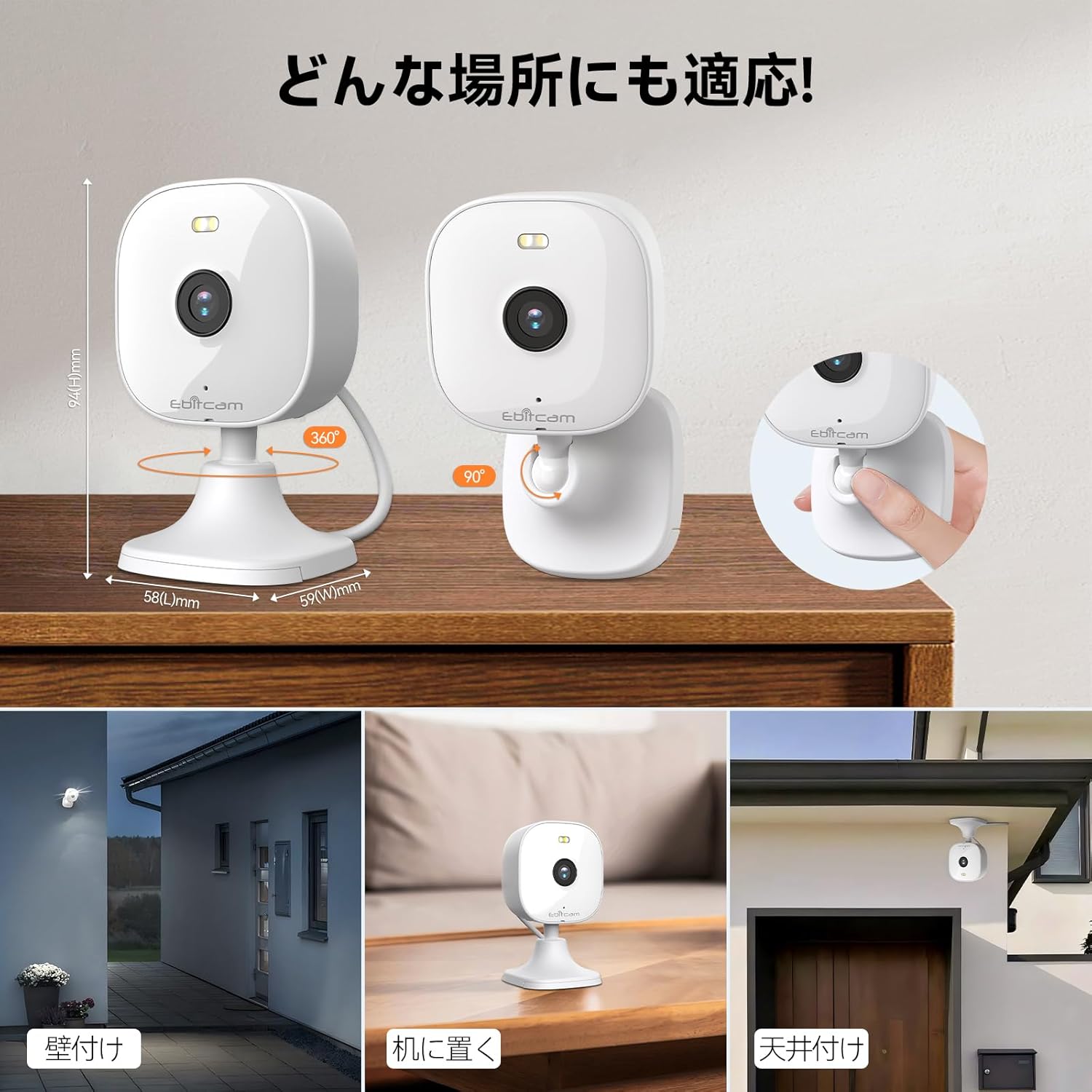
The camera offers versatile mounting options:

The camera can be mounted on walls, ceilings, or placed on a tabletop.
- Поставување на маса: Simply place the camera on a flat surface. The integrated base allows for stable positioning.
- Монтирање на ѕид/таван: The camera's base can be detached by gently pulling the camera from its base. Use the included mounting screws and wall plugs to secure the base to your desired wall or ceiling location. Then, reattach the camera to the mounted base.
Note: The product package includes matching screw mounting tools for installation.
5. Упатства за работа
5.1 Во живо View и Снимање
Access the live video feed and manage recordings through the Ebitcam app.

The camera supports 2K (1296p) resolution for clear video capture.
- Навестување во живо: Отворете ја апликацијата и изберете ја вашата камера за да view the real-time video stream.
- Континуирано снимање: If an SD card is inserted or cloud storage is active, the camera can record continuously 24/7.
- Снимање предизвикано од настан: Configure settings to automatically start recording when motion, sound, or human presence is detected.
5.2 Двонасочно аудио
Communicate with people or pets on the camera's side using the built-in microphone and speaker.
Engage in real-time conversations through the camera's two-way audio feature.
- Tap the microphone icon in the app to speak. Your voice will be transmitted through the camera's speaker.
- The camera's high-sensitivity microphone captures audio from the environment.
5.3 Motion, Sound, and Human Detection & Alerts
The camera utilizes advanced AI to detect specific events and notify you.

AI detection accurately distinguishes between humans and other moving objects.
- Откривање на вештачка интелигенција: The camera can differentiate between human movement, general motion, and sound events.
- Мобилни известувања: Добивајте моментални push известувања на вашиот паметен телефон кога ќе се открие настан.
- Automatic Lighting/Alarm: Configure settings to trigger automatic white light illumination or an audible alarm to deter unwanted visitors upon detection.
5.4 Режими на ноќно гледање
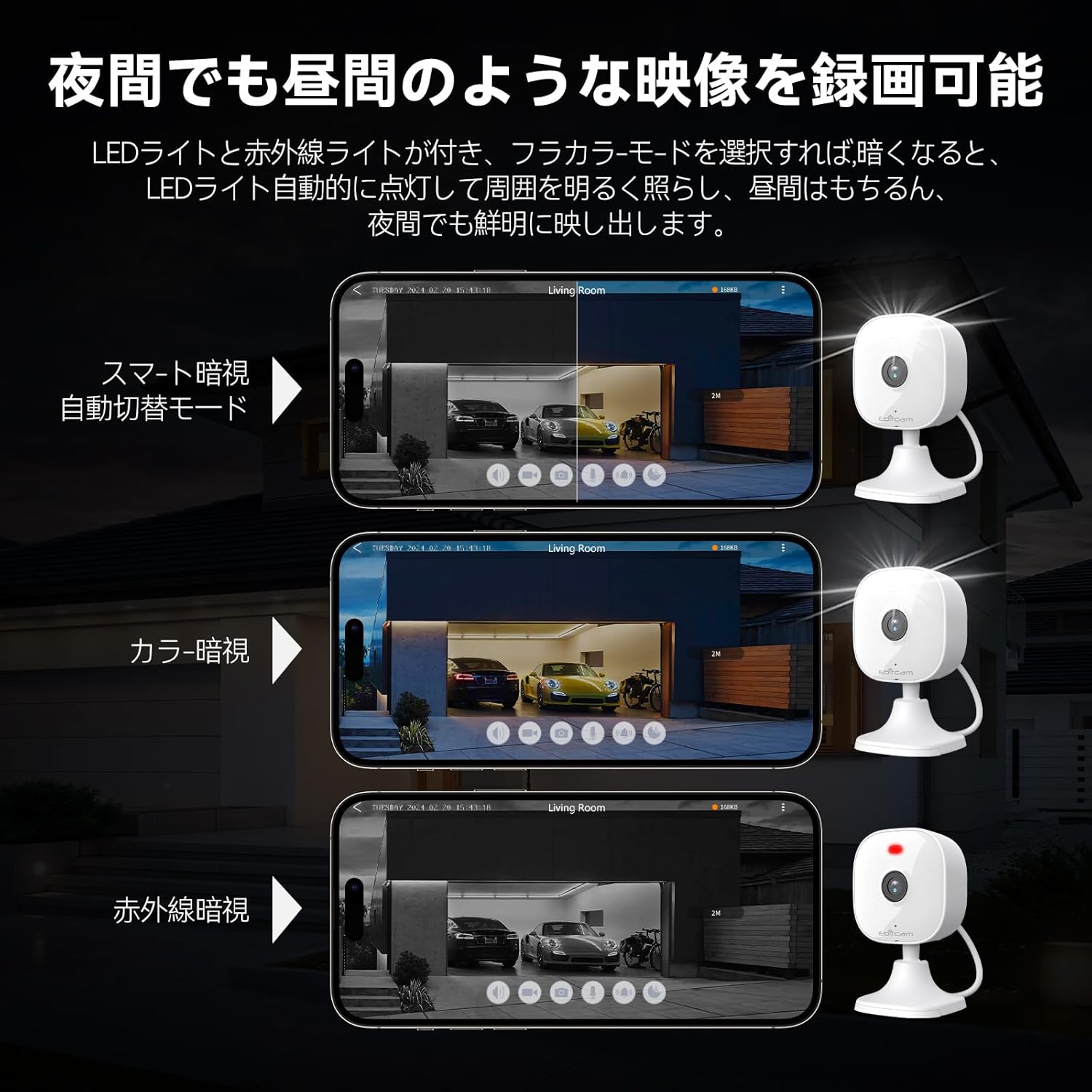
The camera provides clear visibility even in low-light or dark conditions.

Choose from various night vision modes for optimal clarity.
- Ноќно гледање во боја: Utilizes built-in white lights to provide color video footage in darkness (requires settings).
- Инфрацрвено ноќно гледање: Provides clear black-and-white video in complete darkness using infrared LEDs.
- Автоматско префрлување: The camera can automatically switch between day and night modes based on ambient light.
5.5 Дигитален зум
Zoom in on details within the live view или снимена хранаtage.

The camera supports up to 8x digital zoom.
- Use the pinch-to-zoom gesture on your smartphone screen within the app to digitally zoom in or out.
5.6 Интеграција со Алекса
Control your Ebitcam camera using voice commands with Amazon Alexa.
Integrate your camera with Alexa for convenient voice control.
- Enable the Ebitcam skill in your Alexa app.
- Use commands like "Alexa, show me the [camera name]" to view the live feed on compatible Alexa devices.
5.7 Семејно споделување
Share access to your camera with family members or trusted friends.
- Within the Ebitcam app, navigate to the sharing settings for your camera.
- You can share access by generating a QR code for others to scan, allowing them to view доводот на камерата.
6. Одржување
6.1 Управување со SD-картички
The camera supports up to a 512GB microSD card for local video storage.

Insert a microSD card for local video storage.
- Вметнување: Gently insert the microSD card into the slot located under the camera lens until it clicks into place.
- Форматирање: It is recommended to format the SD card through the camera settings in the app before first use.
- Отстранување: Push the SD card gently to release it, then pull it out.
6.2 Чистење
- Wipe the camera lens with a soft, clean cloth to ensure clear image quality.
- Исчистете го телото на фотоапаратот со рекламаamp крпа. Не користете груби хемикалии или абразивни средства за чистење.
6.3 Ажурирања на фирмверот
- Periodically check for firmware updates through the Ebitcam app. Updates can improve performance, add new features, and enhance security.
- Follow the app's instructions carefully when performing a firmware update.
7 Смена на проблеми
Еве решенија за вообичаени проблеми со кои може да се соочите:
- Unstable SD Card Performance: If you experience issues with recording or playback, an unstable SD card may be the cause. Please replace your SD card with a reliable, high-quality one and try again.
- App Not Functioning Correctly / Unstable Network: If the app does not function correctly, it might be due to an unstable network environment. Please ensure you have a stable 2.4GHz Wi-Fi connection.
- Camera Offline / Connection Issues: Ensure the camera is powered on and within range of your 2.4GHz Wi-Fi router. Check your Wi-Fi password in the app.
- Forgetting Login Password / Changing Network Environment: If you change your network environment or forget your login password, you can reset the camera. The camera's restart button is located under the lens. Press and hold it for a few seconds until the camera resets.
- Лажни аларми од детекција на движење: Adjust the motion detection sensitivity settings within the app. Consider setting specific detection zones to reduce unwanted alerts from areas like busy streets or swaying trees.
8. Спецификации
| Карактеристика | Спецификација |
|---|---|
| Број на модел на производ | 8311 |
| Број на артикли | 1 |
| Технологија на безжична комуникација | Wi-Fi |
| Тип на монтирање | Freestanding, Wall Mount, Ceiling Mount, Tabletop Mount, Door Mount |
| Опсег на ноќни визии | 10 метри |
| Стапка на слики | 25 fps |
| Димензии на производот (ДxШxВ) | 10 x 5 x 5 cm |
| Водоотпорно ниво | IP66 Водоотпорен |
| Тежина на производот | 190 гр |
| Препорачана употреба | Interior, Home, Living Room, Bedroom, Pet, Shop |
| Технологија за поврзување | WiFi |
| Внатрешна/надворешна употреба | Затворен, Надворешен |
| Компатибилни уреди | iPhone, TV, Tablet, Desktop, Smartphone |
| Извор на енергија | Електричен со кабел |
| Протокол за поврзување | Wi-Fi |
| Резолуција за снимање видео | 1296p (2K) |
9. Гаранција и поддршка
Ebitcam provides the following warranty and support for your product:
- Гаранција: A 2-year warranty is provided from the original purchase date.
- Поддршка преку Интернет: Online support is available Monday to Friday, from 8 AM to 5 PM (local time). Please refer to the Ebitcam app or official webсајт за детали за контакт.


