Вовед
This manual provides detailed instructions for the Keychron K10 Max Wireless Custom Mechanical Keyboard. It covers initial setup, operational procedures, maintenance guidelines, troubleshooting tips, and product specifications. Please read this manual thoroughly to ensure proper use and optimal performance of your keyboard.
Содржина на пакетот
Проверете дали сите артикли се присутни во вашиот пакет:
- Безжична прилагодена механичка тастатура Keychron K10 Max
- Кабел од тип А до тип Ц
- Type-A 2.4GHz Receiver
- Привлечник за клучеви
- Hex Key & Screwdriver
- Additional Windows Keycaps

Image: The Keychron K10 Max keyboard displayed with its accessories, including the USB-C cable, 2.4GHz receiver, keycap puller, hex key, screwdriver, and extra keycaps.
Поставување
1. Почетно поставување
Before first use, it is recommended to fully charge the keyboard using the provided Type-A to Type-C cable. Connect the USB-C end to the keyboard and the USB-A end to a power source (e.g., computer USB port, USB wall adapter).
2. Режими на поврзување
The K10 Max supports three connectivity options: 2.4 GHz wireless, Bluetooth 5.1, and wired USB-C.

Image: The Keychron K10 Max keyboard on a desk, illustrating its three connectivity options: USB Wired, 2.4GHz, and Bluetooth 5.1, connecting to a monitor, tablet, and smartphone.
2.1. Безжична конекција од 2.4 GHz
- Locate the 2.4 GHz receiver (USB-A dongle) included in the package.
- Plug the 2.4 GHz receiver into an available USB-A port on your computer.
- On the keyboard, slide the mode switch (located on the back or side) to the "2.4G" position.
- The keyboard should automatically connect. The 2.4 GHz connection provides a 1000 Hz polling rate for responsive performance.
2.2. Bluetooth 5.1 конекција
- On the keyboard, slide the mode switch to the "BT" (Bluetooth) position.
- Притиснете и задржете го fn+1 (или fn+2 / fn+3) key combination for 4 seconds until the backlight flashes rapidly. This indicates the keyboard is in pairing mode.
- На вашиот уред (компјутер, таблет, паметен телефон), овозможете Bluetooth и пребарувајте нови уреди.
- Select "Keychron K10 Max" from the list of available devices to pair.
- The keyboard can store up to three Bluetooth devices. Switch between them by pressing fn+1, fn+2, или fn+3.
2.3. Жична USB-C конекција
- Connect the provided Type-A to Type-C cable to the keyboard's USB-C port and to a USB-A port on your computer.
- Slide the mode switch on the keyboard to the "Cable" position.
- The keyboard will function as a wired device. This mode also supports a 1000 Hz polling rate.
3. Operating System Toggle
The K10 Max is compatible with both macOS and Windows/Linux operating systems. Use the OS toggle switch located on the back or side of the keyboard to select the appropriate layout.

Image: A close-up of the Keychron K10 Max keyboard's side, showing the physical toggle switch to select between Windows/Android and macOS modes, along with the connectivity switch for Cable or Bluetooth.
- Mac/iOS: Use this setting for Apple devices. The keyboard includes Mac multimedia keys and specific keycaps.
- Win/Android: Use this setting for Windows and Android devices. Additional Windows keycaps are provided for customization.
Упатства за работа
1. Key Remapping and Customization (QMK Firmware & Keychron Launcher)
The K10 Max is powered by QMK open-source firmware, allowing for extensive customization of key functions, macros, and lighting effects. The Keychron Launcher web application provides an intuitive interface for these customizations.
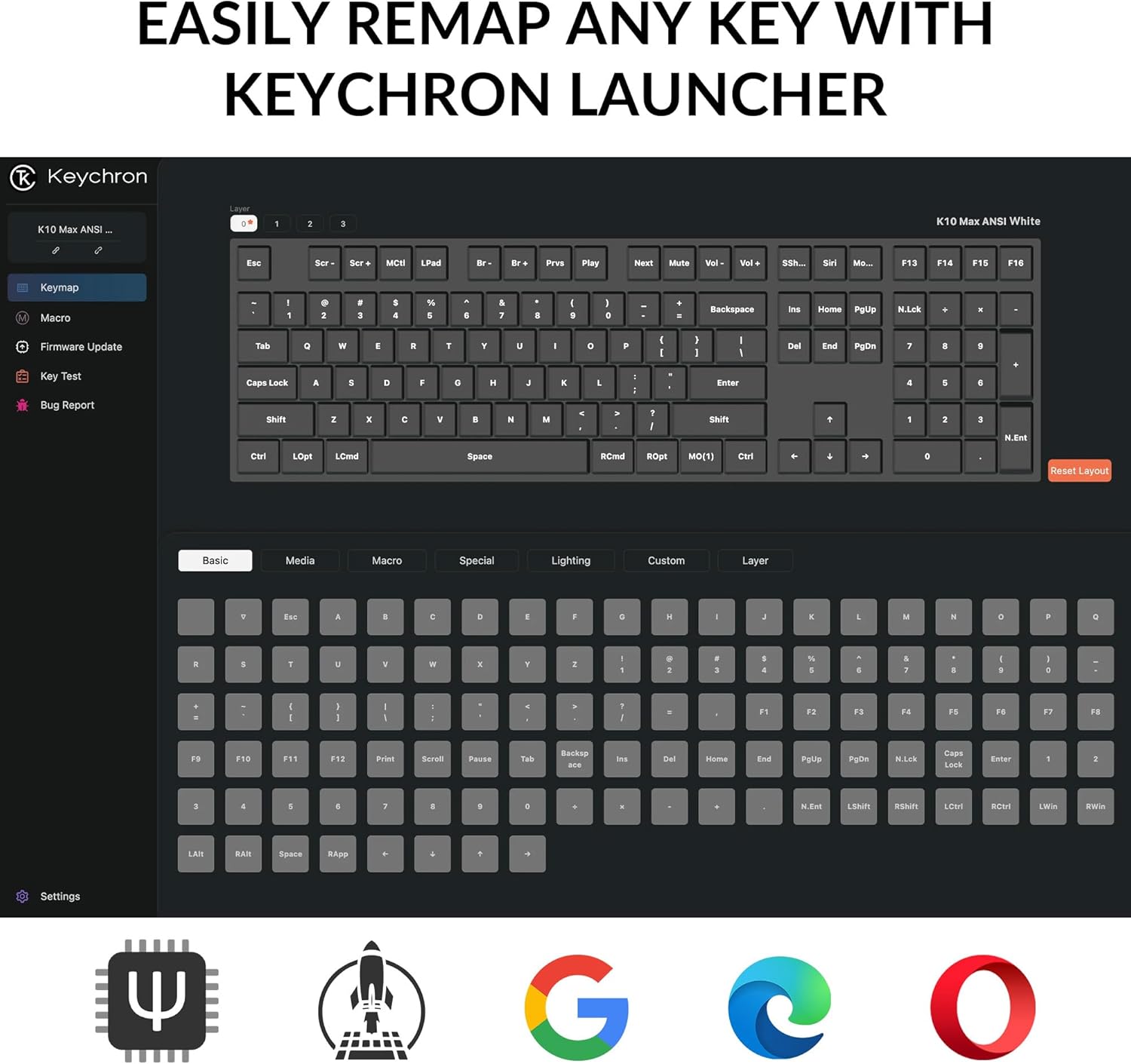
Слика: Слика од екранот на Keychron Launcher web application, showing the graphical interface for remapping keys and configuring keyboard settings.
- Пристап до Keychron Launcher web апликација преку вашата web прелистувач.
- Поврзете ја тастатурата со компјутерот преку USB-C кабел.
- Follow the on-screen instructions in the Launcher to remap keys, create macros, and adjust lighting.
- Save your changes to the keyboard's firmware.
2. Контрола на задното осветлување
The keyboard features a south-facing white LED backlight. Use the following key combinations to control the backlight:
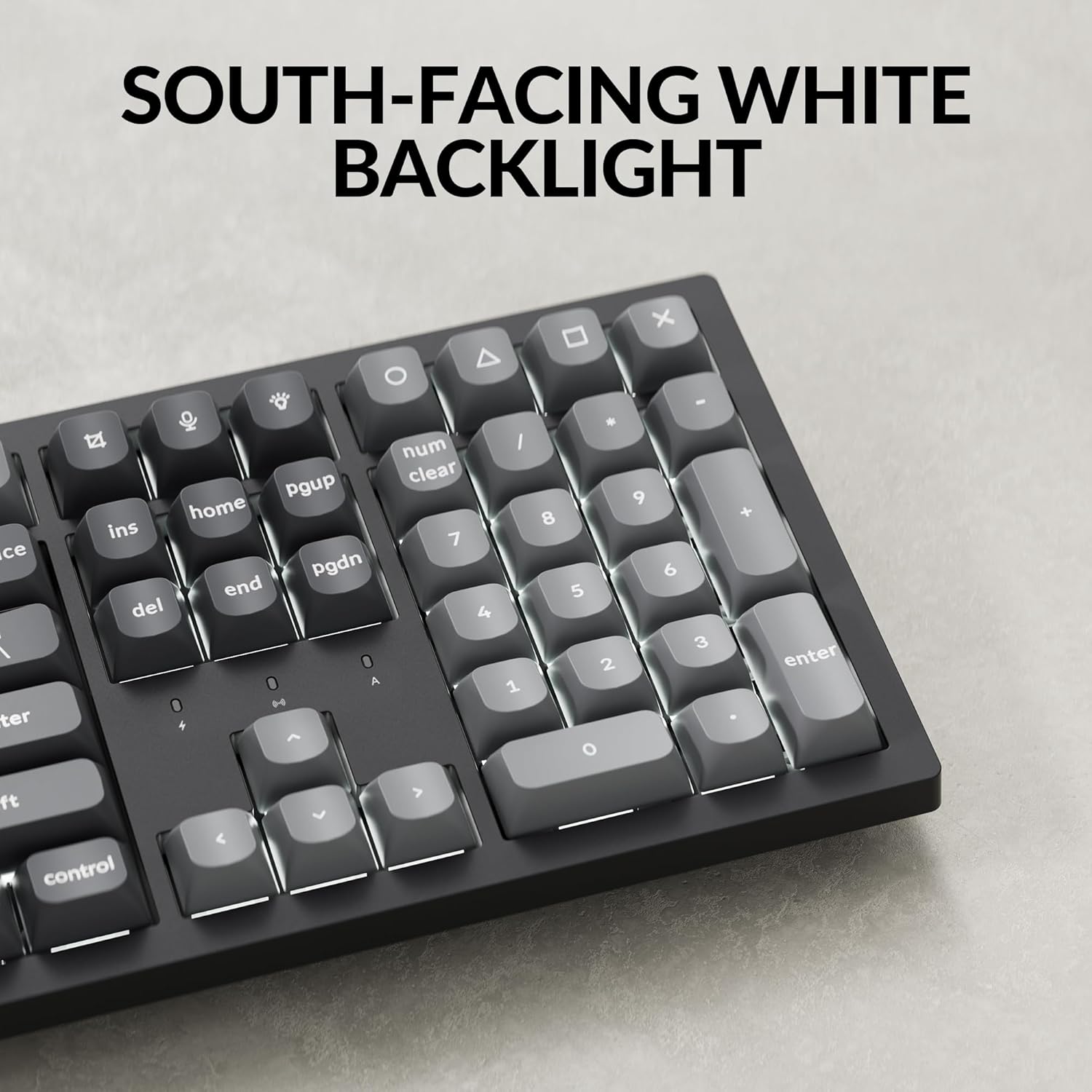
Слика: Крупен план view of the Keychron K10 Max keyboard's number pad and arrow keys, showcasing the south-facing white LED backlight illuminating the key legends.
- Fn + Light Key (usually F5 or a dedicated key): Циклусирање низ ефектите на позадинското осветлување.
- Fn + стрелка нагоре/надолу: Прилагодете ја осветленоста на позадинското осветлување.
- Fn + стрелка лево/десно: Adjust backlight effect speed (if applicable).
3. Управување со батерии
The K10 Max is equipped with a 4000 mAh rechargeable battery. To maximize battery life:
- Turn off the backlight when not needed.
- Use the wired connection when possible to conserve battery.
- The keyboard can last up to 190 hours with the backlight off and approximately 100 hours at the lowest brightness setting.
- A low battery indicator (usually a flashing LED) will notify you when charging is required.
Одржување
1. Чистење
Редовното чистење помага во одржувањето на изгледот и функционалноста на тастатурата.
- Исклучете ја тастатурата од сите извори на енергија и уреди пред чистење.
- Користете мека крпа без влакненца малку гampened with water or a mild cleaning solution to wipe the keycaps and frame. Avoid excessive moisture.
- За прашина и остатоци помеѓу копчињата, користете компримиран воздух или мала четка.
- The PBT keycaps are durable and oil-resistant, making them easy to clean.
2. Keycap Removal
To remove keycaps for cleaning or replacement:

Image: A close-up of the Keychron K10 Max keyboard, showing several double-shot PBT keycaps removed, revealing their construction and the underlying switches.
- Користете го испорачаниот извлекувач на капачето на копчето.
- Gently hook the puller onto the sides of the keycap.
- Pull straight up with even pressure to remove the keycap. Avoid twisting or excessive force to prevent damage to the switch.
- When reattaching, align the keycap with the switch stem and press down firmly until it clicks into place.
Решавање проблеми
- Тастатурата не реагира:
- Осигурајте се дека тастатурата е наполнета.
- Check the connectivity mode switch (2.4G, BT, Cable) is set correctly.
- For 2.4 GHz, ensure the receiver is securely plugged in.
- For Bluetooth, re-pair the device or try a different Bluetooth slot (Fn+1/2/3).
- For wired, ensure the USB-C cable is properly connected to both the keyboard and the computer.
- Обидете се да се поврзете со друга USB порта на вашиот компјутер.
- Клучевите не се регистрираат или се пишуваат двојно:
- Исчистете ја околината на засегнатото капаче за да отстраните евентуални остатоци.
- Проверете дали капачето на копчето е правилно поставено на прекинувачот.
- If using wireless, ensure there is no interference and the keyboard is within range.
- Consider updating the keyboard firmware via the Keychron Launcher.
- Задното осветлување не работи:
- Осигурајте се дека тастатурата има доволно полнење на батеријата.
- Прилагодете ја осветленоста користејќи Fn + Стрелка нагоре.
- Cycle through backlight effects using Fn + копче за светло.
- OS layout issues (e.g., Alt/Cmd keys swapped):
- Verify the OS toggle switch on the keyboard is set to the correct operating system (Mac/iOS or Win/Android).
Спецификации
| Име на моделот | K10 Макс |
| Број на модел | K10M-A3 |
| Распоред | 100% Full-sized, 108 Keys |
| Поврзување | 2.4 GHz безжична, Bluetooth 5.1, USB-C кабелска |
| Стапка на анкети | 1000 Hz (2.4 GHz и жичен), 90 Hz (Bluetooth) |
| Клучни клучеви | Double-shot PBT (non-shine-through) |
| Задно осветлување | South-facing White LED |
| Прекинувачи | Keychron Super Mechanical Switch (Super Red Switch) |
| Стабилизатори | Screw-in PCB Stabilizers |
| Фирмвер | QMK (Open-source), Keychron Launcher compatible |
| Капацитет на батеријата | 4000 mAh |
| Траење на батеријата | Up to 190 hours (backlight off), approx. 100 hours (lowest brightness) |
| Компатибилен ОС | macOS, Windows, Linux |
| Материјал за рамка | ABS |
| Димензии на производот | 13.94 x 4.89 x 0.64 инчи (447.37 x 139.82 mm) |
| Тежина на ставката | 1.1 фунти (1530 г ± 10 г) |
| Превртување на клучот N (НКРО) | Да |
Гаранција и поддршка
За информации за гаранцијата и техничка поддршка, ве молиме погледнете го официјалниот Keychron website or contact Keychron customer service. Details regarding warranty periods and service procedures are available through these channels.
Официјален Keychron Webсајт: www.keychron.com


