1. Вовед
This user manual provides comprehensive instructions for the installation, operation, and maintenance of your COCOCAM AOV 4G LTE Security Camera. Please read this manual thoroughly before using the product to ensure proper functionality and safety.
1.1 Содржина на пакетот
- 1x COCOCAM AOV 4G LTE Security Camera
- 1x соларен панел
- 1x Screw Package (for mounting)
- 1x податочен кабел
- 1x Упатство за употреба (овој документ)
- 1x Држач за соларни панели
- 2x AA Batteries (pre-installed or included for initial setup)

Figure 1.1: COCOCAM AOV 4G LTE Security Camera and Solar Panel. The image displays the main camera unit with two antennas, a lens, and four LED lights, alongside a rectangular solar panel connected by a cable.
2. Информации за безбедност
- Ensure the camera and solar panel are installed securely to prevent falling.
- Не го изложувајте фотоапаратот на екстремни температури надвор од неговиот работен опсег.
- Чувајте го уредот подалеку од силни магнетни полиња.
- Не обидувајте се сами да ја расклопите или поправите камерата. Контактирајте ја поддршката за помош.
- Ensure all cables are properly connected and protected from environmental damage.
- This device is IP66 rated for water and dust resistance, but avoid submerging it in water.
3. Производот завршиview
3.1 Клучни карактеристики
- 24/7 Recording & Fast Alarm Trigger: Continuous recording with quick alarm activation.
- Intelligent Sound and Light Alarm: Customizable alarm areas with real-time notifications.
- 30 Meters Night Vision: Clear visibility in low-light conditions with white light and infrared options.
- AI Detection/Tracking: Human form detection and movement tracking up to 30 meters.
- Флексибилни опции за складирање: Supports TF card (up to 128GB) and cloud storage.
- Двонасочно аудио: Вграден микрофон и звучник за комуникација.
- Long-lasting Battery with Solar Panel: 15000mAh rechargeable battery with 8W solar panel for continuous power.
- IP66 Водоотпорност: Designed for outdoor use, resistant to water and dust.
- 3MP High Definition Video: 2304*1296 resolution for clear footage.
- 355° Pan/90° Tilt: Wide area coverage with remote adjustable viewинг агли.
- Remote Monitoring and Mobile Compatibility: Access via COCOCAM app on Android/iOS devices.
- 4G LTE поврзување: Operates without Wi-Fi, includes a built-in SIM card with trial data.
4. Поставување
4.1 Монтирање на камерата и соларниот панел
The camera and solar panel can be mounted on walls or ceilings. Choose a location that provides optimal sunlight exposure for the solar panel and a clear view за камерата.
- Identify a suitable mounting surface.
- Use the provided screw package to secure the camera bracket and solar panel bracket.
- Attach the camera to its bracket and the solar panel to its bracket.
- Connect the solar panel cable to the camera's charging port. Ensure the connection is secure and waterproof.

Figure 4.1: Easy installation of the COCOCAM camera and solar panel. The image shows a person installing the camera and solar panel unit under an eave, demonstrating the ease of setup.

Figure 4.2: Self-sustaining power setup with solar panel and battery. This image illustrates the camera and solar panel mounted on a building, highlighting the 8W solar panel and 15000mAh rechargeable battery for continuous power.
4.2 Инсталација на SIM картичка и картичка за складирање
The camera comes with a built-in SIM card for initial use. You can also install an external SIM card or a TF (microSD) card for local storage.
- Locate the SIM card slot and TF card slot on the camera (refer to the product diagram in the quick start guide).
- Insert the TF card (up to 128GB) into the TF card slot with the contacts facing down.
- If using an external SIM card, insert it into the designated slot. Ensure it is properly seated.
- Close the protective cover to maintain IP66 rating.

Figure 4.3: 3G/4G LTE Connection without Wi-Fi. This image highlights the camera's ability to operate using 3G or 4G LTE networks, making it suitable for locations without Wi-Fi, such as farms, construction sites, or RVs.
4.4 App Download and Initial Configuration
Download the COCOCAM app from your device's app store (Android or iOS).
- Пребарај за "COCOCAM" in the Google Play Store or Apple App Store.
- Инсталирајте ја апликацијата и креирајте сметка.
- Следете ги упатствата во апликацијата за да ја додадете вашата камера. Ова обично вклучува скенирање QR-код на камерата или рачно внесување на нејзиниот ID.
- Once connected, you can configure network settings, recording preferences, and alarm settings.

Figure 4.4: COCOCAM app for 24/7 continuous recording. This image shows a smartphone displaying the COCOCAM app interface, with the security camera mounted on a wall in the background, indicating continuous monitoring capabilities.
5. Упатства за работа
5.1 24/7 Recording and Alarm Features
The camera supports continuous recording. When an alarm is triggered, the camera quickly switches to full-frame recording.
- Континуирано снимање: The camera records 2 seconds per frame during non-alarm periods.
- Fast Alarm Trigger: Upon detection, the camera initiates full-frame recording within 0.2 seconds.
- Customizable Alarm Areas: Дефинирајте специфични зони во рамките на камерата view за детекција на движење.
- Intelligent Sound and Light Alarm: The camera can emit sound and light warnings upon detecting suspicious activity.
- Известувања во реално време: Receive instant alerts on your mobile device when an alarm is triggered.
5.2 PTZ контрола (панел, навалување, зумирање)
The camera offers extensive pan and tilt capabilities, allowing you to adjust the viewing angle remotely via the COCOCAM app.
- Пан: Ротирајте ја камерата хоризонтално до 355°.
- Навалување: Прилагодете ја камерата вертикално до 90°.
- Дигитален зум: Use the app to digitally zoom into the live feed or recorded footage.

Figure 5.1: 355° Pan and 90° Tilt with AI Tracking. This image illustrates the camera's wide range of motion and its ability to track subjects, with icons for two-way audio, AI detection, and AI tracking.
5.3 Детекција и следење со вештачка интелигенција
The camera's advanced AI capabilities allow for precise detection and tracking of human forms and vehicles.
- Откривање на луѓе: Identifies human shapes, reducing false alarms from animals or swaying branches.
- Vehicle Recognition: Distinguishes vehicles for specific alerts.
- Следење со вештачка интелигенција: The camera can automatically follow detected subjects within its field of view до 30 метри.
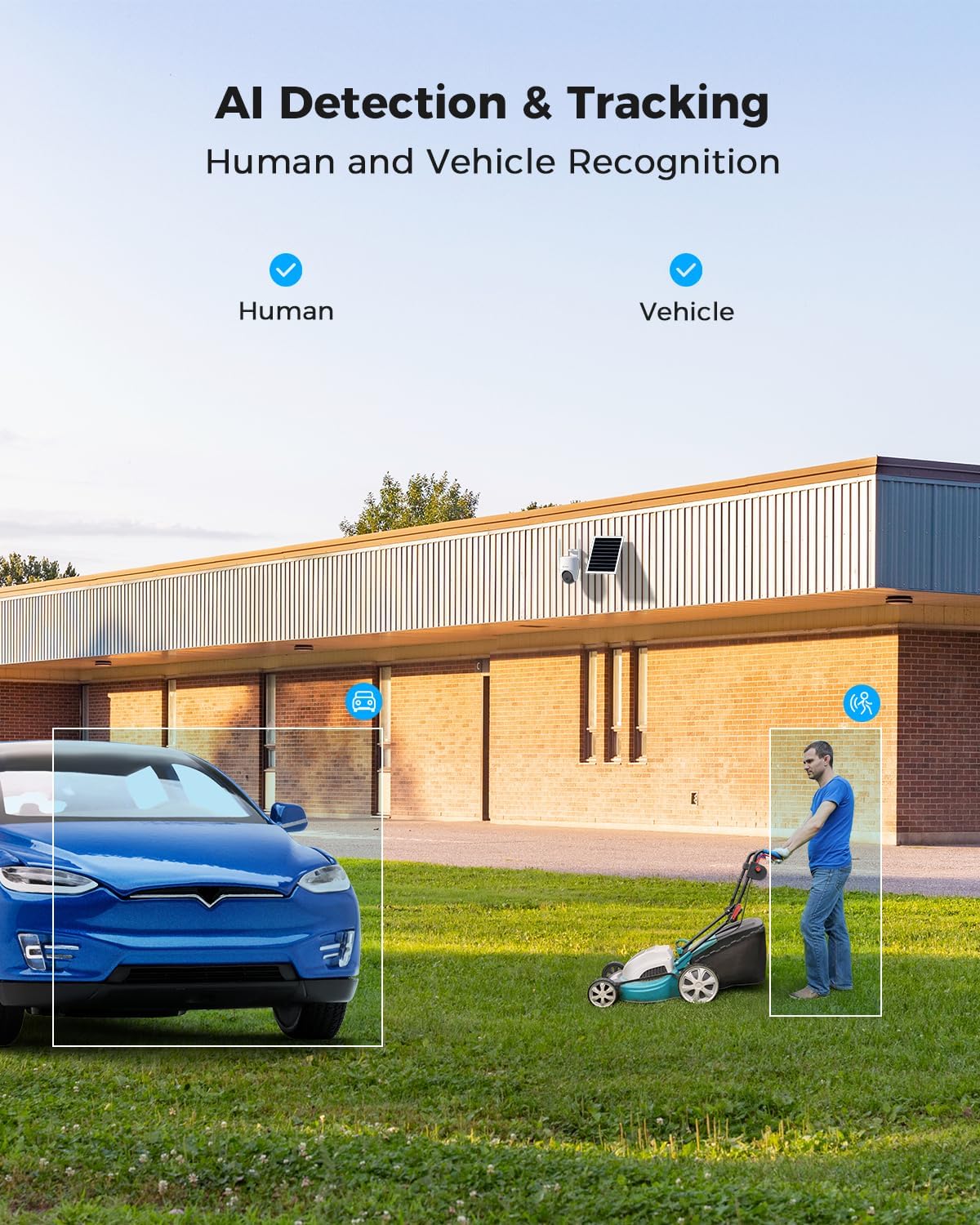
Figure 5.2: AI Detection & Tracking for Human and Vehicle Recognition. The image shows a security camera monitoring an outdoor area, with highlighted boxes indicating detected human and vehicle subjects, demonstrating its AI capabilities.
5.4 Двонасочно аудио
Комуницирајте со посетители или одвратете ги натрапниците користејќи го вградениот микрофон и звучник.
- Access the two-way audio feature through the COCOCAM app.
- Speak into your phone's microphone to transmit audio through the camera's speaker.
- Listen to audio from the camera's surroundings through your phone.
5.5 Ноќно гледање
The camera provides clear visibility up to 30 meters in complete darkness.
- Инфрацрвено ноќно гледање: Automatically activates in low-light conditions for black and white video.
- Ноќно гледање во боја: Utilizes white light LEDs to provide color video at night when activated or upon detection.

Figure 5.3: 30m Night Vision and 2K Full Color Night Vision. This image compares standard black and white night vision with the camera's full-color night vision capability, showing enhanced detail and color in low light.
6. Одржување
6.1 Грижа за батерии и соларни панели
The integrated 15000mAh battery is continuously charged by the 8W solar panel. To ensure optimal performance:
- Осигурајте се дека соларниот панел е поставен така што ќе прима максимална директна сончева светлина во текот на денот.
- Regularly clean the surface of the solar panel to remove dust, dirt, or debris that may obstruct sunlight.
- Avoid placing the solar panel in shaded areas.

Figure 6.1: 8W Solar Panel for continuous power. This image focuses on the solar panel, highlighting its 8W power output and the 3-meter cable length for flexible installation.
6.2 Чистење на камерата
- Користете мека, гamp cloth to wipe the camera lens and body.
- Не користете груби хемикалии или абразивни средства за чистење.
- Ensure the camera is dry before prolonged exposure to the elements.
6.3 Ажурирања на фирмверот
Periodically check the COCOCAM app for available firmware updates. Keeping your camera's firmware updated ensures optimal performance, new features, and security enhancements.
7 Смена на проблеми
| Проблем | Можна причина | Решение |
|---|---|---|
| Camera not connecting to app. | Incorrect pairing process, weak 4G signal, camera not powered on. | Ensure camera is powered on. Re-attempt pairing process. Check 4G signal strength at installation location. |
| Лош квалитет на видеото. | Dirty lens, low light conditions, weak 4G signal. | Clean the camera lens. Ensure adequate lighting or verify night vision is active. Check 4G signal strength. |
| Батеријата не се полни. | Solar panel obstructed, faulty connection, insufficient sunlight. | Ensure solar panel is clean and receives direct sunlight. Check cable connection between solar panel and camera. |
| AI detection not working or too many false alarms. | Incorrect sensitivity settings, detection area not configured. | Adjust AI detection sensitivity in the app. Configure specific detection zones to exclude irrelevant areas. |
| Проблеми со двонасочен звук. | Microphone/speaker obstruction, app permissions, network delay. | Ensure nothing is blocking the camera's microphone or speaker. Check app permissions for microphone access. Verify stable 4G connection. |
8. Спецификации
| Карактеристика | Детал |
|---|---|
| Име на моделот | AOV 4G Camera with 7x24 Recording |
| Број на модел на ставка | ZY-Q6 |
| Бренд | КОКОКАМ |
| Резолуција за снимање видео | 1440p (3MP, 2304*1296) |
| Опсег на пан/навалување | Панорама од 355° / навалување од 90° |
| Опсег на ноќни визии | 30 Meters (Infrared & White Light) |
| Технологија за поврзување | Wireless (4G LTE) |
| Извор на енергија | Battery Powered (15000mAh) with 8W Solar Panel |
| Опции за складирање | TF картичка (до 128GB), складирање во облак |
| Отпорност на времето | IP66 |
| Материјал | Акрилонитрил бутадиен стирен (ABS) |
| Димензии на ставката (Д x Ш x В) | 20 x 15 x 12 cm |
| Тежина на ставката | 620 гр |
| Батерии | 2 AA батерии (вклучени) |
9. Гаранција и поддршка
COCOCAM provides a доживотна гаранција за овој производ, обезбедувајќи долгорочна сигурност и задоволство на клиентите.
For technical support, troubleshooting assistance, or warranty claims, please contact COCOCAM customer service:
- Производител: КОКОКАМ
- Службен Webсајт: www.cococamtech.com
- Е-пошта: service@cococamtech.com
Please have your model number (ZY-Q6) and purchase information ready when contacting support.


