1. Производот завршиview
The VIVOTEK FD9383-HTV is a high-performance 5-megapixel outdoor network dome camera designed for robust surveillance applications. It features a 2.8-12mm motorized varifocal lens, providing flexibility in field of view, and integrated IR LEDs for clear night vision up to 98 feet. This camera is built to withstand harsh outdoor conditions with IP66 and IK10 ratings, ensuring protection against dust, water, and vandalism. It also includes a built-in microphone for audio monitoring.
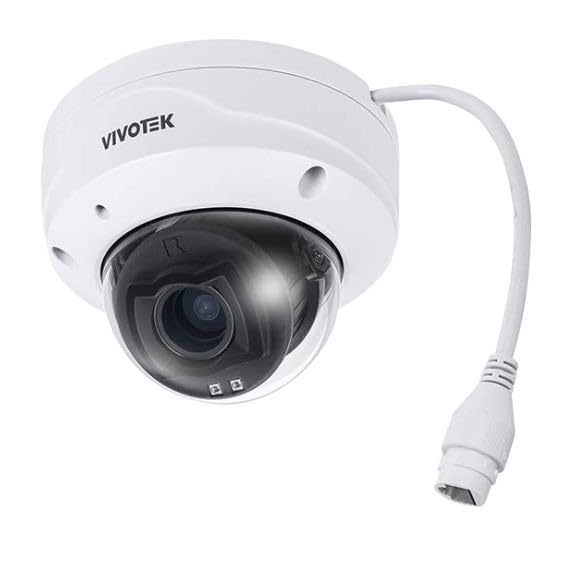
Слика 1.1: напред view of the VIVOTEK FD9383-HTV 5MP Outdoor Network Dome Camera.
Клучни карактеристики:
- 2560 x 1920 Resolution at 30 fps for high-quality video.
- IR LEDs for Night Vision up to 98 feet (30 meters).
- 2.8-12mm Motorized Varifocal Lens for flexible viewинг агли.
- 95.4 to 28.7° Horizontal Angle of View.
- Built-In Microphone for audio capture.
- IP66-Rated for outdoor use, protecting against dust and water.
- IK10-Rated for vandal resistance.
- Supports microSD Cards up to 1TB for local storage.
- RJ45 Ethernet with Power over Ethernet (PoE) Technology.
- Complies with ONVIF Profiles G, S, T for broad compatibility.
2. Содржина на пакетот
Verify that all items are present and in good condition. If any items are missing or damaged, contact your vendor immediately.
- VIVOTEK FD9383-HTV Network Dome Camera
- Комплет завртки за монтирање (завртки, ѕидни анкери)
- Комплет за водоотпорни конектори
- Alignment Sticker/Drill Template
- Водич за брза инсталација
- Софтверско ЦД (или информации за линк за преземање)
3. Информации за безбедност
Please read these safety instructions carefully before operating the device to prevent injury to yourself or others and to avoid damage to the device. Keep this manual for future reference.
- Инсталација: Installation should be performed by qualified personnel only and must comply with all local codes.
- Извор на енергија: Use only the specified power source (PoE or 12V DC adapter, if applicable) to avoid fire or electric shock.
- Животна средина: Не го изложувајте фотоапаратот на екстремни температури, влажност или корозивни средини надвор од наведените работни услови.
- Чистење: Исклучете го напојувањето пред чистење. Користете мека, сува крпа. Не користете течни или аеросолни средства за чистење.
- Сервисирање: Не обидувајте се сами да го сервисирате овој производ. Пренесете ги сите сервиси на квалификуван сервисен персонал.
4. Поставување
4.1 Физичка инсталација
The FD9383-HTV camera is designed for wall or ceiling mounting. Ensure the mounting surface is strong enough to support the camera's weight.
- Подгответе ја површината за монтирање: Use the provided drill template to mark the screw holes on the desired mounting location.
- Дупчете дупки: Drill pilot holes for the mounting screws and, if necessary, for the network cable. Insert wall anchors if mounting on drywall or masonry.
- Прикачете го држачот за монтирање: Прицврстете го држачот за монтирање на камерата на површината со помош на испорачаните завртки.
- Поврзете кабли: Route the Ethernet cable through the mounting surface or cable entry point. Connect the RJ45 connector to the camera's network port. If not using PoE, connect a 12V DC power adapter (sold separately) to the power input. Ensure waterproof connections for outdoor installations.
- Secure Camera Body: Attach the camera body to the mounting bracket. Adjust the camera's orientation and angle as needed.
- Завршете ја инсталацијата: Secure all covers and ensure the camera is firmly mounted and protected from the elements.

Image 4.1: Illustrative diagram of camera mounting and cable connection.
4.2 мрежно поврзување
The camera supports Power over Ethernet (PoE) for simplified installation, allowing both power and data to be transmitted over a single Ethernet cable.
- Connect the camera to a PoE-enabled switch or a PoE injector using a standard Ethernet cable.
- Alternatively, connect to a standard network switch and use a separate 12V DC power adapter.
- Ensure your network is configured to assign an IP address to the camera (DHCP recommended for initial setup).
4.3 Почетна конфигурација
After physical installation and network connection, you need to access the camera's web интерфејс за почетна конфигурација.
- Откријте ја камерата: Use VIVOTEK's IP Search utility (available on their website) or a network scanner to find the camera's IP address on your network.
- Пристап Web Интерфејс: Отвори a web прелистувач (на пр., Chrome, Firefox) и внесете ја IP адресата на камерата во полето за адреса.
- Најавете се: The default username is typically 'root' and the password is 'pass'. You will be prompted to change the password upon first login for security reasons.
- Основни поставки: Configure essential settings such as date/time, network settings (if not using DHCP), and user accounts.
5. Работење
5.1 Accessing the Camera Interface
Откако ќе се конфигурира, можете да пристапите до преносот во живо на камерата view and settings through its web interface or compatible VIVOTEK software/NVR systems.
- Enter the camera's IP address in your web прелистувач.
- Log in with your configured username and password.
- The interface provides access to live video, recording settings, motion detection, and other advanced features.
5.2 Adjusting Lens and Focus
The FD9383-HTV features a motorized varifocal lens, allowing remote adjustment of zoom and focus.
- Navigate to the 'Video' or 'Lens' settings section in the web интерфејс.
- Use the zoom controls to adjust the focal length (2.8mm to 12mm) to achieve the desired field of view.
- Utilize the focus controls to sharpen the image. Many VIVOTEK cameras offer a one-touch focus feature for automatic adjustment.
5.3 Night Vision Settings
The camera automatically switches to night vision mode in low-light conditions using its IR LEDs.
- In the 'Image' or 'IR' settings, you can configure the IR illuminator's behavior (e.g., auto, manual on/off).
- Adjust IR intensity if available, to prevent overexposure or underexposure in specific scenarios.
5.4 Снимање и складирање
The camera supports various recording methods, including local storage on a microSD card and network video recording (NVR).
- MicroSD картичка: Insert a compatible microSD card (up to 1TB) into the camera's slot. Format the card via the web interface. Configure recording schedules and triggers (e.g., continuous, motion-triggered).
- NVR/NAS: Connect the camera to a VIVOTEK NVR or a compatible Network Attached Storage (NAS) device. Configure recording settings on the NVR/NAS.
5.5 Детекција на движење
Configure motion detection to trigger recordings, send alerts, or activate other actions.
- Access the 'Event' or 'Motion Detection' settings in the web интерфејс.
- Define detection zones within the camera's field of view.
- Прилагодете ги нивоата на чувствителност за да ги минимизирате лажните аларми.
- Set up actions to be taken when motion is detected (e.g., record video, send email notification).
6. Одржување
6.1 Чистење
Редовното чистење помага во одржувањето на оптимален квалитет на сликата и го продолжува животниот век на камерата.
- Објектив: Gently wipe the lens with a soft, lint-free cloth. For stubborn dirt, use a lens cleaning solution specifically designed for optical surfaces. Avoid abrasive materials.
- Домување: Избришете го куќиштето на камерата со рекламаamp крпа. Не користете силни детергенти или растворувачи.
- Купола за покривање: If applicable, carefully clean the dome cover to ensure clear visibility.
6.2 Ажурирања на фирмверот
Periodically check the VIVOTEK website for firmware updates. Firmware updates often include bug fixes, performance improvements, and new features.
- Download the latest firmware for your FD9383-HTV model from the official VIVOTEK support page.
- Пристапете до камерата web interface and navigate to the 'System' or 'Maintenance' section.
- Следете ги упатствата на екранот за да го поставите и инсталирате фирмверот. Не исклучувајте го фотоапаратот за време на процесот на ажурирање.
7 Смена на проблеми
This section provides solutions to common issues you might encounter with your VIVOTEK FD9383-HTV camera.
| Проблем | Можна причина | Решение |
|---|---|---|
| Камерата не се вклучува | No power from PoE switch/injector; faulty power adapter; loose cable connection. | Check PoE status on switch; verify power adapter functionality; ensure all cables are securely connected. |
| Не може да се пристапи до камерата преку мрежа | Incorrect IP address; network cable issue; firewall blocking access; camera not receiving an IP address. | Verify IP address; check network cable integrity; temporarily disable firewall; use IP Search utility to find camera. |
| Лош квалитет на сликата (матна, темна) | Lens out of focus; dirty lens/dome; insufficient lighting; incorrect image settings. | Прилагодете го фокусот преку web interface; clean lens/dome; check IR settings; reset image settings to default. |
| Откривањето на движење не работи | Detection zones not configured; sensitivity too low; event actions not set up. | Configure detection zones; increase sensitivity; ensure event actions (e.g., record, notify) are enabled. |
| MicroSD картичката не снима | Card not formatted; card full; recording schedule not active; faulty card. | Format microSD card in camera settings; check recording schedule; replace card if faulty. |
8. Спецификации
Detailed technical specifications for the VIVOTEK FD9383-HTV camera.
| Карактеристика | Спецификација |
|---|---|
| Сензор за слика | 1/2.8" Type CMOS |
| Резолуција | 2560 x 1920 со 30 fps |
| Фокусна должина | 2.8 to 12mm Motorized Varifocal Lens |
| Хоризонтален агол на View | 95.4 до 28.7° |
| Ноќна визија | IR LEDs up to 98 feet (30 meters) |
| Аудио | Вграден микрофон |
| Складирање | Supports microSD Cards up to 1TB |
| Мрежен интерфејс | 1x RJ45 Input (PoE) |
| Оценка за животна средина | IP66 (отпорен на прашина и вода) |
| Вандалски отпор | IK10-Rated |
| Усогласеност со ONVIF | Проfiles G, S, T |
| Димензии на производот | 5.3 x 4.1 x 4.1 инчи (13.5 x 10.4 x 10.4 см) |
| Тежина на ставката | 1.9 фунти (0.86 кг) |
9. Гаранција и поддршка
VIVOTEK products are covered by a limited warranty. For specific warranty terms and conditions, please refer to the warranty card included with your product or visit the official VIVOTEK webсајт.
For technical support, product documentation, and software downloads, please visit the VIVOTEK official support portal:
https://www.vivotek.com/support
When contacting support, please have your camera's model number (FD9383-HTV) and serial number ready.


