1. Вовед
This manual provides detailed instructions for the safe and effective use of your KKnoon Digital Multimeter, specifically focusing on the FY128 model. This compact and intelligent electrical tester is designed for accurate measurements of various electrical parameters, making it suitable for professionals, educational institutions, and home users. It adheres to the safety requirements of the International Electrotechnical Safety Standard (IEC-61010) for electronic measuring instruments.
The multimeter features a 5999-count backlit LCD for clear readings, along with functions for AC/DC voltage, resistance, frequency, continuity, live wire checking, and Non-Contact Voltage (NCV) детекција.

Слика 1: Предна страна view of the KKnoon Digital Multimeter (Model FY128) showing the display and control buttons.
2. Информации за безбедност
To ensure safe operation and prevent damage to the meter, please read and follow all safety instructions carefully. Improper use can result in electric shock or damage to the instrument.
- Always verify the meter's functionality before use by testing a known voltagе или тековен извор.
- Не ги надминувајте максималните влезни вредности наведени за секој опсег на мерење.
- Ensure test leads are in good condition, free from cracks or damaged insulation, before connecting them to any circuit.
- Never use the meter if it appears damaged or if the casing е отворено.
- Бидете внимателни кога работите со волtagнад 30V AC RMS, 42V врв или 60V DC. Овие волумениtagтие претставуваат опасност од шок.
- Извадете ги мерните сонди од колото пред да ги промените функциите или опсезите.
- Веднаш заменете ги батериите кога ќе се појави индикаторот за слаба батерија за да се обезбедат точни мерења.
- Не ракувајте со мерачот во експлозивен гас, пареа или прашливи средини.
3. Карактеристики на производот
The KKnoon Digital Multimeter offers a range of features designed for convenience and accuracy:
- Мулти-функционалност: Мери AC/DC Voltage, Resistance, Frequency, Continuity, Live Wire Checking, and NCV (Non-Contact Voltagд)
- Two Measurement Modes:
- Auto Identification: Автоматски детектира и мери јачина на звук на AC/DCtage, frequency, resistance, and continuity.
- Рачно префрлување: Allows selection of specific functions including AC/DC voltage, frequency, resistance, continuity, diode, capacitance (FY129C only), and LIVE NCV.
- Задржување на податоци: Lock the current measurement reading on the display with a single button press.
- Голем LCD дисплеј: Provides clear and easy-to-read values with a 5999-count resolution.
- Flashlight & Screen Backlight: Ја подобрува видливоста во услови на слаба осветленост.
- Compact Design with Bracket: Portable and includes a built-in support bracket for hands-free operation.
- Усогласеност со безбедноста: Designed and produced according to IEC-61010 safety standards.

Figure 2: The multimeter's large LCD display clearly shows various measurement functions.

Figure 3: The integrated support bracket allows for convenient hands-free use.
4. Содржина на пакетот
По отварањето на пакувањето, проверете дали сите артикли наведени подолу се присутни и во добра состојба:
- 1 x KKnoon Digital Multimeter (Model FY128)
- 1 x пар мерни кабли (црвена и црна)
- 1 x Упатство за користење (англиски)
5. Поставување
5.1 Инсталација на батерија
Мултиметарот бара 2 x 1.5V AAA батерии (не се вклучени). За да инсталирате или замените батерии:
- Осигурајте се дека мултиметарот е исклучен и дека тест каблите се исклучени.
- Пронајдете го капакот на преградата за батерии на задната страна од уредот.
- Користете шрафцигер за да ја отворите преградата за батерии.
- Вметнете две батерии од 1.5 V AAA, почитувајќи го точниот поларитет (+/-) како што е наведено во преградата.
- Вратете го капакот на преградата за батерии и прицврстете го со завртката.
5.2 Поврзување на тест кабли
Мултиметарот доаѓа со пар мерни сонди (црвена и црна). Поврзете ги на следниов начин:
- Вметнете го црниот мерен кабел во влезниот приклучок „COM“ (Заеднички).
- Вметнете ја црвената мерна сонда во приклучокот „INPUT“ за повеќето мерења (волуменtage, Resistance, Frequency, Continuity, Diode, Capacitance).

Figure 4: Labeled diagram of the multimeter's functions and input jacks.
6. Упатства за работа
6.1 Вклучување/исклучување
Притиснете го црвеното копче за вклучување (Копче за вклучување) to turn the multimeter on or off. The device features an auto-shutdown function to conserve battery life after a period of inactivity.
6.2 Режими на мерење
The multimeter offers two primary measurement modes:

Figure 5: The multimeter supports both auto identification and manual switching modes.
- Режим на автоматска идентификација: When powered on, the meter defaults to auto identification. In this mode, it automatically detects and measures AC/DC voltage, frequency, resistance, and continuity. Simply connect the test leads to the circuit, and the meter will display the relevant measurement.
- Режим на рачно префрлување: To access specific functions not covered by auto identification or to manually select a range, press the 'NCV/LIVE' button (or other function buttons if available on your specific model, e.g., FY129C for Diode/Capacitance). This allows you to cycle through AC/DC voltage, frequency, resistance, continuity, LIVE, and NCV.
6.3 Мерење AC/DC Voltage
- Connect the black test lead to the 'COM' jack and the red test lead to the 'INPUT' jack.
- If in auto identification mode, the meter will automatically detect voltage. If in manual mode, select the appropriate AC or DC voltage функција.
- Поврзете ги мерните сонди паралелно преку компонентата или колото што треба да се мери.
- Прочитајте го томtagе вредност на LCD екранот.
6.4 Мерење на отпор
- Пред мерење на отпорот, проверете дали колото е исклучено од напон.
- Connect the black test lead to 'COM' and the red test lead to 'INPUT'.
- If in auto identification mode, the meter will automatically detect resistance. If in manual mode, select the resistance function (Ω).
- Поврзете ги мерните сонди преку компонентата чиј отпор сакате да го измерите.
- Прочитајте ја вредноста на отпорот на LCD екранот.
6.5 Мерење на фреквенција
- Connect the black test lead to 'COM' and the red test lead to 'INPUT'.
- If in auto identification mode, the meter will automatically detect frequency. If in manual mode, select the frequency function (Hz).
- Поврзете ги мерните сонди со колото каде што треба да се мери фреквенцијата.
- Прочитајте ја вредноста на фреквенцијата на LCD дисплејот.
6.6 Тест за континуитет
- Осигурајте се дека колото е исклучено од напон.
- Connect the black test lead to 'COM' and the red test lead to 'INPUT'.
- If in auto identification mode, the meter will automatically detect continuity. If in manual mode, select the continuity function (★)).
- Touch the test leads to the two points of the circuit or component you want to test.
- A continuous beep indicates a low resistance path (continuity). The display will show the resistance value.
6.7 Live Wire Checking
This function helps identify live AC wires.
- Connect the black test lead to 'COM' and the red test lead to 'INPUT'.
- Press the 'NCV/LIVE' button until 'LIVE' is indicated on the display.
- Insert the red test lead into the socket or touch it to the wire you suspect is live.
- The meter will beep and the display will indicate 'LIVE' if a live wire is detected.
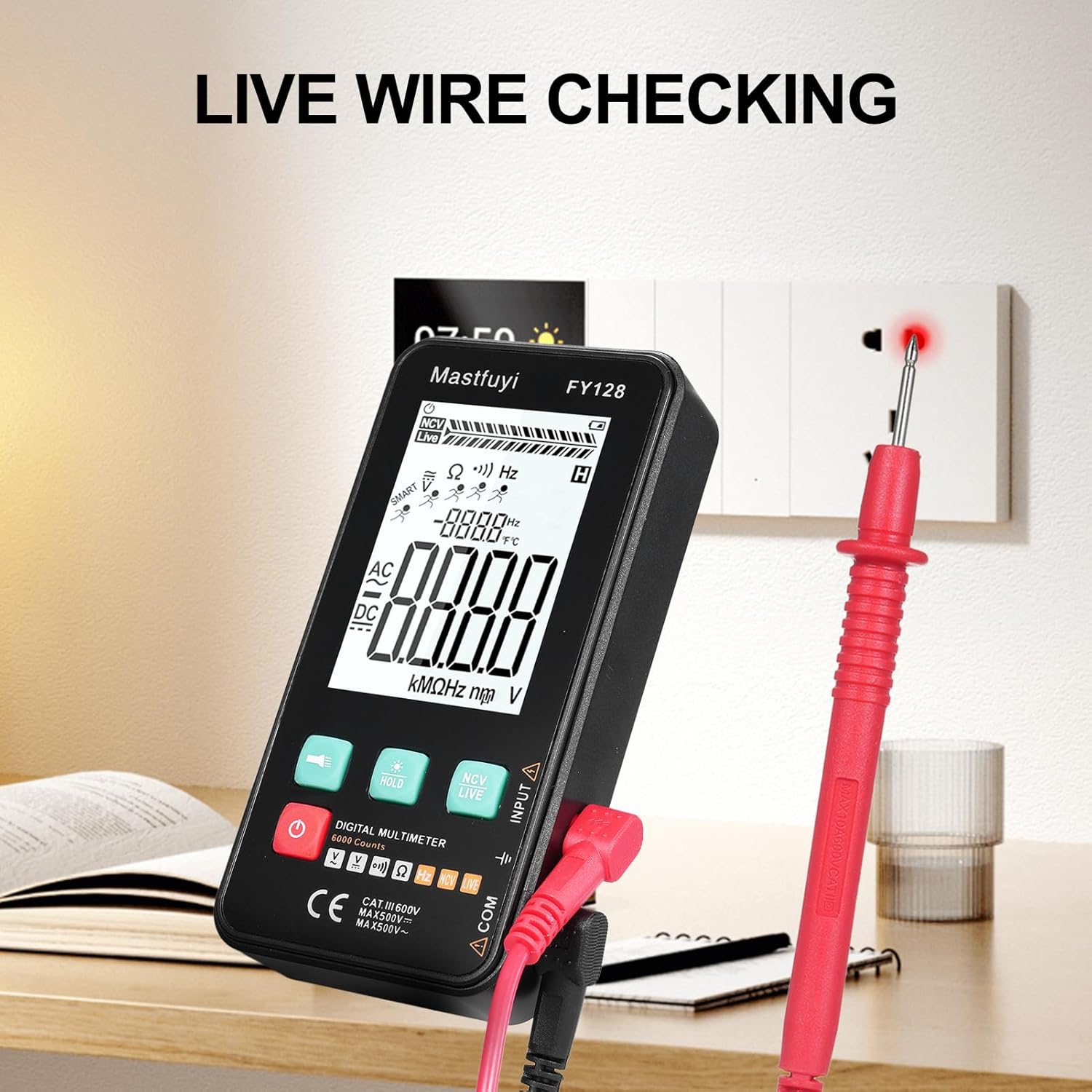
Figure 6: Using the multimeter for live wire detection.
6.8 NCV (бесконтактен волуменtagд) Тест
Функцијата NCV овозможува детекција на волумен на ACtagд без директен контакт.
- Press the 'NCV/LIVE' button until 'NCV' is indicated on the display.
- Bring the top front part of the multimeter close to the wire or electrical outlet.
- The meter will beep and the NCV indicator on the display will illuminate or increase in intensity as it detects AC voltage.

Слика 7: Безконтактна јачина на звукtage (NCV) detection in progress.
6.9 Функција за задржување податоци
To freeze the current reading on the display, press the 'HOLD' button. Press it again to release the hold and resume live measurements.
6.10 Flashlight & Backlight
Press the flashlight button (🔦) to turn on the built-in flashlight. Long press the 'HOLD' button to activate the screen backlight for improved visibility in dark environments.
7. Одржување
7.1 Замена на батеријата
Кога на екранот ќе се појави индикаторот за слаба батерија, заменете ги батериите како што е опишано во Дел 5.1. Секогаш користете нови батерии од 1.5V AAA.
7.2 Чистење
За чистење на мултиметарот, избришете го куќиштето со адхезија.amp крпа и благ детергент. Не користете абразивни средства или растворувачи. Пред употреба, проверете дали уредот е целосно сув.
7.3 Складирање
If the multimeter is not used for an extended period, remove the batteries to prevent leakage and corrosion. Store the device in a cool, dry place, away from direct sunlight and extreme temperatures.
8 Смена на проблеми
Доколку наидете на проблеми со вашиот мултиметар, погледнете ги следните вообичаени проблеми и решенија:
| Проблем | Можна причина | Решение |
|---|---|---|
| Нема екран или екранот е затемнет | Low or dead batteries; Incorrect battery installation | Заменете ги батериите; проверете го поларитетот на батериите |
| Неточни читања | Low batteries; Damaged test leads; Incorrect function selected | Replace batteries; Inspect/replace test leads; Select correct measurement function |
| Тестот за континуитет не дава звучен сигнал | Open circuit; High resistance; Incorrect function | Ensure circuit is closed; Check for breaks; Select continuity function |
| Мерачот не реагира | Frozen display (Data Hold); Internal fault | Press 'HOLD' button to release; Contact customer support if issue persists |
9. Спецификации
The following specifications apply to the KKnoon Digital Multimeter Model FY128 (and FY128C, unless specified for FY129C):
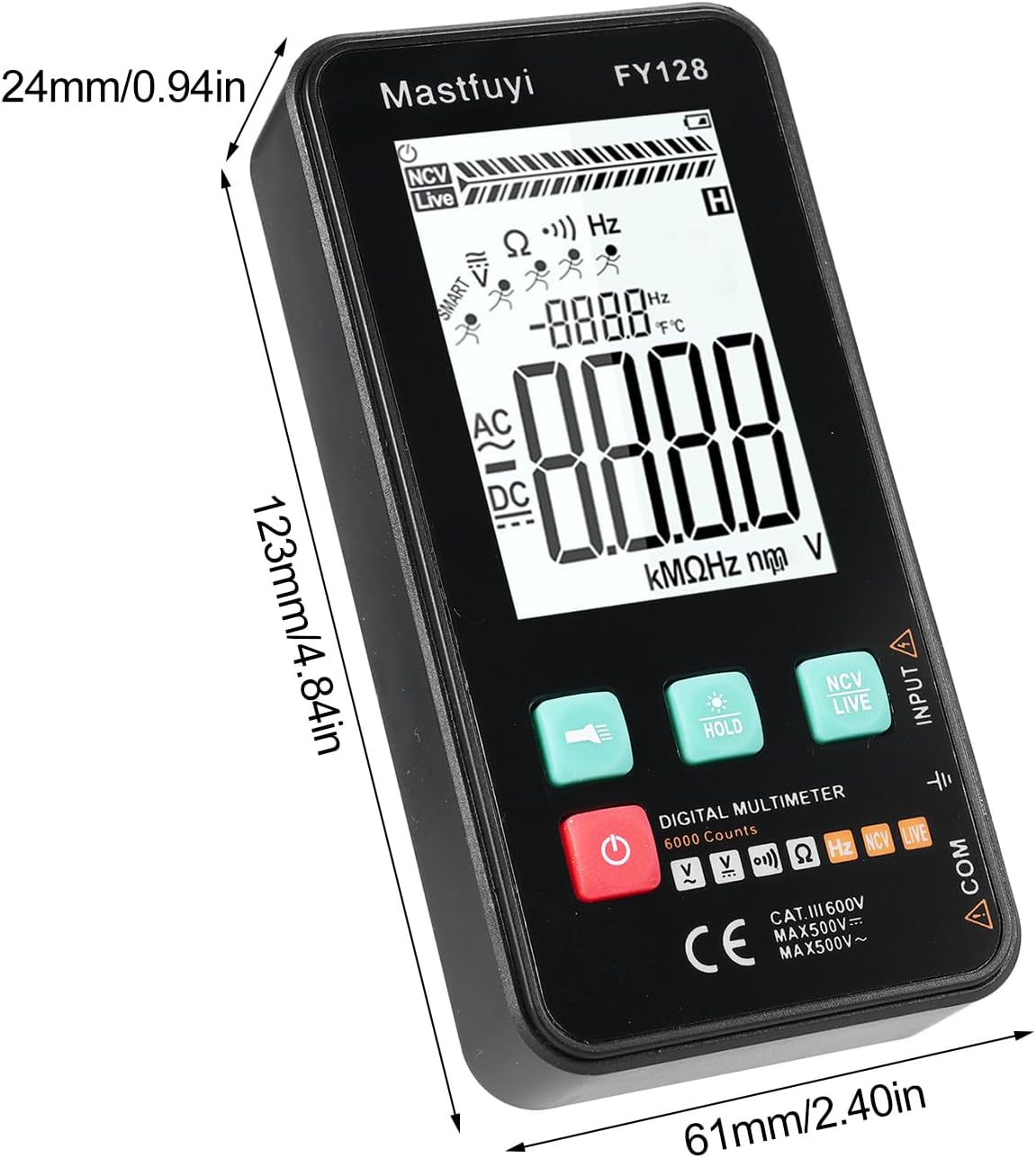
Figure 8: Physical dimensions of the KKnoon Digital Multimeter.
| Параметар | Specification (FY128/FY128C) | Specification (FY129C - if different) |
|---|---|---|
| AC Voltage | 1V~500V, ±(1.5%+3) | 0.8V~500V, ±(1.5%+5) |
| DC Voltage | 0.5V~500V, ±(1.2%+5) | 0.8V~500V, ±(1.2%+5) |
| Отпор | 30Ω~10000KΩ, ±(2%+5) | 30Ω~60000KΩ, ±(2%+5) |
| Фреквенција | 40Hz~1000Hz, ±(2.5%+5) | 10Hz~6000Hz, ±(2.5%+5) |
| Капацитет | N/A | 6nf~60000µf, ±(2.5%+5) |
| Температура | N/A | -20℃~1000℃, ±(5%+4) |
| Амбиентална температура | N/A | 0℃~70℃ |
| Диода | бр | Да |
| Континуитет | Да | Да |
| NCV | Да | Да |
| Проверка на жици во живо | Да | Да |
| Автоматско исклучување | Да | Да |
| Напојување | 2 * 1.5V AAA batteries (Not included) | 2 * 1.5V AAA batteries (Not included) |
| Големина на ставка | 123 * 61 * 24 мм / 4.84 * 2.40 * 0.94 инчи | 123 * 61 * 24 мм / 4.84 * 2.40 * 0.94 инчи |
| Тежина на ставката | 113 g / 3.98 oz | 113 g / 3.98 oz |
10. Гаранција и поддршка
For warranty information or technical support, please refer to the product packaging or contact your retailer. Keep your purchase receipt as proof of purchase. For general inquiries, you may visit the KKnoon brand page on Amazon.
