1. Вовед
This user manual provides detailed instructions for the Baseus 17-in-1 Docking Station (Model: B0D78WFLST). This versatile docking station is designed to expand the connectivity of your laptop or compatible device, offering multiple ports for display, data transfer, networking, and power delivery. Please read this manual thoroughly before using the product to ensure proper operation and to maximize its capabilities.
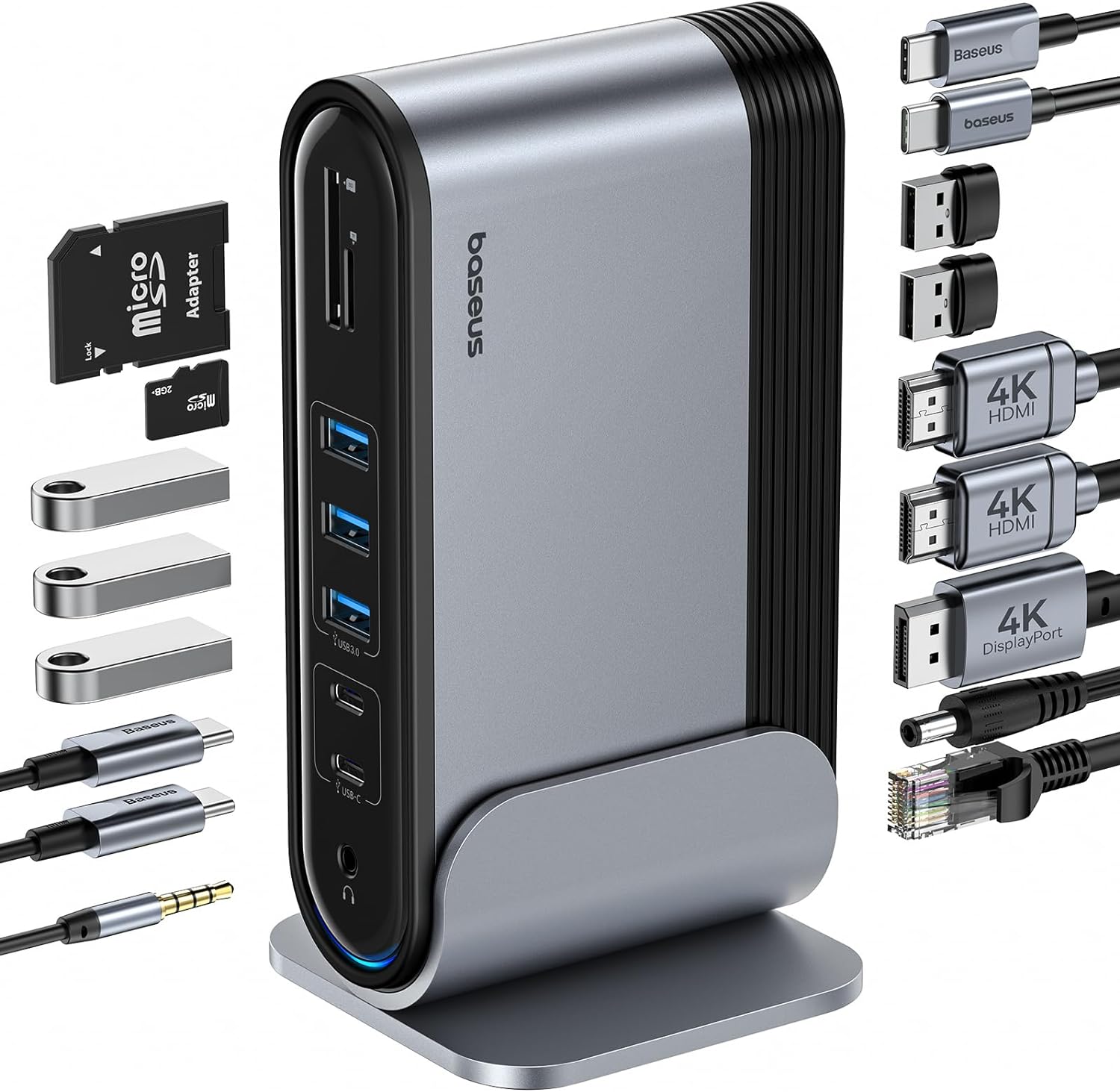
Слика 1: Докинг станица Baseus 17-во-1 и вклучени додатоци.
2. Клучни карактеристики
The Baseus 17-in-1 Docking Station offers comprehensive connectivity solutions:
- 17-in-1 Port Expansion: Integrates a wide array of ports for diverse connectivity needs.
- Поддршка за троен монитор: Connect up to three external monitors for enhanced productivity.
- Екран со висока резолуција: Supports 4K@60Hz resolution for single and dual displays, and 1080P@60Hz for triple displays on Windows systems.
- Брз пренос на податоци: Features USB 3.0 ports with 5Gbps transfer speeds and USB 2.0 ports for peripherals.
- Испорака на енергија од 100 W: Provides up to 85W power output to charge your laptop (100W input required).
- Гигабитен етернет: Ensures stable and high-speed wired network connection up to 1Gbps.
- SD/TF читач на картички: Convenient access to memory cards with speeds up to 104 MB/s.
- Аудио поврзување: Integrated 3.5mm audio jack for headphones or speakers.
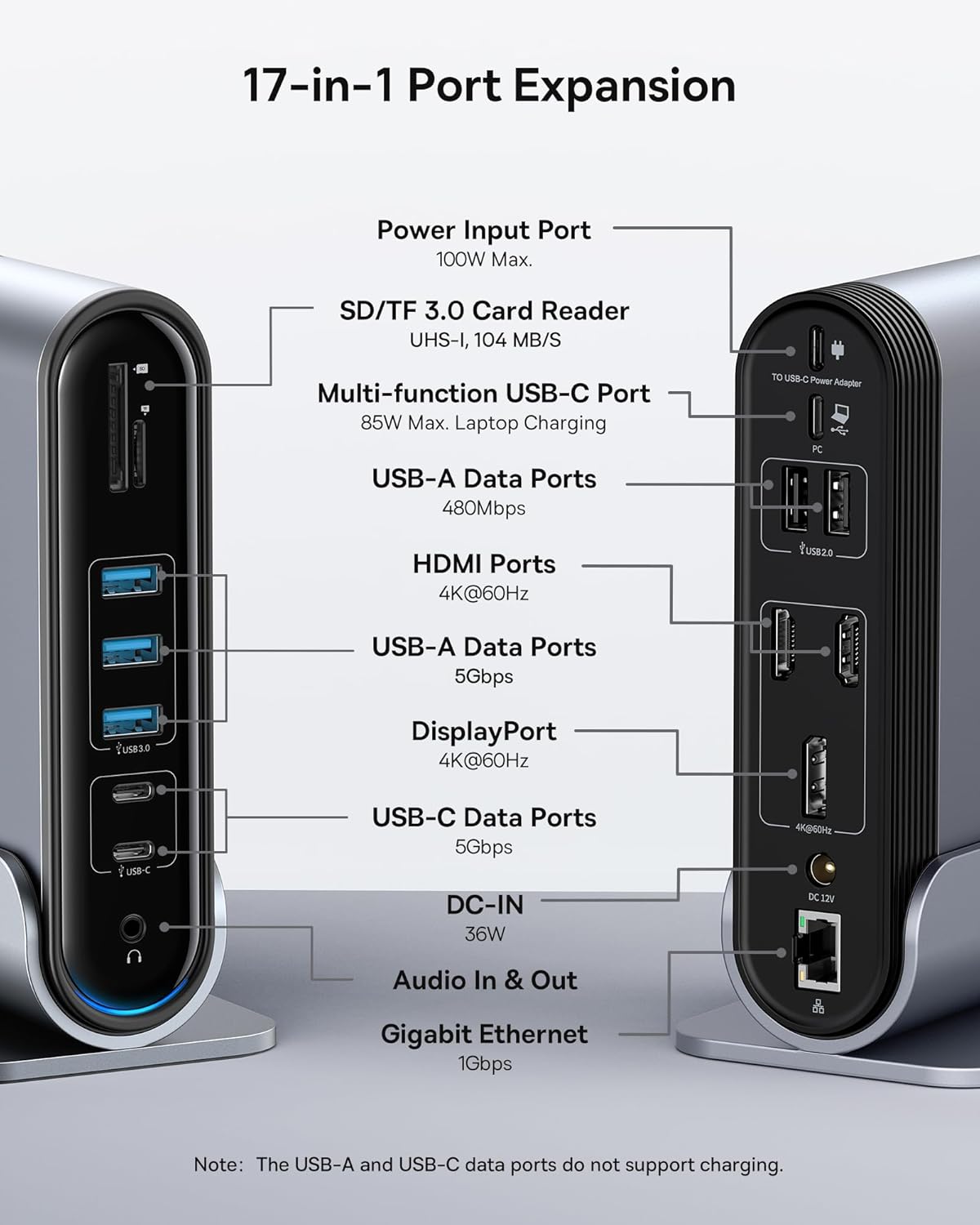
Figure 2: Detailed port layout and specifications of the docking station.
3. Содржина на пакетот
Ве молиме проверете дали сите артикли се присутни во пакетот:
- Станица за приклучување со троен екран на Baseus UnionJoy 17 порти
- Док штанд
- Адаптер за напојување
- Кабел USB-C на USB-C
- Адаптер за приклучок за САД
- Адаптер за приклучок од ЕУ
- Адаптер за приклучок во Велика Британија
- Упатство за употреба

Слика 3: Што е вклучено во кутијата.
4. Упатства за поставување
Следете ги овие чекори за да ја поставите вашата докинг станица Baseus 17-во-1:
- Поврзете напојување:
Connect the provided power adapter to the DC-IN port (36W) on the docking station. Use the appropriate regional adapter plug (US, EU, or UK) for your power outlet. For laptop charging, ensure a 100W PD charger (not included) is connected to the Power Input Port (100W Max.) on the docking station.

Figure 4: Power connection for the docking station and laptop charging.
- Поврзете се со домаќинскиот уред:
Use the included USB-C to USB-C cable to connect the docking station's Multi-function USB-C Port (85W Max. Laptop Charging) to your laptop or compatible host device.
- Поврзете ги мониторите:
Connect your external monitors to the HDMI Ports (4K@60Hz) and/or DisplayPort (4K@60Hz) on the docking station using appropriate cables. Refer to the "Operating Instructions" section for display mode configurations.
- Поврзете периферни уреди:
Connect your USB devices (keyboard, mouse, external drives, etc.) to the available USB-A Data Ports (5Gbps or 480Mbps) and USB-C Data Ports (5Gbps). Insert SD or TF cards into the respective card reader slots.
- Поврзување на мрежа (опционално):
For a wired network connection, connect an Ethernet cable from your router/modem to the Gigabit Ethernet port (1Gbps) on the docking station.
- Поврзете аудио (опционално):
Connect headphones or speakers to the 3.5mm Audio In & Out jack.
5. Упатства за работа
5.1 Режими на прикажување
The docking station supports various display configurations depending on your operating system and the number of connected monitors.
За Windows системи:
- Mirror Mode (A+A+A): Displays the same content on all connected monitors and the laptop screen. Supports 1080P@60Hz.
- Extend Mode (A+B+C): Extends your desktop across multiple monitors, allowing different content on each screen. Supports 1080P@60Hz for triple display.
За macOS системи:
- Mirror Mode (A+A+A): Displays the same content on all connected monitors and the laptop screen. Supports 4K@60Hz.
- Extend Mode (A+B+B): Extends your desktop across external monitors, but macOS typically mirrors content across multiple external displays when using a single MST hub. Supports 4K@60Hz.
- Note: macOS does not support triple extended display (A+B+C) through a single MST hub.

Figure 5: Display mode configurations for Windows and macOS.

Figure 6: Detailed resolution capabilities for various display configurations and DP versions.
5.2 Пренос на податоци
Докинг станицата овозможува брз пренос на податоци:
- USB 3.0 (5Gbps): Ideal for external hard drives, SSDs, and other high-bandwidth devices.
- USB 2.0 (480Mbps): Suitable for keyboards, mice, printers, and other standard peripherals.
- SD/TF читач на картички: Quickly transfer photos and videos from memory cards.

Figure 7: Illustrating super-fast data transfer via the docking station.
5.3 Испорака на енергија
The docking station supports Power Delivery (PD) to charge your laptop:
- Connect a 100W PD charger (not included) to the dedicated Power Input Port on the docking station.
- The docking station will then provide up to 85W of power to your connected laptop via the USB-C host connection.
Note: The USB-A and USB-C data ports on the front of the docking station do not support charging.
6. Одржување и грижа
To ensure the longevity and optimal performance of your docking station, follow these guidelines:
- Одржувајте го уредот чист со бришење со мека, сува крпа. Избегнувајте употреба на абразивни средства за чистење или растворувачи.
- Do not expose the docking station to water, moisture, or extreme temperatures.
- Избегнувајте паѓање или изложување на уредот на силни удари.
- Обезбедете соодветна вентилација околу приклучната станица за да спречите прегревање.
- Исклучете ги сите кабли кога уредот не се користи подолг период.
7 Смена на проблеми
If you encounter issues with your Baseus 17-in-1 Docking Station, refer to the following common problems and solutions:
7.1 No Display Output / Flickering Screen
- Проверете ги поврзувањата на кабелот: Ensure all HDMI/DisplayPort cables are securely connected to both the docking station and the monitors.
- Verify Host Connection: Confirm the USB-C cable connecting the docking station to your laptop is firmly plugged in.
- Напојување: Make sure the docking station is receiving adequate power from its power adapter.
- Поставувањата на екранот: Check your computer's display settings (e.g., Windows Display Settings, macOS System Preferences > Displays) to ensure the external monitors are detected and configured correctly (Extend, Mirror).
- Ажурирања на возачот: Ensure your laptop's graphics drivers and USB-C drivers are up to date.
- Компатибилност на резолуцијата: Verify that the selected resolution and refresh rate are supported by your monitors and the docking station. Refer to the "Multiple Display Modes" table in Section 5.1.
- macOS Triple Display: Remember that macOS does not support triple extended display (A+B+C) through a single MST hub.
7.2 USB Devices Not Working
- Reconnect Device: Unplug and re-plug the USB device from the docking station.
- Пробај различен порт: Test the USB device in another USB port on the docking station or directly on your laptop to isolate the issue.
- Напојување: Ensure the docking station has sufficient power, especially for power-hungry USB devices.
- Проблеми со возачот: Check if the USB device requires specific drivers and ensure they are installed on your computer.
7.3 Лаптопот не се полни
- 100W PD Charger: Confirm you are using a 100W Power Delivery charger connected to the dedicated Power Input Port on the docking station. The docking station itself does not generate power for your laptop.
- USB-C кабел: Ensure the USB-C cable connecting the docking station to your laptop supports power delivery.
- Компатибилност со лаптоп: Verify your laptop supports charging via its USB-C port.
7.4 Ethernet Connection Issues
- Проверка на кабел: Осигурајте се дека Ethernet кабелот е безбедно поврзан и со приклучната станица и со вашиот рутер/модем.
- Мрежни поставки: Проверете ги мрежните поставки на вашиот компјутер за да се осигурате дека Ethernet адаптерот е овозможен и правилно конфигуриран.
- Рутер/Модем: Verify your router/modem is functioning properly.
8. Спецификации
| Карактеристика | Спецификација |
|---|---|
| Модел | B0D78WFLST |
| Бренд | Басеус |
| Вкупно порти | 17 |
| HDMI порти | 2 (4K@60Hz) |
| DisplayPort | 1 (4K@60Hz) |
| USB-A податочни порти | 7 (3x 5Gbps, 4x 480Mbps) |
| USB-C податочни порти | 2 (5Gbps) |
| Достава на енергија (Влез) | 100W Max (via dedicated PD port) |
| Power Output (to Laptop) | 85W Max (via Multi-function USB-C Port) |
| Етернет порта | 1 (1Gbps Gigabit Ethernet) |
| Читач на картички | SD/TF (UHS-I, 104 MB/s) |
| Аудио Џек | 3.5 мм аудио влез и излез |
| Компатибилни уреди | Dell, HP, Mac, Lenovo, Steam Deck, etc. |
| Димензии | 9.29 x 8.27 x 2.28 инчи |
| Тежина на ставката | 1.9 фунти |
9. Гаранција и поддршка
За информации за гаранцијата и техничка поддршка, ве молиме погледнете го официјалниот Baseus website or contact Baseus customer service directly. Keep your purchase receipt as proof of purchase for warranty claims.
Официјален претставник на Baseus Webсајт: www.baseus.com
За дополнителна помош, можете да го контактирате продавачот и преку платформата каде што сте го купиле производот.


