1. Вовед
The Eureka Forbes Smart Air Purifier 355 is designed to provide clean and healthy indoor air. This device features a 4-stage advanced purification system, including a True H13 HEPA filter, and offers smart control via Wi-Fi connectivity. It is capable of purifying air in spaces up to 480 sq. ft. by removing 99.97% of impurities as small as 0.1 µm.
This manual provides detailed instructions for the proper setup, operation, and maintenance of your air purifier to ensure optimal performance and longevity.
2. Важни безбедносни информации
Внимателно прочитајте ги сите упатства пред да го користите апаратот. Зачувајте го ова упатство за во иднина.
- Обезбедете ја јачината на напојувањетоtage се совпаѓа со етикетата со спецификации на апаратот.
- Не ракувајте со апаратот со оштетен кабел или приклучок.
- Чувајте ги влезот и излезот на воздухот од препреки.
- Не потопувајте го апаратот во вода или други течности.
- Исклучете го апаратот од струја пред чистење или вршење на какво било одржување.
- Овој апарат е само за внатрешна употреба.
3. Производот завршиview
The Eureka Forbes Smart Air Purifier 355 features a sleek design with 360° air intake for comprehensive purification. The top panel includes a digital display and touch controls for easy operation.
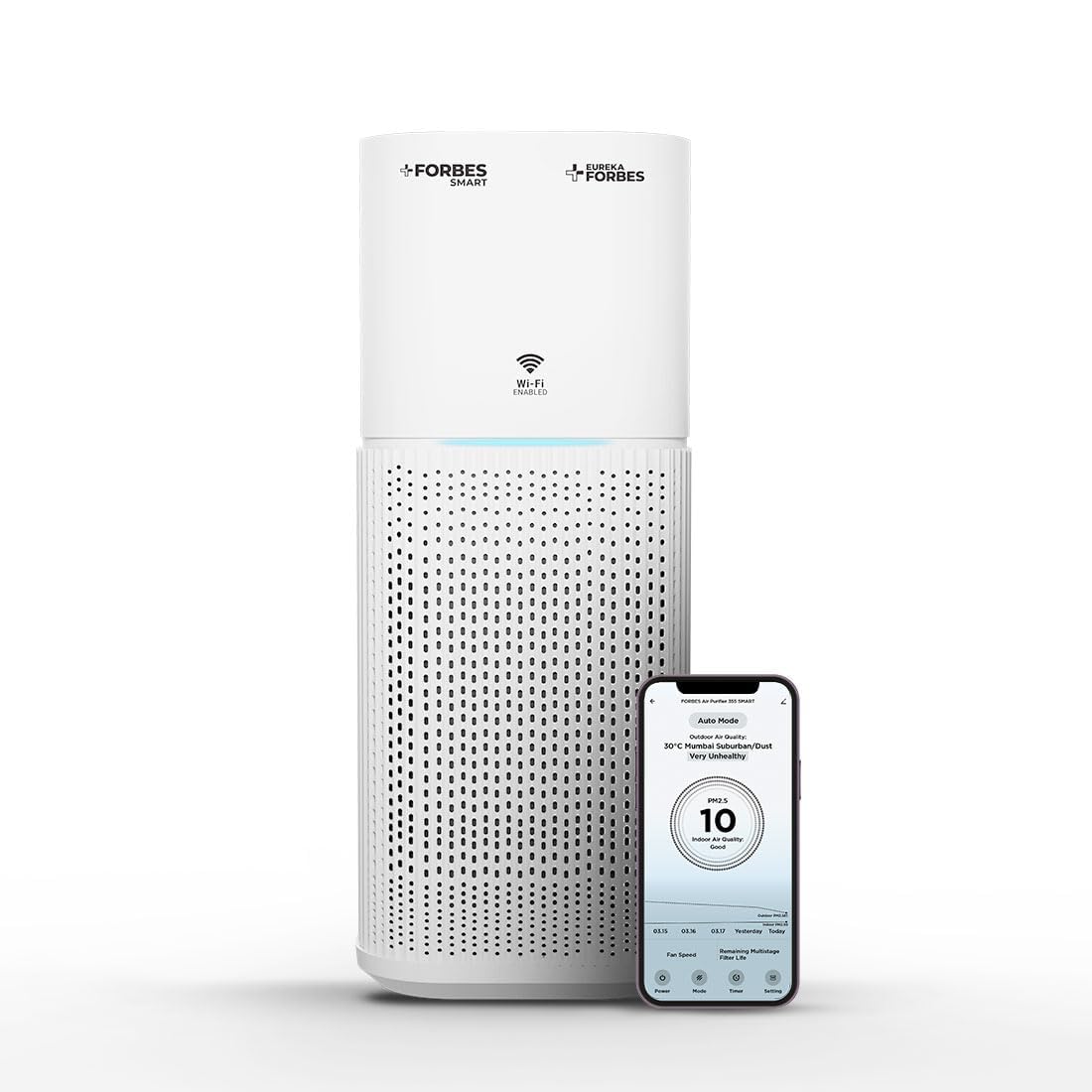
Figure 3.1: Main unit of the Eureka Forbes Smart Air Purifier 355.
Карактеристики на контролниот панел:

Figure 3.2: Top control panel with digital display and touch buttons.
- Копче за вклучување: Го вклучува/исклучува уредот.
- Копче за режим: Cycles through Auto, Sleep, and Manual modes.
- Копче за брзина: Ја прилагодува брзината на вентилаторот (12 нивоа).
- Копче за тајмер: Sets operation timer (1-12 hours).
- Plasma Button: Activates/deactivates plasma ion function.
- Копче за затемнување: Ја прилагодува осветленоста на екранот.
- Индикатор за Wi-Fi: Го прикажува статусот на Wi-Fi конекцијата.
- PM 2.5 Display: Real-time air quality indicator.
Систем за филтрирање:
The purifier utilizes a 4-stage advanced filtration system to capture various airborne particles and odors.

Слика 3.3: Експлодирано view од 4-титеtagсистем за филтрирање.
- Предфилтер: Captures large particles like dust, lint, and pet hair.
- Филтер со активен јаглен: Absorbs odors, volatile organic compounds (VOCs), and harmful gases.
- True H13 HEPA Filter: Апсорбира 99.97% од честичките во воздухот со големина од 0.3 микрони, вклучувајќи полен, прашински грини, спори од мувла и првут од домашни миленици.
- Plasma Filtration: Generates positive and negative ions to eliminate microbial contaminants and enhance air freshness.
4. Поставување
4.1 Unboxing and Filter Installation
Before first use, ensure all packaging materials are removed and the filter is correctly installed.
- Внимателно извадете го прочистувачот на воздух од неговото пакување.
- Свртете го уредот наопаку и завртете ја основата спротивно од стрелките на часовникот за да ја отклучите и извадите.
- Remove the integrated filter from its protective plastic bag.
- Insert the filter back into the unit, ensuring it is seated properly.
- Вратете ја основата и завртете ја во насока на стрелките на часовникот за да ја заклучите безбедно.
Video 4.1: Demonstrates the unboxing and filter installation process for the air purifier.
4.2 Поврзување за напојување
Place the air purifier on a flat, stable surface. Connect the power adapter to the unit and then plug it into a suitable electrical outlet.
5. Упатства за работа
5.1 Основно работење
- Притиснете го Моќ button to turn the air purifier on. The PM 2.5 display will show the current air quality.
- Притиснете го Режим копче за менување на режимите на работа:
- Автоматски режим: The fan speed adjusts automatically based on the detected air quality (PM 2.5 levels) and ambient light.
- Режим на спиење: Operates at the lowest fan speed with dimmed lights for quiet operation during rest.
- Рачен режим: Allows manual selection of fan speed.
- In Manual Mode, press the Брзина button to select from 12 fan speed levels.
- Притиснете го Тајмер button to set the desired operating duration from 1 to 12 hours. The unit will automatically turn off after the set time.
- Притиснете го Плазма button to activate or deactivate the plasma ion function for enhanced air purification.
- Притиснете го Затемнувач button to adjust the brightness of the display lights.
Видео 5.1: Брз крајview of key features and controls of the air purifier.
5.2 Wi-Fi Enabled Smart Control
The air purifier can be controlled remotely using a dedicated smartphone application.

Figure 5.1: Smart app interface showing air quality and control options.
- Download the Eureka Forbes Smart app from your smartphone's app store.
- Следете ги упатствата во апликацијата за да го поврзете вашиот прочистувач на воздух со вашата домашна Wi-Fi мрежа.
- Once connected, you can manage all settings, monitor real-time PM 2.5 levels, and adjust modes/speeds from anywhere.
6. Одржување
6.1 Замена на филтерот
The air purifier is equipped with a filter replacement indicator. When the indicator lights up, it is time to replace the integrated filter to maintain optimal performance.
- Исклучете го прочистувачот на воздух од штекерот.
- Свртете го уредот наопаку и завртете ја основата спротивно од стрелките на часовникот за да го отклучите.
- Отстранете го стариот филтер и фрлете го правилно.
- Insert a new Eureka Forbes replacement filter into the unit.
- Вратете ја основата и завртете ја во насока на стрелките на часовникот за да ја заклучите.
- Plug in the unit. Reset the filter replacement indicator by pressing and holding the appropriate button (refer to the control panel diagram for specific button, usually the Timer or Mode button for a few seconds).
6.2 Чистење на единицата
- Секогаш исклучувајте го уредот пред чистење.
- Избришете ги надворешните површини со мека, гamp крпа. Не користете абразивни средства за чистење или растворувачи.
- Clean the air intake and outlet vents with a soft brush or vacuum cleaner attachment to remove dust buildup.
- Не мијте го филтерот.
7 Смена на проблеми
| Проблем | Можна причина | Решение |
|---|---|---|
| Уредот не се вклучува. | No power supply; power cord not connected; unit damaged. | Check power outlet; ensure power cord is securely plugged in; contact customer support if damaged. |
| Лоши перформанси на прочистување на воздухот. | Филтерот е валкан или треба да се замени; влезовите/излезите за воздух се блокирани. | Check filter replacement indicator and replace filter if necessary; clear any obstructions from vents. |
| Невообичаен шум за време на работата. | Foreign object inside; unit not on a stable surface. | Unplug and check for foreign objects; place unit on a flat, stable surface. |
| Проблеми со Wi-Fi конекција. | Incorrect Wi-Fi password; router too far; app not configured correctly. | Verify Wi-Fi password; move unit closer to router; reconfigure Wi-Fi settings in the app. |
8. Спецификации
| Карактеристика | Детал |
|---|---|
| Бренд | Еурека Форбс |
| Број на модел | GAPDF400Z1SM00 |
| Боја | Бело |
| Димензии на производот | 24.3D x 24.3W x 53.5H сантиметри |
| Покриеност на подна површина | 480 квадратни метри |
| CADR | 355 м³/час |
| Тип на филтрација | 4-Сtage (Pre-filter, Activated Carbon, True H13 HEPA, Plasma) |
| Големина на задржување на честички | 0.1 микрони |
| Ниво на бучава | 63 децибели (макс.) |
| Тип на контролер | Mobile Application, Touch Control |
| Ватtage | 35 вати |
| Извор на енергија | Електричен со кабел |
| Тежина на ставката | 4.3 килограми |
| Вклучени компоненти | Air Purifier, Integrated Filter, Adapter |
9. Гаранција и поддршка
Your Eureka Forbes Smart Air Purifier 355 comes with a 1 година сеопфатна гаранција. For any assistance or service requests, please contact Eureka Forbes customer support.
- Поддршка за корисници: Available for 12 hours daily.
- Услужна мрежа: Presence in over 700 cities and 17,000+ pincodes.
- Продолжена гаранција: A 2-Year Extended Warranty Plan by Onsitego is available for purchase.

Figure 9.1: Information on Eureka Forbes' extensive service network and support.
For further details or to register your product, please visit the official Eureka Forbes website or refer to the product detail page on Amazon.


