1. Важни безбедносни информации
- Прочитајте ги сите упатства пред да го користите уредот.
- Чувајте го уредот подалеку од вода и влага.
- Не изложувајте на екстремни температури или директна сончева светлина.
- Use only the provided power adapter and charging cables.
- Не обидувајте се сами да го расклопите или поправите уредот. Контактирајте квалификуван сервисер.
- Обезбедете соодветна вентилација за да спречите прегревање.
2. Содржина на пакетот
Проверете дали сите артикли се присутни во пакувањето:
- Ikarao Break X2 Karaoke Machine
- 2 безжични микрофони
- Кабел за полнење
- Ремен
- Упатство за употреба
3. Производот завршиview
The Ikarao Break X2 is an all-in-one portable karaoke system designed for an immersive entertainment experience. It features a 10.1-inch touch screen, a powerful 600W Bluetooth speaker, and two self-charging wireless microphones.
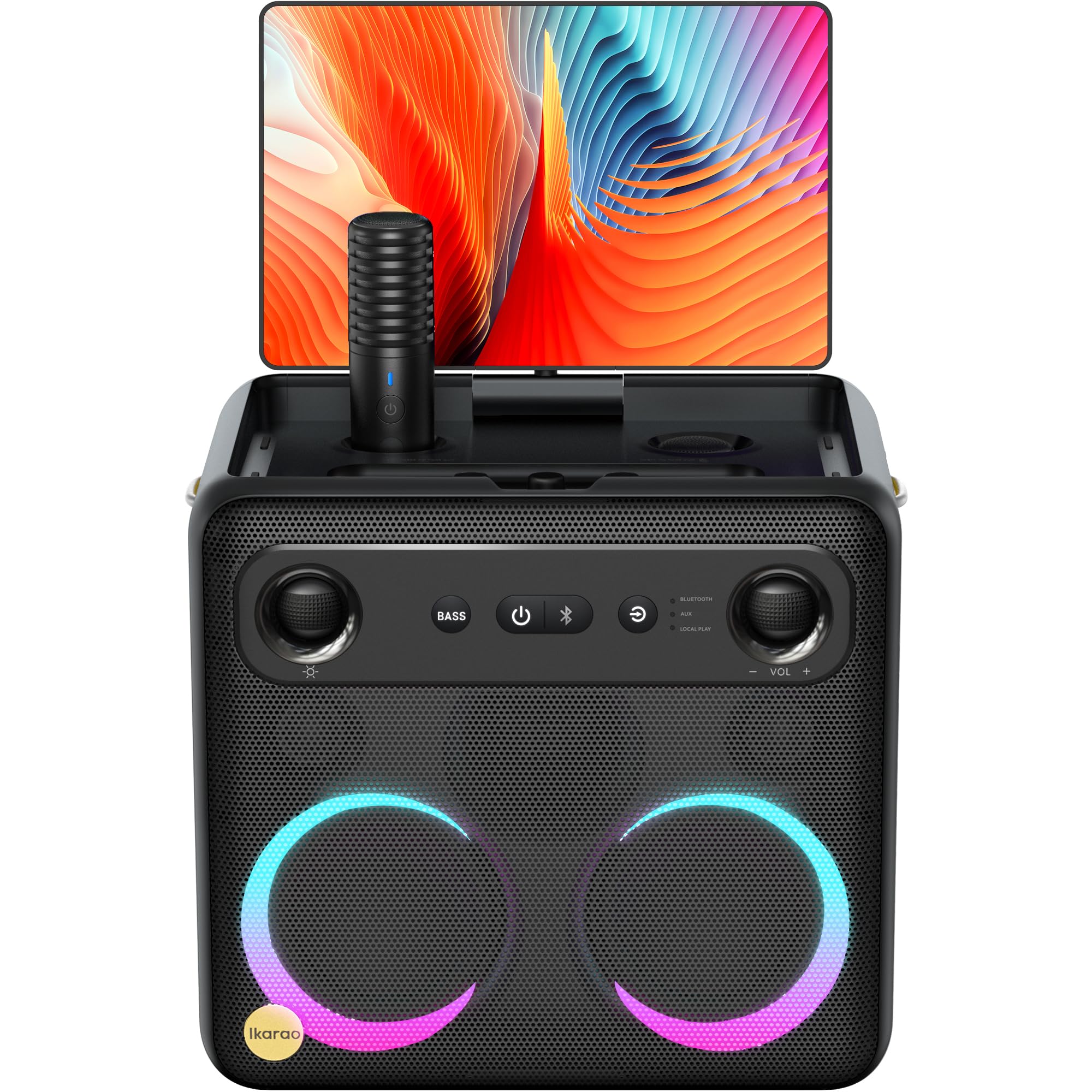
Image: Ikarao Break X2 Karaoke Machine. This image shows the main unit with its integrated 10.1-inch touch screen, the speaker grille, and the two wireless microphones stored in their charging slots.
Клучни карактеристики:
- Integrated 10.1-inch Touch Screen: 2K HD resolution for clear lyric display. The screen can rotate 180 degrees for optimal viewинг агли.
- 600W Bluetooth Speaker: Delivers powerful and clear audio for an engaging karaoke experience.
- Two Self-Charging Wireless Microphones: Conveniently store and charge microphones within the unit. No manual pairing required.
- Built-in Connectivity: Access YouTube and Spotify via Wi-Fi for an unlimited song library.
- Повеќе режими на репродукција: Supports HDMI, USB, AUX IN, AUX OUT, TF, SD, and wired microphone connections.
- Преносен дизајн: Compact and equipped with a strap for easy transport, offering up to 8 hours of battery life.
4. Поставување
4.1 Почетно полнење
- Connect the provided charging cable to the charging port on the Ikarao Break X2.
- Plug the other end into a suitable power outlet.
- Оставете уредот целосно да се наполни пред првата употреба. Индикаторот за полнење ќе ја покаже состојбата на батеријата.
4.2 Вклучување/исклучување
- To power on, press and hold the Power button located on the control panel until the screen illuminates.
- To power off, press and hold the Power button until the shutdown options appear on the screen, then select 'Power Off'.
4.3 Wi-Fi конекција
- Once powered on, navigate to the 'Settings' menu on the touch screen.
- Изберете „Wi-Fi“ и вклучете го.
- Изберете ја саканата Wi-Fi мрежа од листата и внесете ја лозинката доколку се побара.
- Once connected, you can access online features like YouTube and Spotify.
4.4 Употреба на микрофон
- The two wireless microphones are pre-paired with the unit. Simply remove them from their charging slots to activate.
- To charge, place the microphones back into their designated slots on the main unit.
5. Упатства за работа
5.1 Користење на екранот на допир
- The 10.1-inch touch screen functions like a tablet. Tap to select, swipe to scroll.
- The screen can be rotated 180 degrees to adjust the viewing angle. Gently pivot the screen to the desired position.
5.2 Karaoke Mode (YouTube/Spotify)
- Осигурајте се дека уредот е поврзан на Wi-Fi.
- From the home screen, tap on the YouTube or Spotify application icon.
- Пребарај за your desired karaoke songs or playlists.
- Adjust the main volume using the controls on the unit or the on-screen interface.
- Adjust microphone volume and echo effects using the dedicated controls.
5.3 Режим на Bluetooth звучник
- Activate Bluetooth on your external device (e.g., smartphone, tablet).
- On the Ikarao Break X2, navigate to the Bluetooth settings or select the Bluetooth input mode.
- Пребарај за 'Ikarao Break X2' on your external device and pair.
- Once connected, you can play audio from your external device through the Ikarao Break X2 speaker.
5.4 External Device Connectivity
- HDMI: Connect to a TV or external display for a larger viewискуство.
- USB/TF/SD: Insert USB drives or memory cards to play local audio or video files.
- AUX ВО: Поврзете надворешни аудио извори користејќи 3.5 мм аудио кабел.
- AUX OUT: Connect to external speakers or sound systems.
- Жичен микрофон: An additional port is available for a wired microphone if desired.
6. Одржување
6.1 Чистење
- Wipe the screen and exterior surfaces with a soft, dry, lint-free cloth.
- Не користете абразивни средства за чистење, растворувачи или аеросолни спрејови.
- За тврдокорни траги, лесно дampисплакнете ја крпата со вода, а потоа веднаш избришете ја на суво.
6.2 Складирање
- Чувајте го уредот на ладно и суво место, подалеку од директна сончева светлина и екстремни температури.
- Ensure microphones are securely placed in their charging slots when not in use.
6.3 Грижа за батерии
- За да го продолжите животниот век на батеријата, избегнувајте често целосно празнење на батеријата.
- If storing for an extended period, charge the battery to approximately 50% every few months.
7 Смена на проблеми
7.1 Нема звук од звучникот
- Check the main volume level on the unit and any connected external devices.
- Ensure the correct input source is selected (e.g., Bluetooth, AUX, YouTube).
- Verify that cables are securely connected if using wired inputs.
7.2 Микрофоните не работат
- Ensure microphones are fully charged. Place them in their slots for a few minutes.
- Check microphone volume levels on the unit.
- Confirm that the microphones are removed from their charging slots to activate.
7.3 Проблеми со Wi-Fi поврзување
- Restart the Ikarao Break X2 and your Wi-Fi router.
- Осигурајте се дека сте во опсегот на вашата Wi-Fi мрежа.
- Проверете ја лозинката за Wi-Fi двапати.
7.4 Екранот не реагира
- Обидете се да го рестартирате уредот со држење на копчето за вклучување.
- If the screen is frozen, a hard reset might be necessary (refer to specific instructions if available, or hold power button for 10-15 seconds).
8. Спецификации
| Карактеристика | Спецификација |
|---|---|
| Бренд | Икарао |
| Име на моделот | Пауза X2 |
| Димензии на производот | 21 x 27 x 29 cm |
| Тежина | 6 килограми |
| Тип на батерија | Литиум-јонски (потребен е 1, вклучен) |
| Извор на енергија | Напојува со батерија |
| Компатибилни периферни уреди | HDMI, Guitar, USB, AUX IN, AUX OUT, TF, SD, Wired Microphone |
| Посебни карактеристики | Integrated YouTube and Spotify connection |
| Технологија за поврзување | Aux, Bluetooth, HDMI, USB, Wi-Fi |
| Тип на медиум | USB, Bluetooth |
| Препорачана употреба | TV connection, Indoor, Outdoor, Parties, Commercial, Home use |
9. Гаранција и поддршка
The Ikarao Break X2 Karaoke Machine comes with a standard manufacturer's warranty. Please refer to the warranty card included in your package for specific terms and conditions.
For technical support, troubleshooting assistance, or warranty claims, please contact Ikarao customer service through their official webстраницата или информациите за контакт наведени во вашата документација за купување.
Ве молиме зачувајте го доказот за купување за целите на гаранцијата.


