1. Вовед
Thank you for choosing the MageGee MK-Storm Mechanical Gaming Keyboard. This 104-key wired keyboard is designed for an enhanced typing and gaming experience, featuring durable brown switches, blue backlighting, and anti-ghosting technology. This manual provides essential information for setup, operation, and maintenance to ensure optimal performance.
2. Клучни карактеристики
- Blue Backlit Gaming Keyboard: Features 20 different backlit modes, 5 brightness levels, and 5 speed adjustments. The backlight can be easily turned off.
- Mechanical Brown Switches: Offers moderate trigger key travel and force, suitable for both typing and gaming. Provides tactile feedback with a slight sound.
- Anti-Ghosting Keyboard: All 104 keys have individual switches with full N-key rollover, ensuring faster response and simultaneous key presses without conflict.
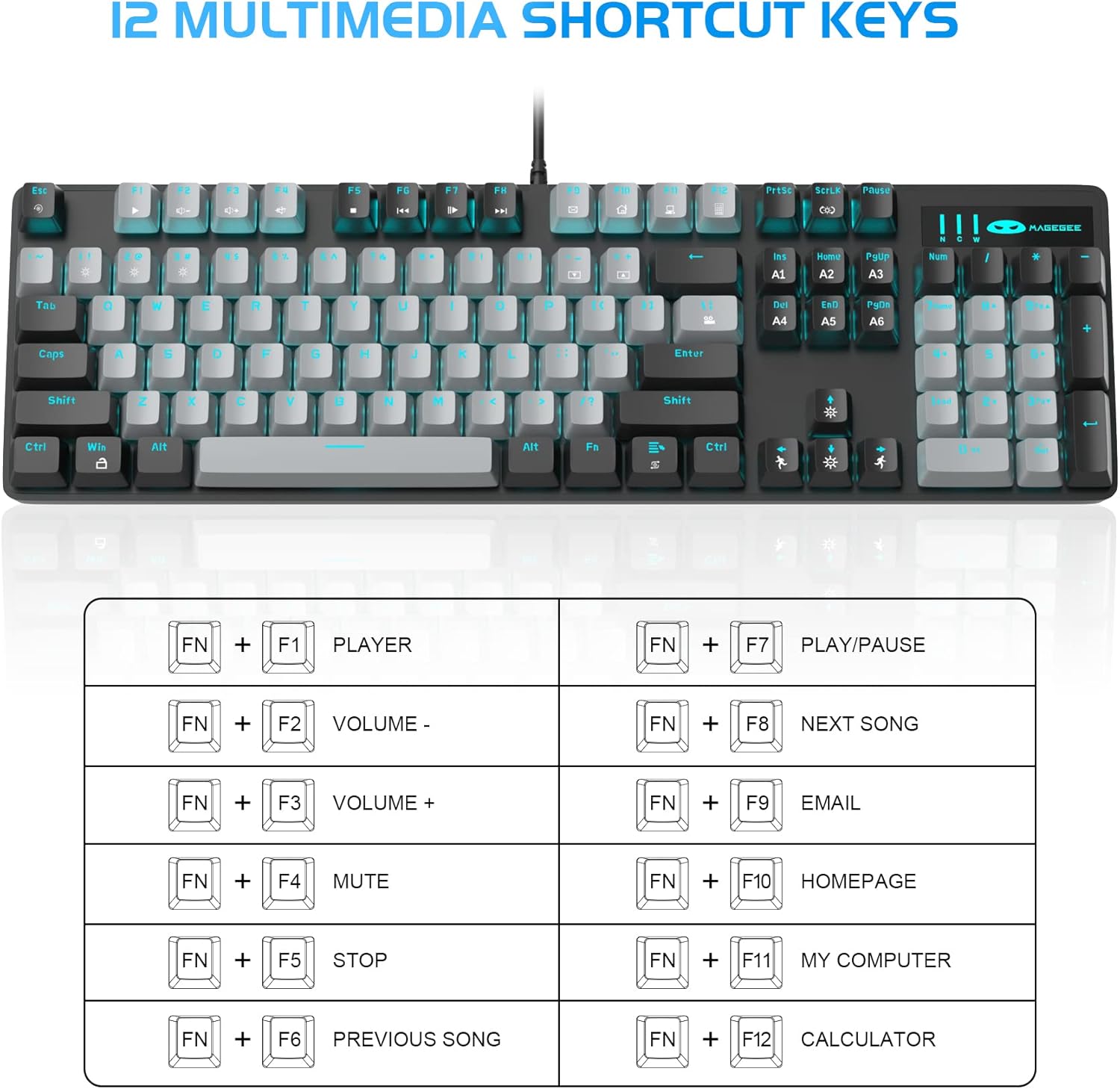
- 12 мултимедијални комбинации на копчиња: Quick operations via FN+ F1~F12 for media control and office functions.
- Ергономски дизајн: Premium metal panel construction for stability. Ergonomic key layout and two-step adjustable feet for comfortable typing angles.
- Широка компатибилност: USB wired connection compatible with Windows 2000/Vista/Win7/Win8/Win10/MAC/Linux.

3. Содржина на пакетот
The MageGee MK-Storm Mechanical Gaming Keyboard package includes the following items:
- MageGee Mechanical Gaming Keyboard (MK-Storm)
- USB Wired Cable (attached to keyboard)
- Алатка за извлекување на клучеви
- 16 Extra Keycaps (color scheme varies by keyboard variant)
- Упатство за употреба
4. Поставување
- Поврзете ја тастатурата: Plug the USB connector of the keyboard cable into an available USB port on your computer (PC, laptop, or desktop).
- Инсталација на драјвери: The keyboard is plug-and-play. Your operating system should automatically detect and install the necessary drivers. No additional software installation is typically required for basic functionality.
- Прилагодете го аголот на тастатурата: Flip out the two-step feet on the underside of the keyboard to adjust the typing angle to your preference.

5. Упатства за работа
5.1 Контрола на позадинско осветлување
The MK-Storm keyboard features a single blue backlight with multiple modes and adjustable settings.
- Промена на режимот на позадинско осветлување: Притиснете FN + INS за да се движите низ 20 различни режими на задно осветлување.
- Прилагодете ја осветленоста: Притиснете FN + (Up Arrow) to increase brightness (5 levels). Press FN + (Стрелка надолу) за намалување на осветленоста.
- Прилагодете ја брзината: Притиснете FN + (Left Arrow) to decrease animation speed (5 levels). Press FN + (Стрелка надесно) за зголемување на брзината на анимацијата.
- Turn Off Backlight: The backlight can be turned off by cycling through the brightness levels until it is off, or by selecting a mode that has no illumination.

5.2 Мултимедијални клучеви
Access multimedia and system functions quickly using the FN key in combination with the F1-F12 keys.
| Комбинација на клучеви | Функција |
|---|---|
| FN + F1 | Играч |
| FN + F2 | Волумен - |
| FN + F3 | Волумен + |
| FN + F4 | Исклучи звук |
| FN + F5 | Стоп |
| FN + F6 | Претходна песна |
| FN + F7 | Пушти/Пауза |
| FN + F8 | Следна песна |
| FN + F9 | Е-пошта |
| FN + F10 | Почетна страница |
| FN + F11 | Мојот компјутер |
| FN + F12 | Калкулатор |
5.3 Прилагоден професионалецfiles (If applicable)
The keyboard supports custom lighting profiles. Refer to the manufacturer's website or included software (if any) for detailed instructions on programming and saving custom lighting zones or key assignments. Once programmed, these profiles can often be accessed directly from the keyboard using FN key combinations (e.g., FN+1, FN+2, FN+3 for different profileс).
6. Прилагодување
The MageGee MK-Storm keyboard allows for customization of keycaps and switches.
- Замена на капачето на копчето: Use the included keycap puller tool to carefully remove existing keycaps. Align the new keycap with the switch stem and press down gently until it clicks into place.
- Замена на прекинувач: The keyboard comes with extra brown switches. To replace a switch, first remove the keycap. Then, use a switch puller (not included, but often similar to a keycap puller) to gently extract the switch from the PCB. Insert the new switch, ensuring the pins align correctly, and press firmly until it seats properly.


7. Одржување
- Чистење: The floating keys design makes cleaning easier. Use a soft brush or compressed air to remove dust and debris from between the keycaps. For stubborn dirt, remove keycaps using the provided tool and wipe the keyboard surface with a slightly damp крпа. Пред чистење, проверете дали тастатурата е исклучена.
- Складирање: Чувајте ја тастатурата на суво, ладно место, подалеку од директна сончева светлина и екстремни температури.
- Грижа за кабел: Избегнувајте прекумерно виткање или извиткување на USB кабелот за да спречите оштетување.
8 Смена на проблеми
- Тастатурата не реагира:
- Проверете дали USB кабелот е безбедно приклучен и во тастатурата и во компјутерот.
- Обидете се да ја поврзете тастатурата во друг USB порт на вашиот компјутер.
- Рестартирајте го компјутерот.
- Тестирајте ја тастатурата на друг компјутер за да исклучите проблем специфичен за системот.
- Backlight Not Working/Incorrect:
- Ensure the backlight is not turned off (FN + ↓ to increase brightness).
- Cycle through backlight modes using FN + INS.
- Check if any specific software is interfering with the lighting settings.
- Клучевите не се регистрираат:
- Clean around the affected key to ensure no debris is obstructing the switch.
- If a specific switch is faulty, consider replacing it with one of the spare switches provided, following the customization instructions.
9. Спецификации
| Карактеристика | Детал |
|---|---|
| Бренд | МејџГи |
| Број на модел | MK-Storm |
| Распоред на клучеви | 104 копчиња (целосна големина) |
| Тип на прекинувач | Mechanical Brown Switches |
| Задно осветлување | Blue Backlit (20 modes, 5 brightness, 5 speed) |
| Поврзување | USB жичен |
| Анти-Ghosting | Целосно превртување на клучот N |
| Мултимедијални клучеви | 12 (FN + F1-F12) |
| Материјал | Metal Panel Construction |
| Компатибилни уреди | Лаптоп, компјутер |
| Оперативни системи | Windows 2000/Vista/Win7/Win8/Win10/MAC/Linux |
| Тежина на ставката | 2.77 фунти |
| Димензии на пакетот | 17.63 x 12.36 x 1.89 инчи |

10. Гаранција и поддршка
For warranty information, technical support, or any product-related inquiries, please contact MageGee customer service through the retailer where the product was purchased or visit the official MageGee webсајт. Чувајте ја вашата потврда за купување за барања за гаранција.


