1. Вовед
This manual provides essential instructions for the setup, operation, and maintenance of your iStorage diskAshur DT3 8TB Secure Encrypted Desktop Hard Drive. Please read this manual thoroughly before using the device to ensure proper functionality and data security.
Што има во кутијата
- 1 x iStorage diskAshur DT3 Secure Encrypted Desktop Hard Drive
- USB Type C & A cables
- Universal Mains Adapter
- Quick Start Guide and Product Disclaimer
2. Поставување
2.1 Поврзување на уредот
To begin using your diskAshur DT3, follow these steps:
- Connect the supplied AC adapter to the DC 12V port on the back of the drive and then to a mains power outlet.
- Insert the supplied USB cable into the USB 3.0 port on the back of the drive and connect the other end to your computer or laptop.
- Turn the power switch on the back of the drive to the 'ON' position. The red LED on the keypad will illuminate.

Слика: Заден дел view of the iStorage diskAshur DT3, highlighting the USB 3.0 port, DC 12V power input, and the ON/OFF switch. This illustrates where to connect the power adapter and USB cable.
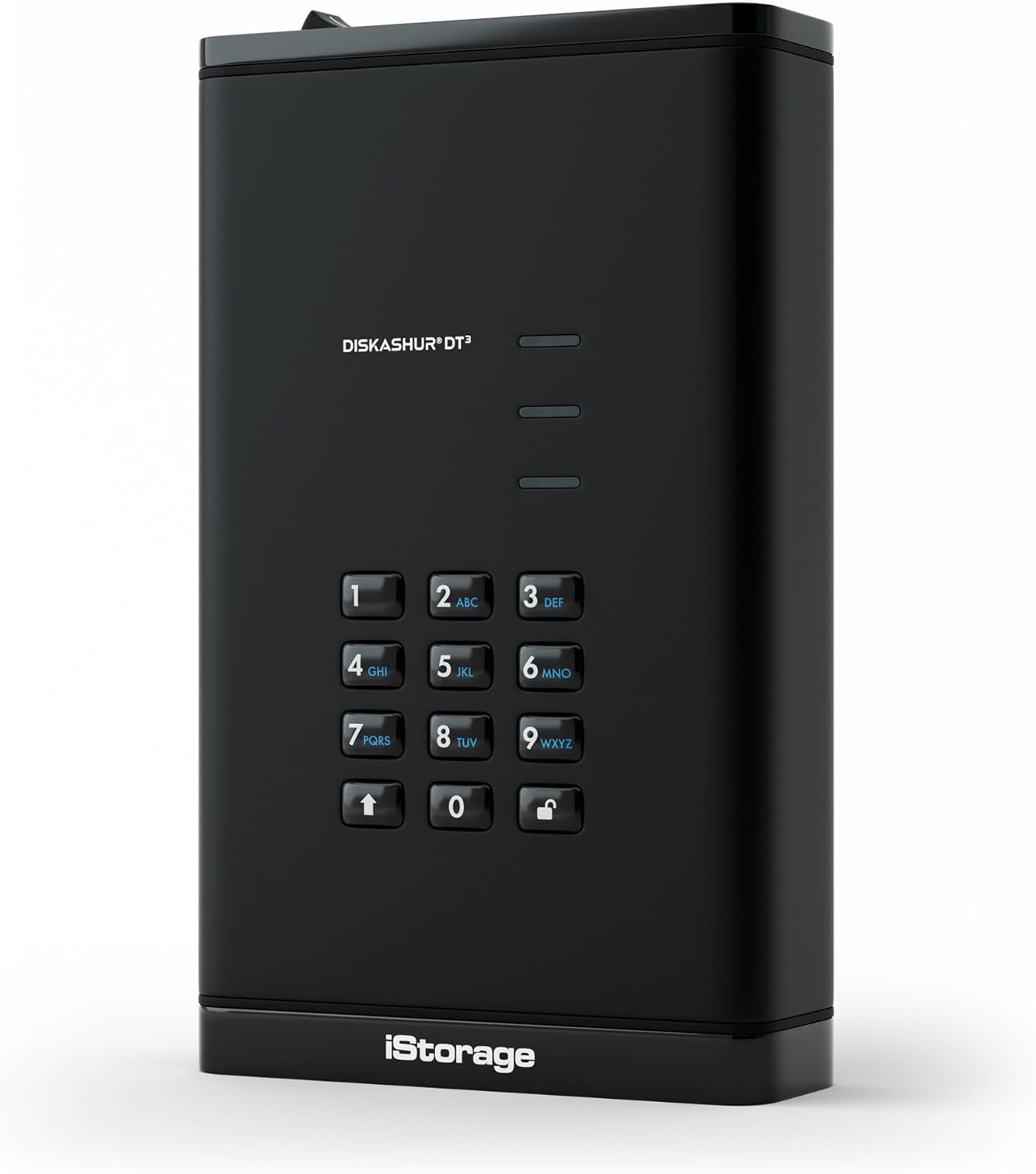
Слика: напред view of the iStorage diskAshur DT3, displaying the alphanumeric keypad and LED indicators. This shows the primary interface for PIN entry.
2.2 Initial Unlock
To unlock your diskAshur DT3 for the first time or after it has been locked:
- Ensure the red LED is illuminated.
- Enter your 8-64 digit User PIN on the keypad.
- Press the UNLOCK button (key with a padlock icon).
Upon successful PIN entry, the green and blue LEDs will blink, and then the middle LED will turn solid green, indicating the drive is unlocked and ready for use.
Video: This video demonstrates the process of unlocking and encrypting data using a diskAshur drive. While the video specifically mentions DT2, the steps for unlocking and data transfer are applicable to the diskAshur DT3.
3. Ракување со уредот
3.1 Складирање на податоци
Once the drive is unlocked and connected to your computer, it will appear as a removable drive. You can store files од:
- Копирање и лепење files into the drive's folder.
- Влечење и пуштање files directly into the drive's folder.
All data transferred to the diskAshur DT3 is encrypted in real-time using AES-XTS 256-bit hardware encryption.
3.2 Locking the Device
To secure your data and disconnect the drive:
- Safely eject the drive from your operating system (e.g., 'Safely Remove Hardware' on Windows, 'Eject' on macOS).
- Once ejected, the drive will automatically lock, and the red LED will illuminate.
- Turn the power switch on the back of the drive to the 'OFF' position.
The drive is now securely locked and can be safely disconnected and transported.
3.3 Безбедносни карактеристики
- PIN Authentication: Access requires an 8-64 digit PIN. Without the correct PIN, data remains inaccessible.
- Хардверско шифрирање: All data is encrypted in real-time using AES-XTS 256-bit hardware encryption.
- FIPS 140-3 Level 3 Certified: The diskAshur DT3 is certified to FIPS 140-3 Level 3 (pending), ensuring high-level security compliance.
- Автоматско заклучување: The drive features an auto-lock function that can be configured to automatically lock after a predetermined period of inactivity.
- Wear-Resistant Keypad: The alphanumeric keypad is designed to prevent key usage from being easily identified, protecting against potential brute-force attacks.
- OS and Platform Independent: Works with any device that has a USB port, including Windows, macOS, iPadOS, Linux, Chrome, Android, and various embedded systems.
Видео: Воведна видео презентацијаasing the iStorage diskAshur3 range, highlighting its key features and security aspects relevant to the DT3 model.
4. Одржување
To ensure the longevity and optimal performance of your diskAshur DT3:
- Одржувајте го уредот чист и без прашина. Користете мека, сува крпа за чистење.
- Избегнувајте изложување на уредот на екстремни температури или влажност.
- Do not attempt to open or disassemble the device, as this will void the warranty and may compromise its security features.
- Always safely eject the drive before disconnecting it from your computer to prevent data corruption.
5 Смена на проблеми
If you encounter issues with your diskAshur DT3, consider the following:
- Drive not recognized: Ensure all cables (power and USB) are securely connected and the drive's power switch is ON. Try connecting to a different USB port or computer.
- Incorrect PIN entry: If the User PIN is entered incorrectly 10 consecutive times, the User PIN will be deleted. Data will remain on the device but only accessible with the Admin PIN. If the Admin PIN is entered incorrectly 10 consecutive times, all data is lost forever, and the device will need to be reconfigured.
- Бавни брзини на пренос: Ensure you are using a USB 3.0 compatible port on your computer for optimal speeds (up to 290MB/s Read, 284MB/s Write).
- LED индикатори: Refer to the quick start guide for a detailed explanation of LED behaviors (red, green, blue) which indicate drive status (locked, unlocked, activity).
6. Спецификации
| Карактеристика | Детал |
|---|---|
| Дигитален капацитет за складирање | 8 ТБ |
| Тип на хард диск | Механички хард диск |
| Интерфејс за хард диск | USB 3.0 |
| Технологија за поврзување | USB |
| Хардверска платформа | Линукс, Мек, компјутер |
| Број на модел на ставка | IS-DT3-256-8000-F |
| Тежина на ставката | 2.05 фунти |
| Димензии на производот | 7.3 x 4.41 x 1.71 инчи |
| Боја | Црното |
| Брзина на ротација на хард дискот | 7200 вртежи во минута |
| Извор на енергија | AC |
| Посебни карактеристики | Backward Compatible, Dust Resistant, Hardware Encryption, Portable, Waterproof |
| Компатибилни уреди | Десктоп, играчка конзола, лаптоп, паметен телефон, таблет |
7. Гаранција и поддршка
For warranty information and technical support, please refer to the documentation included with your product or visit the official iStorage webсајт. Чувајте ја вашата потврда за купување за барања за гаранција.


