1. Производот завршиview
The Chilkey ND75 is a 75% percent mechanical keyboard featuring a full aluminum alloy case with an anodized surface treatment, providing a delicate touch and texture. It is designed for gaming, office, and general PC use, offering a blend of sleek minimalist style and advanced functionality. The keyboard incorporates a counterweighted backplate with an artistic gradient pattern and boasts a highly customizable per-key RGB lighting system.
Главните карактеристики вклучуваат:
- 75% распоред
- Tri-mode Connectivity (BT5.0, 2.4GHz Wireless, USB-C Wired)
- Per-key RGB Backlighting
- Прекинувачи со жешка замена
- Doubleshot PBT Keycaps
- Pre-Lubed Linear Switches
- Four Layers of Padding for Acoustic Performance
- Батерија од 3600 mAh
- Independent Driver/Software for Customization
- Functional LCD Screen
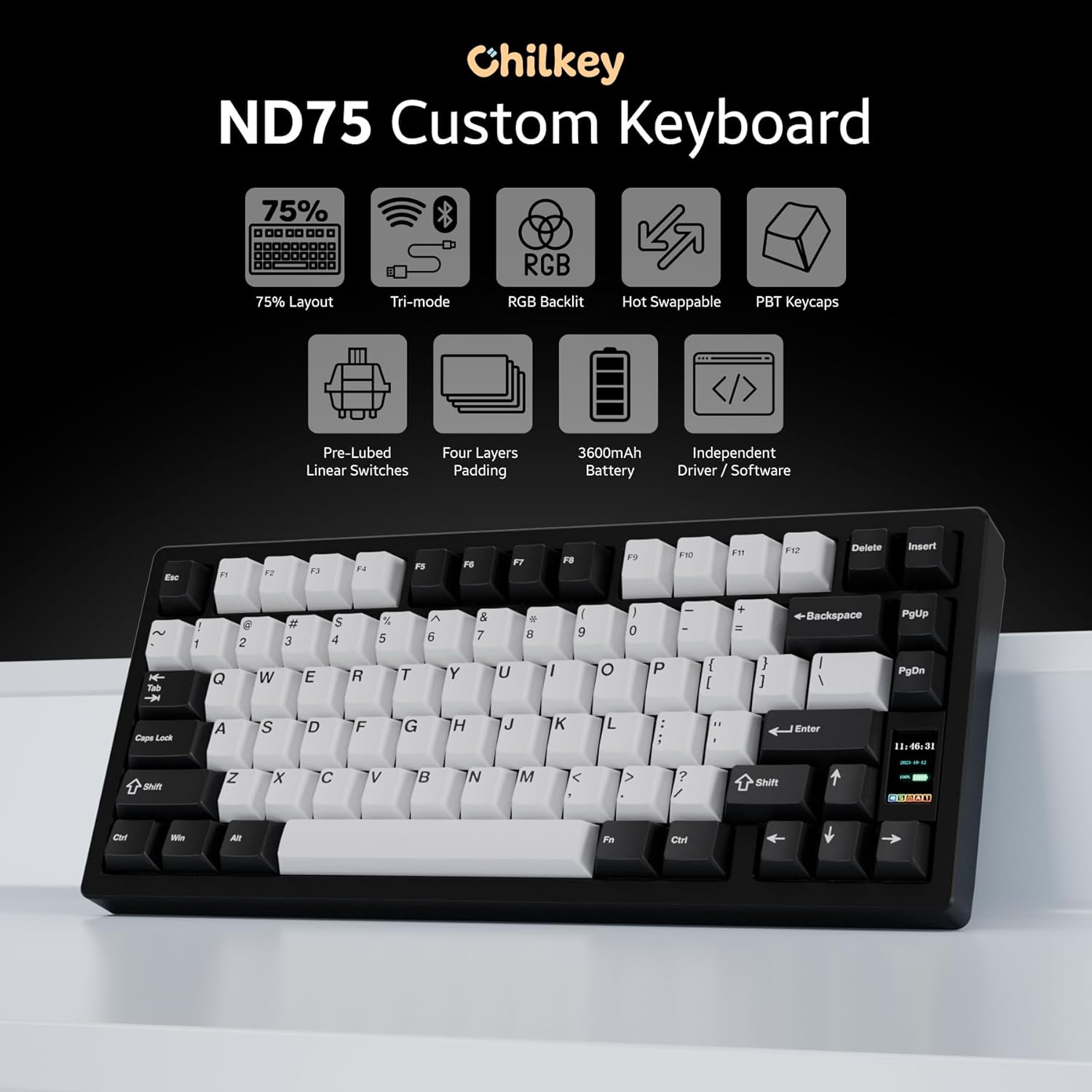
Слика: Надview of Chilkey ND75 keyboard features, including 75% layout, tri-mode, RGB, hot-swappable, PBT keycaps, pre-lubed linear switches, four layers padding, 3600mAh battery, independent driver/software, and LCD screen.

Image: The Chilkey ND75 keyboard showcasing its CNC full aluminum alloy case and anodization surface finish.

Слика: Од горе надолу view of the Chilkey ND75 mechanical keyboard, highlighting its 75% layout with black and white keycaps.
2. Поставување и поврзување
The ND75 mechanical keyboard offers three versatile connection modes: Bluetooth 5.0, 2.4GHz wireless, and USB-C wired. This allows for seamless integration with various devices and usage scenarios.
2.1 Содржина на пакетот
- Chilkey ND75 Mechanical Keyboard
- USB кабел
- Упатство за употреба (овој документ)
2.2 Поврзување на вашата тастатура
Before connecting, ensure the keyboard is charged or connected via USB-C for initial setup.
- Жичен режим (USB-C): Connect the provided USB-C cable from the keyboard to your computer's USB port. The keyboard will automatically detect the connection and function in wired mode.
- Безжичен режим од 2.4 GHz:
- Locate the 2.4GHz wireless dongle, typically stored within the keyboard's chassis (refer to the diagram below for dongle location).
- Remove the Right Shift Keycap to access the wireless switch and turn it ON.
- Приклучете го адаптерот од 2.4 GHz во слободен USB порт на вашиот компјутер.
- The keyboard should automatically pair. If not, refer to the LCD screen for pairing instructions.
- Bluetooth 5.0 режим:
- Remove the Right Shift Keycap to access the wireless switch and turn it ON.
- On the keyboard's LCD screen, navigate to the Bluetooth pairing option.
- On your device (Laptop, PC, Tablet), go to Bluetooth settings and search for new devices.
- Select "Chilkey ND75" from the list of available devices to pair.
- The keyboard can switch between BT5.0, 2.4GHz, and USB-C modes easily by FN key combinations (refer to Section 3.1 for details).

Image: Visual representation of the tri-mode connection options (2.4GHz, Bluetooth, USB-C) and multi-system compatibility (Windows, Apple, Linux, Android).
3. Упатства за работа
3.1 Клучни функции и комбинации
The ND75 keyboard features a 75% layout with dedicated function keys (F1-F12) and a compact design. Many advanced functions are accessible via the Fn клуч комбиниран со други клучеви.
| Комбинација | Функција |
|---|---|
| Fn+F1-F12 | Multimedia controls (e.g., Play/Pause, Volume Up/Down, Mute) |
| Fn + Q/W/E | Switch between Bluetooth devices (if multiple paired) |
| Fn + R | Префрли се на безжичен режим од 2.4 GHz |
| Fn + T | Switch to USB-C wired mode |
| Fn + Backspace | Вклучи/исклучи RGB ефекти на осветлување |
| Fn + Enter | Access LCD screen menu/settings |
For a complete list of key combinations and customizable functions, please refer to the dedicated software.
3.2 Functional LCD Screen
The ND75 features a functional LCD screen that provides real-time information and allows for direct control over various keyboard settings without requiring external software. You can customize the display with custom GIF images.
The screen displays information such as:
- Connection mode (Wired, 2.4G, BT)
- Ниво на батерија
- Системски информации
- Backlight brightness and speed
- RGB mode and color selection
- Контрола на јачината на звукот
- Јазични поставки
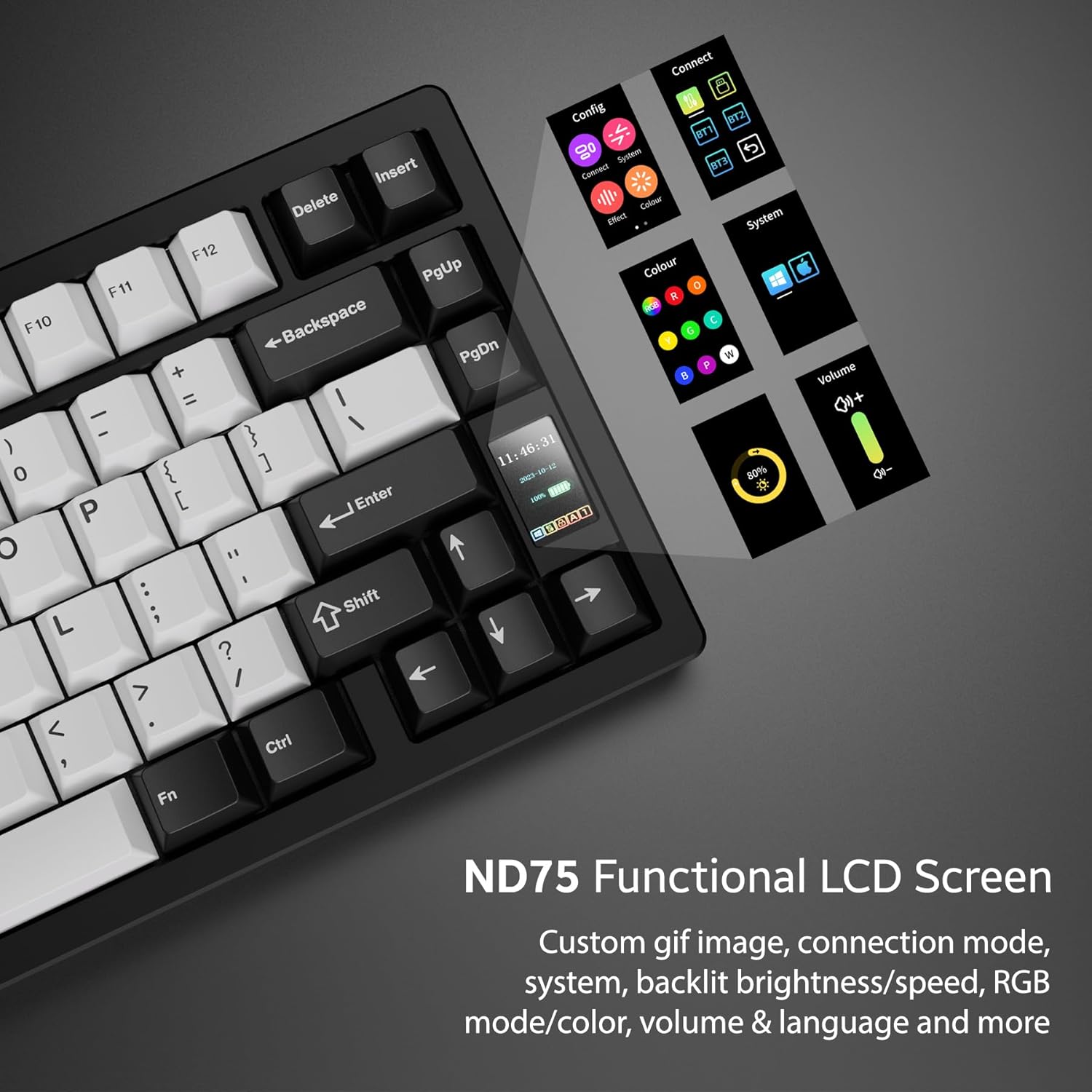
Image: Close-up of the ND75 keyboard's functional LCD screen, showing various menu options for configuration, connection, effects, color, system, volume, and language.
3.3 RGB позадинско осветлување по копче
The ND75 keyboard offers 19 preset lighting effects. You can customize individual key colors and create your own lighting profiles using the keyboard's onboard controls via the LCD screen or through the dedicated software.

Image: The ND75 keyboard with vibrant per-key RGB backlighting illuminated, showcasing various colors across the keys.
4. Одржување и прилагодување
4.1 Прекинувачи што може да се заменат со топла струја
The ND75 features a hot-swappable PCB, allowing you to easily replace switches without soldering. This supports both 3-pin and 5-pin switches, providing flexibility for customization and maintenance. The keyboard comes with pre-lubed linear switches for a smooth typing experience.

Image: A switch puller tool removing a key switch from the hot-swappable PCB of the ND75 keyboard, demonstrating the ease of switch replacement.
4.2 Quick Assembly Structure and Mounting Systems
The ND75 keyboard is designed with a screwless quick assembly structure, utilizing a ball catch system for easy disassembly and reassembly. This design is particularly beneficial for beginner keyboard enthusiasts who wish to explore different typing feels.
The keyboard supports three different mounting systems:
- Split O-Ring Mounting: Provides a softer, more flexible typing feel.
- Silica Gel Particle Mounting: Offers a balanced feel with good vibration dampенинг.
- Горна монтажа: Delivers a firmer, more consistent typing experience.
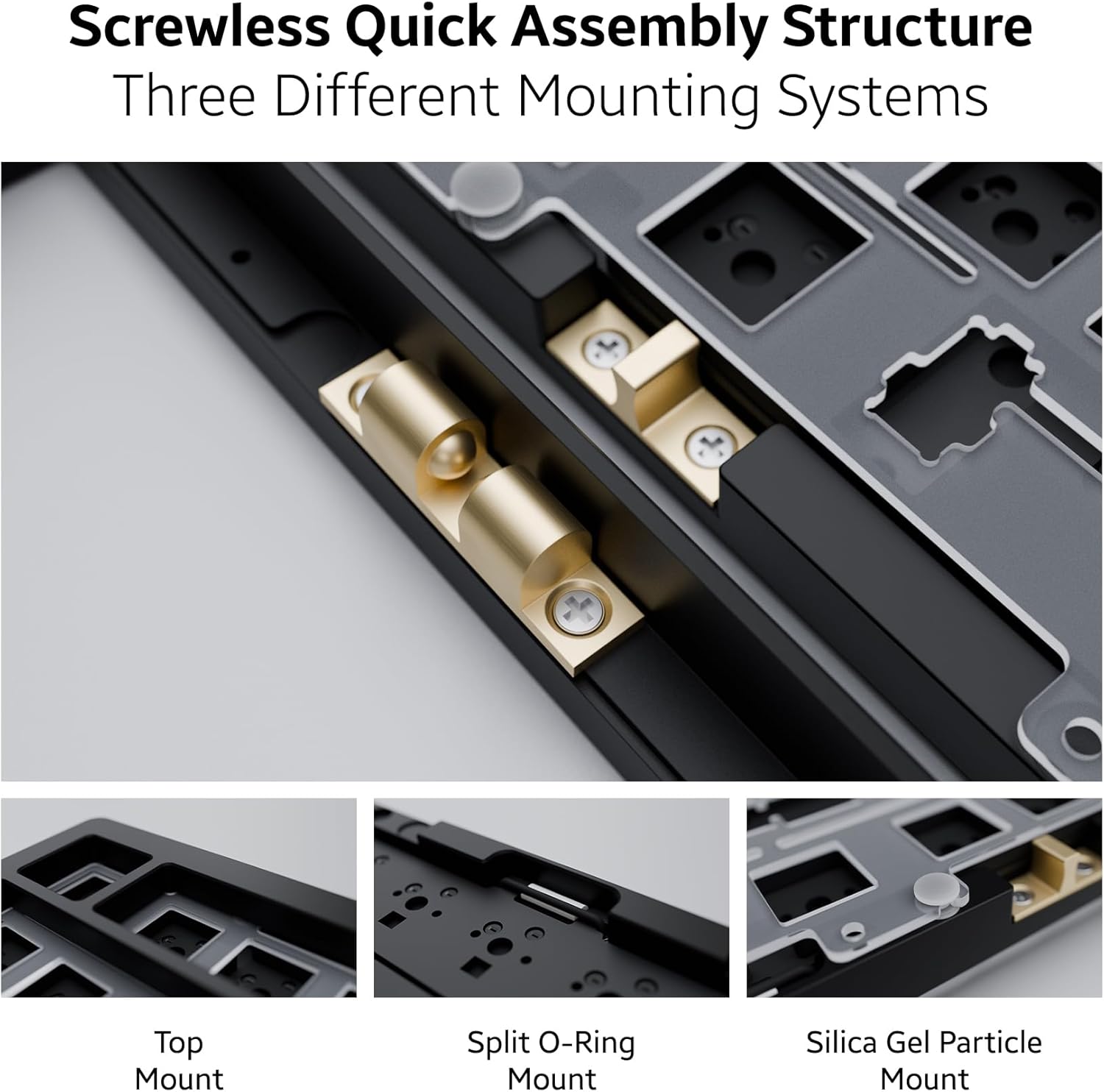
Слика: Детална view of the ND75 keyboard's internal structure, illustrating the screwless quick assembly and the three distinct mounting systems: Top Mount, Split O-Ring Mount, and Silica Gel Particle Mount.
4.3 Чистење и нега
За да ги одржите перформансите и изгледот на вашата тастатура:
- Use a soft, dry cloth to wipe down the aluminum case.
- For keycaps, remove them and clean with mild soap and water if necessary, ensuring they are completely dry before reattaching.
- Користете компримиран воздух за отстранување на прашина и остатоци помеѓу копчињата и прекинувачите.
- Избегнувајте изложување на тастатурата на прекумерна влага или екстремни температури.
Video: Demonstrates the quick disassembly and assembly process of the Chilkey ND75 Aluminum Keyboard, showing how easily the top case can be removed and reattached.
5 Смена на проблеми
If you encounter issues with your Chilkey ND75 keyboard, please refer to the following common solutions:
- Тастатурата не реагира:
- Ensure the keyboard is fully charged or connected via USB-C.
- Check the connection mode (wired, 2.4GHz, Bluetooth) and ensure it matches your device's connection. Use Fn key combinations to switch modes.
- For 2.4GHz, ensure the dongle is securely plugged into a working USB port.
- За Bluetooth, проверете дали Bluetooth е овозможен на вашиот уред и дали тастатурата е спарена. Обидете се повторно да го спарите доколку е потребно.
- Verify the wireless switch under the Right Shift Keycap is in the correct position (ON for wireless modes).
- Проблеми со RGB осветлување:
- Check the keyboard's LCD screen settings for brightness and effect controls.
- Ensure the keyboard's battery has sufficient charge, as low power can affect lighting.
- If using custom software, ensure it is up-to-date and correctly configured.
- Keys Not Registering / Mushy Feel:
- Due to the hot-swappable design, switches can sometimes come loose when removing keycaps. Gently press down on the affected switch to ensure it is fully seated in the PCB.
- If a switch feels mushy or is not registering, consider replacing the individual switch. The hot-swappable feature makes this easy.
- Проблеми со софтверот/драјверот:
- The keyboard has independent driver/software for advanced customization. If you experience issues, ensure you have the latest version installed from the official Chilkey support webсајт.
- Some users have noted the software can be clunky; ensure your operating system is compatible and try reinstalling the software if problems persist.
If these steps do not resolve your issue, please contact Chilkey customer support.
6. Спецификации
| Карактеристика | Детал |
|---|---|
| Модел | ND75 |
| Распоред | 75% (80 клучеви) |
| Материјал на случајот | Full Aluminum Alloy (CNC with anodization) |
| Поврзување | 2.4 GHz безжичен, Bluetooth 5.0, USB-C кабелски |
| Клучни клучеви | Doubleshot PBT, Cherry Profile |
| Прекинувачи | Hot-Swappable (3-pin/5-pin support), Pre-lubed Linear |
| Задно осветлување | Per-key RGB (19 preset effects, customizable) |
| Внатрешна структура | Screwless Quick Assembly, 3 Mounting Systems (Split O-Ring, Silica Gel Particle, Top Mount) |
| Акустичен дизајн | Four layers of sound insulation and shock absorption (Poron plate foam, IXPE switch foam, PET acoustic pad, Poron PCB foam) |
| Батерија | 2 Lithium Polymer batteries (included), 3600mAh total |
| Димензии на производот | 12.68 x 5.5 x 1.38 инчи |
| Тежина на ставката | 4.49 фунти |
| Производител | OOCTPK |
| Прво достапно | 23 септември 2024 година |

Image: Exploded diagram showing the internal components of the ND75 keyboard, including doubleshot PBT keycaps, blue lotus switch, aluminum top case, plate, Poron plate foam, IXPE switch foam, PET acoustic pad, PCB, Poron PCB foam, aluminum bottom case, and lithium batteries.
7. Гаранција и поддршка
7.1 Информации за гаранцијата
For detailed warranty information regarding your Chilkey ND75 Mechanical Keyboard, please refer to the warranty card included with your product or visit the official Chilkey webлокација. Условите за гаранција може да се разликуваат во зависност од регионот и продавачот.
7.2 Поддршка за корисници
If you require further assistance, technical support, or have questions not covered in this manual, please contact Chilkey customer support. Many users find the official Chilkey Discord community to be a valuable resource for quick help and community-driven solutions.
For the most up-to-date contact information and support resources, please visit the official Chilkey webвеб-страница или нивната продавница на брендот Амазон:
- Chilkey Amazon Brand Store
- Refer to product packaging for direct website link or support email.


