Вовед
This manual provides instructions for the safe and effective use of your Ashfly Portable Handheld Kids Microscope. Please read this manual thoroughly before operating the device and retain it for future reference.
The Ashfly Portable Handheld Kids Microscope is designed to introduce young scientists to the microscopic world. Featuring a 2-inch LCD screen and 200x magnification, it allows for real-time observation of small objects.
Содржина на пакетот
Проверете дали сите артикли наведени подолу се присутни во вашиот пакет:
- Ashfly Portable Handheld Kids Microscope
- USB кабел за полнење
- Lanyard/Wrist Strap
- Упатство за употреба (овој документ)

Image: Contents of the Ashfly Portable Handheld Kids Microscope package, including the microscope, USB cable, and wrist strap.
Поставување
1. Полнење на уредот
- Locate the USB charging port on the microscope.
- Connect the provided USB charging cable to the microscope and a compatible USB power source (e.g., computer, wall adapter).
- Индикаторската ламбичка за полнење ќе светне. Потребни се приближно 2-3 часа за целосно полнење.
- Откако ќе се наполни целосно, исклучете го кабелот за полнење.
2. Attaching the Lanyard/Wrist Strap
Thread the lanyard or wrist strap through the designated loop on the microscope to prevent accidental drops during use.
Упатства за работа
1. Вклучување/исклучување
- To power on, press and hold the power button (usually marked with a power symbol) for a few seconds until the screen illuminates.
- За да го исклучите, повторно притиснете и задржете го копчето за вклучување додека екранот не се исклучи.
2. Observing Objects
- Place the object you wish to observe on a flat surface.
- Position the microscope's lens directly over the object.
- Adjust the focus wheel (if present) or move the microscope closer/further from the object until a clear image appears on the 2-inch LCD screen.
- Use the zoom adjustment button (4x zoom) to further magnify the image up to 200x.

Image: A child holding the Ashfly microscope, observing a small object on a surface, demonstrating its handheld operation.
3. Снимање фотографии и видеа
The microscope supports photo and video functions. It comes with built-in memory for storing observations.
- To take a photo: Press the designated photo capture button (refer to device markings).
- To record a video: Press the designated video record button to start recording, and press it again to stop.

Image: The Ashfly microscope's screen displaying a magnified image of an insect, illustrating its digital imaging capability.
4. Dual-Lens Design
This microscope features a dual-lens design. One side is the digital microscope for recording observations, and the other side is a physical magnifier for quick viewвнесување на предмети.
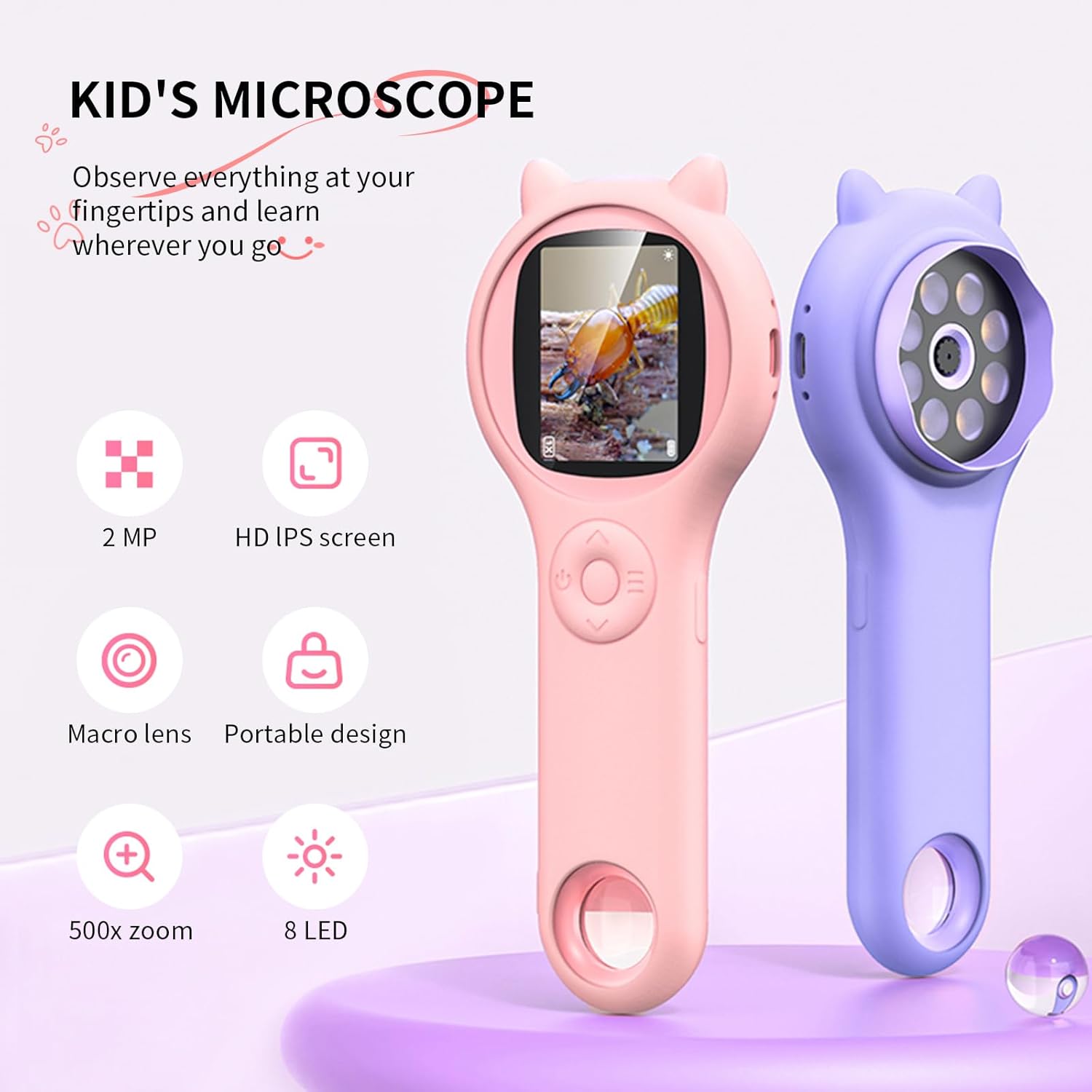
Image: Two Ashfly Kids Microscopes, one pink and one purple, illustrating the compact design and the different lenses/screens on each side.
Одржување
- Чистење: Use a soft, dry cloth to clean the exterior of the microscope. For the lens and screen, use a specialized lens cleaning cloth. Do not use abrasive cleaners or solvents.
- Складирање: Чувајте го микроскопот на ладно и суво место, подалеку од директна сончева светлина и екстремни температури.
- Нега на батеријата: За да го продолжите животниот век на батеријата, избегнувајте често целосно празнење на батеријата. Полнете го уредот редовно, дури и ако не е во употреба подолг период.
Решавање проблеми
| Проблем | Можна причина | Решение |
|---|---|---|
| Уредот не се вклучува. | Батеријата е испразнета. | Наполнете го уредот користејќи го дадениот USB-кабел. |
| Image on screen is blurry. | Incorrect focus or distance from object. | Adjust the microscope's distance from the object or use the focus wheel (if applicable) until the image is clear. |
| Cannot capture photos/videos. | Внатрешната меморија е полна. | Transfer existing photos/videos to a computer to free up space. |
Спецификации
| Карактеристика | Детал |
|---|---|
| Модел | ASIN B0DBVB3RGT |
| Бренд | Ешфлај |
| Зголемување | Up to 200x (with 4x zoom adjustment) |
| Екран | 2-inch LCD, 1080P HD digital imaging |
| Извор на светлина | LED |
| Материјал | Пластика |
| Боја | Виолетова |
| Извор на енергија | Напојува со батерија |
| Објективен објектив | Ахроматски |
Информации за гаранцијата
Ashfly products are designed for quality and durability. For specific warranty details, please refer to the warranty card included with your product or visit the official Ashfly webлокација. Чувајте ја сметката како доказ за купување за гаранциски побарувања.
Поддршка за корисници
If you encounter any issues or have questions regarding your Ashfly Portable Handheld Kids Microscope, please contact our customer support team:
- Поддршка преку Интернет: Посетете го Ashfly Store on Amazon за најчесто поставувани прашања и опции за контакт.
- Е-пошта: Погледнете го пакувањето на производот или официјалниот webстраница за директна поддршка преку е-пошта.


