Chilkey ND75

Упатство за користење на безжична механичка тастатура Chilkey ND75 од алуминиум 75%

Модел: ND75

1. Вовед

This manual provides detailed instructions for the setup, operation, and maintenance of your Chilkey ND75 Aluminum 75% Wireless Mechanical Keyboard. Please read this manual thoroughly before using the product to ensure optimal performance and longevity.

The Chilkey ND75 is a high-performance 75% layout mechanical keyboard featuring a full aluminum alloy case, multi-mode connectivity (Bluetooth 5.0, 2.4GHz wireless, USB-C wired), hot-swappable switches, per-key RGB backlighting, and an integrated LCD screen for enhanced functionality.
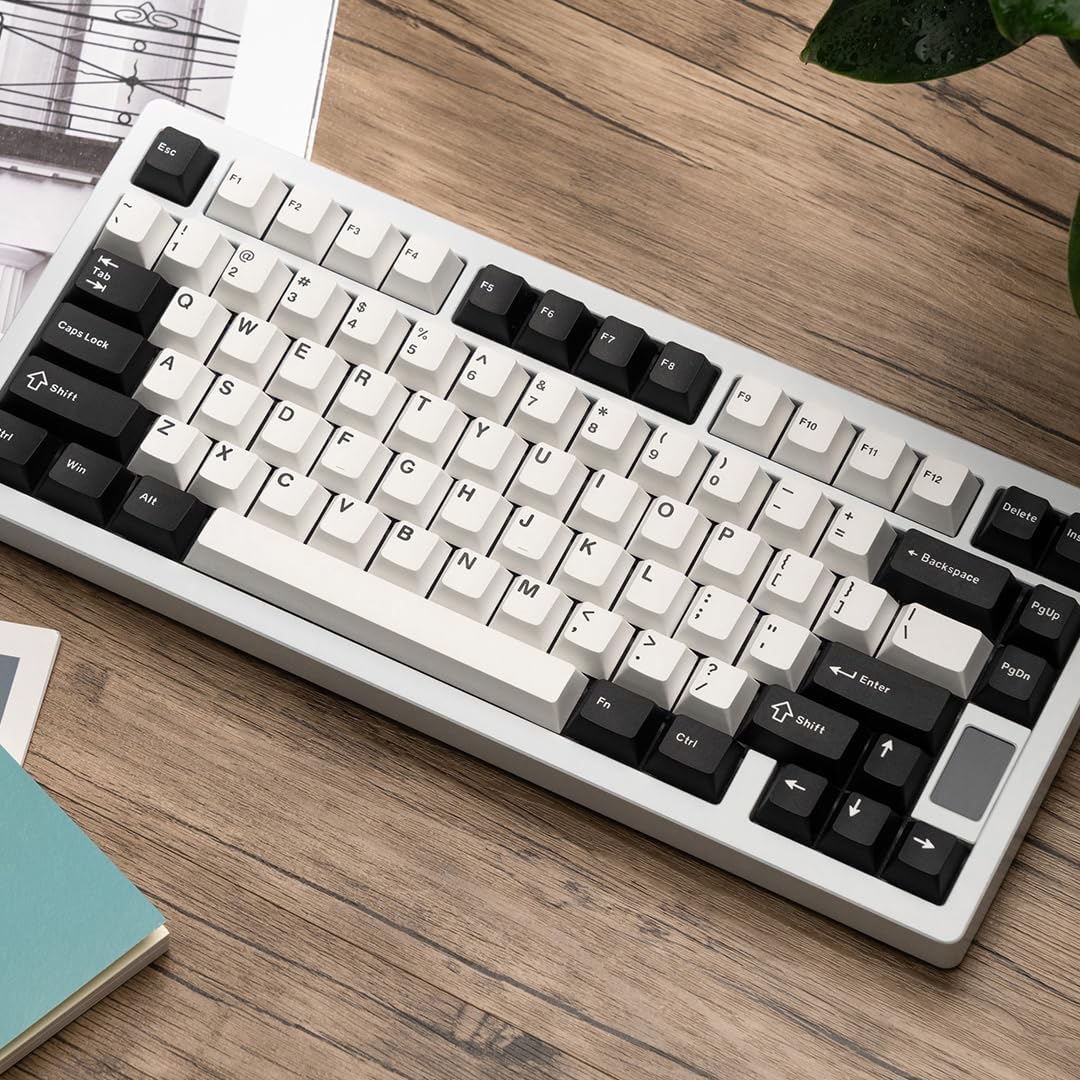
Chilkey ND75 Aluminum 75% Wireless Mechanical Keyboard in white with black and white keycaps, viewed from an angle on a wooden desk.

Image: The Chilkey ND75 keyboard, showcasing its 75% layout and aluminum casing.

2. Содржина на пакетот

Проверете дали сите артикли се присутни во вашиот пакет:

  • Chilkey ND75 Aluminum Mechanical Keyboard
  • USB-C кабел
  • Switch Puller / Keycap Puller Tool
  • Упатство за употреба (овој документ)
  • Additional hardware (e.g., screwdriver, spare mounting system components if applicable)

Note: The product includes 2 Lithium Polymer batteries (pre-installed).

3. Поставување

3.1 Почетна врска

The ND75 keyboard supports three connection modes: Bluetooth 5.0, 2.4GHz wireless, and USB-C wired.

3.1.1 Жичен режим (USB-C)

  1. Поврзете го испорачаниот USB-C кабел со USB-C портата на тастатурата.
  2. Поврзете го другиот крај од USB-C кабелот со слободен USB порт на вашиот компјутер.
  3. The keyboard will automatically be detected and ready for use.

3.1.2 Безжичен режим од 2.4 GHz

  1. Locate the 2.4GHz USB receiver. This is typically stored in a compartment on the keyboard or included separately.
  2. Remove the Right Shift keycap to access the wireless switch. Ensure the switch is in the 2.4GHz position.
  3. Insert the 2.4GHz USB receiver into an available USB port on your computer.
  4. Тастатурата треба да се поврзе автоматски. Ако не, притиснете fn+4 to activate 2.4GHz pairing mode.

3.1.3 Bluetooth 5.0 режим

  1. Remove the Right Shift keycap to access the wireless switch. Ensure the switch is in the Bluetooth position.
  2. На вашиот компјутер или уред, овозможете Bluetooth и пребарајте нови уреди.
  3. On the keyboard, press and hold fn+1, fn+2, или fn+3 for 3-5 seconds to enter pairing mode for one of the three available Bluetooth channels. The LCD screen will indicate pairing status.
  4. Select "Chilkey ND75" from the list of available Bluetooth devices on your computer/device to complete pairing.
  5. You can switch between paired Bluetooth devices using fn+1, fn+2, или fn+3.

3.2 Mounting System Adjustment

The ND75 keyboard features a screwless quick assembly structure and supports three different mounting systems: Split O-Ring Mounting, Silica Gel Particle Mounting, and Top Mounting. These can be adjusted to customize typing feel.

Image showing the three mounting systems: Top Mount, Split O-Ring Mount, and Silica Gel Particle Mount.

Слика: Крупен план view of the keyboard's internal structure highlighting the three mounting systems: Top Mount, Split O-Ring Mount, and Silica Gel Particle Mount. Each system offers a distinct typing experience.

Refer to the detailed instructions provided with the additional hardware for specific guidance on disassembling and reassembling the keyboard to change mounting systems.

4. Упатства за работа

4.1 Функции на LCD екранот

The integrated LCD screen provides real-time information and allows for quick adjustments without software. Functions include:

Image showing the ND75 keyboard with an exploded view of the LCD screen interface, displaying various settings like connection, RGB, system, volume, and custom GIF options.

Image: The ND75 keyboard with an overlay illustrating the various functions accessible via the LCD screen, including configuration, connection modes, RGB settings, system information, and volume control.

Navigate the LCD screen menu using the dedicated knob or specific key combinations (refer to the quick guide provided with the keyboard).

4.2 RGB позадинско осветлување

The ND75 keyboard features per-key RGB backlighting with 19 preset lighting effects. Custom light colors can also be defined.

Image of the ND75 keyboard with vibrant per-key RGB backlighting enabled, showcasing various colors.

Image: The ND75 keyboard illuminated with per-key RGB backlighting, demonstrating the range of colors and effects available.

Adjust lighting effects and colors directly via the LCD screen or using specific Fn key combinations. Consult the quick guide for a list of shortcuts.

4.3 Прекинувачи што може да се заменат со топла струја

The ND75 keyboard is equipped with a hot-swappable PCB, allowing users to replace switches without soldering. It supports both 3-pin and 5-pin switches.

Image showing a switch being removed from the keyboard PCB using a switch puller tool, demonstrating the hot-swappable feature.

Image: A switch puller tool is used to remove a mechanical switch from the keyboard, illustrating the hot-swappable functionality.

За да замените прекинувач:

  1. Carefully remove the keycap using the keycap puller tool.
  2. Use the switch puller tool to gently grip the top and bottom clips of the switch.
  3. Повлечете го прекинувачот право нагоре за да го извадите од печатената плочка.
  4. Порамнете ги игличките на новиот прекинувач со дупките на печатената плочка.
  5. Цврсто притиснете го новиот прекинувач на своето место додека не кликне. Уверете се дека игличките не се свиткани.
  6. Заменете го капачето на копчето.

Caution: Apply gentle, even pressure when inserting switches to avoid bending pins or damaging the PCB.

4.4 Прилагодување на софтверот

The ND75 keyboard supports independent driver/software for advanced customization, including key remapping, macro creation, and further RGB lighting control. The software can be downloaded from the official Chilkey webсајт.

Note: Some users have reported that the software can be clunky. Refer to the official Chilkey Discord community or support channels for assistance with software usage.

5. Одржување

5.1 Чистење на тастатурата

5.2 Грижа за батерии

The keyboard contains two Lithium Polymer batteries. To prolong battery life:

6 Смена на проблеми

6.1 Тастатурата не реагира

6.2 Клучевите не се регистрираат или се пишуваат двојно

6.3 Проблеми со RGB осветлување

6.4 Software Not Detecting Keyboard

7. Спецификации

МоделND75
Распоред75%
Материјал на случајотFull Aluminum Alloy (CNC with electrophoretic surface treatment)
ПоврзувањеBluetooth 5.0, безжичен 2.4GHz, USB-C кабел
ПрекинувачиHot-swappable (supports 3-pin/5-pin switches), Pre-lubed Linear Switches
Клучни клучевиDoubleshot PBT, Cherry Profile
Задно осветлувањеPer-key RGB (19 preset effects, custom colors)
ПриказFunctional LCD Screen (custom GIF, connection mode, battery, RGB, volume, language)
Системи за монтирањеSplit O-Ring, Silica Gel Particle, Top Mount
Звук ДampенингFour layers (Poron plate foam, IXPE switch foam, PET acoustic pad, Poron PCB foam)
Батерија2 x Lithium Polymer (included)
Димензии на производот12.68 x 5.5 x 1.38 инчи (322 мм Д x 159.8 мм Ш x 35.2 мм В)
Тежина на ставката4.6 фунти
ПроизводителOOCTPK
Препорачана употребаBusiness, Education, Everyday Use, Gaming, Multimedia, Personal, Photo Editing, Programming, Student, Video Editing
Diagram showing the dimensions of the Chilkey ND75 keyboard in millimeters and inches.

Image: Technical drawing illustrating the precise dimensions of the ND75 keyboard.

Експлодираше view diagram of the Chilkey ND75 keyboard components, showing layers like doubleshot PBT keycaps, switches, aluminum top case, plate, various foams, PCB, lithium batteries, and backplate.

Слика: Експлодирана view diagram detailing the internal layers and components of the ND75 keyboard, including keycaps, switches, case, and sound dampматеријали за обложување.

8. Гаранција и поддршка

For warranty information, technical support, or further assistance, please refer to the official Chilkey website or contact their customer service. You may also find helpful resources and community support on the official Chilkey Discord server.

Manufacturer: OOCTPK

Поврзани документи - ND75

Предview Главен водич за глечерот Chilkey LW 8K L: Поставување, карактеристики и безбедност
Сеопфатен главен водич за глувчето Chilkey Glacier LW 8K L, кој опфаќа поставување, безжична и Bluetooth конекција, конфигурација на софтверот CHILKEY HUB, безбедносни упатства и препораки за удобност.
Предview Водич за мерење на времето на серијата Schlage ND: Упатства за инсталација и работа
Детално упатство за тајминг на бравите од серијата Schlage ND, кое ги опфаќа чекорите за инсталација, проверките на работењето и решавањето проблеми за различни модели. Обезбедува правилно функционирање на бравата и спречува оштетување.
Предview Schlage ND Series Grade 1 Cylindrical Locks - Product Specifications and Features
Explore the Schlage ND Series Grade 1 cylindrical locks, a comprehensive range of high-security door hardware. This document details finishes, lever styles, mechanical and electrified functions, cylinder options, and detailed specifications, ensuring optimal performance and durability for commercial and residential applications.
Предview ND75 LP Tri-mode Keyboard Operation Manual
Operation manual and FCC compliance statement for the ND75 LP Tri-mode Keyboard by Wuhan Ruobing Technology Co., Ltd. Includes product specifications, key functions, connection instructions, and precautions.
Предview Schlage ND-Series Lock Installation Instructions
Comprehensive installation guide for Schlage ND-Series cylindrical locks (P517-381). Covers door preparation, lock timing, door thickness adjustments, and step-by-step assembly of exterior and interior components. Includes troubleshooting tips and contact information for Schlage support.