1. Вовед
Thank you for choosing the Irfora T58B Digital Multimeter. This instrument is a handheld, true RMS digital multimeter designed for accurate measurement of AC/DC voltage, AC/DC current, frequency, resistance, capacitance, and diodes. It is a versatile tool for solving industrial and household electrical problems, suitable for both DIY enthusiasts and professionals.
Please read this manual thoroughly before use to ensure safe and proper operation. Keep this manual for future reference.
2. Информации за безбедност
Предупредување: To avoid electric shock or personal injury, and to prevent damage to the meter or the equipment under test, observe the following safety rules:
- Секогаш осигурајте се дека мерачот е во точната функција и опсег за мерењето.
- Не применувајте повеќе од оценетиот томtagд, како што е означено на мерачот, помеѓу приклучоците или помеѓу кој било терминал и заземјување.
- Бидете внимателни кога работите со волtagнад 30V AC RMS, 42V врв или 60V DC. Таквиот волуменtagтие претставуваат опасност од шок.
- Пред да правите мерења на струја, проверете дали осигурувачите на мерачот се исправни и дали мерните сонди се поврзани на точните влезни приклучоци.
- Исклучете ги тест каблите од колото пред да ги промените функциите или опсезите.
- Не го користете мерачот ако изгледа оштетен или ако изолацијата на мерните сонди е компромитирана.
- Заменете ја батеријата штом ќе се појави индикаторот за слаба батерија за да избегнете неточни мерења.
- Придржувајте се до локалните и националните безбедносни кодови.
3. Производот завршиview
The Irfora T58B Digital Multimeter features a robust design and a clear LCD display for easy readings.
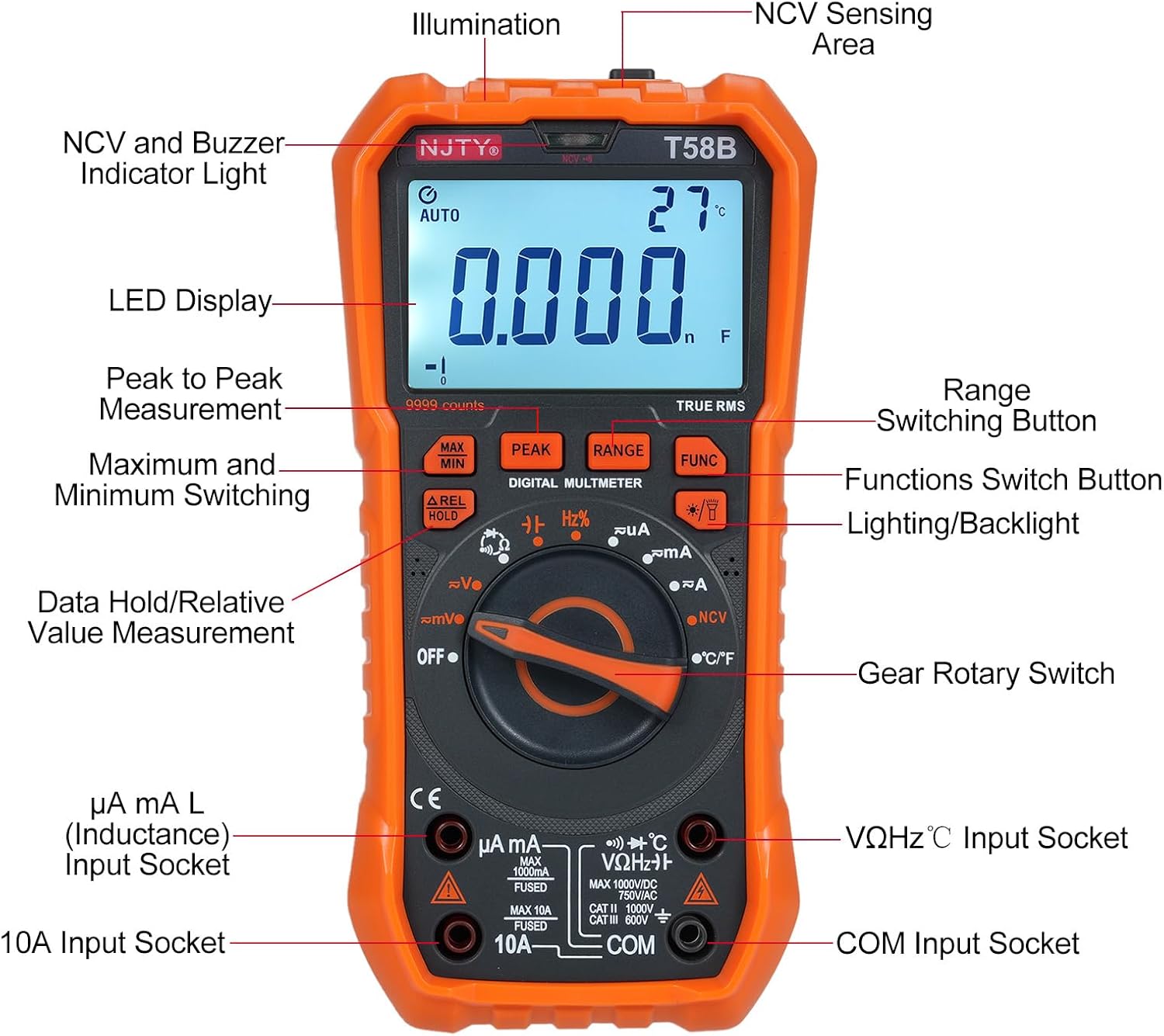
Слика 3.1: Предна страна view of the Irfora T58B Digital Multimeter with labeled components. Key features include the LED Display, NCV and Buzzer Indicator Light, Gear Rotary Switch, Input Sockets, and various function buttons.

Слика 3.2: Dimensions of the Irfora T58B Digital Multimeter. The device measures approximately 187mm (7.36in) in height, 95mm (3.74in) in width, and 55mm (2.16in) in depth.

Слика 3.3: Заден дел view of the multimeter showing the 90-degree adjustable support stand and integrated storage slots for test leads, designed for convenience and protection.

Слика 3.4: Во текот наview of the Irfora T58B Digital Multimeter's capabilities, including 9999 counts display, and measurement of current, resistance, capacitance, temperature, and frequency.
Клучни карактеристики:
- 9999 Counts LCD Digital Display with Backlight
- Вистинско мерење RMS
- Бесконтактно волtage (NCV) Откривање
- Автоматско исклучување
- Data Hold and Relative Value Measurement
- Flashlight Function for low-light conditions
- Мери AC/DC Voltage, AC/DC Current, Resistance, Capacitance, Frequency, and Temperature
- Тест на диоди и континуитет
4. Поставување
4.1. Инсталација на батерија
The Irfora T58B Multimeter requires 3 x 1.5V AAA batteries (not included). To install or replace batteries:
- Осигурајте се дека мултиметарот е исклучен и исклучете ги сите тест кабли од влезните терминали.
- Пронајдете го капакот на преградата за батерии на задната страна од мерачот.
- Користете шрафцигер за да ги олабавите завртките што го прицврстуваат капакот на батеријата.
- Remove the cover and insert the 3 AAA batteries, observing the correct polarity (+ and -).
- Вратете го капакот на батеријата и затегнете го/ги завртката/ите.
Забелешка: Отстранете ги батериите ако мерачот не се користи подолг период за да спречите протекување.
4.2. Поврзување на тест кабли
Always connect the black test lead to the "COM" (Common) input jack. Connect the red test lead to the appropriate input jack based on the measurement type:
- За Voltage, Resistance, Capacitance, Frequency, Diode, and Temperature measurements: Connect the red lead to the "VΩHz°C" jack.
- For Current measurements (up to 600mA): Connect the red lead to the "µA mA" jack.
- For High Current measurements (up to 10A): Connect the red lead to the "10A" jack.
Ensure test leads are fully inserted into the jacks before use.
5. Упатства за работа
To operate the multimeter, turn the Gear Rotary Switch to the desired function. The meter will automatically select the appropriate range in most modes (AUTO function).
5.1. AC/DC Voltagд Мерење
- Turn the rotary switch to the "V~" (AC Voltagд) или „V-“ (DC Voltagд) позиција.
- Connect the black test lead to the "COM" jack and the red test lead to the "VΩHz°C" jack.
- Допрете ги тест сондите до точките на колото каде што волуменот еtagе да се мери.
- Прочитајте го томtagе вредност на LCD екранот.
5.2. Мерење на струјата со наизменична/директна струја
Внимание: Никогаш не го поврзувајте мерачот паралелно со зафатнинаtagизвор при мерење на струја. Ова може да го прегори осигурувачот или да го оштети мерачот.
- Turn the rotary switch to the "µA mA" or "A" position for AC or DC current. Use the "FUNC" button to switch between AC and DC if necessary.
- Connect the black test lead to the "COM" jack. Connect the red test lead to the "µA mA" jack for currents up to 600mA, or to the "10A" jack for currents up to 10A.
- Отворете го колото каде што треба да се мери струјата и поврзете го мерачот сериски со товарот.
- Прочитајте ја моменталната вредност на LCD дисплејот.
5.3. Мерење на отпор
- Свртете го ротациониот прекинувач во положба „Ω“.
- Connect the black test lead to "COM" and the red test lead to "VΩHz°C".
- Пред мерење на отпорот, проверете дали колото е исклучено од напон.
- Допрете ги тест сондите преку компонентата или колото каде што треба да се мери отпорот.
- Прочитајте ја вредноста на отпорот на LCD екранот.
5.4. Мерење на капацитетот
- Turn the rotary switch to the "Capacitance" position (often shared with other functions, use FUNC button if needed).
- Connect the black test lead to "COM" and the red test lead to "VΩHz°C".
- Discharge the capacitor completely before measurement to avoid damage to the meter.
- Допрете ги тест сондите преку терминалите на кондензаторот.
- Прочитајте ја вредноста на капацитетот на LCD екранот.
5.5. Мерење на фреквенција
- Turn the rotary switch to the "Hz" position.
- Connect the black test lead to "COM" and the red test lead to "VΩHz°C".
- Touch the test probes across the circuit where frequency is to be measured.
- Прочитајте ја вредноста на фреквенцијата на LCD дисплејот.
5.6. Тест на диода и континуитет
- Turn the rotary switch to the "Diode/Continuity" position. Use the "FUNC" button to toggle between diode test and continuity.
- Connect the black test lead to "COM" and the red test lead to "VΩHz°C".
- For Diode Test: Place the red probe on the anode and the black probe on the cathode. The display will show the forward voltagпад. Свртете ги сондите; екранот треба да прикаже „OL“ (Отворена јамка) за добра диода.
- For Continuity Test: Touch the probes to the circuit points. If resistance is below approximately 50Ω, the buzzer will sound, indicating continuity.
5.7. Мерење на температурата
- Turn the rotary switch to the "°C/°F" position.
- Connect the thermocouple (included) to the "VΩHz°C" and "COM" jacks, observing polarity.
- Place the thermocouple tip on the object or area where temperature is to be measured.
- Read the temperature value on the LCD display. Use the "FUNC" button to switch between Celsius and Fahrenheit.
5.8. Бесконтактен томtage (NCV) Откривање

Слика 5.1: Demonstrating NCV (Non-Contact Voltage) detection. The meter's top is placed near an AC voltage source, and the signal strength indicator lights up, accompanied by an audible alarm.
- Turn the rotary switch to the "NCV" position.
- Place the top of the meter (NCV sensing area) close to the conductor or outlet you suspect has AC voltage.
- Ако AC voltage is detected, the corresponding signal strength indicator (low-yellow, high-red) will light up, and the buzzer will emit different frequency alarms based on signal strength.
5.9. Backlight and Flashlight
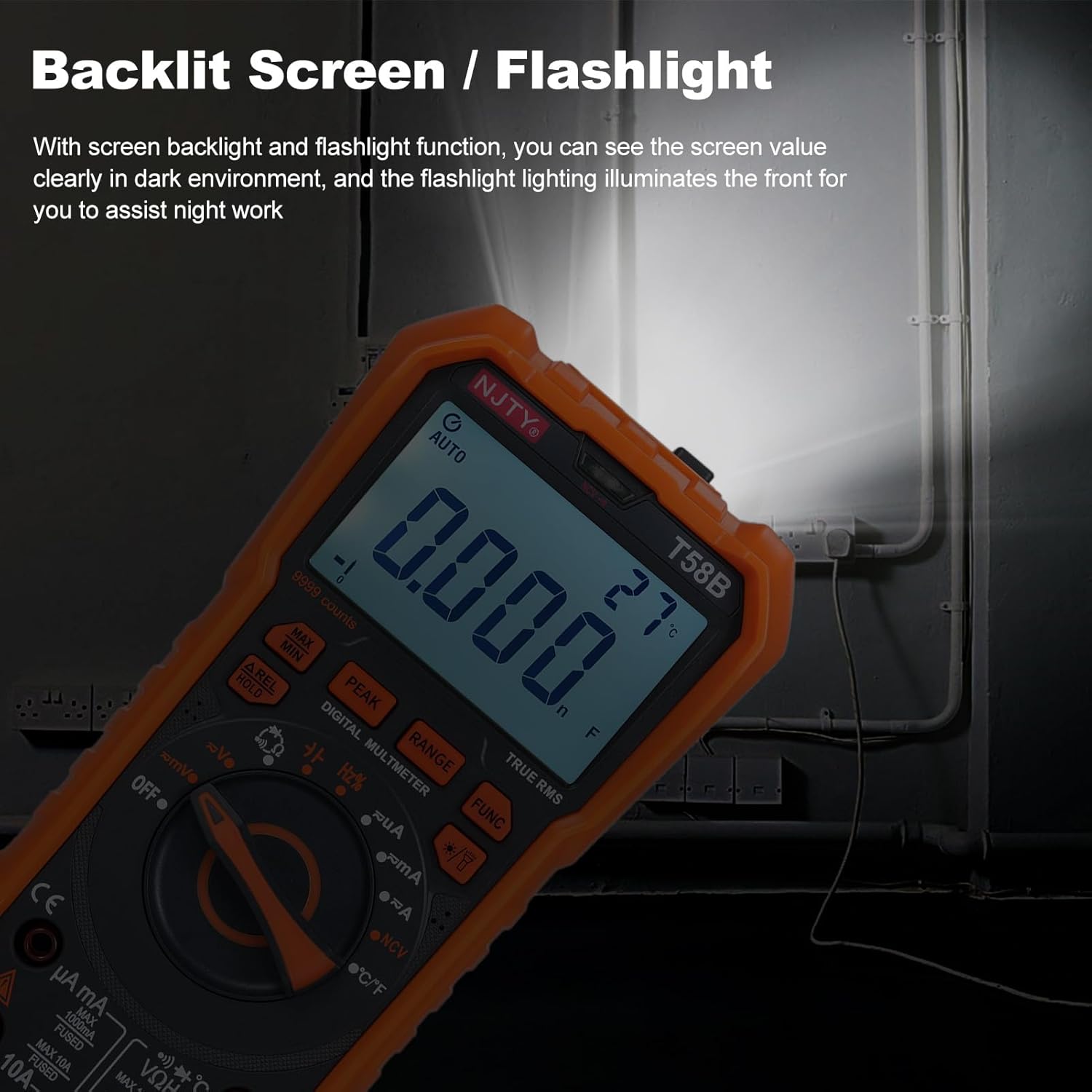
Слика 5.2: The multimeter's backlit screen and integrated flashlight illuminate the display and work area, enhancing visibility in dark environments.
Press the "Lighting/Backlight" button (often marked with a light bulb icon) to turn on the display backlight. Press and hold the same button to activate the flashlight located at the top of the meter. Press again to turn off.
5.10. Автоматско исклучување

Слика 5.3: The multimeter features an automatic shutdown function, turning off after approximately 15 minutes of inactivity to conserve battery life.
The multimeter will automatically power off after approximately 15 minutes of inactivity to conserve battery life. An audible voice prompt will sound before shutdown. To restart the meter, press any button or turn the rotary switch.
6. Одржување
6.1. Чистење
Избришете го мерачот со рекламаamp крпа и благ детергент. Не користете абразивни средства или растворувачи. Чувајте ги влезните терминали без нечистотија и влага.
6.2. Замена на батеријата
When the low battery indicator appears on the display, replace the batteries as described in Section 4.1. Prompt battery replacement ensures accurate readings.
6.3. Замена на осигурувачите
Ако мерачот не успее да ја мери струјата, осигурачот може да е прегорен. За да го замените осигурачот:
- Осигурајте се дека мултиметарот е исклучен и исклучете ги сите тест кабли.
- Open the battery compartment cover as described in Section 4.1.
- Внимателно отстранете го стариот осигурувач.
- Replace with a fuse of the same type and rating:
- For µA mA input: F 600mA/250V
- For 10A input: F 10A/250V
- Вратете го капакот на батеријата и затегнете го/ги завртката/ите.
7 Смена на проблеми
| Проблем | Можна причина | Решение |
|---|---|---|
| Мерачот не се вклучува. | Мртви или неправилно инсталирани батерии. | Check battery polarity and replace batteries if necessary (Section 4.1). |
| No reading or "OL" displayed during measurement. | Incorrect range, open circuit, or blown fuse (for current). | Ensure correct function/range. Check test lead connections. For current, check and replace fuse (Section 6.3). Verify circuit continuity. |
| Неточни читања. | Low battery, incorrect connection, or external interference. | Replace batteries. Recheck test lead connections. Move away from strong electromagnetic fields. |
| Buzzer does not sound during continuity test. | Отпорот на колото е превисок. | Ensure resistance is below approximately 50Ω for continuity indication. |
Ако проблемот продолжи откако ќе се обидете со овие решенија, контактирајте ја корисничката поддршка.
8. Спецификации
The following specifications are for the Irfora T58B Digital Multimeter:
Општи спецификации:
- Display: 9999 Counts LCD display
- Safety Rating: CAT III 600V, CAT II 1000V
- Pollution Grade: 2
- Working Height: Under 2000m
- Working Temperature: 0-40°C (<80%RH, not considered <10°C)
- Storage Temperature: -10~60°C (<80%RH, remove battery)
- Test/Calibration Ambient Temperature: 20°C ± 2°C
- Максимален волуменtage between Measurement End and Ground: 1000V DC or 750V AC
- Заштита од осигурувачи:
- For µA mA input: F 600mA/250V
- For 10A input: F 10A/250V
- Conversion Rate: Approximately 3 readings/second
- Overload Display: "OL"
- Power Supply: 3 * 1.5V AAA batteries (Not included)
- Item Size: 187 * 95 * 55mm / 7.36 * 3.74 * 2.16in
- Тежина на предметот: 331 г / 11.67 оз
Опсези на мерење:
- DC Voltage: 100mV, 600mV, 1V, 60V, 600V, 1000V
- AC Voltage: 100mV, 600mV, 1V, 60V, 600V, 750V
- DC Current: 600µA, 6mA, 60mA, 600mA, 6A, 10A
- AC Current: 600µA, 6mA, 60mA, 600mA, 6A, 10A
- Отпорност: 600Ω, 6kΩ, 60kΩ, 600kΩ, 6MΩ, 60MΩ
- Capacitance: 6nF, 60nF, 600nF, 6µF, 60µF, 600µF, 6mF, 60mF
- Frequency: 100Hz, 1KHz, 10KHz, 100KHz, 1MHz, 10MHz, 25MHz
- Temperature: -50°C~1000°C / -58°F~1832°F
- Тест на диоди: Да
- Buzzer (Continuity): Yes
9. Гаранција и поддршка
For warranty information or technical support, please refer to the purchase platform or contact Irfora customer service directly. Keep your purchase receipt as proof of purchase.
Контакт информации: Please refer to the seller's contact details on the platform where the product was purchased.
