1. Вовед
The FLEXISPOT E6 Pro Oval Dual Motor Standing Desk Frame (Model E8) is designed to provide a versatile and ergonomic workspace. This height-adjustable electric desk frame features a robust 3-stage oval leg system and powerful dual motors, allowing for smooth and quiet transitions between sitting and standing positions. The intuitive LED control panel includes memory presets and a convenient USB charging port, enhancing user experience and productivity. This manual provides essential information for the safe assembly, operation, and maintenance of your desk frame.

Figure 1: FLEXISPOT E6 Pro Oval Dual Motor Standing Desk Frame (Black)
2. Информации за безбедност
За безбедно работење и спречување на оштетување, ве молиме почитувајте ги следниве упатства:
- Ensure the desk is securely assembled according to the provided instructions.
- Do not exceed the maximum weight capacity of 330 lbs (150 kg) to prevent tipping or instability.
- Држете ги рацете и предметите подалеку од подвижните делови за време на прилагодувањето на висината.
- Избегнувајте ставање течности директно на контролната табла или во близина на електричните компоненти.
- Regularly inspect all connections and fasteners to ensure they are tight and secure.
- The desk is equipped with an anti-collision system. However, always exercise caution when adjusting height to prevent accidental contact with objects or persons.
3. Собрание
The FLEXISPOT E6 Pro desk frame is designed for straightforward assembly. Please follow the detailed instructions provided in the separate user manual included with your product. Ensure all components are present before beginning assembly.
3.1 Клучни компоненти
- Lifting Columns (Legs)
- Нозете
- Попречно зрак
- Контролна кутија
- Handset (Control Panel)
- Адаптер за напојување
- Хардвер за монтирање
3.2 Склопување завршиview
Typically, assembly involves attaching the feet to the lifting columns, connecting the crossbeam, mounting the control box and handset, and finally securing your chosen desktop (sold separately) to the frame. All necessary tools are usually included. Refer to the specific step-by-step diagrams in your product manual for precise instructions.

Слика 2: Експлодирано view of the FLEXISPOT E6 Pro desk frame components.
4. Упатства за работа
4.1 Прилагодување на висината
The E6 Pro features a 3-stage oval leg system, offering a broad height adjustment range from 23.6 inches to 48.8 inches. This allows users of various heights, from children to tall adults, to find their optimal ergonomic position.
- Подигнете ја масата: Притиснете и задржете го Стрелка нагоре копче на контролната табла.
- Долна маса: Притиснете и задржете го Стрелка надолу копче на контролната табла.
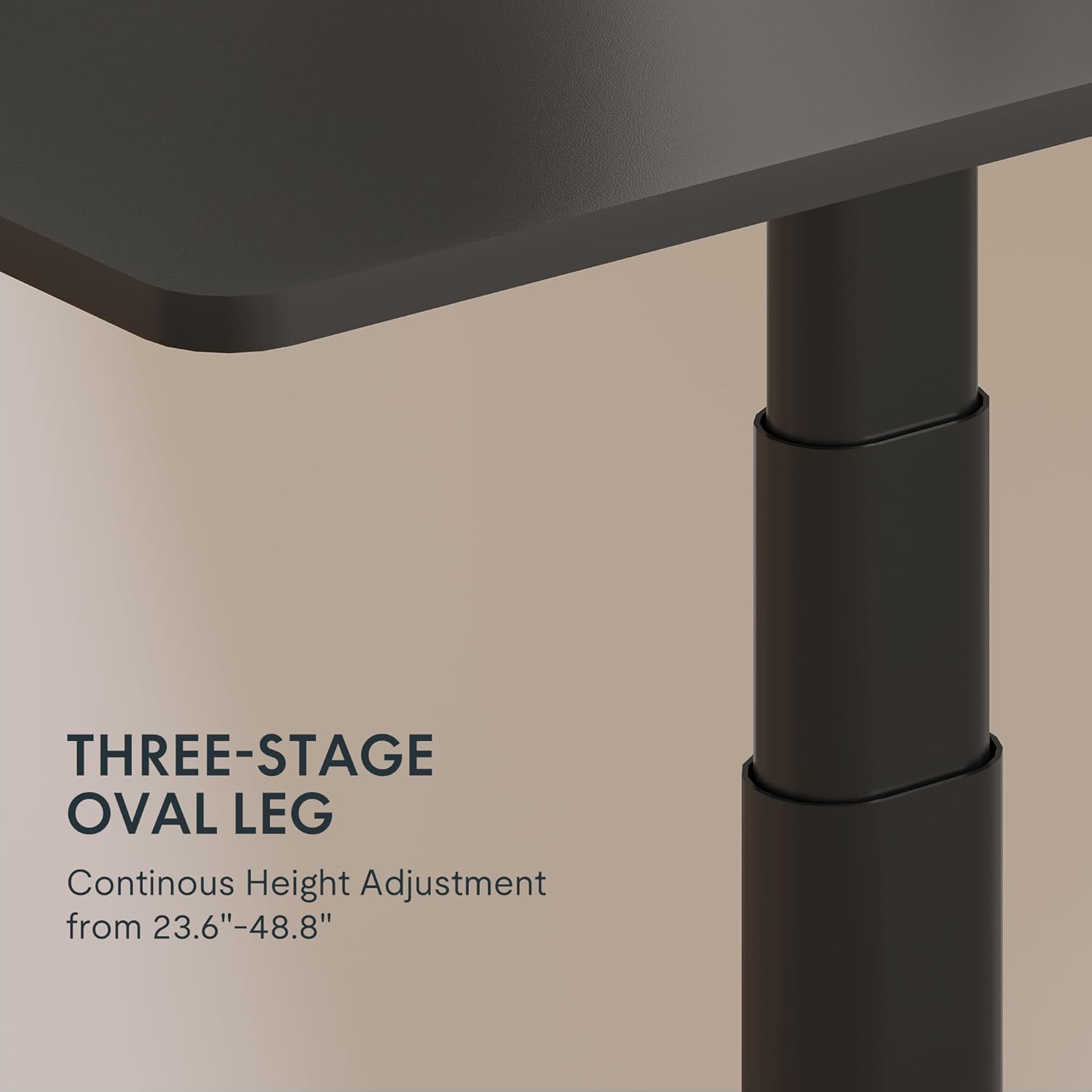
Figure 3: Close-up of the 3-stage oval leg mechanism.
4.2 LED Control Panel with Memory Presets and USB Port
The intuitive LED control panel allows for easy height adjustments and includes programmable memory presets for your preferred sitting and standing heights. It also features a convenient USB port for charging devices.
- Поставување на мемориски поставки: Adjust the desk to your desired height using the Up/Down arrows. Press the „М“ button, then press one of the numbered preset buttons ('1', '2', '3', или '4') за да ја зачувате тековната висина.
- Повикување на мемориските претходно поставени поставки: Press any of the numbered preset buttons ('1', '2', '3', или '4') за автоматски да ја поместите работната маса на зачуваната висина.
- USB порта за полнење: Use the integrated USB port to conveniently charge your electronic devices.
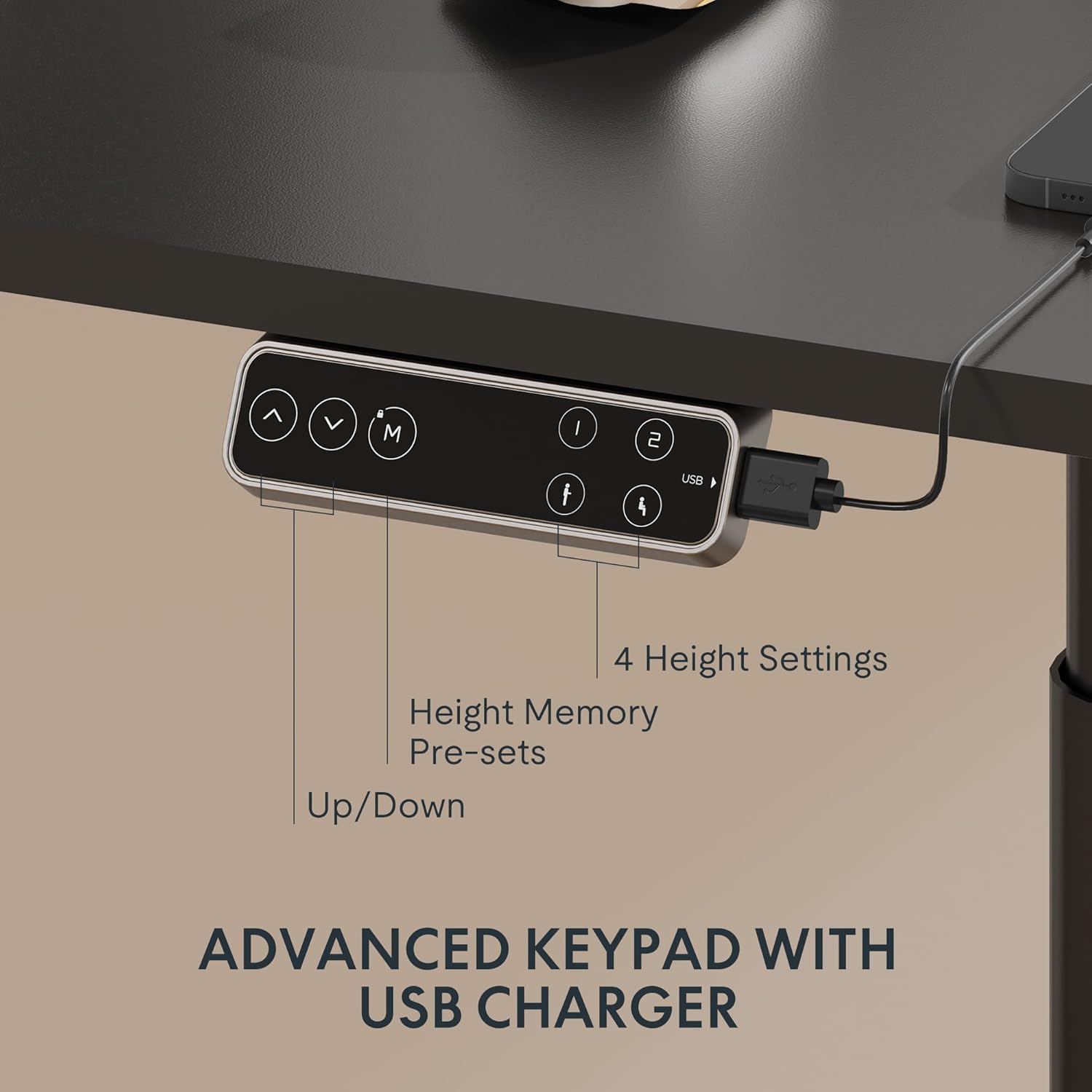
Figure 4: LED Control Panel with memory presets and USB port.
4.3 Dual Motor System
The E6 Pro is equipped with quiet dual motors that operate at less than 45dB, ensuring minimal disturbance in your workspace. These powerful motors can handle up to 330 lbs (150 kg) of weight, providing stable and reliable performance.
4.4 Систем против судир
For enhanced safety, the desk features an anti-collision system. If the desk encounters an obstruction during height adjustment, it will automatically stop and reverse slightly to prevent damage or injury. This system is designed to protect both the desk and its surroundings.
5. Спецификации
| Карактеристика | Детал |
|---|---|
| Бренд | ФЛЕКСИСПОТ |
| Број на модел | E8 |
| Дизајн на биро | Рамка за стоечка маса |
| Ногата Сtages | 3 Сtages Oval Leg |
| Опсег за прилагодување на висината | 23.6" до 48.8" |
| Тип на мотор | Двоен мотор |
| Тежински капацитет | До 330 фунти (150 кг) |
| Ниво на бучава | Помалку од 45 dB |
| Контролен панел | LED with 4 Memory Presets & USB Port |
| Специјална карактеристика | Систем против судир |
| Основен материјал | Метал |
| Боја | Црна рамка |
| Задолжително собрание | Да |
6. Одржување
To ensure the longevity and optimal performance of your FLEXISPOT E6 Pro desk frame, regular maintenance is recommended:
- Чистење: Избришете ја рамката на бирото со мека, дamp крпа. Избегнувајте употреба на груби хемикалии или абразивни средства за чистење кои би можеле да ја оштетат завршната обработка.
- Управување со кабли: Periodically check and organize cables to prevent tangling or damage, especially during height adjustments.
- Проверка на прицврстувачите: Every few months, inspect all screws and bolts to ensure they are tight. Re-tighten if necessary.
- Распределба на тежината: Distribute weight evenly across the desktop to prevent undue stress on the frame and motors.
7 Смена на проблеми
If you encounter any issues with your desk frame, please refer to the following common troubleshooting steps:
- Бирото не се движи: Check all cable connections to ensure they are securely plugged into the control box and power outlet. Verify the power adapter is functioning.
- Нерамномерно движење: Ensure the desk is not overloaded and that weight is evenly distributed. Perform a reset procedure (refer to your specific user manual for reset instructions).
- Кодови за грешки на екранот: Consult your user manual for a list of error codes and their corresponding solutions.
- Anti-Collision System Triggering Frequently: Ensure there are no obstructions in the desk's path during movement.
If the problem persists after attempting these steps, please contact FLEXISPOT customer support for further assistance.
8. Гаранција и поддршка
FLEXISPOT provides a comprehensive warranty for your peace of mind:
- 5-годишно покритие: Applies to the desk frame and motor.
- 2-годишно покритие: Applies to the control panel and electronics.
For warranty claims, technical support, or any questions regarding your FLEXISPOT E6 Pro desk frame, please visit the official FLEXISPOT webстраницата или директно контактирајте ја нивната служба за корисници. Зачувајте ја сметката за купување како доказ за купување.
9. Видеа за производи
9.1 Why Choose FLEXISPOT E6
Video 1: This official FLEXISPOT video highlights the key features and benefits of the E6 series, including its robust construction and smooth operation.
9.2 Welcome to FLEXISPOT'S Mega Factory
Video 2: An inside look at the FLEXISPOT manufacturing facility, showcasing the precision and quality control involved in producing their products.


