Вовед
This manual provides detailed instructions for the setup, operation, and maintenance of your Nulea KM75 Advanced Ergonomic Wireless Keyboard and Mouse Combo. Please read this manual thoroughly before using the product to ensure optimal performance and longevity.
Содржина на пакетот
- Nulea KM75 Ergonomic Wireless Keyboard
- Nulea Ergonomic Wireless Mouse
- 2.4G USB Receiver (shared for keyboard and mouse)
- USB-C кабел за полнење
- Упатство за употреба (овој документ)
Производот завршиview
Карактеристики на тастатурата
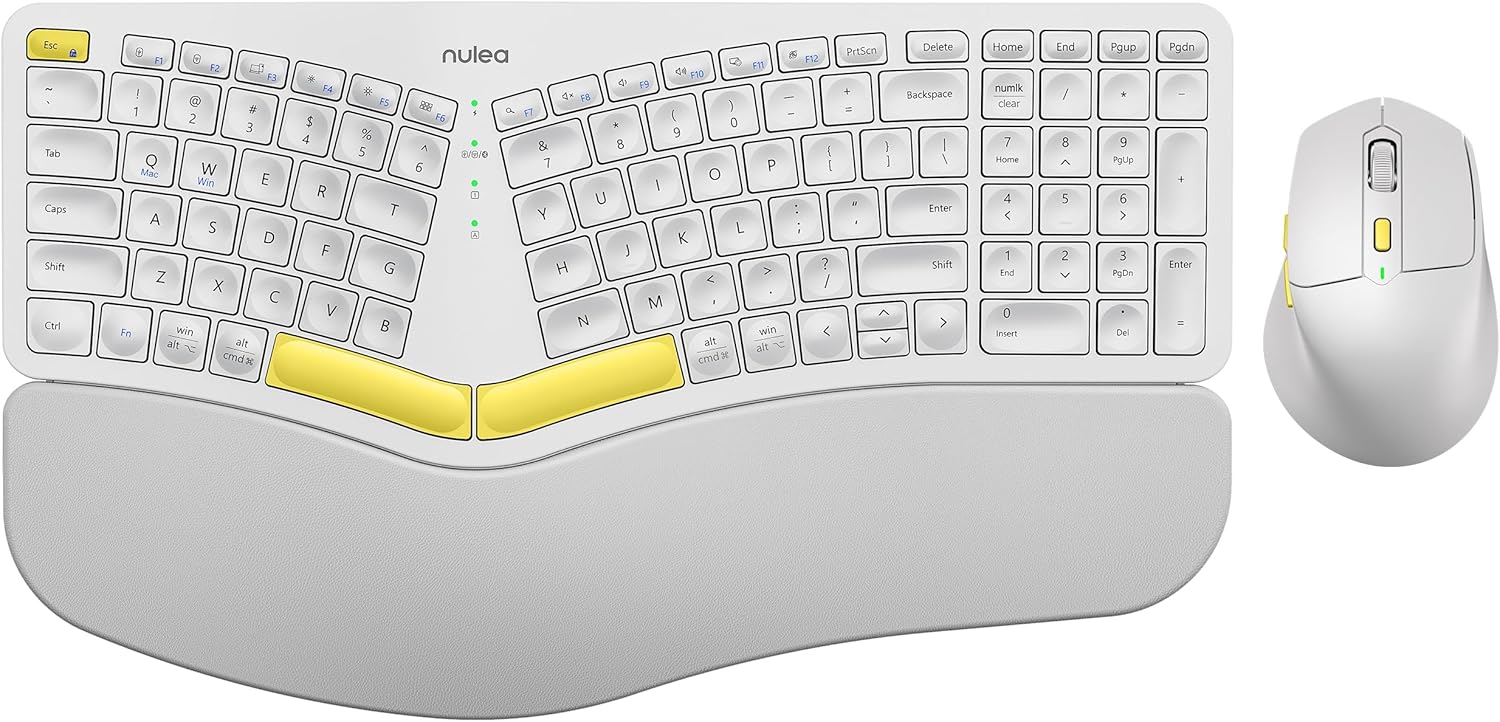
Image: The Nulea KM75 ergonomic keyboard and mouse combo. The keyboard features a curved and split layout with an integrated palm rest, and the mouse is sculpted for comfort. Both are white with yellow accents.
- Ergonomic Curved and Split Key-frame: Designed to position wrists and forearms naturally.
- Интегриран потпирач за дланки: Features a soft memory foam layer for wrist support.
- Adjustable Tilt Design: Allows for optimal keyboard positioning.
- Поврзување со повеќе уреди: Supports USB cable, 2.4G USB receiver, and Bluetooth.
- Батерија на полнење: 500mAh capacity with USB-C charging.
- Режим на автоматско спиење: Conserves power after 30 minutes of inactivity.
Карактеристики на глувчето

Image: A close-up of the Nulea ergonomic mouse, showing its sculpted design for a natural hand posture with integrated palm and thumb rests. The mouse is white with yellow accents.
- Ergonomic Sculpted Design: Integrated palm and thumb rests for natural hand position.
- Прилагодливи поставки за DPI: For precise cursor control.
- Копчиња за напред/назад: За погодност web навигација.
- Поврзување со повеќе уреди: Supports 2.4G USB receiver and Bluetooth.
- Батерија на полнење: 300mAh capacity with USB-C charging.
- Режим на автоматско спиење: Conserves power after 30 minutes of inactivity.
Поставување
1. Полнење на уредите
Before initial use, fully charge both the keyboard and mouse using the provided USB-C cable. Connect the USB-C end to the device and the USB-A end to a power source (e.g., computer USB port, USB wall adapter).

Image: Illustration showing the keyboard and mouse connected via USB-C cables for charging. The keyboard has a 500mAh battery and the mouse has a 300mAh battery.
The indicator lights will show charging status and turn off when fully charged. A full charge provides approximately two months of operation.
2. Connecting via 2.4G USB Receiver
- Locate the 2.4G USB receiver. It is typically stored in a compartment on the underside of the mouse.
- Вметнете го USB приемникот во слободен USB-A порт на вашиот компјутер.
- Вклучете ја тастатурата и глувчето користејќи ги нивните соодветни прекинувачи за вклучување.
- For the keyboard, press Fn + F2 to select 2.4G mode.
- For the mouse, switch the mode selector on the bottom to 2.4G.
- The devices should connect automatically.

Image: A close-up of the underside of the mouse, showing the storage compartment for the 2.4G USB receiver.
3. Поврзување преку Bluetooth
- Вклучете ја тастатурата и глувчето.
- For the keyboard, press Fn + F3 to select Bluetooth mode. The indicator light will blink, indicating pairing mode.
- For the mouse, switch the mode selector on the bottom to Bluetooth. The indicator light will blink.
- На вашиот уред (компјутер, таблет, паметен телефон), овозможете Bluetooth и пребарувајте нови уреди.
- Select "Nulea Keyboard" and "Nulea Mouse" from the list of available devices to pair.
- Следете ги сите предупредувања на екранот за да го завршите процесот на спарување.
4. Поврзување преку жичен режим
- Connect the USB-C charging cable to the keyboard or mouse and the USB-A end to your computer.
- For the keyboard, press Fn + F1 to select wired mode.
- For the mouse, switch the mode selector on the bottom to wired mode.
- The devices will function as wired peripherals.

Image: Diagram illustrating the simple connectivity options for the Nulea KM75. Pressing Fn+F1 connects via wired, Fn+F2 via 2.4G, and Fn+F3 via Bluetooth, allowing connection to multiple devices like PCs, laptops, and mobile devices.
5. Префрлување помеѓу уреди
The Nulea KM75 combo supports multi-device connectivity. You can switch between up to three connected devices (one wired, one 2.4G, one Bluetooth) by pressing the corresponding function keys on the keyboard (Fn + F1/F2/F3) and adjusting the mode selector on the mouse.
Упатства за работа
Употреба на тастатура
- Ергономски дизајн: The curved and split key-frame is designed for natural hand and wrist positioning. Allow some time to adapt to this layout for optimal comfort.
- Прилагодливи ногарки за навалување: Located on the underside of the keyboard, these legs allow you to adjust the typing angle for personalized comfort.

Image: A user demonstrating the adjustable tilt legs of the Nulea KM75 keyboard, showing how to customize the typing angle for ergonomic comfort.
- Функциски копчиња (Fn): Многу копчиња имаат секундарни функции достапни со држење притиснато Fn key and pressing the desired function key (e.g., media controls, volume). Refer to the keycap legends for specific functions.
Употреба на глувчето
- Прилагодување на DPI: Use the DPI switch button, usually located near the scroll wheel, to cycle through different sensitivity levels (DPI). This allows for precise control or faster cursor movement.

Image: A close-up of the Nulea ergonomic mouse, highlighting the DPI switch key and indicator light for adjusting cursor sensitivity.
- Странични копчиња: The side buttons (typically on the left for right-handed users) are often pre-programmed for forward and backward navigation in web прелистувачи или file истражувачи.
Одржување
- Чистење: Користете мека, сува крпа за чистење на површините на тастатурата и глувчето. За тврдокорна нечистотија, малкуamp Може да се користи крпа со благ сапун, осигурувајќи се дека течноста не влегува во уредот. Избегнувајте груби хемикалии или абразивни материјали.
- Нега на батеријата: To prolong battery life, avoid fully discharging the devices frequently. Recharge when the low battery indicator appears. Store in a cool, dry place if not used for extended periods.
- Складирање: When not in use, store the USB receiver in its designated compartment on the mouse to prevent loss.
Решавање проблеми
- Уредот не се поврзува:
- Осигурајте се дека и тастатурата и глувчето се вклучени.
- Verify the correct connection mode (2.4G, Bluetooth, Wired) is selected on both devices and your computer.
- За 2.4G, проверете дали USB приемникот е безбедно поврзан во функционален USB порт.
- For Bluetooth, ensure Bluetooth is enabled on your device and the devices are in pairing mode. Try re-pairing if necessary.
- Осигурајте се дека уредите се наполнети.
- Try restarting your computer and the devices.
- Доцнење или повремена врска:
- Move the devices closer to the USB receiver or your computer to reduce interference.
- Избегнувајте поставување на приемникот во близина на други безжични уреди или големи метални предмети.
- Осигурајте се дека батериите се доволно наполнети.
- Keys not responding or mouse not moving:
- Проверете ги нивоата на батеријата и наполнете ја доколку е потребно.
- Ensure the devices are properly connected (see "Device not connecting" above).
- Clean any debris from around the keys or mouse sensor.
Спецификации
| Карактеристика | Детал |
|---|---|
| Бренд | Нулеа |
| Модел | KM75 |
| Поврзување | Bluetooth, 2.4G USB, Wired (USB-C) |
| Батерија за тастатура | Литиум од 500 mAh |
| Батерија на глувчето | Литиум од 300 mAh |
| Компатибилен ОС | Windows, Mac OS, Android |
| Посебни карактеристики | Ergonomic design, Curved/Split key-frame, Integrated palm rest, Adjustable tilt, Adjustable mouse DPI |
| Тежина на ставката | 4.2 фунти (комбинирано) |
| Димензии на пакетот | 16.97 x 11.69 x 2.05 инчи |
Гаранција и поддршка
Nulea products are designed for reliability and performance. For warranty information, technical support, or customer service inquiries, please refer to the contact details provided on the Nulea official webстраницата или вашата документација за купување. Ве молиме зачувајте го доказот за купување за гаранциски барања.


