1. Производот завршиview
The CAPOXO Wired 1080p Full HD Video Recording Camera is designed for discreet surveillance and recording. This device captures high-definition video with audio, features motion detection, and includes a night lamp for low-light conditions. It operates without Wi-Fi, storing recordings directly onto a memory card for easy access.
This manual provides detailed instructions for setting up, operating, and maintaining your CAPOXO camera to ensure optimal performance.
2. Содржина на пакетот
Проверете дали сите артикли се присутни во вашиот пакет:
- CAPOXO Wired 1080p Full HD Video Recording Camera
- USB кабел
- Упатство за употреба
Забелешка: A Micro SD card (16GB, 32GB, or 64GB Class 10 recommended) and a 5V/1A charger are not included and must be purchased separately.
3. Карактеристики на производот
- Full HD 1080p Video Recording: Captures clear, high-definition video footage.
- Аудио снимање: Снима аудио заедно со видео.
- Откривање на движење: Automatically triggers video recording when motion is detected.
- Ноќен Л.amp Способност: Equipped with white LED lights for recording in low-light or dark conditions.
- Континуирано снимање: Records directly to a Micro SD card (not included).
- Лесно поставување: Wired operation, no complex Wi-Fi configuration required.
- Преносен дизајн: Compact and easy to carry or clip.
- Ротирачки објектив: 90° rotatable lens for wider viewинг агли.

Image: The CAPOXO camera featuring its 90-degree rotatable lens, allowing for flexible recording angles.

Слика: Крупен план view of the CAPOXO camera's rotatable lens mechanism, highlighting its design for wider field of view.
4. Водич за поставување
4.1 Полнење на камерата
- Before first use, charge the camera for at least 1 hour.
- Connect the camera to a 5V/1A charger (not included) using the provided USB cable.
- Индикаторското светло за полнење ќе свети за време на полнењето и ќе се исклучи кога ќе се наполни целосно.
- A full charge provides up to 3 hours of continuous operation. The camera can also be used while charging for extended recording.
4.2 Вметнување на Micro SD-картичка
- Проверете дали камерата е исклучена.
- Пронајдете го слотот за микро SD картичка на страната од камерата.
- Gently insert a Class 10 Micro SD card (16GB, 32GB, or 64GB) into the slot until it clicks into place.
- За да ја извадите, нежно притиснете ја картичката повторно додека не испадне.

Image: Diagram showing the CAPOXO camera's various components, including the Micro SD card slot, ON/OFF switch, and recording buttons.
5. Упатства за работа
5.1 Вклучување/исклучување
- За да го вклучите, лизгајте го ВКЛУЧЕНО/ИСКЛУЧЕНО префрлете се во положба „ВКЛУЧЕНО“.
- За исклучување, лизгајте го ВКЛУЧЕНО/ИСКЛУЧЕНО префрлете се во положба „ИСКЛУЧЕНО“.

Image: A hand demonstrating how to operate the CAPOXO camera, highlighting the easy-to-use ON/OFF switch for one-button recording.
5.2 Снимање видео
- Проверете дали камерата е вклучена и дали е вметната микро SD картичка.
- Slide the "SAVE -> VIDEO" switch to the "VIDEO" position to start recording.
- The indicator light will flash to confirm recording is in progress.
- To stop recording, slide the "SAVE -> VIDEO" switch back to the "SAVE" position. The video file ќе се зачува на Micro SD картичката.
5.3 Снимање со детекција на движење
The camera automatically records 1080p HD videos when motion is detected. This feature is active when the camera is powered on and in recording mode.
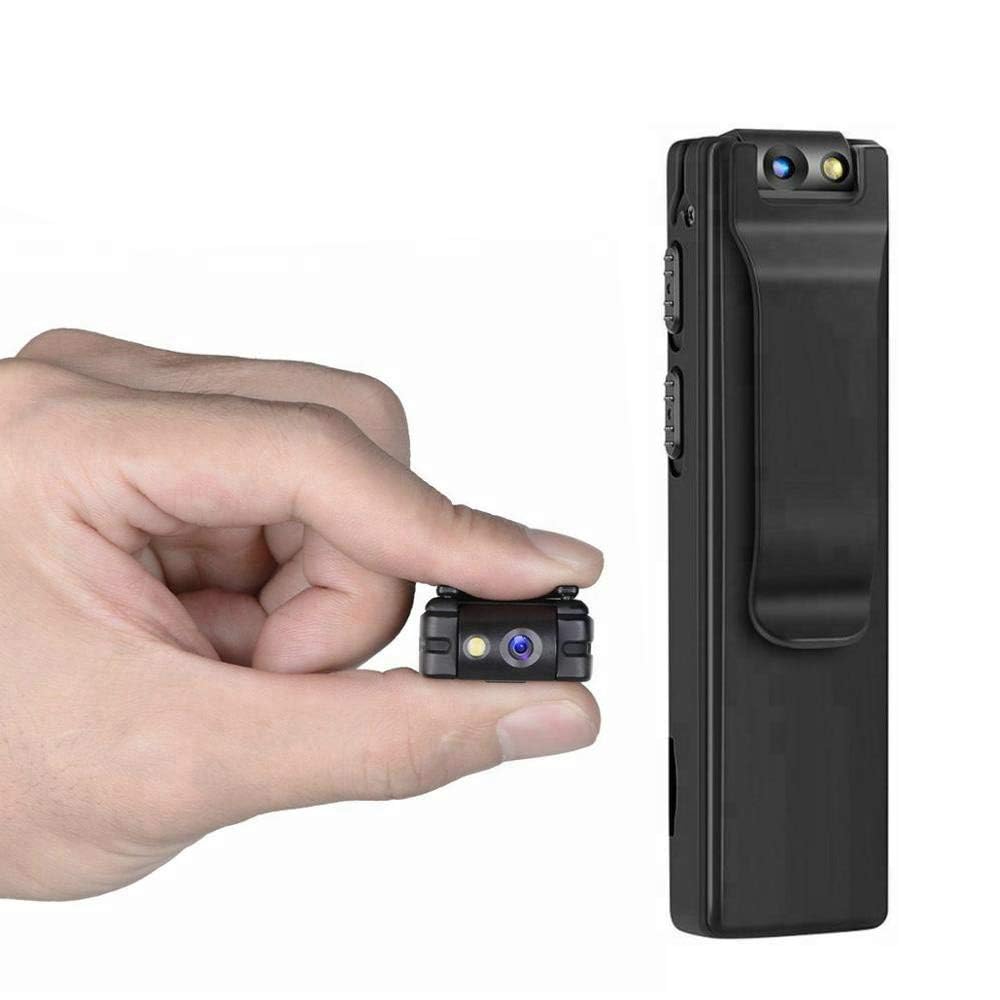
Image: Illustration of the CAPOXO camera's motion detection feature, showing it capturing activity in a room.
5.4 Night Lamp Режим
The camera is equipped with white LED lights to enhance visibility and recording quality in low-light or dark environments.
- To activate the night lamp, slide the "ON -> LAMP" switch to the "LAMP" position.
- To deactivate, slide the switch back to the "ON" position.
5.5 Фотографирање
- Проверете дали камерата е вклучена.
- Press the "PHOTO" button once to take a still image. The indicator light may flash briefly.
- Photos are saved to the Micro SD card.
5.6 Viewинг Снимки
- Исклучете ја камерата.
- Remove the Micro SD card from the camera.
- Insert the Micro SD card into a computer's card reader or a compatible device.
- Пристапете до files on the Micro SD card to view вашите снимени видеа и фотографии.

Image: The CAPOXO camera shown in different usage environments, including an office, car, laboratory, and home, demonstrating its versatility.

Image: The CAPOXO camera depicted in diverse settings such as business meetings, family gatherings, children playing, and outdoor adventures, illustrating its broad application.
6. Одржување
- Чистење: Use a soft, dry cloth to clean the camera body. Do not use liquid cleaners or solvents.
- Нега на леќи: Gently wipe the lens with a microfiber cloth designed for optics. Avoid touching the lens with bare fingers.
- Складирање: Чувајте го фотоапаратот на ладно и суво место, подалеку од директна сончева светлина и екстремни температури.
- Траење на батеријата: За да го продолжите животниот век на батеријата, избегнувајте често целосно празнење на батеријата. Полнете ја редовно, дури и ако не ја користите подолг период.
- Управување со SD картички: Regularly back up important recordings and format the Micro SD card periodically to maintain optimal performance and prevent data corruption.
7 Смена на проблеми
Камерата не се вклучува
- Ensure the battery is charged. Connect the camera to a charger for at least 1 hour.
- Verify the ON/OFF switch is in the "ON" position.
Не може да се снима видео
- Check if a Micro SD card is properly inserted.
- Ensure the Micro SD card has sufficient free space.
- Verify the Micro SD card is Class 10 and within the supported capacity (16GB, 32GB, 64GB).
- Format the Micro SD card if it's a new card or if you encounter issues.
Лош квалитет на видеото
- Уверете се дека објективот на камерата е чист и без дамки или прашина.
- Check lighting conditions. Use the night lamp во средини со слаба осветленост.
Откривањето на движење не работи
- Ensure the camera is powered on and in recording mode.
- Verify there are no obstructions blocking the camera's view.
Camera Unresponsive (Reset)
- If the camera becomes unresponsive, locate the "RESET" button (often a small pinhole).
- Use a thin object (like a paperclip) to gently press and hold the reset button for a few seconds.
- The camera should restart.
8. Спецификации
| Бренд | КАПОКСО |
| Број на модел | Capoxo-A-Cctv-Camera |
| Резолуција за снимање видео | 1080p full HD |
| Технологија за поврзување | Wired (USB for charging/data transfer) |
| Тип на флеш меморија | Micro SD (supports 16GB, 32GB, 64GB Class 10) |
| Формат за снимање видео | AVI |
| Поддржан аудио формат | AAC |
| Посебни карактеристики | Motion Detection, Night Lamp, HD Resolution, 90° Rotatable Lens |
| Траење на батеријата | До 3 часа (по целосно полнење) |
| Влез за полнење | 5V/1A (charger not included) |
| Димензии (ДxШxВ) | 9 x 2.5 x 1 сантиметри |
| Тежина на ставката | 250 гр |
| Вклучени компоненти | Camera, USB Cable, Manual |
9. Гаранција и поддршка
For warranty information or technical support, please refer to the contact details provided with your purchase documentation or visit the official CAPOXO webсајт.
Ве молиме задржете го доказот за купување за какви било гаранциски побарувања.


