1. Вовед
The EE Smart 4G Hub 2 (model HH10E) is a versatile 4G WiFi router designed to provide high-speed internet connectivity using a mobile network SIM card. It offers an alternative to traditional fixed-line broadband, ideal for temporary setups, areas with poor fixed-line infrastructure, or mobile offices. This manual provides detailed instructions for setting up, operating, and maintaining your device to ensure optimal performance.
2. Што има во кутијата
Ве молиме проверете дали сите од следниве компоненти се вклучени во вашиот пакет:
- Smart 4G Hub 2 (HH10E): The main router unit.
- Адаптер за напојување: For connecting the hub to a power outlet.
- USB Cable (Power): Used with the power adapter.
- Водич за брз почеток: A brief guide for initial setup.
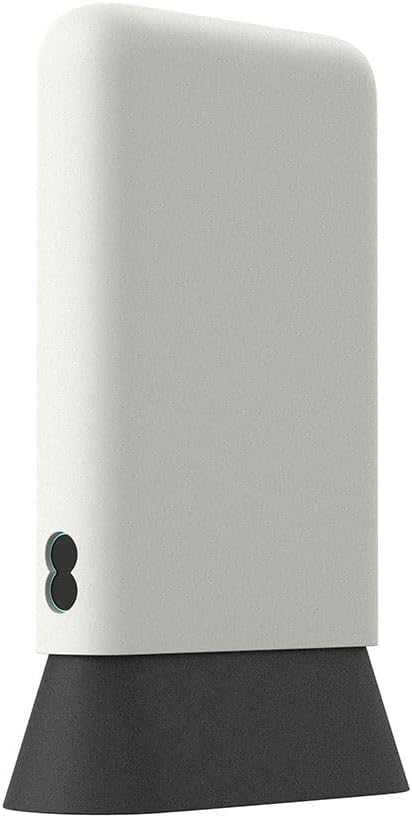
Figure 2.1: The EE Smart 4G Hub 2 and its standard accessories. Ensure all items are present before proceeding.
3. Распоред на уредот
Familiarize yourself with the various ports, indicators, and buttons on your Smart 4G Hub 2.
Слика 3.1: Предна страна view of the HH10E router, showing the minimalist design and status indicators.

Слика 3.2: Заден дел view displaying the LAN ports, power input, and SIM card slot.
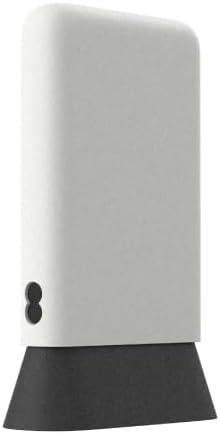
Слика 3.3: Страна view, highlighting the compact form factor.
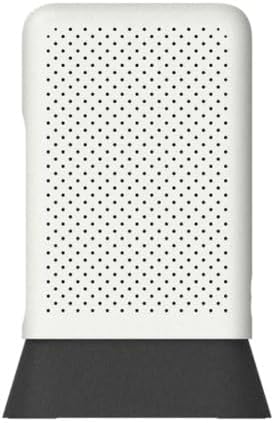
Слика 3.4: Врв view, showing the ventilation pattern for heat dissipation.
4. Водич за поставување
4.1. Инсталација на SIM картичка
The Smart 4G Hub 2 requires a Nano SIM card (sold separately) to access mobile network data. Ensure the device is powered off before inserting or removing the SIM card.
- Locate the SIM card slot on the rear of the device (refer to Figure 3.2).
- Gently insert the Nano SIM card into the slot with the gold contacts facing down and the notched corner aligned correctly. Push until it clicks into place.
- To remove, gently push the SIM card inwards until it springs out.
4.2. Вклучување
Connect the provided power adapter to the power input port on the rear of the hub, then plug the adapter into a wall outlet. The device will automatically power on and begin its startup sequence.
4.3. Почетна конфигурација
Upon first power-on, the hub will attempt to connect to the mobile network. The status indicator lights on the front of the device will provide feedback:
- Flashing Aqua: The device is attempting to connect to the network.
- Steady Aqua: The device is successfully connected to the network and providing internet access.
The default WiFi network name (SSID) and password (WiFi Key) are typically found on a label on the bottom or rear of the device. Use these credentials to connect your devices.
5. Упатства за работа
5.1. Поврзување на уредите
You can connect devices to the Smart 4G Hub 2 via WiFi or Ethernet cable.
- WiFi конекција: On your device (laptop, smartphone, tablet), search for available WiFi networks. Select the SSID of your Smart 4G Hub 2 and enter the WiFi Key when prompted. The hub supports up to 60 connected devices.
- Етернет конекција: For wired connections, use a standard Ethernet cable to connect a device (e.g., desktop computer, gaming console) to one of the LAN ports on the rear of the hub.
5.2. Пристапување до Web Интерфејс
For advanced settings and monitoring, you can access the hub's web-базиран интерфејс за управување:
- Ensure your device is connected to the Smart 4G Hub 2's WiFi network or via an Ethernet cable.
- Отвори a web прелистувач (на пример, Chrome, Firefox, Edge).
- Во лентата за адреси, внесете ја стандардната IP адреса (обично
192.168.1.1or192.168.8.1) или на web address provided on the device label, then press Enter. - Enter the administrator username and password. These are typically found on the device label.
5.3. Мрежни поставки
Во рамките на web interface, you can configure various network settings, including:
- WiFi Name (SSID) and Password: Change these for better security or personalization.
- WiFi за гости: Enable a separate network for guests.
- Поставки за APN: If your SIM card requires specific Access Point Name settings, these can be configured here.
- Ажурирање на фирмверот: Check for and install the latest firmware to improve performance and security.
6. Одржување
To ensure the longevity and optimal performance of your EE Smart 4G Hub 2, follow these maintenance guidelines:
- Поставување: Position the hub in a central location, away from obstructions, large metal objects, and other electronic devices that may cause interference. Avoid direct sunlight and extreme temperatures.
- Чистење: Use a soft, dry cloth to clean the exterior of the device. Do not use liquid cleaners or aerosols. Ensure ventilation holes remain clear of dust.
- Ажурирања на фирмверот: Regularly check for and install firmware updates via the web интерфејс. Ажурирањата често вклучуваат подобрувања на перформансите, поправки на грешки и безбедносни подобрувања.
- Се рестартира: If you experience connectivity issues, try restarting the hub by unplugging the power adapter, waiting 10 seconds, and then plugging it back in.
7 Смена на проблеми
This section addresses common issues you might encounter with your Smart 4G Hub 2.
| Проблем | Можна причина | Решение |
|---|---|---|
| No internet connection (Flashing Aqua light) | No SIM card, incorrect SIM insertion, no network signal, incorrect APN settings. | Ensure SIM is correctly inserted. Check network coverage in your area. Verify APN settings via the web interface. Restart the hub. |
| Бавни интернет брзини | Poor network signal, too many connected devices, network congestion, hub placement. | Relocate the hub to an area with better signal. Reduce the number of active devices. Try restarting the hub. |
| Не може да се поврзе со WiFi | Incorrect WiFi password, device too far from hub, WiFi disabled. | Double-check WiFi password. Move closer to the hub. Ensure WiFi is enabled via the web интерфејс. |
| Не може да се пристапи web интерфејс | Incorrect IP address, device not connected to hub, incorrect login credentials. | Verify the IP address (e.g., 192.168.1.1). Ensure your device is connected to the hub. Use the correct admin username and password from the device label. |
If issues persist after following these steps, please contact customer support for further assistance.
8. Спецификации
Key technical specifications for the EE Smart 4G Hub 2 (HH10E):
| Име на моделот | HH10E |
| Бренд | EE |
| Технологија за поврзување | Wi-Fi, LTE |
| Стандард за безжична комуникација | 802.11n, 802.11b, 802.11a, 802.11g, 802.11ac |
| Класа на фреквентен опсег | Двобенд |
| Големина на SIM картичка | Нано СИМ |
| LAN порти | 2 |
| Макс поврзани уреди | До 60 |
| WiFi Radius | 30 метри |
| Average Download Speeds | 40 Mbps |
| Вклучени компоненти | Smart 4G Hub, USB cable (Power), Power adapter, Quick Start Guide |
| Димензии (приближно) | 22 x 14.1 x 7.8 cm |
| Тежина (приближно) | 350 гр |
9. Гаранција и поддршка
As this product is listed as "Renewed" by Amazon Renewed, it typically comes with a specific return policy and limited warranty provided by the seller or Amazon Renewed program. Please refer to your purchase documentation or the Amazon Renewed policy for details regarding warranty coverage and return periods.
For technical support or assistance with your EE Smart 4G Hub 2, please contact the seller directly through your Amazon order history. For general inquiries about the EE network or services, refer to the official EE support channels.