1. Вовед
The ATTACK SHARK X87 is a 75% layout gasket-mount mechanical keyboard designed for versatility and performance. It features a compact design, hot-swappable switches, triple connectivity modes (Bluetooth 5.0, 2.4GHz wireless, and USB-C wired), and customizable RGB backlighting. This manual provides instructions for setup, operation, and maintenance of your keyboard.
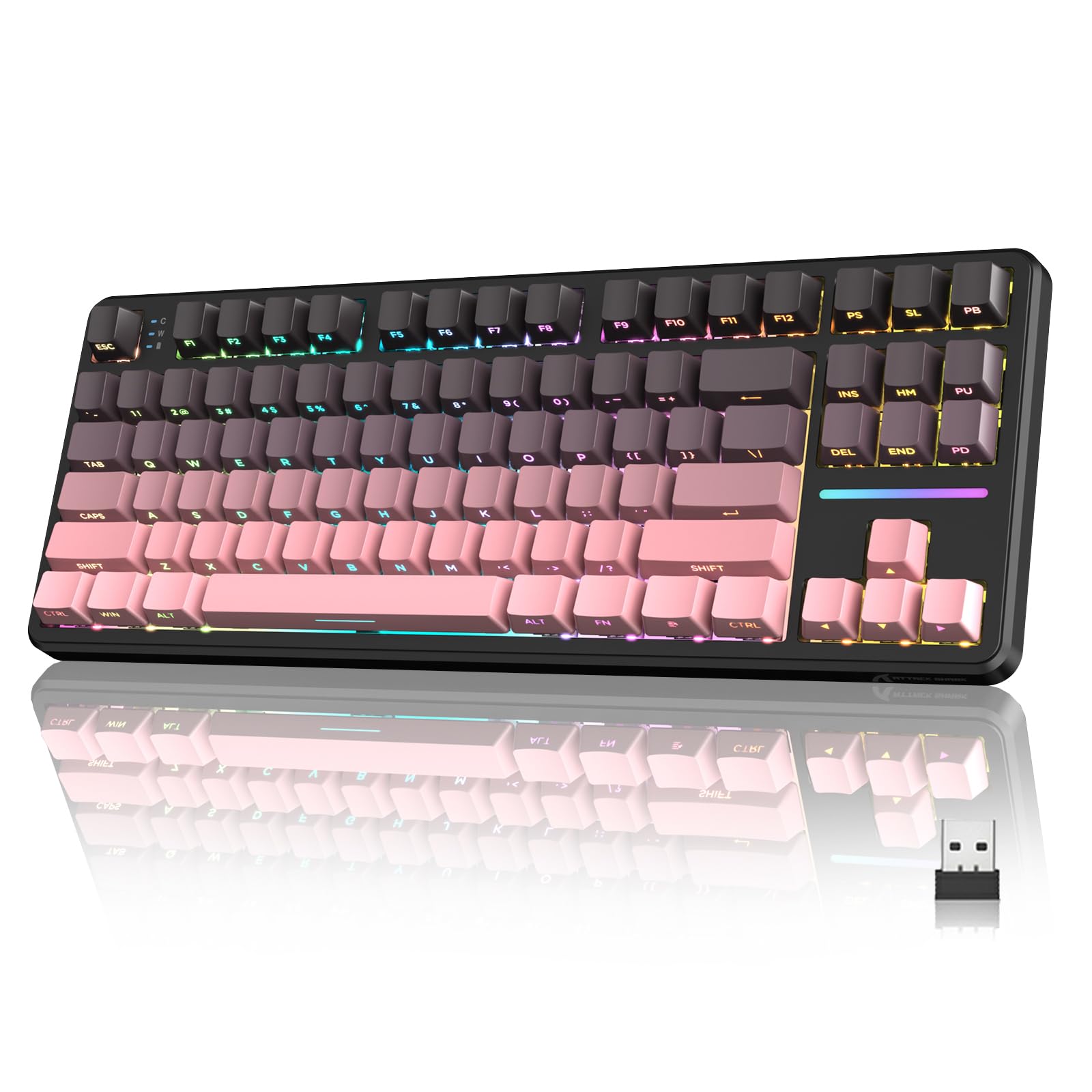
Figure 1: ATTACK SHARK X87 Wireless Mechanical Keyboard Overview
2. Содржина на пакетот
Ве молиме проверете дали сите артикли се присутни во вашиот пакет:
- ATTACK SHARK X87 Wireless Mechanical Keyboard
- USB-C кабел
- Привлечник за клучеви
- 2x резервни прекинувачи
- Упатство за употреба (овој документ)
3. Поставување и поврзување
The X87 keyboard supports three connection methods: Bluetooth 5.0, 2.4GHz wireless, and USB-C wired. It is compatible with Windows, Mac, and PC systems.
3.1 Почетно полнење
Before first use, connect the keyboard to a USB power source using the provided USB-C cable to ensure it is fully charged. The battery indicator will show charging status.
3.2 Режими на поврзување
A switch located on the back of the keyboard allows selection between connection modes (BT/USB/2.4G) and operating systems (Mac/Win).
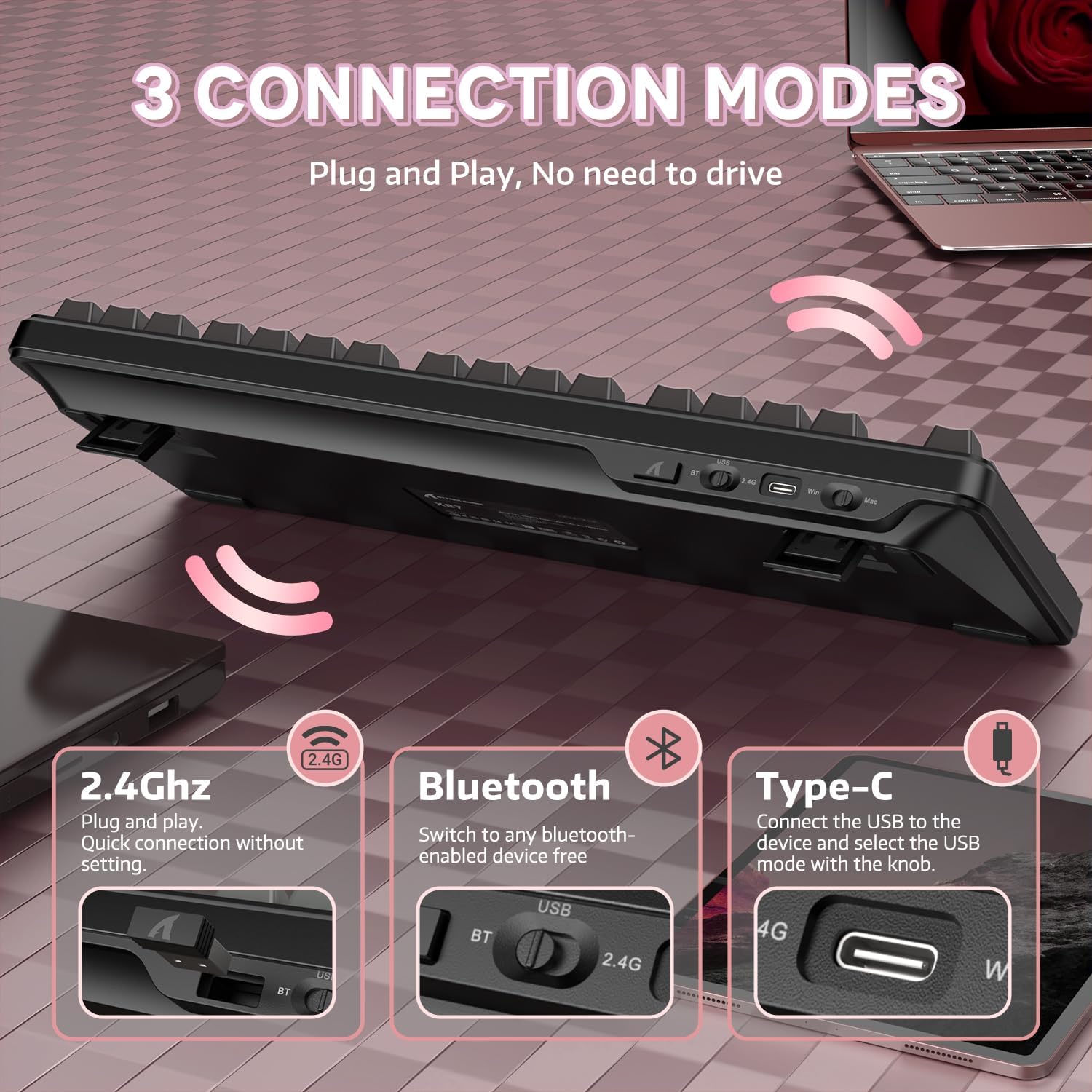
Figure 2: Keyboard with 2.4GHz, Bluetooth, and USB-C connection options highlighted.
- Безжичен режим од 2.4 GHz:
1. Set the switch on the back of the keyboard to '2.4G'.
2. Insert the 2.4GHz USB receiver into an available USB port on your computer.
3. The keyboard will automatically connect. - Bluetooth 5.0 режим:
1. Set the switch on the back of the keyboard to 'BT'.
2. On your device (computer, laptop, smartphone, tablet), enable Bluetooth and search for new devices.
3. Select 'ATTACK SHARK X87' from the list of available devices to pair.
4. The keyboard can connect to up to five devices simultaneously. Use FN + key combinations to switch between paired devices. - USB-C жичен режим:
1. Set the switch on the back of the keyboard to 'USB'.
2. Connect the keyboard to your computer using the provided USB-C cable.
3. The keyboard will function immediately without additional drivers.
4. Упатства за работа
The ATTACK SHARK X87 keyboard features standard key layouts and additional functions accessible via the Function (FN) key.
4.1 Комбинации на функционални копчиња
The FN key, combined with other keys, activates various multimedia and system controls. Refer to the keyboard's keycap legends or the official software for a complete list of combinations.
- FN + F1-F12: Мултимедијални контроли (на пр., јачина на звук, репродукција/пауза, прескокнување на песна).
- FN + Backspace: Check battery level (see Section 6).
- FN + Key Combinations: Adjust RGB lighting effects (see Section 5).
5. RGB позадинско осветлување
The keyboard features 15+ RGB lighting effects with over 16.8 million colors and 10 unique music rhythm lighting effects. Adjustments can be made directly on the keyboard or through the customization software.

Figure 3: RGB Backlighting Controls and Effects
- FN + Arrow Up/Down: Прилагодете ја осветленоста на позадинското осветлување.
- FN + Arrow Left/Right: Прилагодете ја брзината на задното осветлување.
- FN + Enter: Switch light mode.
- FN + ESC: Врати на фабрички поставки.
- FN + X: Light switch (turn RGB on/off).
6. Прилагодување и софтвер
The ATTACK SHARK X87 keyboard is programmable via dedicated drivers, allowing for macro recording, key remapping, and custom backlighting. This enhances both gaming and work efficiency.

Figure 4: Customized Driver Software for Key Functions and Backlighting
For driver downloads and detailed instructions on customization, please visit the official ATTACK SHARK webсајт или контактирајте со поддршката за корисници.
7. Управување со батерии
The keyboard is equipped with a 4000mAh battery, providing extended usage in wireless modes. It features smart power-saving functions.

Figure 5: Battery Level Indication on the ATTACK SHARK X87 Keyboard
За да го проверите моменталното ниво на батеријата, притиснете FN + Backspace. The indicator lights will illuminate to show the approximate charge remaining.
8. Hot-Swappable Switches and Gasket Structure
The X87 keyboard features a hot-swappable PCB, allowing users to easily change switches without soldering. It supports both 3-pin and 5-pin mechanical switches. The keyboard comes with pre-lubed Strawberry switches for a smooth typing experience.

Figure 6: Hot-Swappable Switch Support (3-pin and 5-pin)
The keyboard also incorporates a gasket structure with five layers of sound-absorbing material, including PORON, to reduce noise and vibration, optimizing switch sound for a better typing experience.
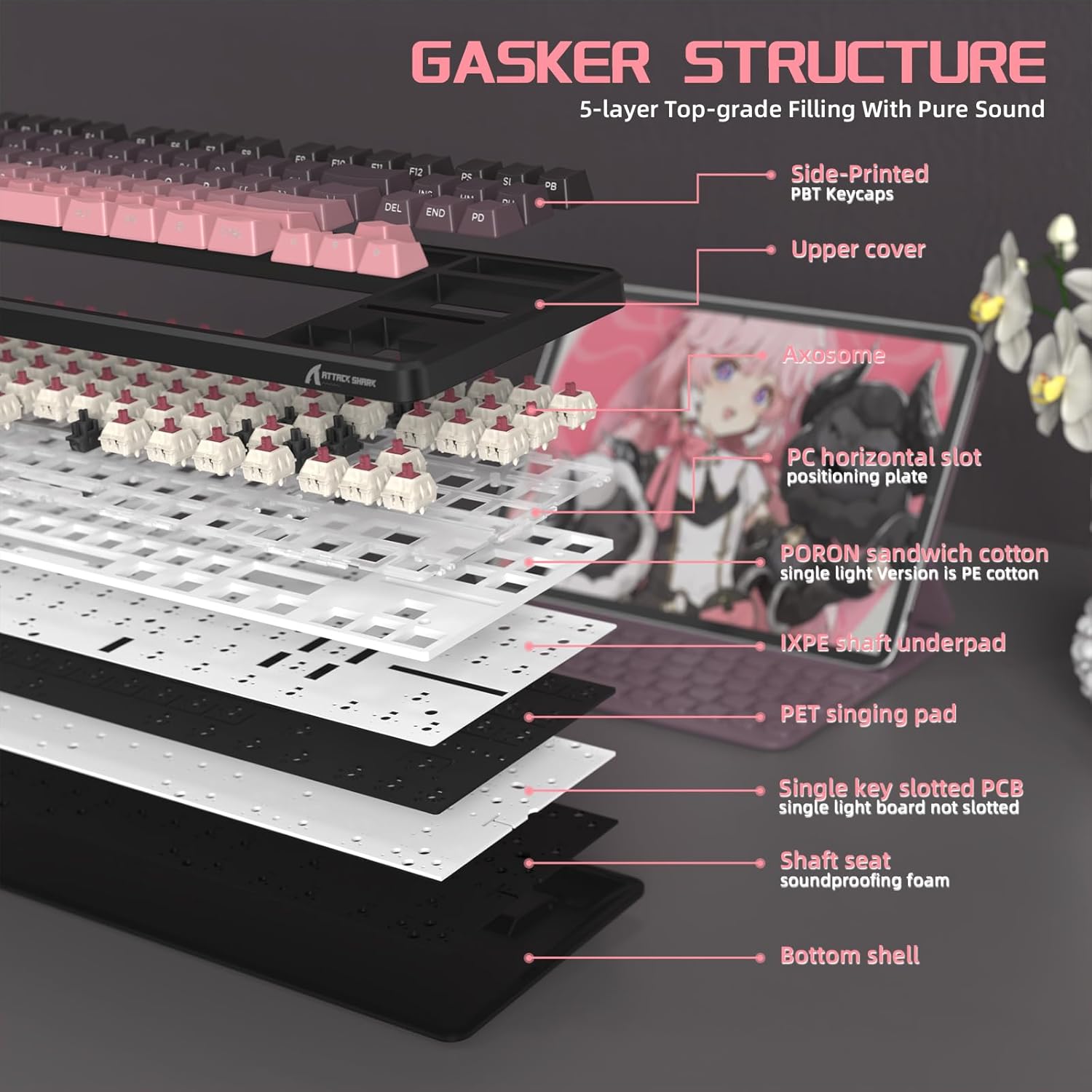
Слика 7: Експлодирано view of the keyboard's gasket structure and sound-absorbing layers.
8.1 PBT копчиња
The keyboard is equipped with side-printed PBT keycaps with an OEM profile. PBT material is known for its durability and resistance to wear, friction, and solvents, ensuring a long-lasting aesthetic and feel.
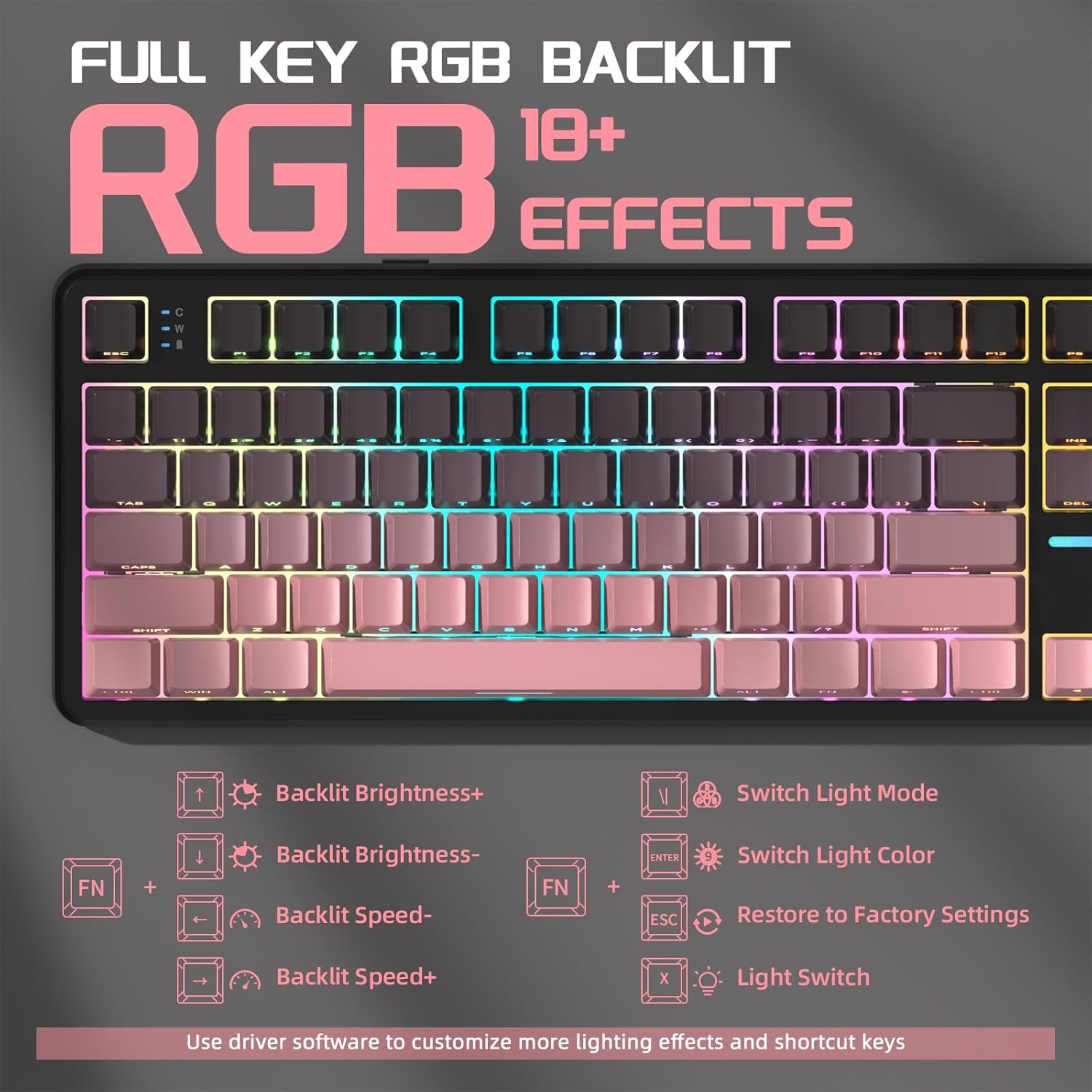
Figure 8: Close-up of the side-printed PBT keycaps.
9. Официјални видеа за производи
9.1 ATTACK SHARK X87 Wireless Mechanical Gaming Keyboard
Видео 1: Оверview of the ATTACK SHARK X87 Wireless Mechanical Gaming Keyboard, showcasing неговиот дизајн и карактеристики.
9.2 ATTACK SHARK X87 Side-Printed PBT Keycaps Mechanical Keyboard
Video 2: A closer look at the side-printed PBT keycaps and the mechanical switches of the ATTACK SHARK X87 keyboard.
9.3 ATTACK SHARK X87 Wireless Mechanical Keyboard
Video 3: Demonstrates the wireless capabilities and overall functionality of the ATTACK SHARK X87 Mechanical Keyboard.
10. Спецификации
| Бренд | НАПАДНА АЈКУЛА |
| Број на модел | X87 |
| Технологија за поврзување | 2.4GHz, BT5.0, USB-C |
| Опис на тастатурата | Механички |
| Компатибилни уреди | Играчка конзола, лаптоп, компјутер, паметен телефон, таблет |
| Посебни карактеристики | Backlit, Ergonomic, Hot-Swappable, Programmable Keys, Rechargeable |
| Позадинско осветлување на тастатурата | RGB |
| Материјал | Пластика |
| Тежина на ставката | 2.42 фунти |
| Димензии на пакетот | 15.71 x 7.52 x 2.09 инчи |
11 Смена на проблеми
- Тастатурата не реагира: Ensure the keyboard is charged. Check the connection mode switch (2.4G/BT/USB) is set correctly. For wireless modes, ensure the receiver is properly inserted or Bluetooth is paired. Try a different USB port or cable for wired mode.
- RGB осветлувањето не работи: Ensure RGB is enabled (FN + X). Adjust brightness (FN + Arrow Up). If issues persist, try restoring factory settings (FN + ESC).
- Клучевите не се регистрираат: For hot-swappable switches, ensure switches are fully seated. If a specific key is not working, try replacing the switch with one of the spare switches provided.
- Проблеми со поврзувањето: Ensure the keyboard is within range for wireless connections. Avoid interference from other wireless devices. For Bluetooth, try re-pairing the device.
12. Гаранција и поддршка
For warranty information, technical support, or any questions regarding your ATTACK SHARK X87 keyboard, please contact ATTACK SHARK customer service through their official webлокацијата или продавачот на мало каде што е купен производот. Ве молиме имајте го моделот на производот и датумот на купување на располагање кога контактирате со поддршката.


