Вовед
This manual provides essential information for setting up, operating, maintaining, and troubleshooting your HP Envy 17-DA000 Laptop. Please read this guide thoroughly to ensure proper use and to maximize the performance and longevity of your device.

Image: The HP Envy 17-DA000 Laptop with its 17.3-inch display open, showing the Windows 11 operating system desktop.
Поставување
1. Откачување и првична проверка
Carefully remove the laptop and all accessories from the packaging. Inspect the laptop for any physical damage. The manufacturer box may have been opened for professional customization and testing.
2. Поврзување на напојување
- Поврзете го AC адаптерот со конекторот за напојување на лаптопот.
- Приклучете го кабелот за струја во штекер.
- Оставете ја батеријата да се полни најмалку 30 минути пред првата употреба или додека индикаторот за батерија не покаже доволно полнење.
3. Првично вклучување и поставување на Windows 11
- Притиснете го копчето за вклучување за да го вклучите лаптопот.
- Следете ги упатствата на екранот за да го завршите процесот на поставување на Windows 11 Home. Ова вклучува избор на вашиот регион, јазик, поврзување со Wi-Fi мрежа и креирање корисничка сметка.
4. Поврзување периферни уреди
Connect external devices such as a mouse, external keyboard, or monitor to the available ports on your laptop. Refer to the 'Ports and Connectors' section for port identification.
Упатства за работа
1. Keyboard and Touchscreen
- Тастатура со позадинско осветлување: The keyboard features backlighting for use in low-light conditions. Adjust brightness settings through the function keys or Windows settings.
- Нумеричка тастатура: A dedicated numeric keypad is integrated for efficient data entry.
- Екран на допир: The 17.3-inch FHD display supports touch input. Use gestures for navigation and interaction within Windows 11.
2. Порти и конектори
Your HP Envy 17-DA000 laptop is equipped with various ports for connectivity:
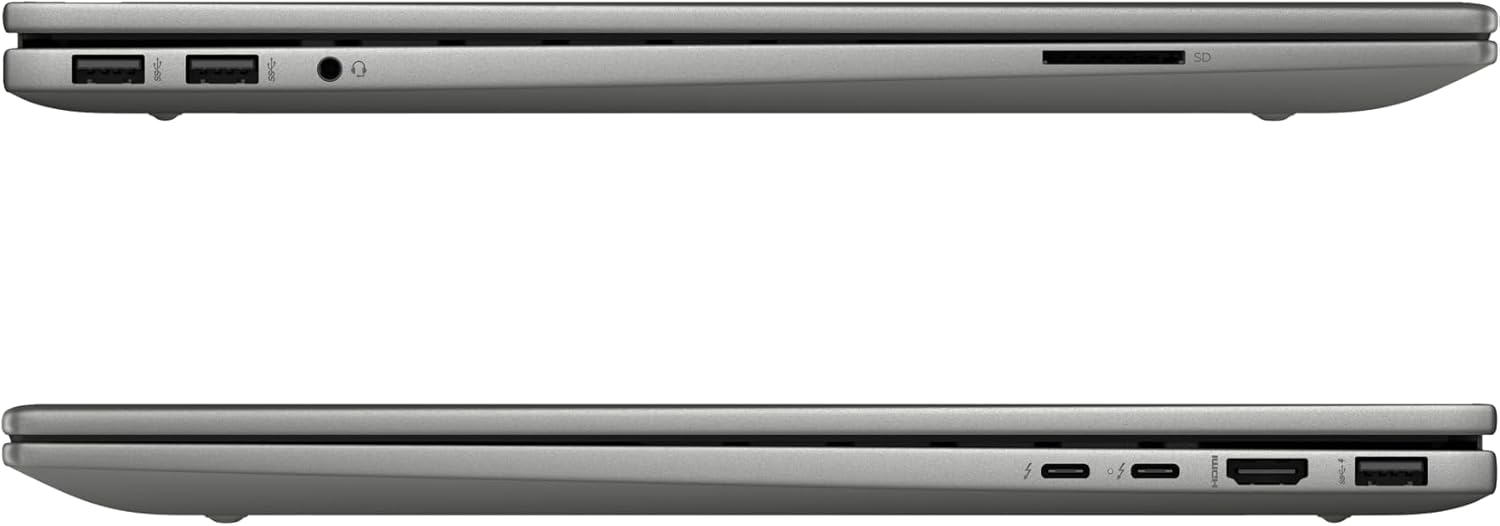
Image: Left side of the laptop, featuring two USB 3.2 Gen 2 ports, a headphone/microphone combo jack, and an SD card reader.
- Лева страна:
- 2x USB 3.2 Gen 2 (10Gbps)
- 1x комбиниран приклучок за слушалки/микрофон
- 1x SD читач на картички

Image: Right side of the laptop, featuring two USB-C Thunderbolt 4 ports, an HDMI 2.1 port, and one USB 3.2 Gen 2 port.
- Десна страна:
- 2x USB-C Thunderbolt 4 / USB4 40Gbps (with Power Delivery and DisplayPort 1.4, Power-off Charging)
- 1x USB 3.2 Gen 2 (10Gbps, with Power-off Charging)
- 1x HDMI v2.1
3. Безжично поврзување
- Wi-Fi 6E AX211 (2x2): Поврзете се со безжични мрежи за пристап до интернет.
- Bluetooth 5.3: Pair with compatible Bluetooth devices such as headphones, speakers, or mice.
4. Webкамера
The HP Wide Vision 5MP IR camera includes a privacy shutter. Slide the shutter to cover the camera lens when not in use to ensure privacy.
Одржување
1. Чистење на лаптопот
- Користете мека крпа без влакненца гampизмијте го со вода или средство за чистење на екранот за да го исчистите екранот.
- За тастатурата и куќиштето, користете мека, сува крпа. Избегнувајте груби хемикалии или абразивни материјали.
- Периодично користете компримиран воздух за чистење на прашина од отворите и отворите.
2. Софтверски ажурирања
Regularly check for and install updates for Windows 11 and HP drivers to ensure optimal performance and security. Access Windows Update through the Settings menu.
3. Нега на батерии
- Избегнувајте често целосно празнење на батеријата.
- Чувајте го лаптопот на ладно и суво место ако не го користите подолг временски период.
- За полнење користете го само испорачаниот адаптер за наизменична струја од 100 W.
4. Управување со складирање
The 1TB NVMe M.2 SSD provides fast storage. Regularly back up important data and manage files to maintain sufficient free space for system performance.
Решавање проблеми
Заеднички прашања и решенија
- Лаптопот не се вклучува: Ensure the AC adapter is securely connected and the battery has sufficient charge. Try a different power outlet.
- Проблеми со екранот: If the screen is blank, try connecting an external monitor to check if the issue is with the laptop's display. Adjust display settings in Windows.
- Нема Wi-Fi конекција: Check if Wi-Fi is enabled in Windows settings. Restart the laptop and your wireless router. Ensure drivers are up to date.
- Бавни перформанси: Затворете ги непотребните апликации, проверете за малициозен софтвер, обезбедете доволно слободен простор за складирање и ажурирајте ги драјверите.
За посложени проблеми, погледнете ја поддршката на HP. webсајт или контактирајте со поддршката за корисници.
Спецификации
| Карактеристика | Детал |
|---|---|
| Модел | HP Envy 17-DA000 |
| Процесор | Intel Core Ultra 7 155U (Up to 4.8 GHz, 12 Cores, 14 Threads) |
| Приказ | 17.3-inch FHD (1920 x 1080) LED-backlit Touchscreen, 60Hz, 300 nits, 45% NTSC |
| Графика | NVIDIA GeForce RTX 3050 4GB GDDR6 |
| Меморија | 32GB DDR5 SDRAM 5600 MHz |
| Складирање | 1TB SSD NVMe M.2 |
| Оперативен систем | Windows 11 Home |
| Тастатура | Тастатура со позадинско осветлување и нумеричка тастатура |
| Безжично поврзување | Intel Wi-Fi 6E AX211 (2x2), Bluetooth 5.3 |
| Пристаништа | 2x USB-C Thunderbolt 4, 3x USB 3.2 Gen 2, 1x HDMI v2.1, 1x Headphone/microphone combo, 1x SD Card Reader |
| Webкамера | HP Wide Vision 5MP IR camera with Privacy Shutter |
| Батерија | Литиум-јонска батерија 55Wh |
| Димензии (ДxШxВ) | 15.59 x 10.18 x 0.77 инчи |
| Тежина | 5.55 фунти |
| Боја | Сребрена платина |
Информации за гаранцијата
Овој производ доаѓа со а 12-месечна гаранција. This warranty covers manufacturing defects and issues arising from normal use. Please retain your proof of purchase for warranty claims. The warranty does not cover damage caused by misuse, accidents, or unauthorized modifications.
Поддршка
If you require technical assistance, have questions about your laptop, or need to make a warranty claim, please contact our support team. You can find contact information on the official HP support webстраницата или преку документацијата вклучена во вашиот производ.
За онлајн ресурси, посетете ја страницата Поддршка на HP Webсајт.