Вовед
Ви благодариме што го избравте О.urlife Mini Drone. This drone is equipped with dual 4K cameras, offering high-quality photo and video capture, and can be controlled via a smartphone app for real-time viewing. Designed for ease of use, it features one-button takeoff/landing, altitude hold, headless mode, and gesture control, making it suitable for beginners and enthusiasts alike. Its compact, foldable design ensures portability for all your adventures. Please read this manual carefully before operation to ensure safe and optimal performance.
Безбедносни упатства
Always prioritize safety when operating your drone. Failure to follow these guidelines may result in injury, damage to property, or legal issues.
- Прочитајте го прирачникот: Fully understand all instructions and warnings before first flight.
- Отворен простор: Always fly in open, unobstructed areas, away from people, animals, buildings, and power lines. Avoid flying in strong winds.
- Линија на погледот: Одржувајте визуелна линија на вид со дронот во секое време.
- Безбедност на батеријата: Use only original batteries and charging cables. Do not overcharge or short-circuit batteries. Discontinue use if batteries are damaged or swollen.
- Безбедност на пропелерите: Keep fingers, hair, and loose clothing away from rotating propellers. Always turn off the drone before handling propellers.
- Возрасно ограничување: Овој производ се препорачува за корисници на возраст од 14 и повеќе години.
- Правна усогласеност: Be aware of and comply with local laws and regulations regarding drone operation.
Содржина на пакетот
Проверете дали сите артикли се присутни во вашиот пакет:

Слика: Содржина на Оurlife Mini Drone package, showing the drone, remote control, two rechargeable batteries, a screwdriver, four protective frames, four main propellers, a USB charging cable, and an instruction manual.
- Ourlife Mini Drone x 1
- Далечински управувач x 1
- Rechargeable Drone Battery x 2
- Шрафцигер x 1
- Protective Frame x 4
- Main Propeller x 4 (spare)
- USB кабел за полнење x 1
- Упатство за употреба x 1
Note: The remote control requires 3 AAA batteries, which are not included.
Производот завршиview
Familiarize yourself with the drone and remote control components.

Слика: Оurlife Mini Drone in its unfolded state, alongside its remote control, two drone batteries, and the drone in its folded, compact form.
Компоненти на дрон
- Преклопни рачки: За компактно складирање и преносливост.
- Пропелери: Four main propellers for flight.
- Двојни камери: Front 4K camera (120° adjustable) and bottom optical flow lens for stable flight and diverse shooting angles.
- Оддел за батерии: Се наоѓа на задниот дел од дронот.
- LED светла: Indicate drone status and orientation.

Слика: Крупен план view од Оurlife Mini Drone's dual camera system, highlighting the adjustable front camera and the lower lens for stable flight. The front camera can be adjusted by 120 degrees.
Распоред на далечински управувач
- Лев џојстик: Ја контролира надморската височина (горе/долу) и ротацијата (лево/десно).
- Десен џојстик: Контролира движење напред/назад и лево/десно.
- Копче за полетување/слетување со едно копче: Иницира автоматско полетување или слетување.
- Копче за режим без глава: Activates/deactivates headless mode.
- Копче за префрлување брзина: Toggles between different flight speeds (low, medium, high).
- Копче за превртување од 360°: Извршува вртење од 360 степени.
- Држач за телефон: For mounting your smartphone to view FPV feed.
Поставување
1. Полнење на батеријата на дронот
- Поврзете го USB кабелот за полнење со батеријата на дронот.
- Plug the USB end into a 5V/1A USB adapter (not included) or a computer USB port.
- The indicator light on the cable will show charging status. It will turn off or change color when fully charged.
2. Инсталирање на батеријата на дрон
- Осигурајте се дека дронот е исклучен.
- Insert the charged battery into the battery compartment at the rear of the drone until it clicks into place.
3. Инсталирање батерии за далечински управувач
- Отворете ја преградата за батерии на задната страна на далечинскиот управувач.
- Вметнете 3 AAA батерии (не се вклучени) според ознаките за поларитет.
- Добро затворете го капакот на преградата за батерии.
4. Attaching Propeller Guards
- Carefully attach the four protective frames to each motor arm of the drone.
- Ensure they are securely fastened to prevent detachment during flight.
5. App Installation (KY UFO)
- Scan the QR code provided in the manual or search for "KY UFO" in your smartphone's app store (App Store for iOS, Google Play for Android).
- Преземете ја и инсталирајте ја апликацијата.
- Turn on the drone, then go to your phone's Wi-Fi settings and connect to the drone's Wi-Fi network (usually named "KY-UFO-XXXXXX").
- Open the KY UFO app to access the real-time FPV feed and advanced controls.
Упатства за работа
1. Pairing the Drone and Remote Control
- Ставете го дронот на рамна, рамна површина.
- Вклучете го прекинувачот за вклучување на дронот. Индикаторските светла на дронот ќе трепкаат.
- Вклучете го далечинскиот управувач.
- Push the left joystick all the way up, then pull it all the way down. The drone's lights will stop flashing and remain solid, indicating successful pairing.
2. Основни контроли за летање
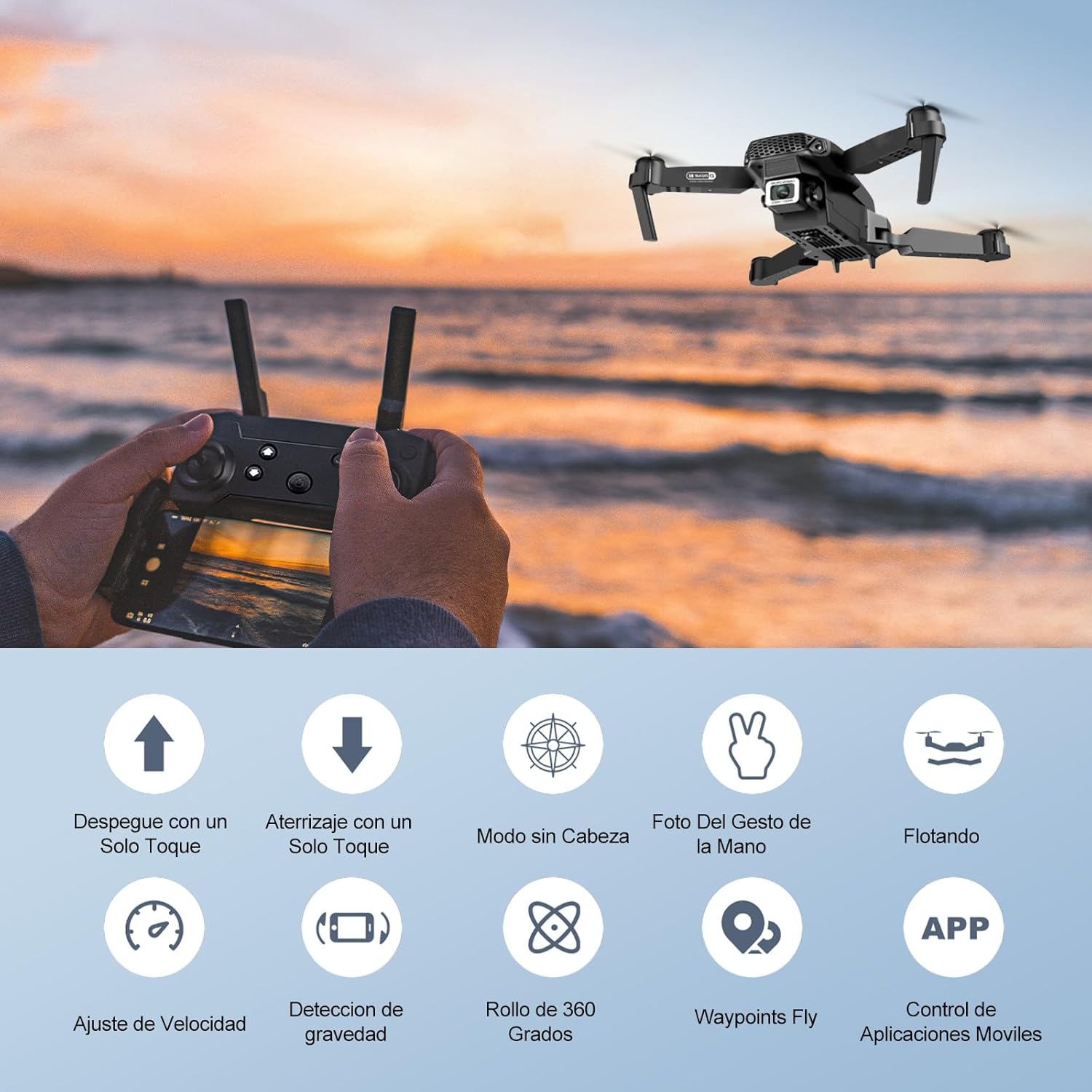
Image: Icons representing various flight features: One-touch takeoff, One-touch landing, Headless Mode, Hand Gesture Photo, Floating (Altitude Hold), Speed Adjustment, Gravity Detection, 360 Degree Roll, Waypoints Fly, and APP Control.
- Полетување со еден клуч: Притиснете го Полетување/слетување со еден клуч button. The drone will automatically ascend and hover at a certain altitude.
- Слетување со еден клуч: Притиснете го Полетување/слетување со еден клуч button again. The drone will automatically descend and land.
- Држење надморска височина: Дронот автоматски ја одржува својата моментална надморска височина, овозможувајќи стабилно лебдење.
- Лев џојстик (гас/сврт):
- Push up/down: Increase/decrease altitude.
- Push left/right: Rotate drone left/right.
- Right Joystick (Forward/Backward/Sideways):
- Push up/down: Fly forward/backward.
- Push left/right: Fly left/right (strafe).

Слика: Оurlife Mini Drone taking off or landing with a single button press, illustrating the ease of use for beginners.
3. Напредни функции за лет
- Режим без глава: Притиснете го Режим без глава button. In this mode, the drone's orientation is relative to the pilot, regardless of the drone's actual front. This simplifies control, especially for beginners.
- Превртување 360°: Fly the drone to a height of at least 2 meters. Press the Превртување 360 ° button, then push the right joystick in any direction to perform a flip in that direction.
- Gesture Control (Photos/Videos): With the KY UFO app open, make specific hand gestures in front of the drone's camera to trigger photo or video recording.
- "V" Gesture: Triggers photo capture.
- Гест со дланка: Triggers video recording.
- Лет со референтна точка: In the KY UFO app, draw a desired flight path on your smartphone screen. The drone will automatically follow this path.
- Прилагодување на брзината: Притиснете го Прекинувач за брзина button to cycle through low, medium, and high-speed modes. Adjust according to your skill level and environmental conditions.
- FPV пренос во реално време: Connect your smartphone to the drone's Wi-Fi. Open the KY UFO app to view live video feed from the drone's camera on your phone screen.
- Индукција на гравитација: In the KY UFO app, activate gravity induction mode. You can then control the drone's movement by tilting your smartphone.

Слика: Оurlife Mini Drone performing a 360-degree flip in the air and demonstrating the Waypoints Fly feature, where the drone follows a pre-drawn path.

Image: Demonstrates 1080P FPV Real-Time Transmission, showing a live view from the drone. Also illustrates gesture control for taking photos (V-sign) and recording videos (palm gesture), and the 120-degree adjustable camera angle.
Одржување
- Чистење: Use a soft, dry cloth to clean the drone and remote control. Do not use harsh chemicals or solvents.
- Замена на пропелер: If propellers are damaged, replace them with spare ones provided. Ensure correct propeller (A or B) is installed on the corresponding motor.
- Нега на батеријата: Чувајте ги батериите на ладно и суво место. Не чувајте целосно наполнети или целосно испразнети батерии подолг временски период. Наполнете ги до околу 50% за долгорочно складирање.
- Складирање: When not in use, store the drone and its accessories in a safe, dry place, away from direct sunlight and extreme temperatures.
Решавање проблеми
| Проблем | Можна причина | Решение |
|---|---|---|
| Дронот не реагира на далечинското. | Not paired; low battery (drone/remote); interference. | Re-pair drone and remote. Charge batteries. Move to an area with less interference. |
| Дронот лебди за време на летот. | Некалибрирано; нерамна површина при полетување; ветер. | Calibrate the gyroscope (refer to app instructions). Take off from a flat surface. Avoid flying in windy conditions. |
| Camera feed is not showing in app. | Not connected to drone Wi-Fi; app issue. | Ensure phone is connected to the drone's Wi-Fi network. Restart the app and drone. |
| Кратко време на лет. | Батеријата не е целосно наполнета; стара батерија. | Ensure battery is fully charged before flight. Consider replacing old batteries. |
| Дронот лесно се урива. | Lack of experience; strong wind; damaged propellers. | Practice in open areas. Avoid strong winds. Replace damaged propellers. |
Спецификации

Image: Diagram showing the dimensions of the Ourlife Mini Drone (unfolded and folded) and its remote control in inches.
| Карактеристика | Детал |
|---|---|
| Бренд | Ourlако |
| Број на модел | AF-E88-BK |
| Тежина на производот | 430 г (приближно 0.95 фунти) |
| Димензии на производот (проширено) | 28 x 22 x 5 см (приближно 11 x 8.7 x 2 инчи) |
| Димензии на производот (преклопено) | 12.5 x 8.1 x 5.3 см (приближно 4.9 x 3.2 x 2.1 инчи) |
| Тип на батерија | Литиум-јонски (2 вклучен) |
| Резолуција за снимање видео | 4K (Dual Cameras) |
| Технологија за поврзување | Wi-Fi |
| Контролен метод | Далечински управувач, апликација за паметен телефон |
| Боја | Црното |
Гаранција и поддршка
Ourlife provides post-sale warranty support for this product. If you encounter any issues with the drone, remote control, or the KY UFO application during flight or operation, please do not hesitate to contact the seller directly for assistance.
For optimal performance and to minimize potential issues, it is recommended to conduct initial flight tests in an open space, especially when using the propeller protectors. Please note that wind interference may occur when operating outdoors.


