Добредојдовте
Thank you for choosing the M-AUDIO Forty Sixty 6.5-inch Studio Monitor Speaker. This manual provides essential information for setting up, operating, and maintaining your new studio monitor. Please read it thoroughly to ensure optimal performance and safe use of your device.
Важни безбедносни инструкции
- Електрична безбедност: Always connect the speaker to a grounded power outlet. Do not expose the unit to rain or moisture.
- Заштита на слухот: This loudspeaker is capable of delivering sound pressure levels of more than 85 dB, which may cause permanent hearing damage. Use caution when adjusting volume levels.
- Вентилација: Обезбедете соодветна вентилација околу звучникот. Не блокирајте ги отворите за вентилација.
- Поставување: Поставете го звучникот на стабилна, рамна површина за да спречите паѓање.
Содржина на пакетот
Проверете дали сите артикли наведени подолу се вклучени во вашиот пакет:
- Четириесет шеесет говорник
- Подлога за изолација
- Кабел за напојување
- Водич за брза станица
- Прирачник за безбедност и гаранција
Производот завршиview
The M-AUDIO Forty Sixty 6.5-inch Studio Monitor is a 100W bi-amplified speaker designed for precise audio reproduction. It features a 6.5-inch Kevlar woofer for extended bass response and a 1-inch high-frequency driver with waveguide for clear highs. Advanced DSP processing and Burr-Brown analog-to-digital conversion ensure detailed sound. The speaker also offers Bluetooth 5.3 TWS audio streaming and control via the M-AUDIO Forty Series Control App.

Поставување
Физичко поставување
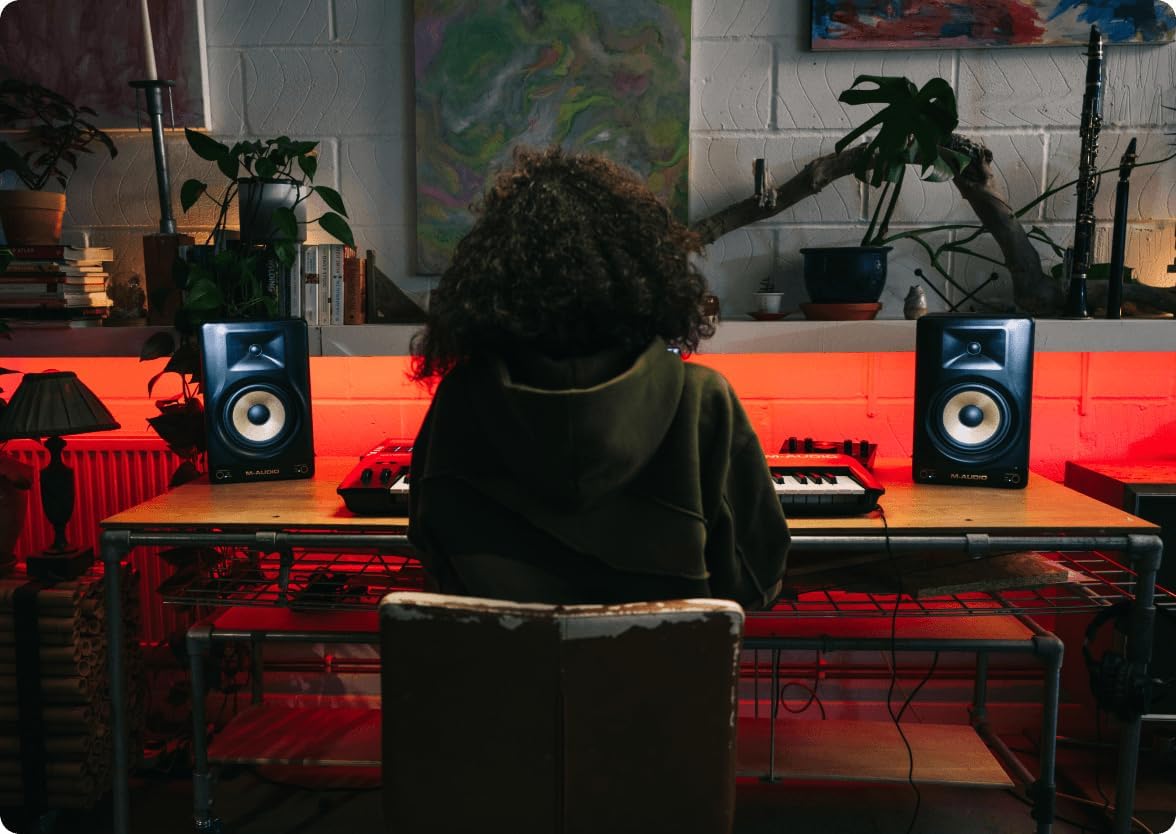
Proper placement of your studio monitors is crucial for accurate sound reproduction. Position the speakers to form an equilateral triangle with your listening position. Ensure the tweeters are at ear level. Use the included isolation pads to minimize unwanted vibrations and improve acoustic performance.
Врски
The M-AUDIO Forty Sixty offers versatile input options for various audio setups:
- Влез XLR: За балансирани врски од професионални аудио интерфејси или миксери.
- Влез TRS: For balanced or unbalanced connections from audio interfaces, DJ rigs, or other studio equipment.
Connect your audio source to the desired input on the rear panel of the speaker. Ensure the power cable is securely connected to the speaker and a grounded power outlet.


Official Product Video: M-AUDIO FORTY series
An official M-AUDIO video showcasing the features and use cases of the Forty Series studio monitors, including connections and studio environments.
Упатства за работа
Вклучување/исклучување
Locate the power switch on the rear panel of the speaker. Flip the switch to the 'ON' position to power on the unit. The power indicator LED on the front will illuminate. To power off, flip the switch to the 'OFF' position.
Контрола на јачината на звукот
Adjust the overall output volume using the 'Volume' knob on the rear panel. Start with a low volume and gradually increase it to your desired listening level.
Режими на слушање
The Forty Sixty features front panel buttons for instant listening modes:
- FLAT Mode: Provides a true, uncolored mix reference for accurate sound.
- HYPE Mode: Simulates how your mix will sound on consumer devices like earbuds or car stereos.
- CUSTOM Mode: Allows you to apply personalized EQ settings configured via the M-AUDIO Forty Series Control App.

Bluetooth поврзување
The Forty Sixty supports Bluetooth 5.3 True Wireless Stereo (TWS) audio streaming. To pair your device:
- Проверете дали звучникот е вклучен.
- Activate Bluetooth on your audio device (smartphone, tablet, etc.).
- Select 'M-AUDIO Forty Sixty' from the list of available Bluetooth devices.
- Once paired, the Bluetooth indicator on the speaker will illuminate. For TWS pairing with a second speaker, refer to the Quickstart Guide.

M-AUDIO Forty Series Control App
Download the M-AUDIO Forty Series Control App to access advanced features, including customizable presets and a 5-band equalizer. The app allows you to fine-tune your speaker's output to match your room's acoustics and personal preferences.

Акустично подесување
The Forty Sixty incorporates precision DSP crossover and professional-grade Burr-Brown analog-to-digital conversion to ensure accurate and detailed sound. These technologies work together to deliver a balanced frequency response, crucial for critical listening and mixing.


Одржување
- Чистење: Користете мека, сува крпа за чистење на надворешноста на звучникот. Избегнувајте употреба на абразивни средства за чистење или растворувачи.
- Складирање: Кога не го користите подолго време, чувајте го звучникот на ладно и суво место, подалеку од директна сончева светлина и екстремни температури.
- Заштита: Protect the speaker cones from physical damage.
Решавање проблеми
- Нема аудио излез:
- Проверете дали звучникот е вклучен и дали јачината на звукот е зголемена.
- Verify that the audio source is connected correctly to the appropriate input (XLR or TRS).
- Check the input switch on the rear panel to ensure it matches your connected input type.
- Confirm that your audio source is playing and its volume is adequate.
- Unexpected Popping Sound:
- A popping sound may occur if the Bluetooth pairing is lost. Try forgetting the speaker in your device's Bluetooth settings and re-pairing.
- Осигурете се дека сите врски се безбедни и без пречки.
Спецификации
| Карактеристика | Спецификација |
|---|---|
| Бренд | М-АУДИО |
| Име на моделот | FORTYSIXTY |
| Големина на звучникот | 6.5 инчи |
| Максимална излезна моќност на звучникот | 100 вати |
| Вуфер со дијаметар | 6.5 инчи |
| Дијаметар на високотонецот | 1 инчи |
| Технологија за поврзување | Bluetooth |
| Bluetooth верзија | 5.3 |
| Контролен метод | Апликација |
| Димензии на производот | 8.6" Д x 8.5" Ш x 13.2" В |
| Тежина на ставката | 15.84 фунти (7.2 килограми) |
| Материјал | Пластика |
| Боја | Црното |
| Извор на енергија | Електричен со кабел |
| Фреквентен одговор | 22 KHz (горна граница) |
Гаранција и поддршка
The M-AUDIO Forty Sixty Studio Monitor comes with a Limited Warranty. Please refer to the included Safety & Warranty Manual for detailed terms and conditions.
For technical support, troubleshooting assistance, or further inquiries, please visit the official M-AUDIO webсајт или контактирајте со нивниот оддел за услуги на клиентите.


