1. Вовед
This manual provides comprehensive instructions for the JHS Pedals Flight Delay Pedal. It covers setup, operation, maintenance, and troubleshooting to ensure optimal performance and longevity of your device. Please read this manual thoroughly before using the pedal.
The JHS Flight Delay pedal is designed to offer essential delay types with user-friendly controls. It features three distinct delay modes: Analog, Reverse, and Digital, alongside modulation options including Chorus and Vibrato. This pedal aims to provide versatile delay effects without complex menu navigation.
2. Информации за безбедност
- Напојување: Use only a regulated 9V DC, center-negative power supply with a minimum current rating of 85mA. Incorrect power supplies can damage the unit and void the warranty.
- Животна средина: Do not expose the pedal to water, moisture, excessive heat, or direct sunlight. Operate in a clean, dry environment.
- Ракување: Avoid dropping the pedal or subjecting it to strong impacts. Do not attempt to open the enclosure or modify the internal circuitry, as this will void the warranty.
- Кабли: Ensure all audio cables are in good condition to prevent unwanted noise or signal loss.
3. Содржина на пакетот
- JHS Pedals Flight Delay Pedal (Model FDBL)
- Упатство за употреба (овој документ)
4. Производот завршиview
The JHS Flight Delay Pedal features a straightforward control layout designed for intuitive use. Below is an illustration of the pedal and a description of its controls.

Слика 1: Предна страна view of the JHS Pedals Flight Delay Pedal (Blue variant).
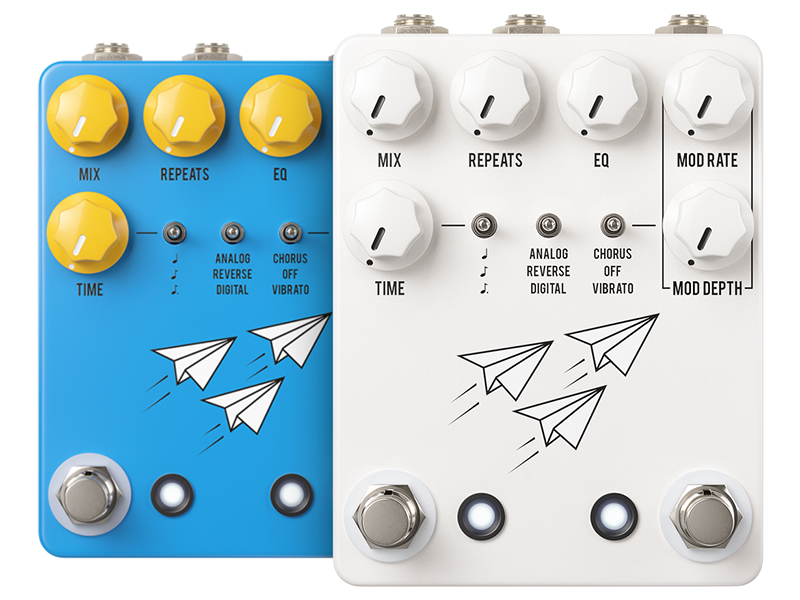
Figure 2: JHS Pedals Flight Delay Pedal shown in both blue and white color options.
Контроли:
- Копче за мешање: Adjusts the balance between the dry (unaffected) signal and the wet (effected) delay signal. Turning clockwise increases the delay effect's presence.
- REPEATS Knob: Controls the number of delay repetitions. From a single repeat to self-oscillation.
- Копче за EQ: Shapes the tone of the delay repeats, allowing for brighter or darker echoes.
- MOD RATE Knob: Determines the speed of the modulation effect (Chorus or Vibrato).
- Копче за длабочина на MOD: Controls the intensity or depth of the modulation effect.
- Копче за ВРЕМЕ: Sets the delay time, from short slap-back to long, ambient delays.
- Left Toggle Switch (Delay Mode): Selects between Analog, Reverse, and Digital delay types. Musical note symbols indicate notation intervals for tap tempo.
- Right Toggle Switch (Modulation Type): Selects between Chorus, Off (no modulation), and Vibrato.
- Лев прекинувач на нозете: Engages or bypasses the delay effect.
- Десен прекинувач за нозе: Typically used for Tap Tempo functionality, allowing you to set the delay time by tapping the switch.
5. Поставување
Follow these steps to integrate your Flight Delay Pedal into your audio setup:
- Поврзување за напојување: Connect a regulated 9V DC, center-negative power supply (not included) to the power input jack on the pedal. Ensure the power supply meets the specified requirements (85mA minimum).
- Влезна врска: Connect your instrument (e.g., guitar) or the output of a preceding effects pedal to the INPUT jack on the Flight Delay Pedal using a standard 1/4-inch instrument cable.
- Излезна врска: Connect the OUTPUT jack of the Flight Delay Pedal to your amplifier's input or the input of the next effects pedal in your signal chain using a standard 1/4-inch instrument cable.
- Вклучување: Once all connections are secure, connect your power supply to a wall outlet. The pedal is now ready for use.
6. Упатства за работа
6.1 Basic Delay Operation
- Вклучување на ефектот: Press the left footswitch to toggle the delay effect on or off. The LED indicator will illuminate when the effect is active.
- Прилагодување на времето на одложување: Користете го ВРЕМЕ knob to set the duration between repeats. Rotate clockwise for longer delay times, counter-clockwise for shorter times.
- Setting Repeats: На ПОВТОРУВА knob controls the number of echoes. Turn clockwise for more repeats, reaching self-oscillation at maximum settings.
- Blending the Effect: Користете го МИКСИ knob to adjust the volume balance between your dry signal and the delayed signal.
- Shaping Delay Tone: На EQ knob allows you to brighten or darken the tone of the delay repeats.

Figure 3: Detail of the TIME knob, used to adjust delay duration.

Figure 4: Detail of the REPEATS knob, controlling the number of delay echoes.

Figure 5: Detail of the MIX knob, used to blend dry and wet signals.

Figure 6: Detail of the EQ knob, for tonal adjustment of delay repeats.
6.2 Delay Modes
Користете го left toggle switch to select one of three distinct delay modes:
- Аналогни: Emulates classic analog delays, providing warm, darker, and decaying repeats.
- Обратно: Plays the delay repeats backward, creating unique textural effects.
- Дигитален: Offers clear, pristine, and accurate repeats, ideal for modern sounds.
6.3 Ефекти на модулација
The Flight Delay Pedal includes built-in modulation. Use the right toggle switch to select the modulation type:
- Рефрен: Adds a swirling, thickening effect to the delay repeats.
- Исклучено: Disables the modulation effect.
- Вибрато: Introduces a pitch-bending effect to the delay repeats.
Прилагодете го МОДЕН СТАПКА и Длабочина на МО knobs to fine-tune the speed and intensity of the selected modulation effect.

Figure 7: Detail of the delay mode (left) and modulation type (right) toggle switches.
6.4 Tap Tempo and Notation Intervals
The right footswitch typically functions as a Tap Tempo control. Tap it two or more times to set the delay time. The left toggle switch also features musical note symbols, indicating options for notation intervals (e.g., quarter notes, dotted eighth notes) when using tap tempo. Refer to the official JHS Pedals website or product page for specific tap tempo subdivision instructions.

Figure 8: Detail of the two footswitches, for bypass and tap tempo control.
7. Одржување
- Чистење: Користете мека, сува крпа за чистење на надворешноста на педалата. Избегнувајте абразивни средства за чистење или растворувачи.
- Складирање: When not in use for extended periods, store the pedal in a cool, dry place, away from extreme temperatures and humidity.
- Инспекција на кабел: Regularly check all audio and power cables for signs of wear or damage. Replace faulty cables immediately.
8 Смена на проблеми
- Нема звук:
- Осигурајте се дека напојувањето е правилно поврзано и работи.
- Проверете ги сите аудио кабли за правилно поврзување и интегритет.
- Проверете дали педалата е вклучена (LED свети).
- Confirm that the MIX knob is not set to fully dry.
- Несакан шум/зуење:
- Користете висококвалитетно, изолирано напојување.
- Проверете дали има неисправни или незаштитени аудио кабли.
- Ensure proper grounding in your electrical setup.
- Ефектот не е привлечен:
- Press the left footswitch firmly.
- Check power and cable connections.
9. Спецификации
| Карактеристика | Спецификација |
|---|---|
| Број на модел | FDBL |
| Тежина на ставката | 1.17 фунти (0.53 кг) |
| Димензии на производот | 6.65 x 4.35 x 3.35 инчи (16.9 x 11.0 x 8.5 см) |
| Потребна моќност | 9V DC, Center-Negative |
| Тековно извлекување | 85 милиониamps |
| Хардверски интерфејс | 1/4-inch Audio Input/Output |
10. Информации за гаранцијата
JHS Pedals products are covered by a limited warranty against defects in materials and workmanship. The warranty period and terms may vary by region. Please retain your proof of purchase. For detailed warranty information, please visit the official JHS Pedals webсајт или контактирајте со поддршката за корисници.
11. Поддршка
If you encounter any issues not covered in this manual or require further assistance, please visit the official JHS Pedals website for FAQs, additional resources, and contact information for customer support.


