1. Вовед
The Hello Kitty Sunrise Alarm Clock is designed to provide a gentle and natural waking experience with its sunrise simulation feature. This digital alarm clock includes multicolor lights, an LED display showing time, date, and temperature, a USB charging port, and a convenient snooze function. Its charming Cinnamoroll design adds a whimsical touch to any room.

Image 1: Hello Kitty Cinnamoroll Sunrise Alarm Clock with multicolor lighting.
2. Информации за безбедност
- Не го изложувајте уредот на екстремни температури, директна сончева светлина или висока влажност.
- Use only the provided USB power cable or a certified equivalent.
- Чувајте го уредот подалеку од вода или други течности.
- Не обидувајте се сами да го расклопите или поправите уредот. Контактирајте квалификуван сервисер.
- Уверете се дека уредот е поставен на стабилна, рамна површина.
3. Содржина на пакетот
Ве молиме проверете го пакувањето за следните ставки:
- Hello Kitty Sunrise Alarm Clock (Cinnamoroll design)
- USB кабел за напојување
- Упатство за употреба (овој документ)
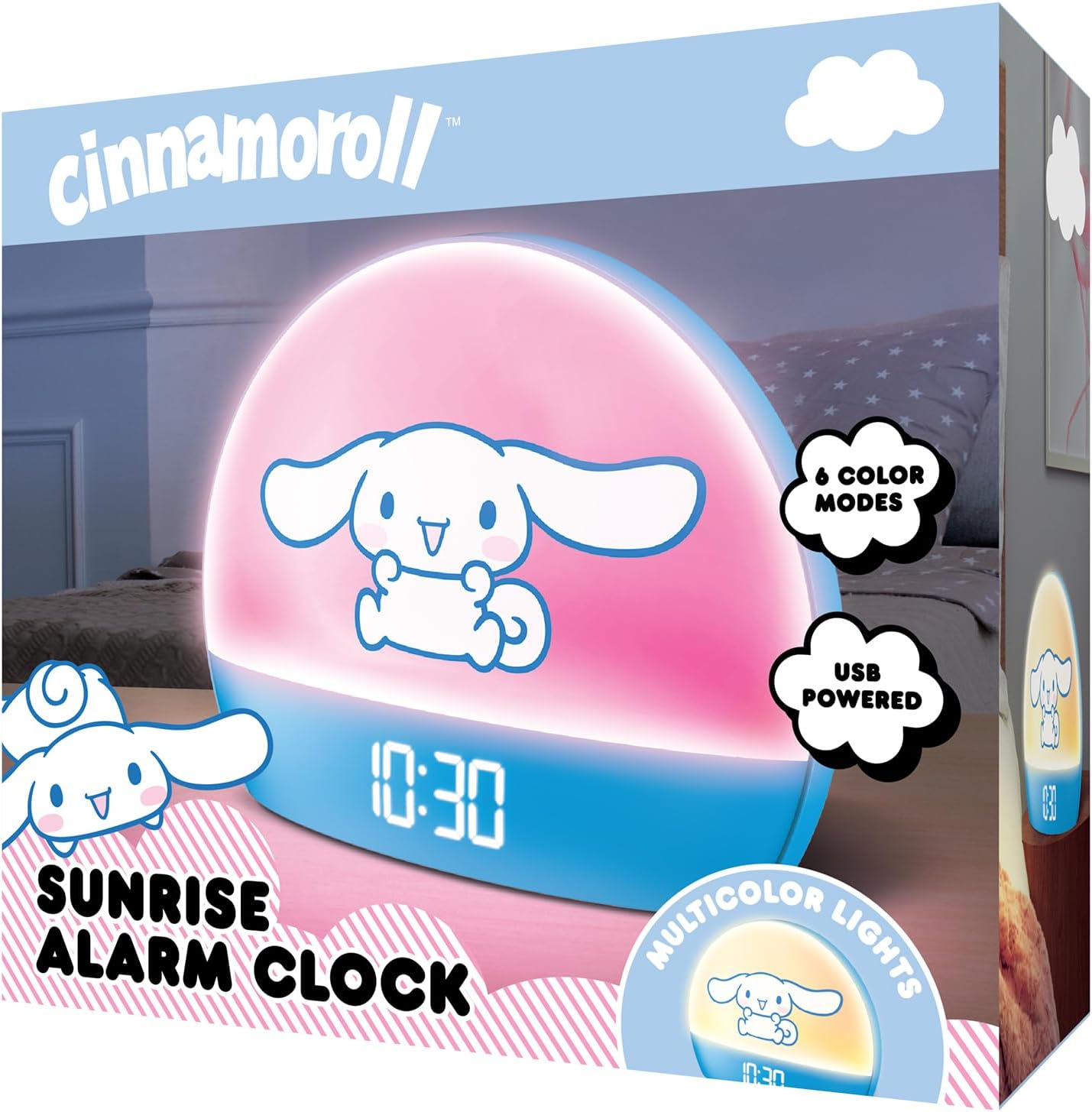
Image 2: Front packaging of the Hello Kitty Cinnamoroll Sunrise Alarm Clock.
4. Производот завршиview
Familiarize yourself with the main components of your alarm clock.
- Лед екран: Покажува време, датум и температура.
- Светлосен панел: Emits multicolor and sunrise simulation lights.
- Контролни копчиња: Located on the back or bottom for setting time, alarm, and light functions.
- USB порта за полнење: For powering the device and charging external devices.
- Копче за одложување: Typically a prominent button on the top or front.

Image 3: Hello Kitty Cinnamoroll Sunrise Alarm Clock in a bedroom setting.
5. Поставување
5.1 Поврзување за напојување
- Connect the provided USB power cable to the USB port on the back of the alarm clock.
- Вклучете го другиот крај од USB кабелот во компатибилен USB адаптер за напојување (не е вклучен) или во USB порт со напојување.
- The LED display will light up, indicating the device is powered on.
5.2 Поставување време и датум
Specific button names are not provided, so general instructions are given. Refer to the physical device for exact button labels.
- Press the "SET" or "TIME" button to enter time setting mode.
- Use the "UP" and "DOWN" buttons to adjust the hour. Press "SET" again to confirm.
- Adjust the minute using "UP" and "DOWN" buttons. Press "SET" to confirm.
- Продолжете со овој процес за да ги поставите годината, месецот и денот.
- The clock may offer 12-hour or 24-hour format selection. Follow on-screen prompts or consult the device's specific button functions.
6. Упатства за работа
6.1 Поставување аларм
- Press the "ALARM" button to enter alarm setting mode.
- Use "UP" and "DOWN" buttons to set the desired alarm hour. Press "ALARM" to confirm.
- Adjust the alarm minute. Press "ALARM" to confirm.
- Some models may allow setting alarm volume or sound. Follow prompts if available.
- To activate/deactivate the alarm, look for an "ALARM ON/OFF" button or a toggle within the alarm setting menu.
6.2 Симулација на изгрејсонце
The sunrise simulation feature gradually increases light intensity before your set alarm time, mimicking a natural sunrise.
- This feature is typically linked to the alarm function. When the alarm is active, the light will begin to brighten a set period (e.g., 30 minutes) before the alarm sounds.
- Consult the device's specific controls for adjusting the duration or intensity of the sunrise simulation, if applicable.
6.3 повеќебојни светла
The clock offers various color modes for ambient lighting.
- Press the "LIGHT" or "COLOR" button to cycle through different color options or activate a color-changing mode.
- Press and hold the "LIGHT" button to turn off the ambient light.
- Brightness of the display and ambient light can often be adjusted using dedicated buttons or by holding the "LIGHT" button.
6.4 Функција за одложување
When the alarm sounds, press the large "SNOOZE" button (usually on top) to temporarily pause the alarm. The alarm will sound again after a short interval (e.g., 5-10 minutes).
6.5 USB порта за полнење
The integrated USB port can be used to charge small electronic devices like smartphones or tablets. Simply connect your device's charging cable to the USB port on the alarm clock.
6.6 Приказ на температура
The LED display shows the current room temperature. No specific action is usually required to view this, as it cycles with time and date or is displayed continuously.
7. Одржување
- Чистете го часовникот со мека, сува крпа. Не користете абразивни средства за чистење или растворувачи.
- Ensure the USB port is free from dust and debris.
- Чувајте го часовникот на ладно и суво место кога не го користите подолг временски период.
8 Смена на проблеми
| Проблем | Можна причина | Решение |
|---|---|---|
| Часовникот не се вклучува. | USB cable not connected properly or power source issue. | Check USB cable connection. Try a different USB power adapter or port. Ensure the cable is securely inserted. |
| Time is incorrect or drifts. | Time not set correctly or internal clock issue. | Re-set the time following Section 5.2. If the issue persists, try disconnecting and reconnecting power. |
| Алармот не се огласува. | Алармот не е активиран или е неправилно поставен. | Verify the alarm is set and activated (check for an alarm icon on the display). Ensure the volume is not set to zero if adjustable. |
| Копчињата не реагираат. | Temporary software glitch or physical button issue. | Disconnect power for a few seconds and reconnect to reset the device. If buttons remain unresponsive, contact support. |
| USB-портата за полнење не работи. | Cable issue, device not fully powered, or port malfunction. | Ensure the clock is properly powered. Try a different USB charging cable. Check if the port is clean and free of debris. |
9. Спецификации
| Бренд | Здраво Кити |
| Број на модел | HKCLK01CR-MFN |
| Боја | Цинаморол |
| Тип на дисплеј | Дигитален |
| Посебни карактеристики | Adjustable Brightness, Alarm, Charging Port, LED Display, Temperature Display, Sunrise Simulation, Multicolor Lights |
| Димензии на производот | 7"Ш x 6"В |
| Извор на енергија | Електрична кабли (USB) |
| Материјал | Пластика |
| Тежина на ставката | 0.4 килограми (14 унци) |
| Технологија за поврзување | USB |
| Производител | Јужен Телеком |
10. Гаранција и поддршка
For warranty information or technical support, please refer to the contact details provided on the product packaging or visit the official Hello Kitty product support webсајт. Чувајте ја вашата потврда за купување за барања за гаранција.


