Вовед
Welcome to the GOBOULT Mirage Smart Watch user manual. This guide provides detailed instructions on how to set up, operate, and maintain your new smartwatch. Please read this manual thoroughly to ensure optimal performance and longevity of your device.
Производот завршиview
The GOBOULT Mirage Smart Watch is a feature-rich device designed to enhance your daily life with advanced health monitoring, communication, and fitness tracking capabilities. It features a vibrant 1.39-inch HD display, Bluetooth calling, and a durable zinc alloy frame.
Клучни карактеристики:
- 1.39-инчен HD екран: Bright and clear screen with 500 nits brightness and 360x360 pixel resolution.
- Повикување преку Bluetooth: Make and receive calls directly from your wrist with a built-in speaker and microphone.
- Сеопфатен здравствен мониторинг: Includes SpO2, heart rate, blood pressure, sleep tracking, breath training, and menstrual cycle tracking.
- 120+ спортски режими: Track a wide range of physical activities with detailed metrics.
- Гласовен асистент со вештачка интелигенција: Hands-free control and access to features.
- IP67 Водоотпорност: Designed to withstand splashes and dust.
- Приспособливи лица на часовникот: Over 300 cloud-based watch faces to personalize your device.
- Паметни известувања: Добивајте известувања за повици, пораки и известувања од апликации.
- Долг век на батеријата: До 7 дена типична употреба.
Што има во кутијата:
- GOBOULT Mirage Smart Watch (Coal Black)
- Кабел за полнење
- Упатство за употреба
- Гарантна картичка

Слика: Надview of the GOBOULT Mirage Smart Watch highlighting its main features.
Водич за поставување
1. Полнење на паметниот часовник
- Поврзете го магнетниот кабел за полнење со пиновите за полнење на задната страна од вашиот паметен часовник.
- Приклучете го USB-крајот од кабелот во стандарден USB адаптер за напојување (препорачан 5V/1A) или USB-порт на компјутер.
- The watch display will show a charging indicator. A full charge takes approximately 120 minutes.
- Пред полнење, проверете дали пиновите за полнење се чисти и суви за да спречите корозија.
2. Вклучување/исклучување
- Вклучување: Press and hold the side button (digital crown) for a few seconds until the GOBOULT logo appears.
- Исклучено: Од екранот на часовникот, повлечете надолу за да пристапите до брзите поставки или одете до менито со поставки. Изберете „Исклучи“ и потврдете. Алтернативно, притиснете и задржете го страничното копче додека не се појави опцијата за исклучување.
3. Спарување со вашиот паметен телефон
- Download the official GOBOULT companion app from your smartphone's app store (available for iOS and Android).
- Проверете дали Bluetooth е овозможен на вашиот паметен телефон.
- Open the GOBOULT app and follow the on-screen instructions to create an account or log in.
- Во апликацијата, изберете „Додај уред“ или слична опција за да го пребарате вашиот паметен часовник.
- Select "GOBOULT Mirage" from the list of available devices.
- Потврдете го барањето за спарување и на вашиот паметен телефон и на паметниот часовник.
- Откако ќе се спари, часовникот ќе ги синхронизира податоците со вашиот телефон, а поставките можете да ги прилагодите преку апликацијата.
Упатства за работа
Основна навигација:
- Екран на допир: Повлечете лево/десно, горе/долу за да се движите низ менијата и известувањата. Допрете за да изберете ставки.
- Digital Crown (Side Button):
- Притиснете еднаш: Return to the watch face from any screen, or wake the screen.
- Притиснете и задржете: Power on/off, or access the AI Voice Assistant (configurable).
- Ротирај: Scroll through menus, lists, or adjust settings.
- Копче за кратенка: The second physical button on the side can be customized for quick access to specific functions, such as launching sports modes.

Image: Digital crown and button functionalities for navigation and quick access.
Здравствен мониторинг
The GOBOULT Mirage Smart Watch offers a comprehensive suite of health tracking features. For accurate readings, ensure the watch is worn snugly on your wrist, about one finger's width from your wrist bone.
- Мониторинг на отчукувањата на срцето: Часовникот континуирано го следи вашиот пулс. View податоци во реално време на часовникот или детални трендови во апликацијата.
- Мониторинг на SpO2 (кислород во крвта): Measure your blood oxygen levels on demand. Navigate to the SpO2 function on your watch and remain still for accurate results.
- Мониторинг на крвниот притисок: Access the blood pressure feature on your watch for readings.
- Следење на сонот: Wear your watch to bed to track your sleep patterns, including deep sleep, light sleep, and awake times. Data is available in the app.
- Breath Training Mode: Следете водени вежби за дишење за да помогнете во намалувањето на стресот и подобрување на релаксацијата.
- Следење активност: Ги следи чекорите, растојанието и согорените калории во текот на денот.
- Потсетник за пиење вода: Set reminders in the app to ensure you stay hydrated.
- Седентарен потсетник: Добивајте известувања кога сте биле неактивни предолго, охрабрувајќи ве да се движите.
- Следење на менструалниот циклус: For female users, track and predict menstrual cycles through the companion app.

Image: The watch's health sensors and a summary of its health monitoring capabilities.
Спортски режими
The GOBOULT Mirage Smart Watch supports over 120 sports modes to accurately track your workouts. From running to yoga, you can monitor your performance and progress.
Using Sports Modes:
- Access the sports mode menu from the watch's main interface or by using the dedicated shortcut button.
- Scroll through the list and select your desired activity (e.g., Running, Cycling, Yoga, Cricket, Badminton, Basketball).
- Tap to start the activity. The watch will begin recording data such as duration, heart rate, calories burned, and distance (where applicable).
- To pause or end an activity, swipe right or press the side button and follow the on-screen prompts.
- Review your workout summaries on the watch or in detail within the companion app.

Image: The watch interface showing various sports modes and quick access options.
Bluetooth повици и паметни известувања
With Bluetooth 5.3 connectivity, your GOBOULT Mirage Smart Watch allows you to manage calls and receive notifications directly on your wrist.
Повикување преку Bluetooth:
- Ensure your watch is paired with your phone via Bluetooth.
- Остварување повици: Пристапете до тастатурата за бирање или листата со контакти на вашиот часовник за да започнете повик.
- Примање повици: When a call comes in, the watch will display the caller ID. You can answer or reject the call directly from your wrist using the built-in speaker and microphone.
- Синхронизација на контакти: Synchronize your phone contacts with the watch through the companion app for easy access.
Паметни известувања:
- Enable app notifications in the GOBOULT companion app on your smartphone.
- Your watch will display incoming messages, social media alerts, and other app notifications.
- Повлечете нагоре или надолу на екранот на часовникот за да view вашата историја на известувања.

Image: Bluetooth calling features and interface on the smartwatch.

Image: Smart notifications and other quick access features like calculator and voice assistant.
Прилагодување
Лица на часовникот:
Personalize your GOBOULT Mirage Smart Watch with over 300 cloud-based watch faces. You can change the watch face directly from the device or through the companion app.
- На часовникот: From the watch face, press and hold the screen. Swipe left or right to browse available watch faces and tap to select.
- Преку апликација: Open the GOBOULT app, navigate to the watch face section, and explore a wider selection of designs. Download and apply your preferred watch face.

Слика: Прamples of customizable watch faces available for the smartwatch.
Дополнителни карактеристики
Гласовен асистент со вештачка интелигенција:
Activate the AI Voice Assistant (compatible with Hey Siri and Ok Google) by long-pressing the digital crown or through a dedicated menu option. Use voice commands to perform various tasks hands-free.
Најдете го мојот телефон:
If your paired smartphone is misplaced, use the "Find My Phone" feature on your watch to make it ring or vibrate, helping you locate it quickly.
- Go to the watch menu.
- Select the "Find Phone" option.
- The connected phone will ring or vibrate.
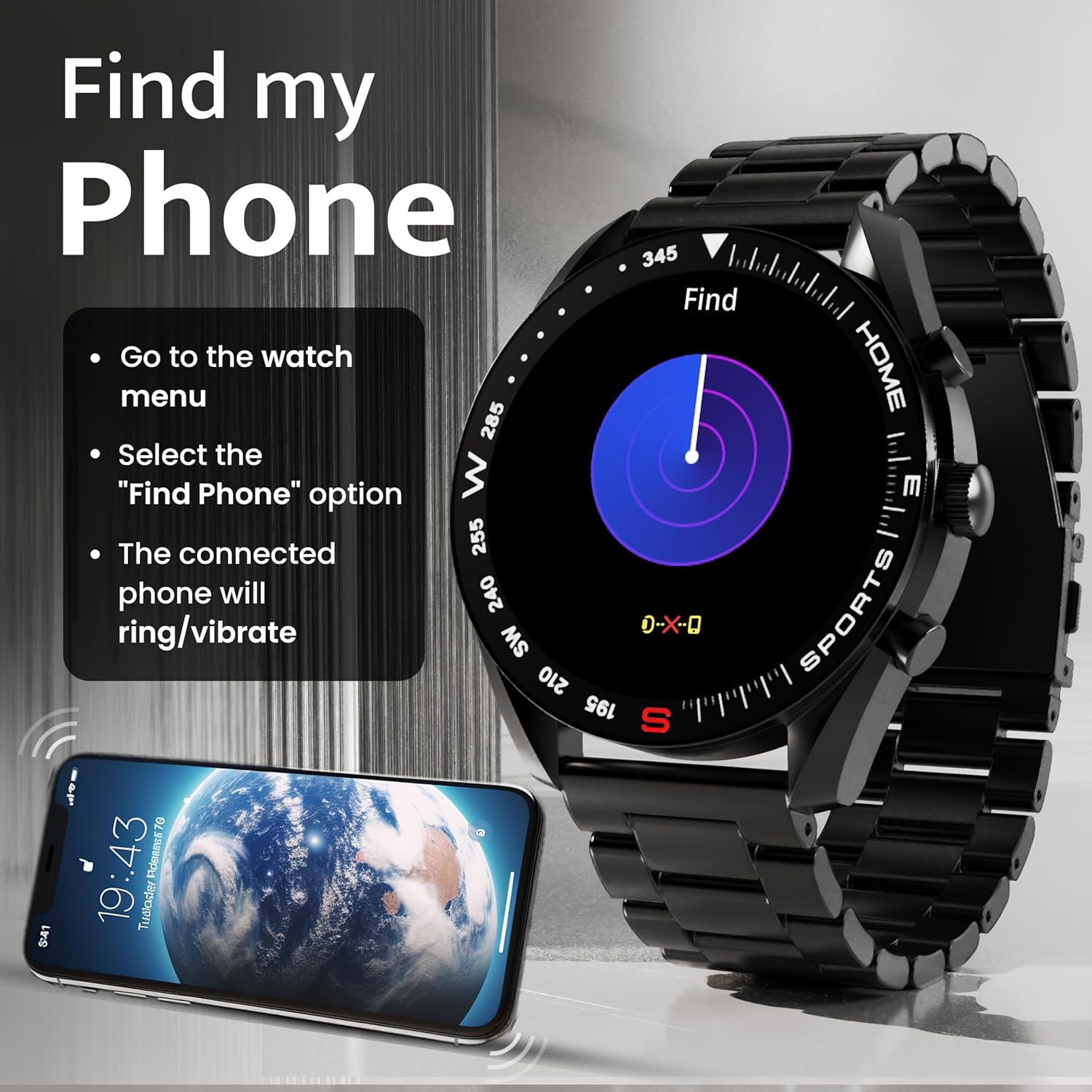
Image: How to use the 'Find My Phone' feature on the smartwatch.
Мини игри:
The watch includes several mini-games for entertainment, such as 2048, Battleship, Hamster, and Young Bird.

Слика: Прamples of mini-games available on the smartwatch.
Одржување
Cleaning Your Smart Watch:
- Избришете го екранот и куќиштето на часовникот со мека крпа што не остава влакненца.
- За тврдокорна нечистотија, малку дampИзмијте ја крпата со вода. Избегнувајте употреба на груби хемикалии или абразивни материјали.
- Clean the charging pins regularly with a dry cloth or cotton swab to ensure proper charging.
Водоотпорност (IP67):
The GOBOULT Mirage Smart Watch is IP67 water-resistant, meaning it is protected against dust ingress and can withstand immersion in water up to 1 meter for up to 30 minutes. However, it is not suitable for swimming, showering with hot water, or diving. Avoid exposure to high-pressure water or corrosive liquids.

Image: Information regarding the IP67 water and dust resistance of the smartwatch.
Подесување на ременот:
The watch comes with a metallic strap adjustment tool. Refer to the included instructions or a professional for adjusting the strap length to ensure a comfortable and secure fit.

Image: The watch's zinc alloy frame and the metallic strap adjustment tool.
Решавање проблеми
- Часовникот не се вклучува: Проверете дали часовникот е целосно наполнет. Поврзете го со кабелот за полнење и оставете го да се полни најмалку 30 минути пред да се обидете повторно да го вклучите.
- Не може да се спари со телефонот:
- Проверете дали Bluetooth е овозможен на вашиот телефон и на часовникот.
- Ensure the watch is within the Bluetooth range (up to 10 meters).
- Рестартирајте го и телефонот и паметниот часовник.
- Clear the Bluetooth cache on your phone or forget the device and try pairing again.
- Ensure the GOBOULT companion app is updated to the latest version.
- Неточни здравствени податоци: Уверете се дека часовникот е цврсто носен на вашиот зглоб, не е премногу стегнат или премногу лабав. Исчистете ги сензорите на задната страна од часовникот. Избегнувајте прекумерно движење за време на мерењата.
- Известувањата не се појавуваат:
- Check if notifications are enabled for the specific apps in the GOBOULT companion app.
- Ensure your phone's notification settings allow the GOBOULT app to display alerts.
- Verify that the watch is properly connected to your phone via Bluetooth.
- Кратко траење на батеријата: Reduce screen brightness, disable unnecessary features like continuous heart rate monitoring if not needed, and limit the number of active notifications. Ensure the watch is fully charged.
- Екранот на допир не реагира: Рестартирајте го часовникот. Ако проблемот продолжи, проверете дали екранот е чист и сув.
Спецификации
| Карактеристика | Детал |
|---|---|
| Име на моделот | Мираж |
| Големина на приказ | 1.39 инчи HD |
| Резолуција на екранот | 360 x 360 пиксели |
| Осветленост | 500 Nits Peak Brightness |
| Поврзување | Bluetooth 5.3 |
| Отпорност на вода | IP67 |
| Материјал за рамка | Цинк легура |
| Тип на батерија | Литиум полимер |
| Просечен век на траење на батеријата | До 7 дена |
| Време на полнење | Приближно 120 минути |
| Компатибилност на оперативниот систем | iOS, Android |
| Тежина на ставката | 106 гр |
| Вклучени компоненти | Smart Watch, Charging Cable, User Manual, Warranty Card |
Гаранција и поддршка
Информации за гаранцијата:
Your GOBOULT Mirage Smart Watch comes with a manufacturer's warranty. Please refer to the included Warranty Card for specific terms, conditions, and duration of the warranty. Keep your purchase receipt as proof of purchase.
Поддршка за корисници:
If you encounter any issues or have questions not covered in this manual, please contact GOBOULT customer support. Contact details can typically be found on the Warranty Card or the official GOBOULT webсајт.


