Вовед
Welcome to your RCA Wave-68 True Wireless Earbuds. This manual provides detailed instructions on how to set up, operate, maintain, and troubleshoot your earbuds to ensure optimal performance and a seamless audio experience. Please read this manual thoroughly before using your device.
Содржина на пакетот
- RCA Wave-68 True Безжични Слушалки (лева и десна)
- Случај за полнење
- USB кабел за полнење
- Упатство за употреба
Производот завршиview
Familiarize yourself with the components of your RCA Wave-68 earbuds and charging case.

Слика: The RCA Wave-68 earbuds are shown inside their open charging case. The case features a digital display indicating the battery levels of both the case and individual earbuds.
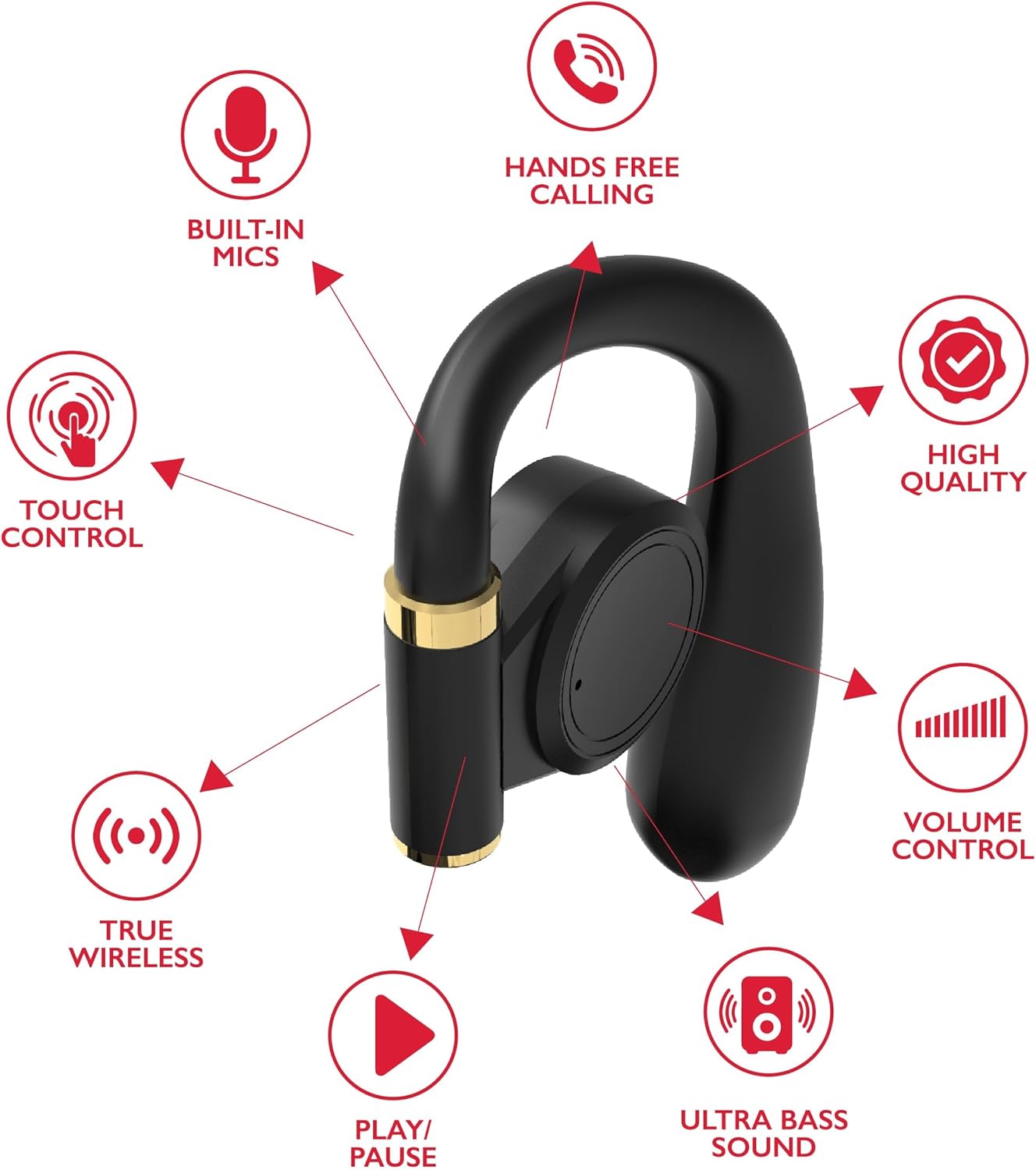
Слика: A diagram highlights key features of a single RCA Wave-68 earbud, including built-in mics, hands-free calling, touch control, true wireless connectivity, play/pause function, ultra bass sound, volume control, and high-quality audio.
Поставување
1. Полнење на слушалките и футролата
Before first use, fully charge the earbuds and charging case. Place the earbuds into the charging case. Connect the USB charging cable to the charging port on the case and to a power source. The digital display on the case will show the charging status. A full charge provides approximately 20 hours of total playtime with the charging case.
2. Bluetooth спарување
- Вклучување: Open the charging case. The earbuds will automatically power on and enter pairing mode. You may see a blinking light indicator on the earbuds.
- Активирајте Bluetooth: На вашиот уред (паметен телефон, таблет итн.), овозможете Bluetooth.
- Изберете уред: Пребарај за „RCA Wave-68“ во листата на достапни Bluetooth уреди и изберете го за да се поврзете.
- Потврда: Once connected, the earbuds will indicate successful pairing, and the light indicator may stop blinking or turn off.
If pairing fails, ensure the earbuds are charged and within range of your device. Turn off Bluetooth on other nearby devices to avoid interference.
Упатства за работа
Вклучување/исклучување
- Вклучување: Отворете ја кутијата за полнење и слушалките автоматски ќе се вклучат. Алтернативно, притиснете и задржете ја областа за контрола на допир на обете слушалки 3 секунди.
- Исклучено: Place the earbuds back into the charging case and close the lid. They will automatically power off. Alternatively, press and hold the touch control area on both earbuds for 5 seconds.
Допрете Контроли
The RCA Wave-68 earbuds feature intuitive touch controls for managing audio playback, calls, and voice assistant functions.
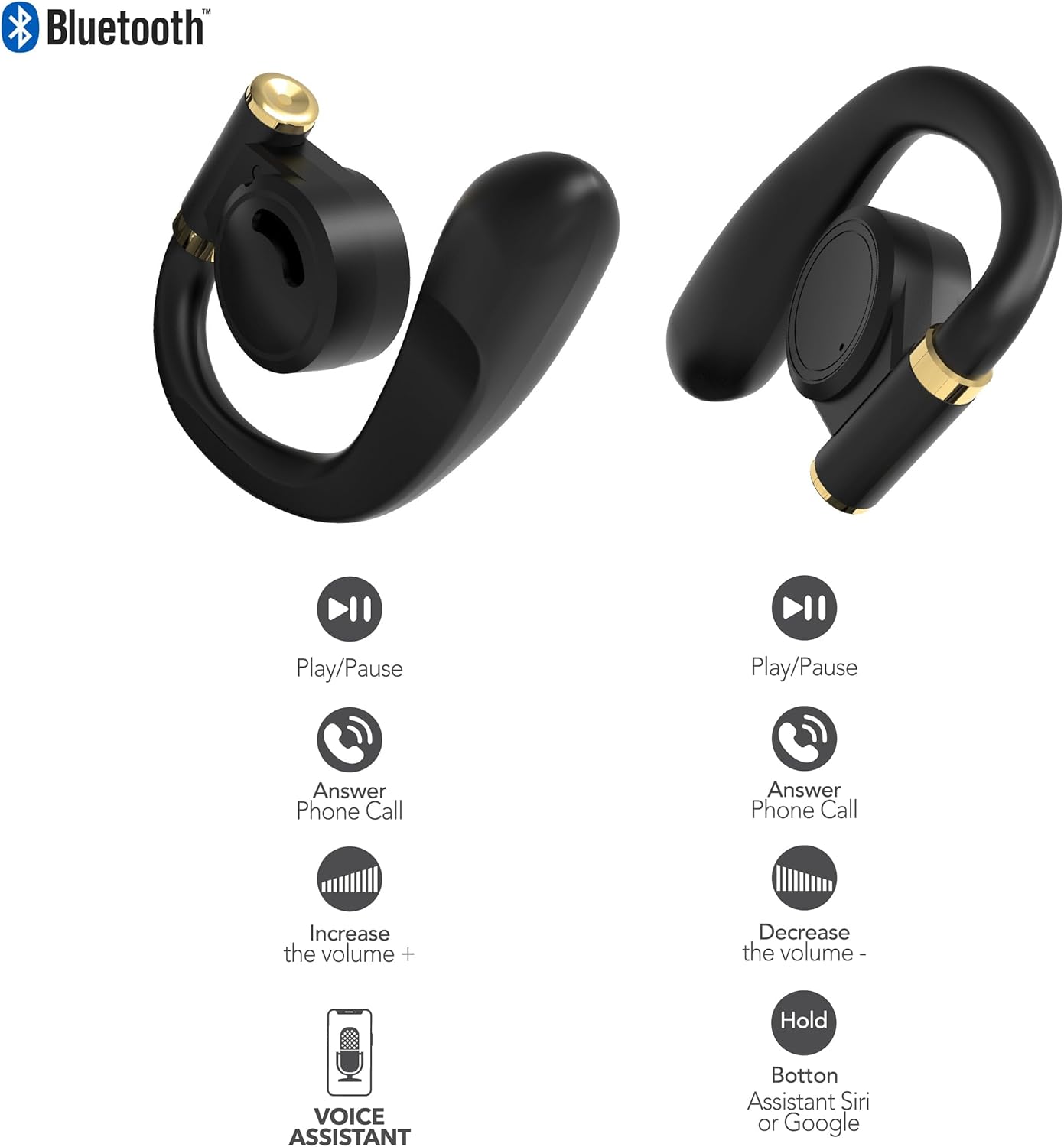
Слика: This diagram illustrates the touch control functions for both the left and right RCA Wave-68 earbuds, including play/pause, answer phone call, volume increase/decrease, and activating the voice assistant.
- Пушти/Пауза: Еден допир на која било слушалка.
- Следна песна: Допрете двапати на десната слушалка.
- Претходна песна: Допрете двапати на левата слушалка.
- Јачина на звук нагоре: Допрете трипати на десната слушалка.
- Намалување на јачината на звукот: Трипати допрете ја левата слушалка.
- Одговори/заврши повик: Еднократно допирање на која било слушалка за време на дојдовен повик или активен повик.
- Одбијте го повикот: Притиснете и задржете која било слушалка 2 секунди за време на дојдовен повик.
- Активирајте го гласовниот асистент (Siri/Google Assistant): Притиснете и задржете ги двете слушалки 3 секунди.
Режим на транспарентност
The Transparency Mode allows you to hear your surroundings while still enjoying your audio. This feature is useful for awareness in environments like busy streets or public transport.
- Activate/Deactivate Transparency Mode: Consult your device's Bluetooth settings or specific app if available, or refer to the product's quick start guide for a specific touch control gesture if not listed above.
Одржување
Чистење
Редовното чистење помага во одржувањето на квалитетот на звукот и хигиената.
- Користете мека, сува крпа што не остава влакненца за да ги избришете слушалките и кутијата за полнење.
- Не користете абразивни средства за чистење, алкохол или хемиски растворувачи.
- Gently remove any earwax or debris from the earbud tips and speaker mesh using a small, clean brush or cotton swab.
Складирање
Кога не ги користите, чувајте ги слушалките во нивната кутија за полнење за да ги заштитите од прашина и оштетување.
- Чувајте на ладно и суво место, подалеку од екстремни температури.
- Избегнувајте продолжено изложување на директна сончева светлина или влага.
Решавање проблеми
If you encounter issues with your RCA Wave-68 earbuds, refer to the following common solutions:
- Earbuds not powering on automatically: Ensure the charging case is charged. Place earbuds back in the case, close the lid, then open it again. If issues persist, manually power on by pressing and holding the touch control area for 3 seconds.
- Слушалките не се спаруваат: Make sure both earbuds are fully charged. Turn off Bluetooth on your device, then turn it back on. Forget "RCA Wave-68" from your device's Bluetooth list and attempt to pair again. Ensure no other devices are actively connected to the earbuds.
- Нема звук од едната слушалка: Place both earbuds back into the charging case, close the lid, and then take them out again. This often re-syncs them. Check your device's audio balance settings.
- Charging case not displaying battery info/not charging: Ensure the USB cable is securely connected to both the case and the power source. Try a different USB cable or power adapter. Clean the charging port on the case for any debris.
- Ниска јачина на звук или лош квалитет на звук: Adjust the volume on both your device and the earbuds. Ensure the earbuds are properly seated in your ears for a good seal. Clean any debris from the earbud speaker mesh.
- Паѓање на слушалките: Ensure you are using the correct ear tip size for a secure and comfortable fit.
Спецификации
| Карактеристика | Детал |
|---|---|
| Име на моделот | Бран-68 |
| Бренд | RCA |
| Технологија за поврзување | Безжичен (Bluetooth) |
| Bluetooth верзија | 5.3 |
| Траење на батеријата | До 20 часа (со кутија за полнење) |
| Контролен метод | Допрете |
| Поставување на увото | Во уво |
| Форма фактор | Во уво |
| Материјал | Пластика, силикон |
| Посебни карактеристики | Built-In Voice Assistant, Transparency Mode |
| UPC | 850068964468 |
Информации за безбедност
- Не расклопувајте или модифицирајте ги слушалките или кутијата за полнење.
- Избегнувајте изложување на уредот на екстремни температури, влажност или течности.
- Не ги користете слушалките со голема јачина на звук подолг временски период за да спречите оштетување на слухот.
- Да се чува подалеку од дофат на деца и домашни миленици.
- Отстранете го уредот одговорно во согласност со локалните прописи.
Гаранција и поддршка
RCA products are designed for reliability and performance. For warranty information or technical support, please refer to the warranty card included in your package or visit the official RCA support webстраница. Ве молиме задржете го доказот за купување за гаранциски барања.


