1. Вовед
This manual provides detailed instructions for the proper use, setup, and maintenance of your Pard NV009-850nm Digital Night Vision Monocular. Please read this manual thoroughly before operating the device to ensure optimal performance and longevity. This device is designed for wildlife observation, hunting, and general outdoor viewing in various light conditions.

Image 1.1: The Pard NV009-850nm Digital Night Vision Monocular. This image displays the compact and ergonomic design of the monocular, highlighting its main body, objective lens, and eyepiece.
2. Производот завршиview
2.1 Содржина на пакетот
По отпакувањето, проверете дали ги имате сите наведени подолу наведени артикли:
- Pard NV009-850nm Digital Night Vision Monocular
- Заштитна торбичка за носење
- USB кабел за полнење
- Wrist Strap / Neck Strap
- Упатство за употреба (овој документ)

Image 2.1: Contents of the Pard NV009-850nm package. This image shows the monocular, its carrying case, charging cable, straps, and the user manual, all neatly arranged.
2.2 Клучни карактеристики
- Daytime and Nighttime Operation: Seamless transition between full-color daytime viewing and monochrome night vision mode.
- Сликање со висока резолуција: Features a 1920x1080 FHD CMOS image sensor and a 1024x768 OLED display for clear, detailed visuals.
- Adjustable IR Illuminator: Integrated 850nm IR illuminator with three intensity levels, providing effective illumination up to 200 meters.
- Фото и видео снимање: Capture 2608x1944 resolution photos and 1920x1080 Full HD videos directly to a Micro SD card.
- Оптички и дигитален зум: Offers 4.7x optical magnification and 1.5x-3.0x digital zoom for precise target observation.
- Wi-Fi поврзување: Connects to smart mobile devices via the "PardVision" app for remote viewing and data transfer.
- Режим „Слика во слика“ (PIP): Provides a magnified inset view of the central area for enhanced detail without losing the wider field of view.
- Издржлив дизајн: IP67 waterproof rating ensures reliability in various outdoor conditions.

Image 2.2: Comparison of day and night vision modes. This image illustrates the monocular's capability to provide full-color images during the day and clear monochrome images at night, featuring a fox in both scenarios.

Image 2.3: Nighttime viewing range illustration. This graphic demonstrates the monocular's effective viewing distance of up to 200 meters (656 feet) in low-light conditions, showing a wild boar as an example target.

Image 2.4: Enhanced image quality demonstration. This image compares a blurred, lower-quality image with a sharp, enhanced image, illustrating the effectiveness of the PARD Visual Light Enhancement Algorithm (VLEA) and OLED display.
3. Поставување
3.1 Инсталација на батерија
- Locate the battery compartment cover, typically on the underside or side of the monocular.
- Отворете го капакот со вртење или лизгање според индикаторот.
- Insert a fully charged 18650 type battery (not included) with the correct polarity (+/-) as indicated inside the compartment.
- Безбедно затворете го капакот на одделот за батерии.
3.2 Вметнување на микро SD картичка
The device supports Micro SD cards for storing photos and videos.
- Locate the Micro SD card slot, usually protected by a rubber cover.
- Gently insert the Micro SD card into the slot until it clicks into place. Ensure the card is oriented correctly.
- Затворете го гумениот капак за да го заштитите слотот од прашина и влага.
3.3 Првично вклучување и прилагодување на фокусот
- Притиснете и задржете го копчето за вклучување за да го вклучите уредот.
- Adjust the diopter ring on the eyepiece until the on-screen display (OSD) text appears sharp and clear to your eye.
- Rotate the objective lens focus ring to bring the observed image into sharp focus.
4. Упатства за работа
4.1 Вклучување/исклучување
- Вклучување: Притиснете и задржете го копчето за вклучување/исклучување приближно 3 секунди.
- Исклучено: Press and hold the Power button for approximately 3 seconds until the device shuts down.
4.2 Mode Selection (Day/Night)
The NV009-850nm automatically adjusts to ambient light, but you can manually switch modes:
- Во главниот viewing interface, short press the Mode button to toggle between Day (color) and Night (monochrome) vision modes.
4.3 IR Illuminator Adjustment
The integrated IR illuminator enhances visibility in complete darkness.
- Activate the IR illuminator by pressing its dedicated button (if available) or through the menu.
- Short press the IR button to cycle through the three intensity levels (Low, Medium, High) or to turn it off.

Image 4.1: IR Illuminator functionality. This graphic illustrates the 200m adjustable beam IR illuminator with its three intensity levels, showing how it illuminates a target in darkness.
4.4 Операција на зумирање
- Use the designated zoom buttons (often '+' and '-') to adjust the digital magnification. The optical magnification is fixed at 4.7x.
4.5 Снимање фотографии и видеа
- Фото: In viewing mode, short press the Photo button to capture an image.
- Видео: Short press the Video button to start recording. Press again to stop recording.

Image 4.2: Video recording and playback function. This image shows the monocular's ability to capture and play back high-definition video, with a simulated screen displaying a recorded scene of a fox.
4.6 Репродукција
- Enter the Playback menu via the main menu.
- Navigate through your recorded photos and videos using the directional buttons.
- Select an item to view it on the OLED display.
4.7 Wi-Fi Connectivity (PardVision App)
- Download the "PardVision" app from your device's app store (Apple App Store or Google Play Store).
- On the monocular, enable Wi-Fi through the system settings. The device will broadcast a Wi-Fi network.
- Connect your smartphone or tablet to the monocular's Wi-Fi network.
- Open the PardVision app to view a live feed, control settings, and transfer files.
4.8 Режим на слика-во-слика (PIP)
- Activate PIP mode through the quick menu or system settings.
- A magnified window will appear on the main display, showing a zoomed-in view of the central area.
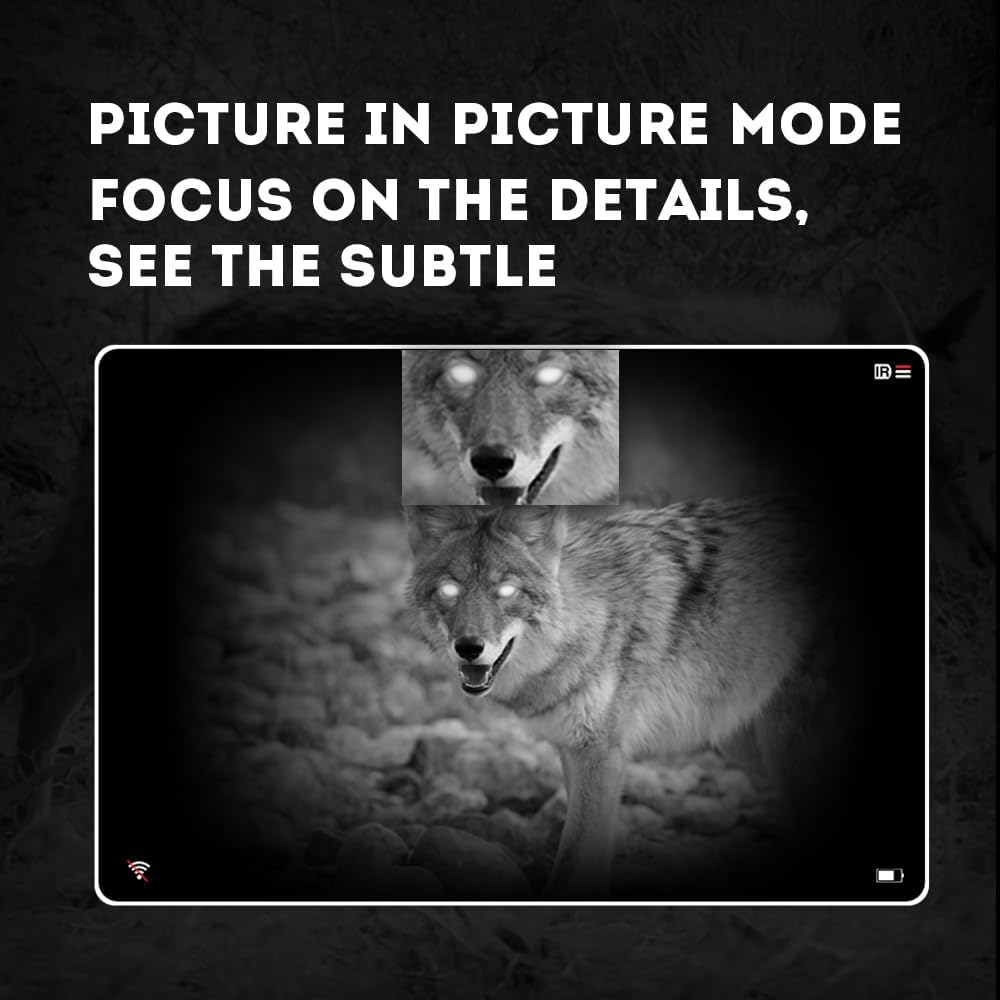
Image 4.3: Picture-in-Picture (PIP) mode. This image demonstrates how PIP mode allows users to focus on specific details within the main view, showing a magnified inset of a coyote's face.
5. Одржување
5.1 Чистење на уредот
- Леќи: Use a soft, lint-free cloth specifically designed for optical lenses. For stubborn smudges, use a small amount of lens cleaning solution. Avoid abrasive materials.
- Тело: Избришете го телото на монокуларот со мека, дamp крпа. Не користете груби хемикалии или растворувачи.
5.2 Грижа за батерии
- Always use high-quality, rechargeable 18650 batteries.
- Отстранете ја батеријата ако уредот нема да се користи подолг период.
- Чувајте ги батериите на ладно и суво место.
5.3 Складирање
- Store the monocular in its protective carrying case when not in use.
- Чувајте го уредот на суво место, подалеку од директна сончева светлина и екстремни температури.
6 Смена на проблеми
If you encounter issues with your Pard NV009-850nm, refer to the following common problems and solutions:
| Проблем | Можна причина | Решение |
|---|---|---|
| Уредот не се вклучува | Low or depleted battery; Incorrect battery installation | Charge or replace the battery; Reinstall battery with correct polarity. |
| Сликата е матна | Improper focus adjustment; Dirty lens | Adjust the diopter and objective lens focus rings; Clean the lenses. |
| No image in night mode | IR illuminator is off or set too low | Turn on the IR illuminator and adjust its intensity. |
| Проблеми со Wi-Fi конекцијата | Wi-Fi not enabled on device; Incorrect app settings | Ensure Wi-Fi is enabled on the monocular; Check app permissions and settings. |
| Cannot record photos/videos | No Micro SD card; SD card full or corrupted | Insert a Micro SD card; Delete old fileили форматирајте ја картичката (прво направете резервна копија на важните податоци). |
If the problem persists after attempting these solutions, please contact Pard customer support.
7. Спецификации
| Карактеристика | Детал |
|---|---|
| Бренд | Pard |
| Име на моделот | PARD Night Vision Monocular |
| Број на модел | NV009-850nm |
| Боја | Црното |
| Димензии на производот (ДxШxВ) | 7.16" x 2.24" x 2.79" (18.19 см x 5.69 см x 7.09 см) |
| Тежина на ставката | 340 грама |
| Материјал | Алуминиум |
| Дијаметар на објективната леќа | 25 милиметри |
| Олеснување на очите | 25 милиметри |
| Способност за ноќно гледање | Да |
| IR Illuminator Wavelength | 850nm (with 940nm option available in other variants) |
| CMOS Sensor Resolution | 1920x1080 пиксели |
| Екран за прикажување | 1024x768 OLED |
| Оптичко зголемување | 4.7x |
| Дигитален зум | 1.5x-3.0x |
| Резолуција на фотографијата | 2608x1944 пиксели |
| Видео резолуција | 1920x1080 пиксели |
| Водоотпорен рејтинг | IP67 |
| Компатибилни уреди | Camera (for recording) |
| Тип на монтирање | Rail Mount (if applicable for accessories) |
8. Гаранција и поддршка
8.1 Информации за гаранцијата
The Pard NV009-850nm Digital Night Vision Monocular comes with a 1 година гаранција од датумот на купување. Оваа гаранција ги покрива производствените дефекти и неисправностите при нормална употреба. Не ги покрива штетите предизвикани од злоупотреба, несреќи, неовластени модификации или неправилно одржување.
Ве молиме чувајте го вашиот доказ за купување за барањата за гаранција.
8.2 Поддршка за корисници
For technical assistance, warranty claims, or any questions regarding your device, please contact Pard customer support through the official Pard website or your retailer. When contacting support, please have your model number (NV009-850nm) and purchase date available.


