1. Вовед
Ви благодарам за купувањетоasing the XO F41 Mirror Bluetooth Speaker. This device combines a digital clock display with a portable Bluetooth speaker, offering multiple playback options including Bluetooth, TF card, and FM radio. Please read this manual carefully before use to ensure proper operation and to maximize your experience with the product.

Image 1.1: The XO F41 Mirror Bluetooth Speaker in use, showing its digital clock display.
2. Карактеристики на производот
- Поврзување со Bluetooth 5.3: За стабилно и ефикасно безжично аудио стриминг.
- Огледален дисплеј: Clear digital time display with adjustable brightness.
- Повеќе режими на репродукција: Supports Bluetooth, TF card, and FM radio.
- Интегриран микрофон: За повици без раце.
- Долго време за репродукција: Up to 8 hours at 50% volume, 5 hours at 100% volume.
- Компактен и пренослив дизајн: Easy to carry and place anywhere.
- Полнење USB-C: Modern and convenient charging port.
3. Содржина на пакетот
Ве молиме проверете го пакувањето за следните ставки:
- XO F41 Mirror Bluetooth Speaker
- USB-C кабел за полнење
- Упатство за употреба

Image 3.1: The XO F41 Mirror Bluetooth Speaker packaging.
4. Распоред на уредот и контроли
Запознајте се со копчињата и портите на звучникот:
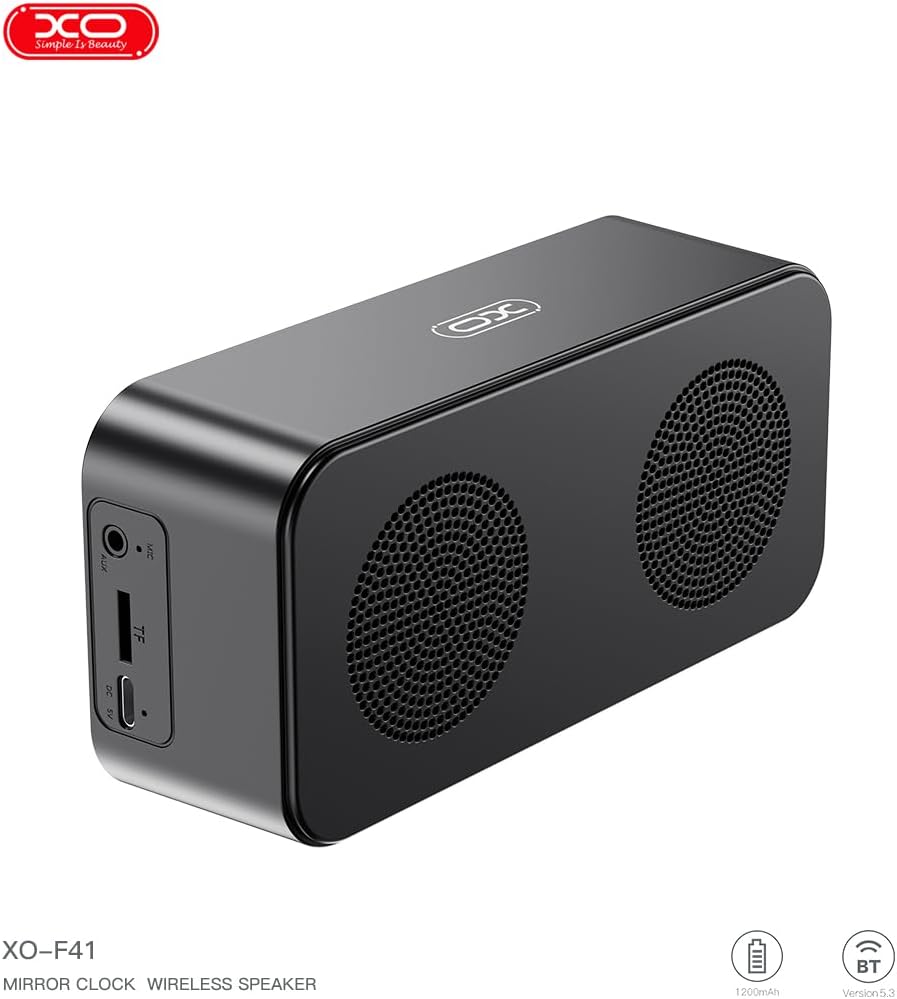
Слика 4.1: Страна view of the XO F41 with ports labeled.
- Копче за вклучување: Притиснете и задржете за вклучување/исклучување. Кратко притиснете за менување режими.
- Копче за репродукција/пауза: Пушти или паузирај аудио. Одговарај/заврши повици.
- Зголемување на јачината на звукот/Следна песна: Кратко притискање за зголемување на јачината на звукот, долго притискање за следната песна.
- Намалување на јачината на звукот/Претходна песна: Кратко притискање за намалување на јачината на звукот, долго притискање за претходна песна.
- USB-C порта: За полнење на уредот.
- Слот за картичка TF: Insert a TF (MicroSD) card for local music playback.
- AUX пристаниште: За жичен аудио влез.
5. Поставување
5.1 Полнење на звучникот
- Поврзете го испорачаниот USB-C кабел со приклучокот за полнење на звучникот.
- Поврзете го другиот крај од кабелот со USB адаптер за напојување (не е вклучен) или со USB порт на компјутерот.
- The charging indicator will illuminate. It takes approximately 3 hours for a full charge.
- The indicator will turn off or change color once fully charged.
5.2 Вклучување/исклучување
- За вклучување: Press and hold the Power button for approximately 3 seconds. You will hear an audible prompt.
- За исклучување: Press and hold the Power button for approximately 3 seconds. You will hear an audible prompt.
6. Упатства за работа
6.1 Спарување преку Bluetooth
- Ensure the speaker is powered on and in Bluetooth mode. If not, short press the Power button to cycle through modes until "BT" or a Bluetooth icon appears on the display.
- На вашиот мобилен уред, овозможете Bluetooth и побарајте достапни уреди.
- Select "XO-F41" from the list of devices.
- Откако ќе се поврзе, звучникот ќе означи успешна врска и можете да започнете со репродукција на аудио од вашиот уред.
6.2 Режим на TF картичка
- Вметнете TF (MicroSD) картичка со MP3 аудио files во отворот за TF картичка.
- The speaker will automatically switch to TF card mode and begin playing music. If not, short press the Power button to cycle to TF card mode.
- Use the Volume Up/Down buttons for track navigation and the Play/Pause button for playback control.
6.3 FM режим на радио
- Short press the Power button to switch to FM radio mode. The display will show the FM frequency.
- Долго притиснете го копчето Пушти/Пауза за автоматско скенирање и зачувување на достапните FM станици.
- Short press the Volume Up/Down buttons to switch between saved stations.
6.4 Поставки за часовник и аларм
The XO F41 features a digital clock display. Specific instructions for setting the time and alarm are typically found in the detailed manual included with the product. Generally, a dedicated 'M' (Mode) or 'Set' button is used to enter time/alarm setting mode, and volume buttons are used to adjust values.

Image 6.1: The XO F41 speaker functioning as a bedside clock.
6.5 Прилагодување на осветленоста на екранот
The display brightness is adjustable. Look for a dedicated button (often labeled with a sun icon or similar) or a combination of button presses (e.g., double-pressing the Power button) to cycle through brightness levels. Refer to the included quick start guide for exact steps.
7. Одржување
- Чистење: Користете мека, сува крпа за чистење на површината на звучникот. Не користете абразивни средства за чистење или растворувачи.
- Складирање: Чувајте го звучникот на ладно и суво место, подалеку од директна сончева светлина и екстремни температури кога не го користите подолг период.
- Отпорност на вода: Овој уред не е водоотпорен. Избегнувајте изложување на вода или прекумерна влага.
- Нега на батеријата: За да го продолжите животниот век на батеријата, избегнувајте често целосно празнење на батеријата. Полнете го уредот редовно, дури и ако не е во постојана употреба.
8 Смена на проблеми
| Проблем | Можна причина | Решение |
|---|---|---|
| Звучникот не се вклучува. | Слаба батерија. | Полнете го звучникот најмалку 30 минути. |
| Не може да се спари преку Bluetooth. | Звучникот не е во режим на спарување; Bluetooth е исклучен на уредот; предалеку е од уредот. | Ensure speaker is in Bluetooth mode. Enable Bluetooth on your device. Move speaker closer to your device (within 10 meters). |
| Нема звук од TF картичката. | TF card not inserted correctly; unsupported file format; no audio files on card. | Вратете ја TF картичката. Осигурајте се дека files are in MP3 format. Verify audio files are present on the card. |
| Слаб FM радио прием. | Слаб сигнал; пречки од околината. | Move the speaker to a different location. Re-scan for stations. |
9. Спецификации
| Карактеристика | Детал |
|---|---|
| Број на модел | XO-F41 |
| Bluetooth верзија | Bluetooth V5.3 |
| Фреквенција на Bluetooth | 2.402 GHz-2.480 GHz |
| Капацитет на батеријата | 1200 mAh |
| Влез за полнење | USB-C, DC5V/0.5A |
| Време на полнење | Приближно 3 часа |
| Време на играње | 8H (50% volume); 5H (100% volume) |
| Ефективно растојание | Помалку од 10 метри |
| Максимална моќност | 5W |
| Единица за звучник | 52 мм |
| Сооднос на сигнал до бучава | > 80 dB |
| Димензии на производот | 15 x 3.81 x 11 см (приближно 150 x 45 x 72 мм) |
| Тежина на производот | 320 g (approx. 0.28 kg) |
| Материјал | Пластика |
| Специјална карактеристика | Прилагодлива осветленост |

Слика 9.1: Детални параметри на производот.
10. Информации за гаранцијата
The XO F41 Mirror Bluetooth Speaker comes with a standard manufacturer's warranty. Please refer to the warranty card included in your package for specific terms, conditions, and duration. Keep your purchase receipt as proof of purchase for any warranty claims.
11. Поддршка за корисници
For further assistance, technical support, or inquiries regarding your XO F41 Mirror Bluetooth Speaker, please contact the retailer or manufacturer's customer service department. Contact details are typically provided on the product packaging or the official brand webсајт.