1. Вовед
This manual provides detailed instructions for the setup, operation, maintenance, and troubleshooting of your ATTACK SHARK X66 Gasket Wireless Mechanical Keyboard. Please read this manual thoroughly before using the product to ensure optimal performance and longevity.

Слика: Од горе надолу view of the ATTACK SHARK X66 Gasket Wireless Mechanical Keyboard, showcasing its compact layout and keycap design.
2. Производот завршиview
2.1 Клучни карактеристики
- 60% компактен дизајн: Features 66 keys and a volume knob, optimizing desktop space while maintaining portability.
- Upgraded Gasket Mount: Incorporates 5 layers of sound insulation (PORON Sandwich Foam, Foamed IXPE Under Shaft Pads, PET Acoustic Premium Pads, Shaft Seat Sound Deadening Foam, Customized Bottom Foams) for reduced noise and a smooth typing experience.
- Троен режим на поврзување: Supports Bluetooth, 2.4GHz wireless, and USB-C wired connections.
- Multi-Device Tasking: Three Bluetooth channels (FN+Q/FN+W/FN+E) for efficient switching between devices.
- Долготрајна батерија: Equipped with a 3000mAh large-capacity rechargeable battery.
- Hot Swappable Switches: Full hot-swappable design compatible with 3-pin/5-pin switches, featuring pre-lubed Strawberry switches for a creamy sound and smooth keystroke.
- Dynamic RGB Backlight: Offers 9 backlight colors and 18 lighting effects with 16 million LED colors, customizable via software.
- Издржливи капачиња за клучеви: Features side-printed gradient PBT keycaps that are resistant to oiling, non-slip, and wear-resistant.

Слика: Надview of the X66 keyboard highlighting key features such as RGB Backlight, Triple Mode Connectivity, Hot Swappable switches, PBT Keycaps, 60% Layout, 3000mAh Battery, and Gasket Structure.
2.2 Содржина на пакетот
- ATTACK SHARK X66 Mechanical Keyboard
- USB-C Cable (1.5 meters)
- 2-in-1 Key Puller and Switch Puller
- Additional Strawberry Switches (2 pieces)
- Упатство за употреба
3. Поставување
3.1 Режими на поврзување
The X66 keyboard supports three connection modes: 2.4GHz wireless, Bluetooth, and USB-C wired.

Image: Diagram illustrating the three connectivity modes: Bluetooth 5.0, 2.4GHz Wireless with a USB dongle, and Type-C Wired connection.
- Безжична врска од 2.4 GHz:
- Locate the 2.4GHz USB receiver.
- Приклучете го ресиверот во достапна USB порта на вашиот компјутер.
- On the keyboard, slide the mode switch to the '2.4G' position. The keyboard will automatically connect.
- Bluetooth конекција:
- На тастатурата, лизнете го прекинувачот за режим во положба „BT“.
- За да влезете во режим на спарување, притиснете и задржете FN + Q, FN + В, или FN + E for 3-5 seconds until the corresponding key's backlight flashes rapidly.
- On your device (PC, Mac, Tablet), search for Bluetooth devices and select 'ATTACK SHARK X66' to pair.
- Once paired, the key's backlight will stop flashing and remain steadily lit. You can pair up to three Bluetooth devices and switch between them using FN + Q/W/E.
- USB-C жична конекција:
- Поврзете го испорачаниот USB-C кабел со USB-C портата на тастатурата.
- Поврзете го другиот крај на кабелот со достапна USB порта на вашиот компјутер.
- Тастатурата автоматски ќе се префрли во жичен режим и ќе почне да се полни.
3.2 Прекинувач на оперативен систем
The keyboard features a dedicated switch for Windows and Mac operating systems.
- Locate the 'Win/Mac' switch on the side or back of the keyboard.
- Slide the switch to the appropriate operating system setting for optimal key mapping.
4. Упатства за работа
4.1 Функционалност на копчето за јачина на звук
The aluminum CNC metal knob provides convenient control over audio.
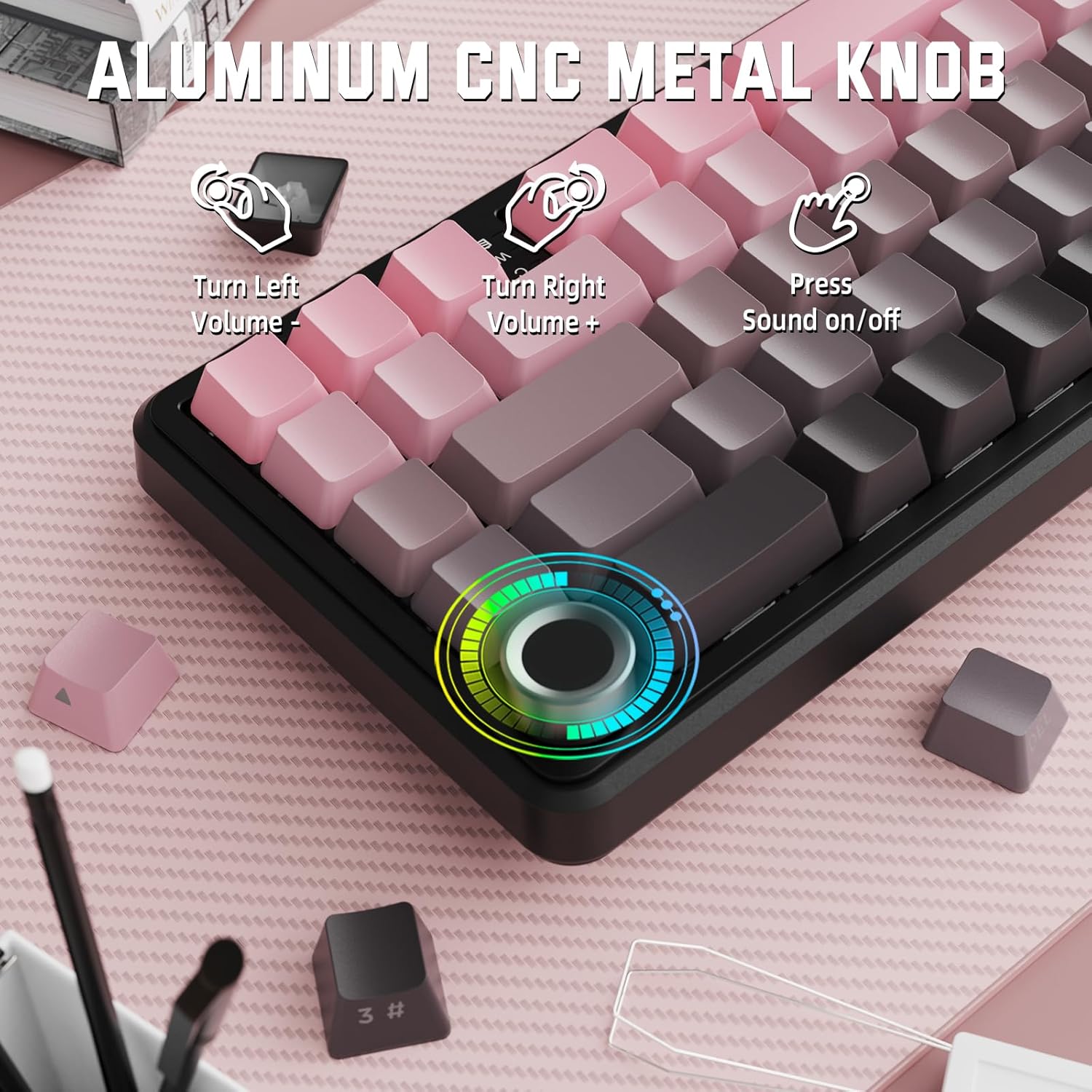
Image: Close-up of the volume knob with icons indicating its functions: Turn Left (Volume -), Turn Right (Volume +), Press (Sound on/off).
- Свртете лево: Намалете ја јачината на звукот.
- Завртете десно: Зголемете ја јачината на звукот.
- Притиснете: Исклучи/Вклучи звук на аудио.
4.2 Function Key Combinations (FN Key)
Due to the compact 60% layout, some functions are accessed via the FN key.
| Комбинација | Функција |
|---|---|
| FN + Q/W/E | Switch between Bluetooth devices 1, 2, and 3 |
| FN + Backspace | Проверете го капацитетот на батеријата |
| FN + 1-0 (top row) | F1-F10 functions (e.g., FN+1 for F1) |
| FN + -/= | F11/F12 functions |
| FN + \| | Избриши |
| FN + P | Екран за печатење |
| FN + [ { | Дома |
| FN + ]} | Крај |
| FN + ; : | Страница нагоре |
| FN + ' " | Страница надолу |
| FN + Arrow Keys | Navigation (e.g., FN+Up Arrow for Page Up) |
5. Прилагодување
5.1 Поставки за RGB позадинско осветлување
The keyboard features dynamic RGB backlighting with multiple effects and colors.

Image: Visual representation of RGB backlight controls including turning on/off, changing lighting mode, speed, direction, brightness, and color, often in combination with the FN key.
- Turn on/off Lighting / Power Saving Mode: Specific key combination (refer to keyboard legends or software).
- Режим на осветлување: Cycle through 18 lighting effects.
- Брзина на осветлување: Прилагодете ја брзината на динамичките ефекти на осветлување.
- Насока на осветлување: Change the direction of certain lighting effects.
- Осветленост на осветлувањето: Прилагодете ја јачината на задното осветлување.
- Боја на осветлување: Select from 9 preset backlight colors or customize via software.
5.2 Програмирање на софтвер
For advanced customization of RGB modes, macros, and key remapping, dedicated software is available.
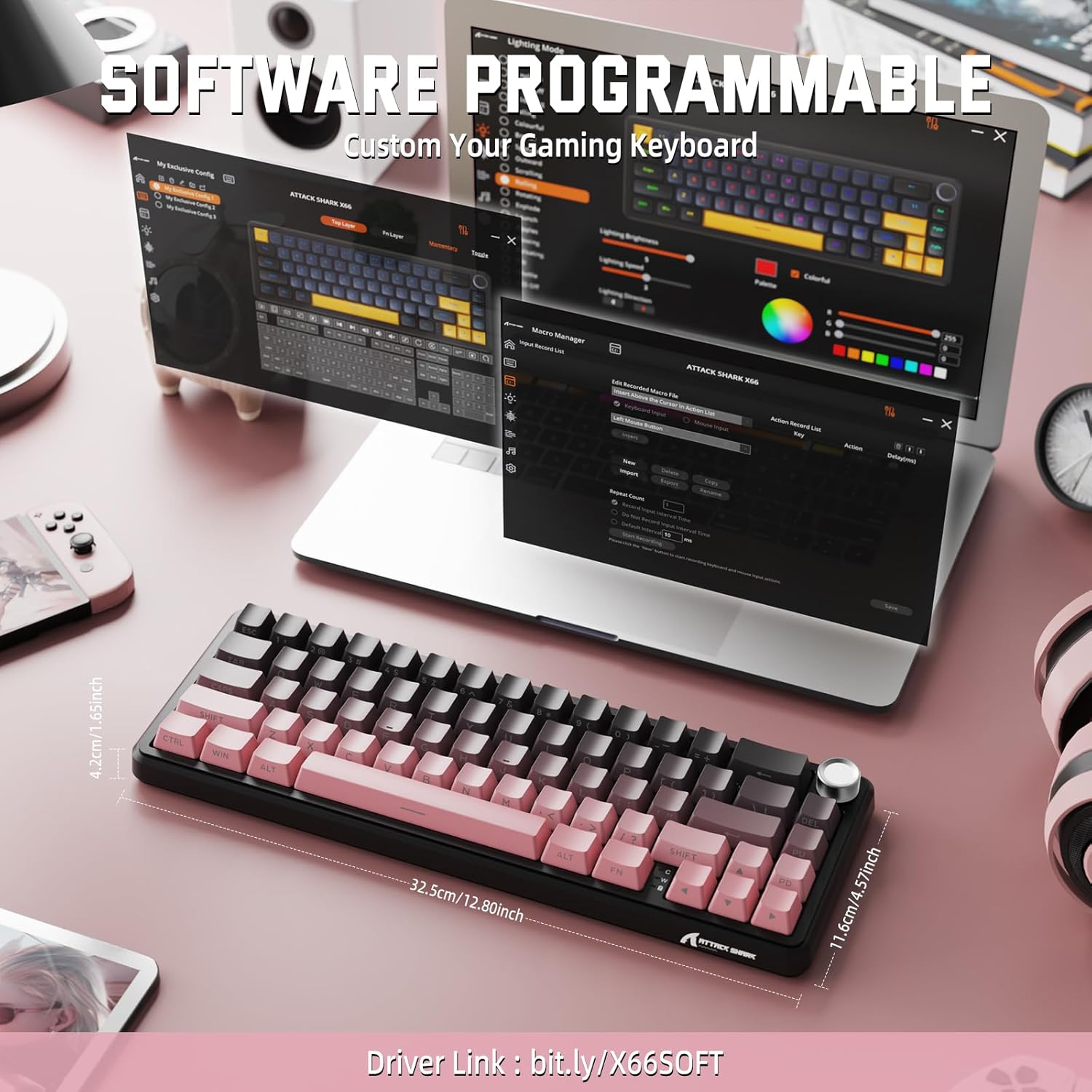
Image: Screenshot of the keyboard's software interface, showing options for custom key assignments, macro recording, and RGB lighting customization. A driver link is provided for download.
Download the official software from the manufacturer's webстраница. Софтверот ви овозможува да:
- Прилагодете ги RGB ефектите и боите на осветлувањето.
- Program macros for complex key sequences.
- Remap individual keys to different functions.
- Креирајте и зачувајте повеќе професииfiles за различни апликации или игри.
6. Одржување
6.1 Чистење на тастатурата
- Исклучете ја тастатурата од сите извори на енергија пред чистење.
- Користете мека крпа без влакненца малку гampизмијте со вода или благ раствор за чистење за да ги избришете капачињата на копчињата и куќиштето.
- За прашина и остатоци помеѓу копчињата, користете компримиран воздух.
- Избегнувајте употреба на груби хемикалии, абразиви или растворувачи.
6.2 Hot Swappable Switch Replacement
The keyboard's hot-swappable design allows for easy switch replacement without soldering.

Image: Illustration showing how to remove and insert mechanical switches on the X66 keyboard, highlighting compatibility with 3-pin and 5-pin switches.
- Користете го испорачаниот извлекувач на капачето за тастатура за нежно да го отстраните посакуваното капаче за тастатура.
- Користете го испорачаниот извлекувач на прекинувачот за внимателно да ги фатите горните и долните штипки на прекинувачот и да го повлечете право нагоре.
- Порамнете ги пиновите на новиот прекинувач со дупките на печатената плочка. Осигурајте се дека пиновите се прави за да избегнете свиткување.
- Нежно притиснете го новиот прекинувач на своето место додека не кликне безбедно.
- Повторно прицврстете го капачето на клучот.
6.3 Управување со батерии
The keyboard is equipped with a 3000mAh rechargeable battery.

Image: Visual guide on how to check the battery capacity using FN + Backspace, showing different battery level indicators (30%, 50%, 100%) with corresponding key light patterns.
- Полнење: Connect the keyboard via the USB-C cable to a computer or a USB power adapter. The charging indicator will show the charging status.
- Проверка на нивото на батеријата: Притиснете FN + Backspace to display the current battery capacity via the key backlights.
- Траење на батеријата: A full charge provides long-lasting usage, but actual duration varies based on RGB lighting usage and connection mode.
7 Смена на проблеми
| Проблем | Можна причина | Решение |
|---|---|---|
| Тастатурата не реагира | Low battery, incorrect connection mode, driver issue. | Charge the keyboard. Ensure the mode switch is set correctly (2.4G, BT, or Wired). Reconnect the USB receiver/cable. Re-pair Bluetooth. Try a different USB port. |
| Bluetooth врската е нестабилна | Пречки, растојание, слаба батерија. | Ensure no strong interference sources nearby. Move closer to the device. Charge the keyboard. Re-pair the Bluetooth connection. |
| 2.4GHz wireless not connecting | Приемникот не е вклучен, неправилен режим, пречки. | Ensure the 2.4GHz receiver is securely plugged in. Set the keyboard mode switch to '2.4G'. Try a different USB port for the receiver. |
| RGB осветлувањето не работи или е неправилно | Lighting settings, software issue. | Check lighting control key combinations (FN + lighting keys). Ensure software is installed and updated. Reset lighting settings via software. |
| Клучевите не се регистрираат или се пишуваат двојно | Неисправен прекинувач, остатоци под капачето на копчето. | Remove keycap and clean around the switch. If issue persists, replace the switch using the provided switch puller and spare switches. |
| Volume knob not functioning | Софтверски конфликт, физичка опструкција. | Ensure no software is overriding media controls. Check for any physical debris around the knob. Restart the computer. |
8. Спецификации
| Карактеристика | Детал |
|---|---|
| Број на модел | X66 |
| Распоред | 66 Keys, 60% Compact QWERTY |
| Поврзување | Bluetooth (5.0), 2.4GHz Wireless, USB-C Wired |
| Прекинувачи | Hot Swappable (3-pin/5-pin compatible), Pre-lubed Strawberry Mechanical Switches |
| Клучни клучеви | Side-printed Gradient PBT |
| Задно осветлување | RGB (16+ Million Colors, 9 preset colors, 18 effects) |
| Капацитет на батеријата | 3000 mAh |
| Компатибилни уреди | Windows, Mac OS, Laptop, PC, Tablet |
| Материјал | Polybutylene Terephthalate, Polycarbonate |
| Тежина на ставката | 2 фунти (приближно 0.91 кг) |
| Димензии на пакетот | 14.02 x 6.54 x 2.05 инчи (приближно 35.6 x 16.6 x 5.2 см) |
| Производител | НАПАДНА АЈКУЛА |
9. Гаранција и поддршка
For warranty information and technical support, please refer to the official ATTACK SHARK webна локацијата или контактирајте го вашиот продавач. Зачувајте ја сметката за гаранциски барања.
Производител: НАПАДНА АЈКУЛА
Продавач: MAGIC-REFINER US
10. Видео за производот
Видео: Официјална видео презентација на производотasing the features and design of the ATTACK SHARK X66 Gasket Wireless Mechanical Keyboard, including its compact size, RGB lighting, hot-swappable switches, and multi-mode connectivity. The video highlights the keyboard's aesthetic appeal and functional aspects.


