Вовед
This manual provides detailed instructions for the setup, operation, and maintenance of your ATTACK SHARK X66 Wireless Mechanical Gaming Keyboard. Please read this manual thoroughly to ensure proper use and to maximize your keyboard's performance.

Image: The ATTACK SHARK X66 Wireless Mechanical Gaming Keyboard, showcasing its compact 66-key layout and volume knob.
Поставување
Before using your ATTACK SHARK X66 keyboard, please follow these steps for initial setup.
1. Распакување и содржина
Внимателно извадете ги сите предмети од пакувањето. Проверете дали сите компоненти се присутни:
- 1 x ATTACK SHARK X66 Mechanical Keyboard
- 1 x 2-in-1 Keycap and Switch Puller
- 1 x USB-C кабел
- 2 x Spare Strawberry Switches
- 1 x Упатство за употреба

Image: A visual representation of the ATTACK SHARK X66 keyboard and its included accessories, such as the USB-C cable, keycap/switch puller, and spare switches.
2. Почетно полнење
For optimal performance, it is recommended to fully charge the keyboard before its first use. Connect the provided USB-C cable to the keyboard's USB-C port and the other end to a power source (e.g., computer USB port, USB wall adapter). The charging indicator light will provide feedback on the charging status.
Работни режими
The ATTACK SHARK X66 keyboard supports three connection modes: Wired (USB-C), 2.4G Wireless, and Bluetooth 5.0. You can seamlessly switch between these modes.

Image: The side of the ATTACK SHARK X66 keyboard, highlighting the 2.4G, BT, and USB-C connection mode switches, along with the USB receiver storage slot.
1. Жичен режим (USB-C)
Connect the keyboard to your device using the provided USB-C cable. This mode provides a stable connection and charges the keyboard simultaneously.
2. 2.4G безжичен режим
- Locate the 2.4G USB receiver, typically stored in a dedicated slot on the keyboard.
- Приклучете го 2.4G USB приемникот во слободен USB порт на вашиот компјутер.
- Set the mode switch on the keyboard to '2.4G'.
- Тастатурата треба автоматски да се поврзе.
3. Режим Bluetooth 5.0
- Set the mode switch on the keyboard to 'BT'.
- На вашиот уред (компјутер, таблет, паметен телефон), овозможете Bluetooth и пребарувајте нови уреди.
- The keyboard will appear as 'ATTACK SHARK X66' or similar. Select it to pair.
- The keyboard supports up to three Bluetooth devices. Switch between paired devices using FN+Q, FN+W, или FN+E.
4. System Switch (Win/Mac)
The keyboard features a dedicated switch to toggle between Windows and Mac operating system layouts, ensuring full compatibility and correct key functions for your chosen system.
Video: An official product video demonstrating the tri-mode connectivity (wired, 2.4G, Bluetooth) and system switching capabilities of the ATTACK SHARK X66 Mechanical Gaming Keyboard.
Клучни функции
The ATTACK SHARK X66 keyboard includes a functional knob and various FN key combinations to enhance usability.
1. Multimedia Knob
The aluminum alloy knob located on the top right of the keyboard provides quick access to multimedia controls:
- Ротирај во насока на стрелките на часовникот: Зголемете ја јачината на звукот
- Ротирајте спротивно од стрелките на часовникот: Намалете ја јачината на звукот
- Притиснете: Исклучи/вклучи звук на звукот

Слика: Детална view of the functional aluminum metal knob on the ATTACK SHARK X66 keyboard, illustrating its volume control and mute/unmute capabilities.
2. Комбинации на копчиња FN
На Fn key (Function key) allows access to secondary functions printed on various keys. Refer to the keycaps for specific combinations. Common functions include:
- FN + [Копче]: Activates the secondary function of the key.
- FN + Backspace: Displays battery level (keys 1-0 will light up to indicate charge).
- FN + PgDn: Cycles through RGB backlight modes.
- FN + стрелка нагоре: Ја зголемува осветленоста на задното осветлување.
- FN + стрелка надолу: Ја намалува осветленоста на задното осветлување.
- FN + Лева стрелка: Changes backlight color.
- FN + Десна стрелка: Changes backlight color.
- FN + X: Toggles backlight On/Off.
Контрола на RGB позадинско осветлување
The ATTACK SHARK X66 keyboard features dynamic RGB backlighting with multiple effects and customization options.

Image: The ATTACK SHARK X66 keyboard illuminated with vibrant RGB lighting, demonstrating its 16+ million color capabilities and dynamic effects.
- Промена на режимот на позадинско осветлување: Притиснете FN + PgDn to cycle through 18 dynamic chroma backlit modes, 7 monochrome colors, and 1 rainbow color light.
- Прилагодете ја осветленоста: Користете FN + стрелка нагоре да се зголеми осветленоста и FN + стрелка надолу да се намали осветленоста.
- Промени боја: Користете FN + Лева стрелка or FN + Стрелка надесно to change the backlight color in certain modes.
- Вклучи/исклучи позадинско осветлување: Притиснете FN + X за вклучување или исклучување на позадинското осветлување.
Прекинувачи со жешка замена
The ATTACK SHARK X66 keyboard is equipped with hot-swappable sockets, allowing you to customize your typing experience by changing switches without soldering.

Слика: Детална view of the hot-swappable sockets and custom Strawberry switches on the ATTACK SHARK X66 keyboard, demonstrating the ease of switch replacement.
- Компатибилност: Supports most 3-pin and 5-pin mechanical switches.
- Замена на прекинувач: Use the provided 2-in-1 keycap and switch puller to carefully remove keycaps and switches. Align new switches with the sockets and press firmly until they click into place.
- Included Switches: The keyboard comes with linear Strawberry switches, known for their smooth and responsive feel.
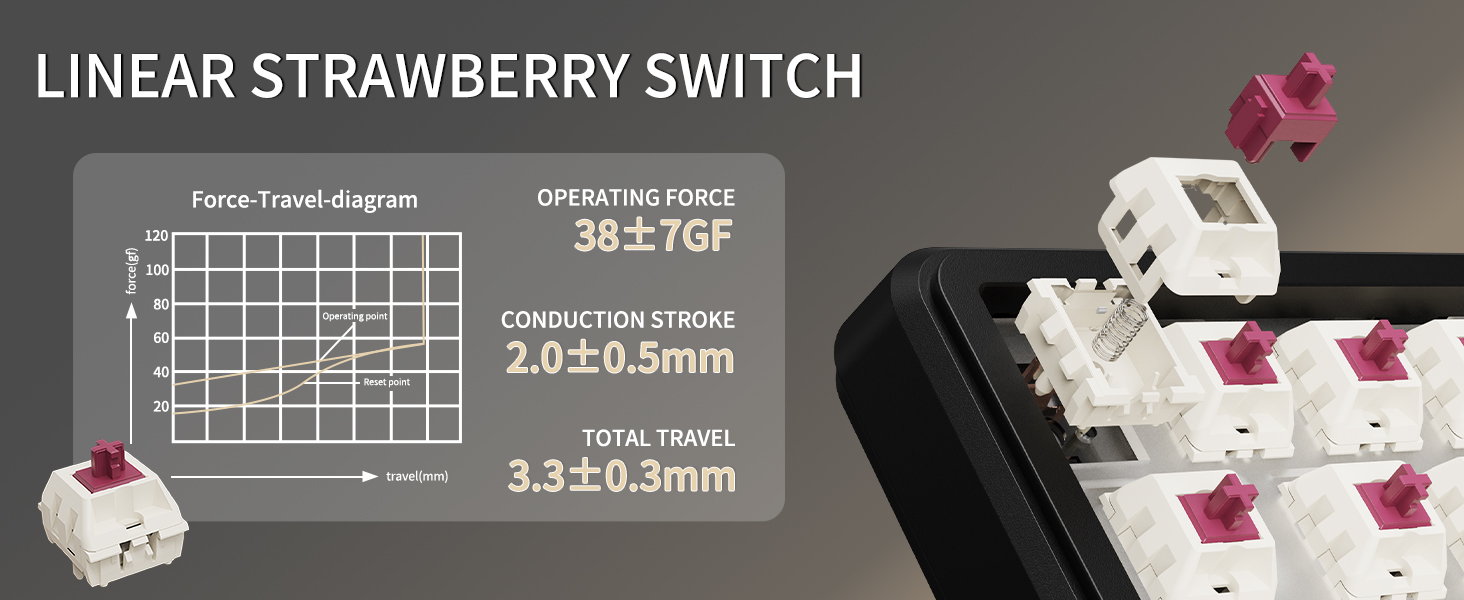
Image: A diagram illustrating the force-travel characteristics of the Linear Strawberry Switch, detailing operating force, conduction stroke, and total travel.
Управување со батерии
The ATTACK SHARK X66 keyboard is equipped with a 3000mAh battery for extended wireless use.

Image: A close-up of the indicator lights on the ATTACK SHARK X66 keyboard, showing status for Caps Lock, Win Lock, and charging.
- Индикатор за полнење: A dedicated indicator light shows the charging status.
- Проверка на нивото на батеријата: Долго притиснете FN + Backspace. The number keys (1-0) will light up to visually represent the current battery level (e.g., 10 keys lit for 100%, 1 key lit for 10%).
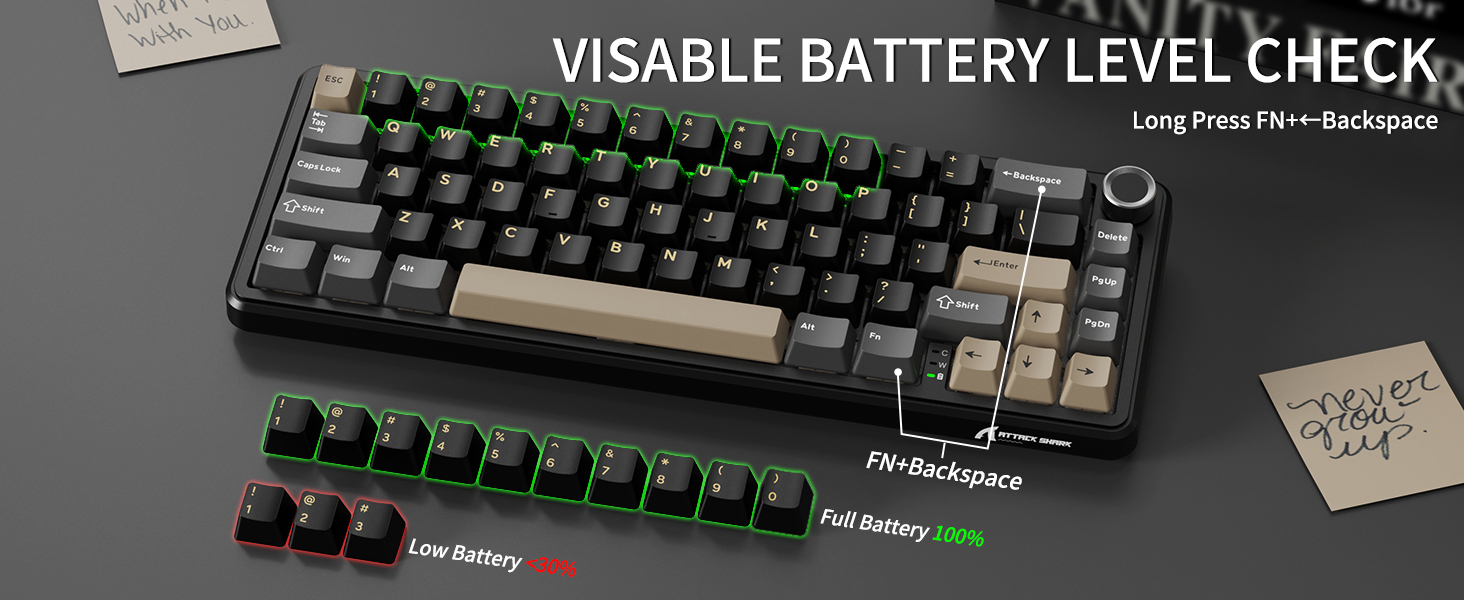
Image: The ATTACK SHARK X66 keyboard demonstrating the visible battery level check feature, where pressing FN+Backspace illuminates number keys to indicate charge percentage.
Одржување
Regular maintenance helps prolong the life and performance of your keyboard.
- Чистење: Use a soft, dry cloth to wipe the keyboard surface. For deeper cleaning, remove keycaps using the provided puller and use compressed air to clear debris.
- Keycap and Switch Care: Avoid excessive force when removing or installing keycaps and switches to prevent damage to the stems or sockets.
- Складирање: Кога не ја користите подолг период, чувајте ја тастатурата на суво место без прашина.
Решавање проблеми
If you encounter issues with your ATTACK SHARK X66 keyboard, refer to the following common solutions:
- Тастатурата не реагира:
- Осигурајте се дека тастатурата е наполнета.
- Check the connection mode switch (Wired, 2.4G, BT) matches your intended connection.
- За 2.4G, проверете дали USB приемникот е безбедно вклучен.
- For Bluetooth, ensure the keyboard is paired and selected in your device's Bluetooth settings.
- Try restarting the keyboard and your device.
- Spacebar Not Functioning: If the spacebar does not register presses, carefully remove the spacebar keycap using the provided puller. Check for any packing foam or foreign objects underneath that might be obstructing the switch's travel. Remove any obstructions and re-install the keycap.
- Проблеми со позадинско осветлување:
- Проверете дали позадинското осветлување не е исклучено (FN + X).
- Прилагодете ја осветленоста користејќи FN + Стрелка нагоре/надолу.
- Кружење низ режимите користејќи FN + PgDn.
- Incorrect Key Functions (Windows/Mac): Ensure the system switch on the keyboard is set to the correct operating system (Win or Mac).
- Typo in Manual (FN+BiidAb): Please note that some early documentation may contain a typo referring to a 'BiidAb' key. The correct key combination to change backlight modes is FN + PgDn.
Спецификации
| Карактеристика | Опис |
|---|---|
| Модел | X66 |
| Бренд | НАПАДНА АЈКУЛА |
| Поврзување | USB-C Wired, 2.4G Wireless, Bluetooth 5.0 |
| Распоред | 66-Key, 60% Gasket Mounted |
| Прекинувачи | Hot-Swappable (3/5 pin), Linear Strawberry Switches |
| Клучни клучеви | PBT Keycaps, OEM Profile |
| Задно осветлување | RGB (18 dynamic modes, 7 monochrome, 1 rainbow) |
| Капацитет на батеријата | 3000 mAh |
| Посебни карактеристики | Multimedia Knob, Dual System Compatibility (Win/Mac), Gasket Mount, 5-layer Sound Absorbing Material, Adjustable Two-stage-контракт |
| Димензии | 14.02 x 6.5 x 2.05 инчи |
| Тежина | 1.96 фунти |
Гаранција и поддршка
For warranty information and technical support, please refer to the official ATTACK SHARK webстраницата или директно контактирајте ја нивната служба за корисници. Зачувајте ја сметката за купување како доказ за купување.


