1. Важни безбедносни информации
Please read this entire manual before installation and assembly. If you have any questions regarding any of the instructions or warnings, please contact your local distributor for assistance.
- We accept no responsibility for incorrect or faulty installation.
- Follow the enclosed installation instructions carefully.
- Check the condition and completeness of all items before beginning.
- Материјалите за прицврстување што се испорачуваат за монтажа на ѕид се наменети исклучиво за прицврстување на цврста ѕидарија или бетон. За други типови ѕидови, како што се шупливи тули, гипс картон или лесна конструкција, ве молиме контактирајте специјализиран продавач за информации за соодветни елементи за прицврстување.
- Under no circumstances should you exceed the limit values specified for the product.
2. Содржина на пакетот
Verify that all components are present and undamaged before installation. If any parts are missing or damaged, do not attempt to install. Contact customer support for replacement parts.

Figure 2.1: XTRARM TiTon Double TV Wall Mount and included hardware components, including various screws, anchors, washers, and a drilling template.
Пакетот обично вклучува:
- XTRARM TiTon Double TV Wall Mount assembly
- Standard mounting hardware for TV and wall (various screws, anchors, washers)
- Шаблон за дупчење
- Small spirit level
- Multiple hook-and-loop straps for cable management
3. Спецификации
| Карактеристика | Спецификација |
|---|---|
| Тип на монтирање | Монтирање на ѕид |
| Тип на движење | Articulated, Swivel, Tilt, Rotate |
| Материјал | Метал |
| Боја | Црното |
| Оддалеченост на Wallидот | 12.9 см (вовлечено) до 120 см (продолжено) |
| Ротација | Up to 90° (portrait/landscape) |
| Завртување | Up to 180° (90° left/right) |
| Навалување | -5° до +12° |
| Препорачана големина на ТВ | Approximately 52 – 110 inches |
| Тежински капацитет | Максимум 80 кг |
| Компатибилност со VESA | 100x100mm, 100x200mm, 200x100mm, 200x200mm, 200x300mm, 300x200mm, 300x300mm, 400x200mm, 400x300mm, 400x400mm, 500x300mm, 600x200mm, 600x400mm |

Figure 3.1: VESA compatibility and maximum weight capacity.

Figure 3.2: Key dimensions and movement capabilities of the mount.
Figure 3.3: Comprehensive technical drawing with detailed dimensions and adjustment ranges.
4. Поставување и инсталација
Proper installation is crucial for the safety and stability of your TV. Ensure you have the necessary tools and assistance before proceeding.
4.1 Потребни алатки (не се вклучени)
- Дупчалка
- Stud finder (if mounting to wood studs)
- Молив
- Мерната лента
- Насаден клуч или прилагодлив клуч
- Шрафцигер за глави Филипс
4.2 Избор на локација за монтирање
Select a wall location that can safely support the weight of the mount and your TV. For solid concrete or masonry walls, use the provided anchors. For wood stud walls, ensure the mount is centered on a stud. Avoid mounting to drywall alone.
4.3 Attaching the Wall Plate
- Position the drilling template at the desired height on the wall and mark the drill holes with a pencil. Use the included spirit level to ensure it is perfectly horizontal.
- Drill pilot holes at the marked locations. The drill bit size will depend on your wall type and the chosen anchors/screws.
- Вметнете ѕидни типли (доколку се потребни за вашиот тип на ѕид) во пилотските дупки.
- Align the wall plate with the drilled holes and secure it to the wall using the appropriate screws and washers. Ensure it is firmly attached.
4.4 Прикачување на држачи за телевизор на телевизорот
- Внимателно поставете го телевизорот со лицето надолу на мека, чиста површина за да спречите оштетување на екранот.
- Идентификувајте ги дупките за монтирање VESA на задниот дел од вашиот телевизор.
- Select the correct size screws and spacers (if needed) from the provided hardware that fit your TV's VESA pattern.
- Attach the two vertical TV brackets to the back of your TV, ensuring they are level and securely fastened. Do not overtighten.
4.5 Монтирање на телевизорот на ѕидна плоча
- With assistance, carefully lift the TV and hook the attached TV brackets onto the wall plate.
- Осигурајте се дека телевизорот е безбедно поставен на ѕидната плоча.
- Engage any safety locking mechanisms on the brackets to prevent accidental dislodgement.

Слика 4.1: Прample of the XTRARM TiTon Double TV Wall Mount installed with a television.
5. Упатства за работа
The XTRARM TiTon Double mount offers full motion capabilities for optimal viewинг агли.
5.1 Adjusting Wall Distance
Gently pull or push the TV to extend or retract the mount. The mount allows for a wall distance ranging from 12.9 cm to 120 cm.

Figure 5.1: Adjustable wall distance of the mount.
5.2 Прилагодување на вртењето
The mount can swivel up to 180 degrees (90 degrees left or right) to direct the screen towards different viewобласти.

Figure 5.2: Swivel capability of the mount.
5.3 Прилагодување на навалување
Adjust the vertical tilt of your TV from -5 degrees to +12 degrees to reduce glare and optimize viewing comfort. Loosen the tilt adjustment knobs, set the desired angle, and then retighten the knobs.
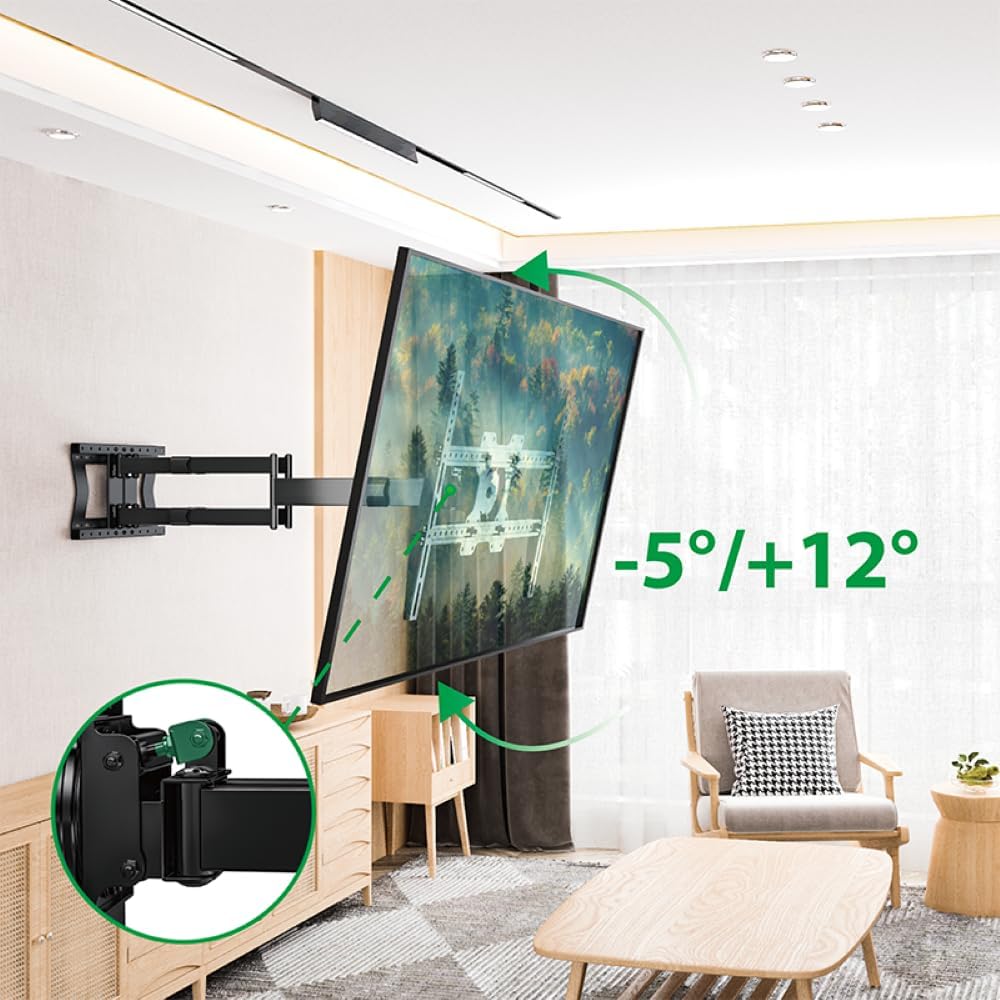
Figure 5.3: Tilt adjustment range and mechanism.
5.4 Прилагодување на ротацијата
The mount allows for a 90-degree rotation, enabling you to switch between landscape and portrait orientation for your TV.

Figure 5.4: 90-degree rotation capability.
5.5 Управување со кабли
Use the provided hook-and-loop straps to bundle and organize cables along the mount arms for a tidy appearance and to prevent snagging during adjustments.
6. Одржување
Редовното одржување обезбедува долготрајност и безбедно работење на ѕидниот држач за вашиот телевизор.
- Чистење: Избришете го држачот со мека, сува крпа. Избегнувајте абразивни средства за чистење или растворувачи што би можеле да ја оштетат завршната обработка.
- Проверете ги врските: Периодично проверувајте ги сите завртки и болтови за да се осигурате дека се цврсто затегнати. Затегнете ги повторно доколку е потребно, но не претерувајте.
- Проверете дали има абење: Редовно проверувајте го држачот за какви било знаци на абење, оштетување или корозија. Доколку се пронајдат какви било проблеми, прекинете со употреба и контактирајте ја службата за корисници.
7 Смена на проблеми
If you encounter any issues with your XTRARM TiTon Double TV Wall Mount, refer to the following common problems and solutions:
| Проблем | Можна причина | Решение |
|---|---|---|
| Телевизорот не е рамен | Wall plate or TV brackets not level during installation. | Carefully remove the TV, adjust the wall plate or TV brackets using a spirit level, and re-mount. |
| Difficulty moving the mount | Joints may be too tight or require lubrication. | Check for any overtightened bolts. Apply a small amount of silicone-based lubricant to moving joints if necessary. |
| Монтажата се чувствува нестабилна | Loose wall plate, incorrect anchors, or exceeding weight capacity. | Immediately remove the TV. Re-check all wall plate fasteners. Ensure correct anchors were used for your wall type. Verify TV weight does not exceed 80 kg. If issues persist, consult a professional installer. |
8. Гаранција и поддршка
For information regarding warranty coverage, technical support, or replacement parts, please refer to the documentation provided at the time of purchase or visit the official XTRARM webстраница. Чувајте ја сметката за купување како доказ за купување.


