1. Во текотview
The NEEWER Basics TP08 is a versatile 2-in-1 camera tripod and monopod designed for photographers and videographers seeking stability and portability. Constructed from durable aluminum alloy with a high-strength plastic head, it supports DSLR cameras up to 13lb (6kg). Its compact and lightweight design makes it ideal for travel and various shooting environments. Key features include a 360° rotatable ball head, an Arca-type quick release plate, adjustable and reversible legs, and an inverted central axis for low-angle and macro photography.
2. Информации за безбедност
- Always ensure the tripod is placed on a stable, level surface before mounting equipment.
- Do not exceed the maximum load capacity of 13lb (6kg) to prevent damage to the tripod or your camera.
- Secure all locking mechanisms tightly after adjusting the height or angle.
- Avoid using the tripod in strong winds or extreme weather conditions without additional stabilization (e.g., a weight hook).
- Keep hands clear of moving parts when adjusting the tripod.
- Store the tripod in its carrying bag when not in use to protect it from dust and damage.
3. Содржина на пакетот
Проверете дали сите артикли се присутни во пакувањето:
- 1 x 2-in-1 Tripod & Monopod
- 3 x L-Shaped Hex Wrench
- 1 x торбичка за носење
- 1 x Упатство за употреба
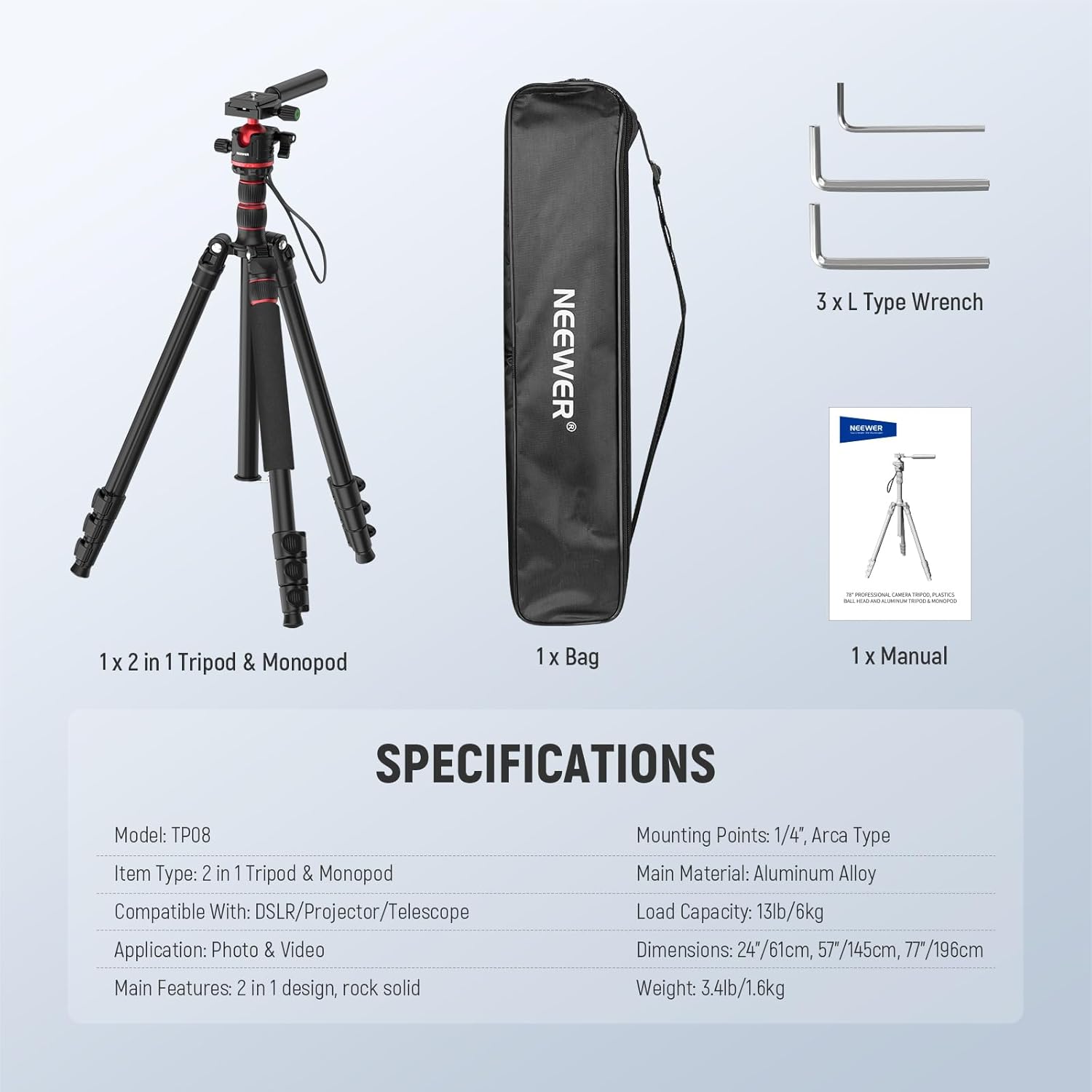
Image: NEEWER Basics TP08 package contents.
4. Поставување
4.1 Расклопување на стативот
- Release the leg locking buckles on each leg.
- Раширете ги ногалките на стативот до саканата должина.
- Adjust the leg angles using the leg adjustment locks at the top of each leg.
- Secure all leg locking buckles and adjustment locks firmly.

Image: The NEEWER Basics TP08 tripod set up for outdoor photography.
4.2 Прикачување на топчестата глава и плочата за брзо отпуштање
- Ensure the ball head is securely attached to the tripod's central column.
- Locate the Arca-type quick release plate.
- Attach the quick release plate to the bottom of your camera or device using the 1/4" screw. Tighten securely.
- Лизнете ја плочата за брзо отклучување со камерата во кл.amp на главата на топката.
- Tighten the quick release plate locking knob to secure your camera.

Image: Detail of the ball head and quick release plate, showing compatibility with various cameras.
4.3 Конверзија на монопод
- To convert to a monopod, unscrew the central column from the tripod base.
- One of the tripod legs is detachable. Unscrew this leg from the tripod.
- Attach the central column to the detachable leg to form a monopod.
- The ball head can be transferred to the monopod for use.

Image: Visual guide for transforming the tripod into a monopod.
5. Операција
5.1 Прилагодување на висината и аглите на нозете
- Прилагодување на висината: Loosen the leg locking buckles, extend or retract the leg sections, and then firmly close the buckles. The central column can also be extended by loosening its locking knob.
- Прилагодување на аголот на ногата: Press the leg adjustment lock at the top of each leg to select one of the available angle positions.
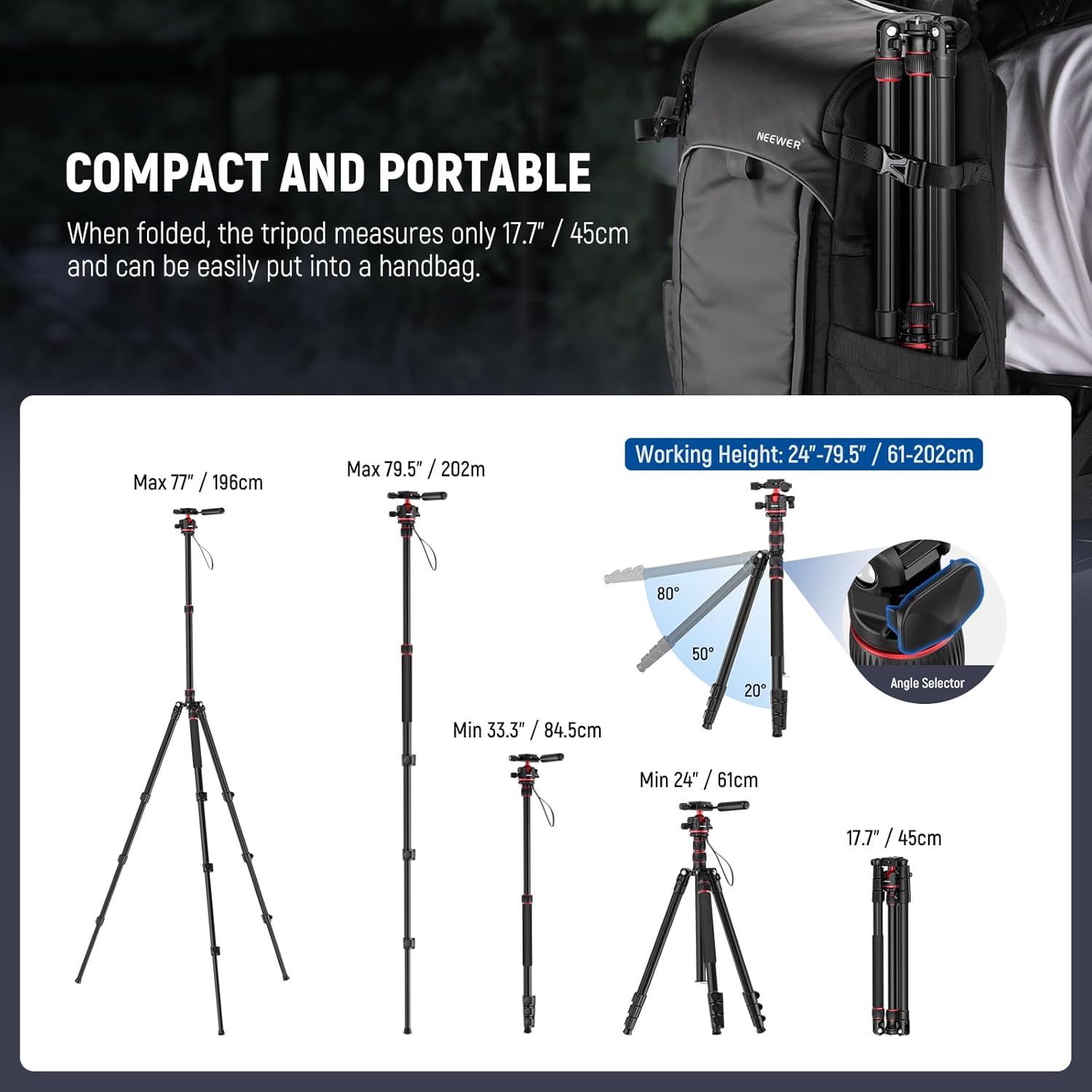
Image: Different height and angle configurations of the tripod.
5.2 Користење на топчестата глава
- Ротација од 360°: Loosen the ball head locking knob to allow the camera to rotate horizontally for panoramic shots. Tighten to secure.
- Наклон од 90°: The ball head allows for tilting the camera up to 90 degrees for vertical shooting. Use the integrated handle for precise adjustments.
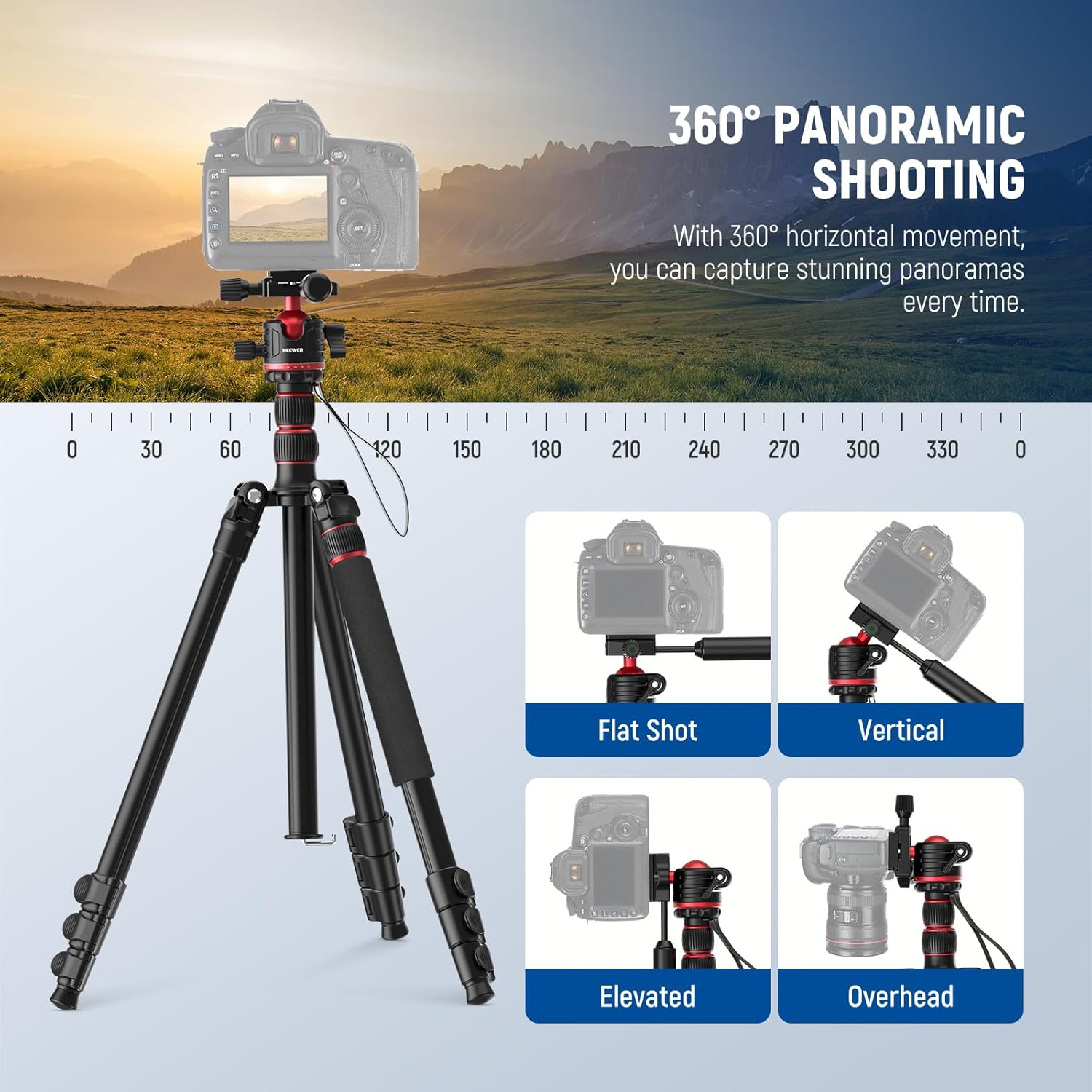
Image: Panoramic shooting and different camera positions using the ball head.
5.3 Low Angle and Inverted Axis Shooting
- For ultra-low angles, the central column can be removed entirely.
- For macro photography, the central column can be inverted and re-installed upside down, allowing the camera to be positioned very close to the ground.

Image: Low angle and macro shooting configurations.
5.4 Карактеристики на стабилност
- Стапала што не се лизгаат: The rubber foot pads provide enhanced grip on various surfaces.
- Weight Hook: A hook is provided on the central column to hang additional weight (e.g., a camera bag) for increased stability, especially in windy conditions.
- Ниво на меур: Use the integrated bubble level on the quick release plate to ensure your setup is perfectly horizontal.
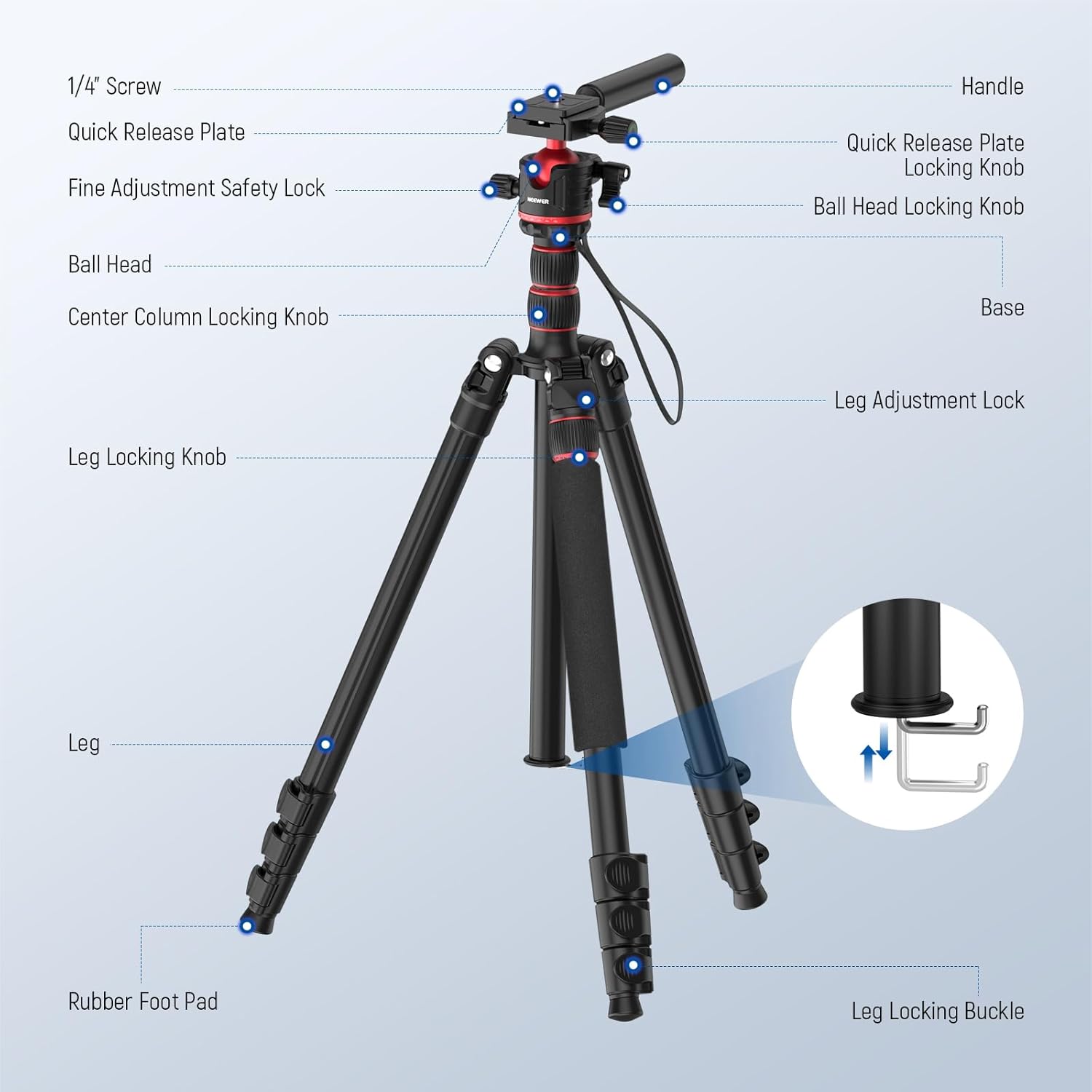
Image: Key stability and leveling features of the tripod.
6. Одржување
- Чистење: Избришете го стативот со мека, сува крпа по секоја употреба. За тврдокорна нечистотија, користете малку крпаamp крпа и благ сапун, а потоа темелно исушете. Избегнувајте јаки хемикалии или абразивни средства за чистење.
- Подмачкување: Periodically check the leg locks and ball head for smooth operation. If stiff, apply a small amount of silicone-based lubricant to the moving parts, avoiding contact with rubber components.
- Складирање: Store the tripod in its provided carrying bag in a cool, dry place away from direct sunlight and extreme temperatures. Ensure it is fully collapsed before storage.
- Инспекција: Regularly inspect all screws, bolts, and locking mechanisms for tightness. Tighten any loose parts using the provided hex wrenches.
7 Смена на проблеми
- Стативот е нестабилен:
- Ensure all leg sections are fully extended and their locking buckles are securely fastened.
- Verify that the leg angles are set evenly.
- Check if the central column locking knob is tightened.
- Add weight to the hook on the central column for increased stability.
- Движењето на топчестата глава е вкочането или лабаво:
- Adjust the tension of the ball head locking knob.
- Clean any debris from the ball head mechanism.
- Quick release plate not securing camera:
- Ensure the 1/4" screw on the plate is fully tightened to your camera.
- Verify the quick release plate is correctly seated in the ball head clamp and the locking knob is fully tightened.
If you encounter issues not listed here or if problems persist, please contact NEEWER customer support for assistance.
8. Спецификации
| Карактеристика | Детал |
|---|---|
| Модел | TP08 |
| Тип на ставка | 2-in-1 Tripod & Monopod |
| Главен материјал | Алуминиумска легура |
| Капацитет на носивост | 13 фунти / 6 кг |
| Максимална висина | 77 инчи / 196 см |
| Минимална висина | 24 инчи / 61 см |
| Преклопени димензии | 19.88 x 4.92 x 4.72 инчи (приближно) |
| Тежина на ставката | 4.14 фунти / 1.6 кг |
| Тип на глава на статив | Топчеста глава |
| Точки за монтирање | 1/4", Arca Type |
| Компатибилни уреди | DSLR Cameras, Camcorders, Phones (with adapter), Telescopes |
| Боја | Црно и црвено |
9. Гаранција и поддршка
NEEWER products are designed for reliability and performance. This product comes with a standard manufacturer's warranty against defects in materials and workmanship. For specific warranty details, including duration and coverage, please refer to the warranty card included in your package or visit the official NEEWER webсајт.
For technical support, troubleshooting assistance, or any inquiries regarding your NEEWER Basics TP08 tripod monopod, please contact NEEWER customer service through their official webстраницата или информациите за контакт наведени во документацијата за вашиот производ.
Ве молиме чувајте го вашиот доказ за купување за барањата за гаранција.